
Inleiding
This manual provides instructions for the NEEWER 67mm Phone Lens Filter Kit. This kit is designed to enhance mobile photography and videography by offering various optical filters and a versatile phone clip. Please read these instructions carefully before use to ensure proper operation and care of your equipment.

Beeld: Oorview of the NEEWER 67mm Phone Lens Filter Kit components.
Wat is in die boks
Verifieer dat alle items in jou pakket teenwoordig is:
- 1 x 67mm Graduated Red Filter
- 1 x 67mm Graduated Orange Filter
- 1 x 67mm Graduated Yellow Filter
- 1 x 67mm Graduated Blue Filter
- 1 x 67mm CPL Filter
- 1 x 67mm ND32 Filter
- 1 x 67mm 6 Point Star Filter
- 1 x 67mm Phone Lens Clip
- 1 x Storage Carrying Pouch
- 1 x Skoonmaaklap

Image: All included components of the filter kit.
Opstelgids
- Attach the Phone Lens Clip: Position the 67mm phone lens clip over your smartphone's camera lens(es). Ensure the clip's opening aligns with your phone's primary camera. The rounded edges of the clip are designed to fit snugly and prevent light leakage.
- Pas digtheid aan: Use the locking knob on the clip to adjust its thickness and secure it firmly to your phone. The design minimizes contact with the screen to preserve touchscreen functionality. Dual rubber pads protect your phone from scratches.
- Install a Filter: Once the clip is securely attached, screw the desired 67mm filter into the threaded opening of the clip. Ensure it is tightened sufficiently to prevent accidental detachment.
Image: Visual guide for quick setup of the phone lens filter.

Image: Details of the phone lens clip features, including cold shoe mount and protective pads.
Filter Usage Guide
ND32 Neutral Density Filter
The ND32 filter reduces the amount of light entering the camera lens by 5 stops. This is useful in bright sunlight conditions to prevent overexposure, allowing for slower shutter speeds or wider apertures. It helps maintain natural image details.
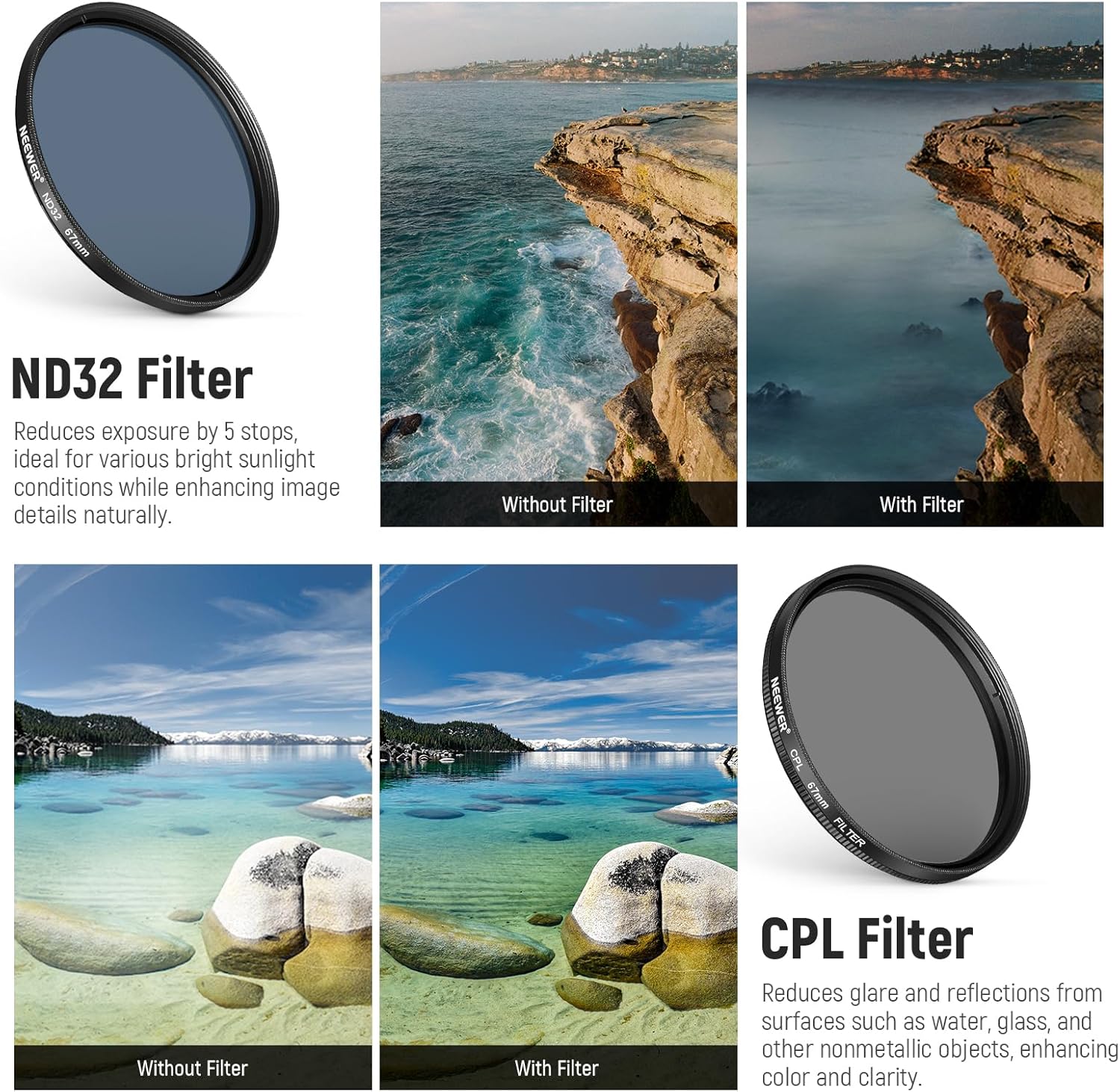
Image: Demonstrating the effect of the ND32 filter on exposure.
CPL (Circular Polarizer) Filter
The CPL filter reduces glare and reflections from non-metallic surfaces such as water, glass, and foliage. Rotate the filter in its mount to adjust the polarization effect and enhance color saturation and clarity in your photos and videos.
Image: Demonstrating the effect of the CPL filter on glare and color.
Graduated Color Filters (Red, Orange, Yellow, Blue)
These resin filters are double-threaded, allowing for stacking. Each filter adds a specific color tint to a portion of the image, typically the sky, while leaving the foreground unaffected. They are used to create dramatic effects or enhance natural colors.
- Graduated Red Filter: Darkens the sky and can make black and white photos more dramatic.
- Graduated Orange Filter: Helps capture photos of sunrise and sunset with enhanced warmth.
- Graduated Yellow Filter: Enhances color contrast when photographing plants and foliage.
- Graduated Blue Filter: Boosts the blue sky color while retaining the color of the ground.
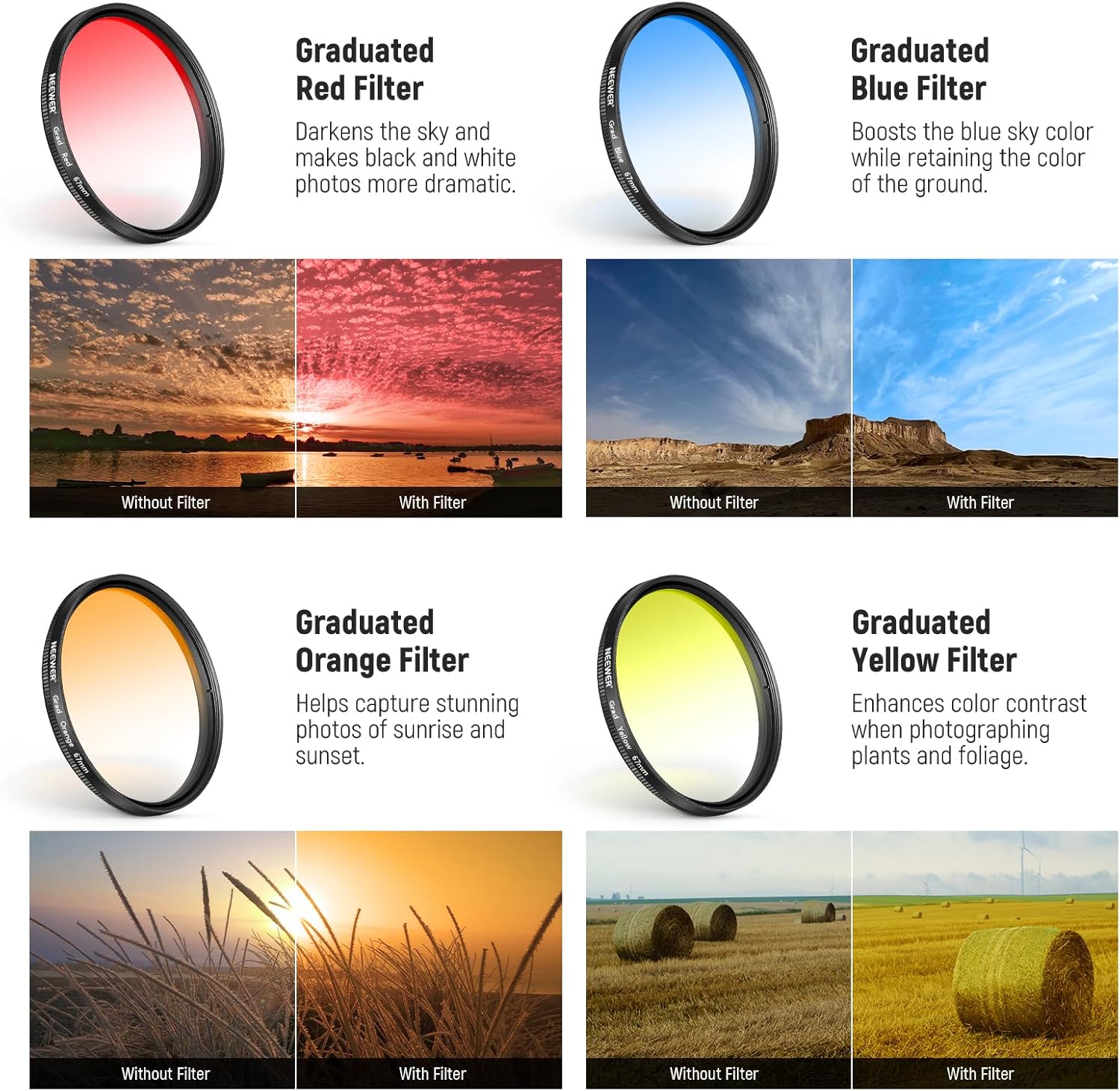
Beeld: Bvamples of graduated color filter effects.
6 Point Star Filter
This filter diffracts light from bright points, creating a starburst effect. It is suitable for enhancing the ambiance of night scenes, jewelry photography, or any image with small, intense light sources.

Image: Demonstrating the 6 Point Star Filter effect.
Stacking Filters
The filters feature a double-threaded design, allowing you to stack multiple filters for combined effects. For example, you can combine a CPL filter with a graduated color filter to achieve both glare reduction and color enhancement.

Image: Illustration of filter stacking capability.
Koue Skoen Mount
The phone lens clip includes a top cold shoe mount. This allows for the attachment of accessories such as an LED fill light or a wireless microphone (accessories not included) to further enhance your mobile content creation.
Verenigbaarheid
The 67mm phone lens clip is compatible with various smartphones up to 13mm thick, including iPhone 16, 15, 14, 13 Pro Max Plus series, and Samsung S22, S23, S24 Ultra series. For optimal fit and to prevent light leakage, case removal is recommended. The 67mm filters are also compatible with 67mm DSLR digital camera lenses.
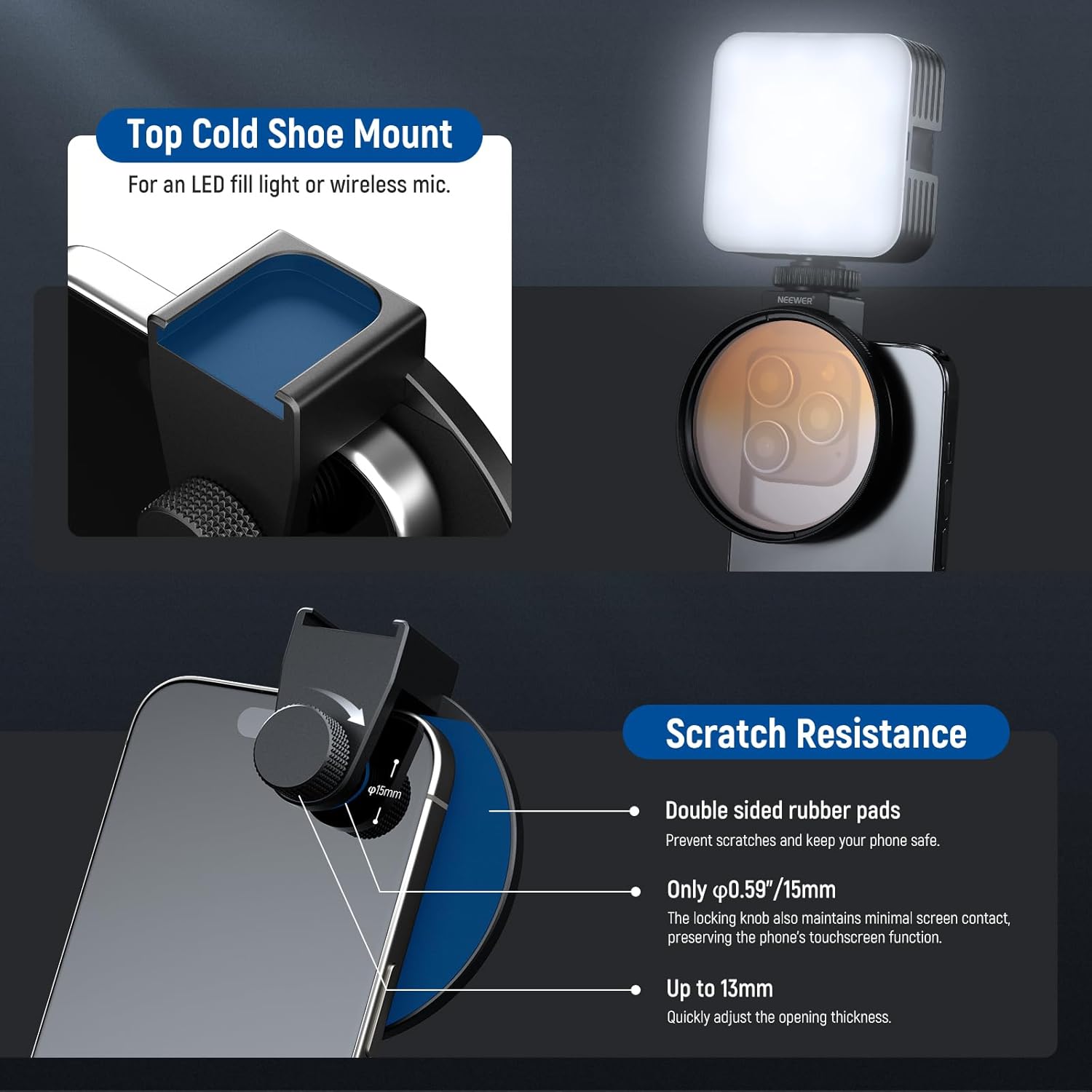
Image: Demonstrating wide compatibility with various phone lens configurations and DSLR cameras.
Onderhoud
- Skoonmaak filters: Use the provided cleaning cloth to gently wipe dust and fingerprints from the filter surfaces. For stubborn smudges, use a lens cleaning solution specifically designed for optical glass. Avoid abrasive materials that could scratch the multi-coated surfaces.
- Storing Filters: Always store filters in the included carrying pouch or individual protective cases when not in use to prevent scratches and dust accumulation.
- Clip Care: Keep the phone lens clip clean and free of debris. Ensure the rubber pads are intact to protect your phone.
- Hantering: Handle filters by their edges to avoid leaving fingerprints on the glass surface.
Probleemoplossing
- Dark Corners (Vignetting): If dark corners appear in your images, ensure the filter is correctly centered over your phone's camera lens. Adjust the clip's position or the filter's alignment as needed. In some cases, very wide-angle phone lenses may exhibit slight vignetting with any external filter.
- Liglekkasie: If unwanted light enters the frame, ensure the phone lens clip is securely and snugly attached to your phone, with no gaps around the camera module. Removing the phone case can improve the fit.
- Filter Not Screwing On: Ensure you are using a 67mm filter with the 67mm phone lens clip. Check for any debris in the threads of either the filter or the clip.
- Reduced Touchscreen Functionality: The locking knob is designed for minimal screen contact. If touchscreen issues occur, slightly loosen the locking knob while maintaining a secure grip on the phone.
Spesifikasies
| Kenmerk | Detail |
|---|---|
| Modelnommer | FL-P4 |
| Filter grootte | 67 mm |
| Materiaal | Optical Glass (Filters), Aluminum Alloy (Frames, Clip) |
| Bedekking | Multi Coating (ND, CPL, Star Filters) |
| ND Filter Factor | ND32 (5 stops) |
| Foonversoenbaarheid | Up to 13mm thickness (case removal recommended) |
| Afmetings (produk) | 2.64 x 2.64 x 0.1 duim |
| Item gewig | 10.6 onse |
Waarborg en Ondersteuning
NEEWER products are designed for reliability and performance. For warranty information, technical support, or service inquiries, please refer to the official NEEWER webwebwerf of kontak hul kliëntediens direk. Bewaar u aankoopbewys vir waarborgeise.
Official NEEWER Webwebwerf: www.neewer.com