
NBD NBD-EU-S110-QT
NBD 4K 48MP Digital Vlogging Camera User Manual
Model: NBD-EU-S110-QT
1. Inleiding
Dankie vir die aankoopasing the NBD 4K 48MP Digital Vlogging Camera. This manual provides essential information for setting up, operating, and maintaining your camera. Please read it thoroughly before use to ensure optimal performance and longevity of your device.
2. Pakketinhoud
Verifieer dat al die items wat hieronder gelys word, in jou pakket ingesluit is:
- NBD 4K Camera x 1
- Mikrofoon x 1
- Driepoot x 1
- Wide-Angle Lens x 1
- Macro Lens x 1
- Skoonmaakstel x 1
- Additional Light x 1
- 32GB SD-kaart x 1
- Kaartleser x 1
- Battery x 2
- Laaier x 1
- Kamerasak x 1
- Lanyard x 1
- Afstandbeheer x 1
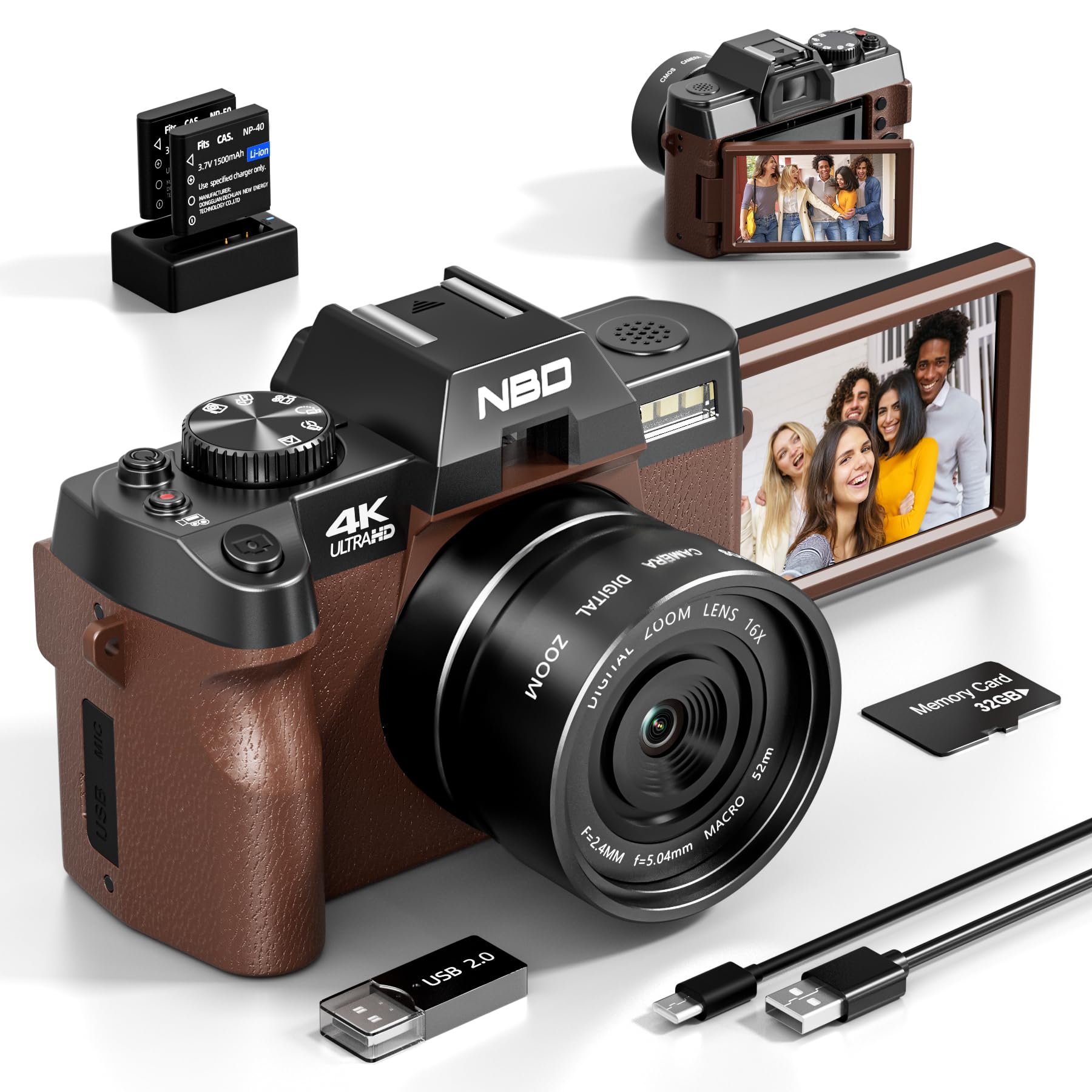
Image: NBD 4K Digital Camera with its complete set of accessories, including microphone, tripod, lenses, and other components.
3. Produk verbyview
3.1 Kamerakomponente
Familiarize yourself with the main parts of your NBD camera.
- Lens: Main optical component for capturing images.
- LCD skerm: 3-inch OLED display for viewing and navigating.
- Kragknoppie: Skakel die kamera aan/af.
- Ontspanknop: Neem foto's of begin/stop video-opname.
- Zoemkontroles: Adjusts digital zoom (up to 16x).
- Mode Dial/Buttons: Selects different shooting modes (photo, video, playback).
- Mikrofooninvoer: For external microphone connection.
- USB-poort: Vir data-oordrag en laai.
- SD-kaartgleuf: Vir die invoeging van die geheuekaart.
- Battery kompartement: Holds the rechargeable battery.
4. Opstelling
4.1 Laai die battery
- Insert the provided battery into the charger.
- Koppel die laaier aan 'n kragbron.
- The indicator light on the charger will show charging status. Charge fully before first use.
4.2 Die SD-kaart insit
- Vind die SD-kaartgleuf op die kamera.
- Insert the 32GB SD card with the metal contacts facing the correct direction until it clicks into place.
- Om te verwyder, druk die kaart versigtig in totdat dit uitspring.
4.3 Attaching Lenses and Accessories
- Wyehoeklens: Screw the wide-angle lens onto the front of the camera's main lens. This expands the field of view met 45%.
- Makro lens: The macro lens is typically integrated with the wide-angle lens or can be used separately for close-up shots. Refer to the lens markings for separation if applicable.
- Mikrofoon: Connect the external microphone to the camera's microphone input port.
- driepoot: Screw the camera onto the tripod mount for stable shooting.
5. Bedryfsinstruksies
5.1 Aan-/afskakel
Press and hold the Power button to turn the camera on or off.
5.2 Foto's neem
- Skakel die kamera aan.
- Select Photo mode using the mode dial or button.
- Raam jou skoot met behulp van die LCD-skerm.
- Press the Shutter button halfway to activate autofocus.
- Druk die Sluiterknoppie volledig om die foto te neem.
5.3 Opneem van video's
- Skakel die kamera aan.
- Kies Videomodus.
- Press the Shutter button to start recording. A red indicator will usually appear on the screen.
- Druk weer op die sluiterknop om die opname te stop.
5.4 Zoemfunksie
Use the zoom controls (usually a rocker switch) to digitally zoom in or out. The camera supports up to 16x digital zoom.
5.5 Autofocus and Night Vision
- Outofokus: The camera features autofocus for sharper images. Half-press the shutter button to engage.
- Nagvisie: Activate night vision mode for improved performance in low-light conditions. Refer to the camera's menu for this setting.
5.6 Self-Timer
The self-timer function allows for a delay before taking a photo. Access this setting through the camera's menu. Options include 2-second and 10-second delays.
5.7 Wi-Fi-konnektiwiteit
The camera supports Wi-Fi connectivity for transferring photos and videos to compatible devices. Consult the camera's on-screen menu for Wi-Fi setup and connection instructions.
5.8 Using as a Webnok
Koppel die kamera via USB aan jou rekenaar om dit as 'n webcam for vlogging, video calls, or live streaming. Select the webcam mode on the camera when prompted.
6. Onderhoud
- Skoonmaak: Use the provided cleaning kit to gently clean the lens and screen. Avoid abrasive materials.
- Berging: Store the camera in its bag in a cool, dry place when not in use. Remove the battery if storing for extended periods.
- Batterysorg: Do not expose batteries to extreme temperatures. Dispose of depleted batteries according to local regulations.
7. Probleemoplossing
| Probleem | Moontlike oorsaak | Oplossing |
|---|---|---|
| Kamera skakel nie aan nie. | Die battery is leeg of verkeerd geplaas. | Laai die battery volledig. Maak seker dat die battery korrek geplaas is. |
| Kan nie foto's neem/video's opneem nie. | SD-kaart is vol, gesluit of nie ingesit nie. | Check SD card capacity. Unlock the SD card. Reinsert the SD card. |
| Beelde is vaag. | Autofocus not engaged, lens dirty, or insufficient light. | Half-press shutter to focus. Clean the lens. Use additional light or night vision mode. |
| Wi-Fi-verbindingsprobleme. | Incorrect password or out of range. | Verify Wi-Fi password. Move closer to the Wi-Fi source. |
| Microphone not recording audio. | Microphone not properly connected or settings incorrect. | Ensure microphone is securely plugged in. Check camera audio settings. |
| Kamera vries of reageer nie meer nie. | Tydelike sagtewarefout. | Verwyder en plaas die battery weer in om die kamera te herstel. |
8. Spesifikasies
| Handelsmerk: | NBD |
| Model Naam: | NBD-EU-S110-QT |
| Effective Photo Resolution: | 48 MP |
| Video-opname-resolusie: | 4K |
| Digitale zoom: | 16x |
| Skermgrootte: | 3 duim |
| Vertoon tipe: | OLED |
| Image Sensor Technology: | CMOS |
| Max Aperture: | F/1.8 |
| Verbindingstegnologie: | Wi-Fi |
| Beeldstabilisasie: | Ja |
| Outofokus: | Ja |
| Nagvisie: | Ja |
| Selfontspanner: | Yes (2s, 10s) |
| Battery tipe: | Litium-ioon |
| Included Memory Card Size: | 32GB (SD Card) |
9. Waarborg en Ondersteuning
For warranty information and technical support, please refer to the documentation provided with your purchase or visit the official NBD webwebwerf. Bewaar u bewys van aankoop vir waarborgeise.
Let wel: Hierdie handleiding is slegs vir inligtingsdoeleindes. Spesifikasies is onderhewig aan verandering sonder kennisgewing.
Ask a question about this manual
Ask about setup, troubleshooting, compatibility, parts, safety, or missing instructions. Manuals+ will review the question and use this page’s manual context to help answer it.