
1. Inleiding
Thank you for choosing the Cecotec Bolero Hexa C126000 Inox Built-in Oven. This manual provides essential information for the safe and efficient use, installation, and maintenance of your new appliance. Please read these instructions thoroughly before operating the oven and keep them for future reference.
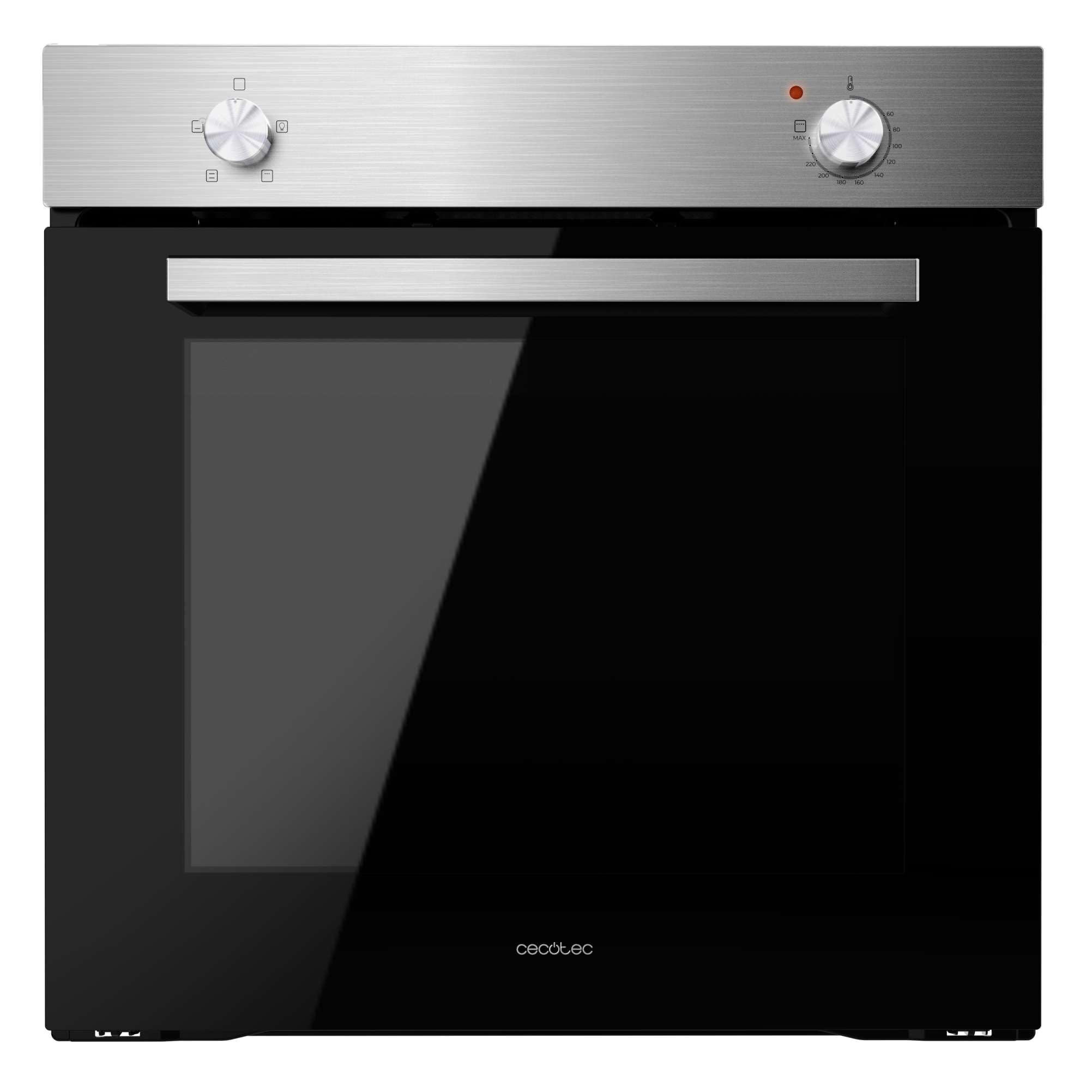
Figuur 1: Voorkant view of the Cecotec Bolero Hexa C126000 Inox Built-in Oven.
2. Veiligheidsinstruksies
To prevent personal injury or damage to the appliance, always follow basic safety precautions, including the following:
- Lees alle instruksies noukeurig voor gebruik.
- Hierdie toestel is slegs bedoel vir huishoudelike gebruik.
- Ensure the oven is properly installed and grounded by a qualified technician before use.
- Moenie aan warm oppervlaktes raak nie. Gebruik oondhandskoene of oondhandskoene.
- Moet nooit die oond gebruik om die kamer te verhit nie.
- Keep children away from the oven during operation and cooling.
- Moenie vlambare materiaal in of naby die oond stoor nie.
- Ontkoppel altyd die kragtoevoer voor skoonmaak of instandhouding.
- Moenie skuurmiddels of skerp metaalskrapers gebruik om die oonddeur se glas skoon te maak nie, aangesien dit die oppervlak kan krap, wat kan lei tot verbrokkeling.
3. Produk verbyview en kenmerke
The Cecotec Bolero Hexa C126000 Inox Built-in Oven is designed for efficient and versatile cooking. Key features include:
- Groot kapasiteit: 77 liters, suitable for cooking for the entire family with 5 grill positions.
- Energiedoeltreffendheid: Class A rating for reduced energy consumption.
- Steam EasyClean: A steam-assisted cleaning function that helps loosen dirt and grease for easier manual cleaning.
- Steam Assist: Incorporates steam during cooking to ensure dishes are crispy on the outside and juicy on the inside.
- Koelwaaier: An air ventilation system for rapid cooling of the oven, minimizing condensation and excess temperature between the oven and the hob.
- Triple-Glazed Door: Features three layers of glass to keep the exterior cool to the touch and prevent heat loss, enhancing efficiency.
- 4 Kookfunksies: Offers natural convection, forced convection, Steam Assist, and Steam EasyClean, along with an interior light.
- Double Steam Zone (Steam Base X2): A dual steam zone with an XXL capacity of up to 1 liter (500 ml + 500 ml) for optimal use of Steam EasyClean and Steam Assist functions.
- Hoë krag: 2800 W for quick and effective cooking results.

Figure 2: The oven's spacious 77-liter interior.

Figure 3: Energy Class A rating for efficient operation.

Figure 4: Control panel illustrating the 4 cooking functions.
4. Opstelling en installering
Proper installation is crucial for the safe and optimal performance of your oven. It is highly recommended that installation be performed by a qualified professional.
4.1. Elektriese aansluiting
- Maak seker dat die elektriese toevoer ooreenstem met die volumetage and frequency specified on the oven's rating plate.
- The oven must be properly grounded.
- Moenie verlengkoorde of adapters gebruik nie.
4.2. Built-in Dimensions
Refer to the diagrams below for the correct dimensions for built-in installation. Ensure adequate ventilation around the appliance.

Figure 5: Dimensions for standard built-in installation (52P x 59.2W x 59.6H cm).

Figure 6: Dimensions for tall cabinet built-in installation.
5. Bedryfsinstruksies
Familiarize yourself with the control knobs and functions before first use.
5.1. Eerste gebruik
- Remove all packaging materials and accessories from the oven cavity.
- Maak die binnekant van die oond skoon met advertensieamp lap en sagte skoonmaakmiddel.
- Verhit die leë oond teen maksimum temperatuur vir ongeveer 30 minute om enige vervaardigingsreste te verbrand. Sorg vir goeie ventilasie tydens hierdie proses.
5.2. Setting the Cooking Function and Temperature
Your oven features two main control knobs: one for selecting the cooking function and another for setting the temperature.
- Funksie Knop: Rotate this knob to select one of the 4 available cooking functions (Natural Convection, Forced Convection, Steam Assist, Steam EasyClean) or to activate the interior light.
- Temperatuurknop: Rotate this knob to set the desired cooking temperature.
5.3. Using Steam Assist
The Steam Assist function adds moisture to your cooking for enhanced results.
- Pour water into the designated Steam Base X2 reservoir at the bottom of the oven cavity. The total capacity is 1 liter (500 ml + 500 ml).
- Plaas jou kos binne-in die oond.
- Select the Steam Assist function using the function knob.
- Stel die verlangde temperatuur en kooktyd in.

Figuur 7: Example of food prepared using Steam Assist for optimal texture.

Figure 8: The Double Steam Zone (Steam Base X2) for steam functions.
6. Onderhoud en Skoonmaak
Regular cleaning and maintenance will prolong the life of your oven and ensure hygienic operation.
6.1. Steam EasyClean Function
This function uses steam to soften food residues, making manual cleaning easier.
- Maak seker die oond is koel.
- Pour approximately 500 ml of water into the Steam Base X2 reservoir.
- Select the Steam EasyClean function using the function knob.
- Allow the cycle to complete (refer to specific timing in the full manual).
- Once the cycle is finished and the oven has cooled, wipe the interior with a soft cloth to remove softened residues.

Figure 9: Steam EasyClean function in action, loosening grime.
6.2. Algemene skoonmaak
- Always ensure the oven is switched off and cool before cleaning.
- Maak die buite-oppervlaktes skoon met 'n sagte, damp lap en sagte skoonmaakmiddel. Moenie skuur skoonmaakmiddels gebruik nie.
- The oven door features triple glazing. Consult the full manual for instructions on how to safely remove and clean the inner glass panels if necessary.

Figure 10: The triple-glazed door design for safety and efficiency.
7. Probleemoplossing
Voordat u kliëntediens kontak, verwys asseblief na die volgende algemene probleme en hul oplossings:
| Probleem | Moontlike oorsaak | Oplossing |
|---|---|---|
| Oond word nie warm nie | Geen kragtoevoer nie; verkeerde instellings | Check power connection and circuit breaker; ensure function and temperature knobs are correctly set. |
| Ongelyke kook | Incorrect rack position; overloaded oven | Gebruik aanbevole rakposisies; vermy om die oond oorvol te maak. |
| Oormatige rook tydens kook | Food spillage; excessive fat | Clean oven thoroughly; trim excess fat from food. |
| Oondlig werk nie | Gloeilamp mislukking | Replace the oven bulb (refer to full manual for instructions). |
Indien die probleem voortduur nadat u hierdie oplossings probeer het, kontak asseblief Cecotec-kliëntediens.
8. Spesifikasies
Technical details for the Cecotec Bolero Hexa C126000 Inox Built-in Oven:
| Kenmerk | Detail |
|---|---|
| Handelsmerk | Cecotec |
| Modelnommer | 02270 |
| Kleur | Inox (vlekvrye staal) |
| Produkafmetings (L x B x H) | 64 x 58 x 65.5 cm |
| Installation Dimensions (D x W x H) | 52P x 59.2W x 59.6H cm |
| Item gewig | 25.85 kilogram |
| Kapasiteit | 77 liter |
| Krag | 2800 Watt |
| Voltage | 240 V |
| Materiaal | Vlekvrye staal |
| Energieklas | A |
| Kenmerke | Steam EasyClean, Steam Assist, Cooling Fan, Triple Glass |
| Verhittingsmetode | Stralend |
| Brandstof tipe | Elektries |
| Installasie tipe | Geïntegreerde |
| Onderdele Beskikbaarheid | 10 Jaar |
9. Waarborg en Ondersteuning
Your Cecotec Bolero Hexa C126000 Inox Built-in Oven comes with a manufacturer's warranty. Please refer to the warranty card included with your purchase for specific terms and conditions.
9.1. Kliëntediens
For technical assistance, spare parts, or any questions regarding your appliance, please contact Cecotec customer support. Contact details can typically be found on the official Cecotec webwebwerf of in u waarborgdokumentasie.
Aanlyn ondersteuning: Besoek die amptelike Cecotec website for FAQs, product registration, and service requests.
Onderdele: Spare parts are available for a period of 10 years from the date of purchase.