
1. Belangrike veiligheidsinligting
Please read this instruction manual thoroughly before installing and using the Doona i ISOFIX Base. Keep this manual in a safe place for future reference. Failure to follow these instructions may result in serious injury.
- This ISOFIX Base is designed exclusively for use with the Doona i car seat. Do not use it with other car seat models.
- The base is suitable for infants in Group 0+ (rear-facing only), weighing less than 13 kg.
- This product complies with European safety regulation ECE R129.
- Always ensure the base is securely installed and the indicators show green before placing your child in the car seat.
- Moet nooit jou kind sonder toesig in die motorstoeltjie los nie.
2. Produk verbyview
The Doona i ISOFIX Base provides a secure and convenient installation method for your Doona i car seat in your vehicle. It features a height-adjustable support leg and clear color indicators to confirm correct installation.

Image: Doona i ISOFIX Base. This image shows the main components of the ISOFIX base, including the ISOFIX connectors and the adjustable support leg.
3. Opstelling en installering
Follow these steps to correctly install the Doona i ISOFIX Base in your vehicle. Ensure your vehicle is equipped with ISOFIX anchor points.
- Locate ISOFIX Anchor Points: Identify the ISOFIX anchor points in your vehicle's rear seat. These are usually marked with an ISOFIX symbol.
- Extend ISOFIX Connectors: Press the release buttons on the ISOFIX base to extend the ISOFIX connectors.
- Attach to Vehicle: Align the ISOFIX connectors with the vehicle's anchor points and push the base firmly until both connectors click into place. The indicators on the base should turn groen, confirming a secure connection.
- Adjust Support Leg: Extend the support leg until it firmly touches the vehicle floor. The indicator on the support leg should also turn groen. Ensure there is no gap between the leg and the floor.
- Toetssekuriteit: Gently pull the ISOFIX base to ensure it is securely attached and does not move excessively.

Image: Doona i ISOFIX Base installed in a car. This image illustrates the base securely connected to the vehicle's ISOFIX anchor points with the support leg extended to the floor.

Image: Close-up of ISOFIX base indicators. This image highlights the color indicators that confirm correct installation of the ISOFIX connectors and the support leg.
Video: Installation Demonstration
Video: This short video demonstrates the process of installing the Doona i car seat, showing both seatbelt installation and installation using the ISOFIX base. It highlights the ease of use and secure attachment.
4. Operating the Doona i Car Seat with the Base
Once the ISOFIX base is securely installed, you can easily attach and detach your Doona i car seat.
- Attaching the Car Seat: Place the Doona i car seat onto the installed ISOFIX base. Push down firmly until you hear a click, indicating it is locked into place. Verify the car seat is secure by gently pulling upwards.
- Detaching the Car Seat: To remove the Doona i car seat, locate the release handle on the base (or car seat, depending on the design, usually on the base for ISOFIX). Pull the handle and lift the car seat upwards.
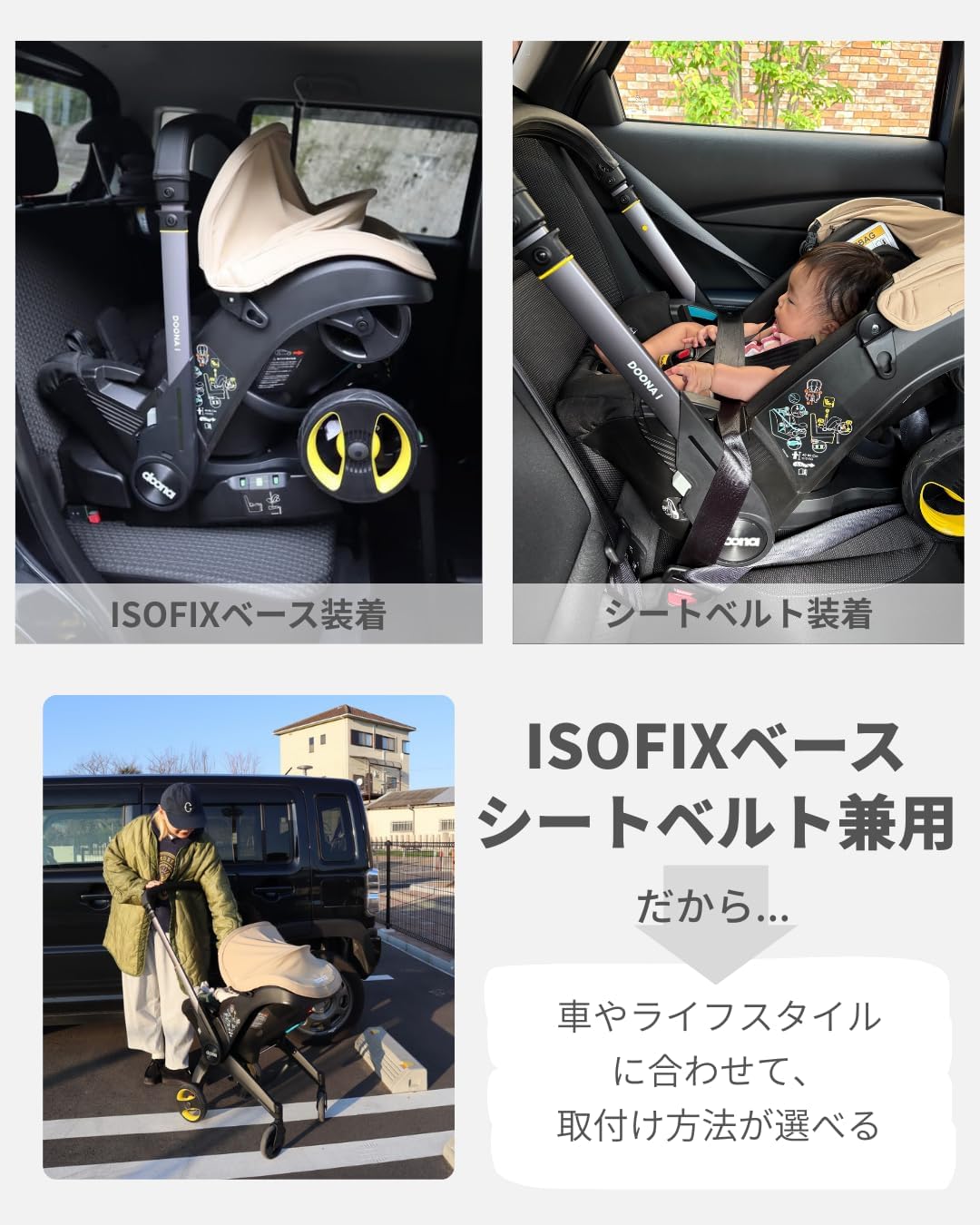
Image: Doona i car seat securely attached to the ISOFIX base in a vehicle. This image shows the car seat correctly positioned on the base, ready for travel.
5. Onderhoud
Regular maintenance ensures the longevity and safe operation of your ISOFIX base.
- Skoonmaak: Wipe the plastic parts of the base with a damp lap en sagte seep. Moenie skuur skoonmaakmiddels of oplosmiddels gebruik nie.
- Inspeksie: Periodically check the ISOFIX connectors, support leg, and all moving parts for any signs of wear, damage, or malfunction. If any damage is found, discontinue use and contact customer service.
- Berging: When not in use, store the ISOFIX base in a cool, dry place, away from direct sunlight and extreme temperatures.
6. Probleemoplossing
If you encounter any issues with your Doona i ISOFIX Base, refer to the following common solutions.
| Probleem | Moontlike oorsaak | Oplossing |
|---|---|---|
| ISOFIX indicators do not turn green. | Connectors not fully engaged with anchor points. | Push the base more firmly until a click is heard and indicators turn green. Ensure no obstructions. |
| Support leg indicator does not turn green. | Support leg not fully extended or not making firm contact with the floor. | Adjust the support leg length until it firmly rests on the vehicle floor and the indicator turns green. |
| Car seat does not click onto the base. | Car seat not properly aligned or base not fully secured. | Ensure the base is correctly installed (all indicators green). Realign the car seat and push down firmly until it clicks. |
Indien die probleem voortduur, kontak asseblief kliëntediens vir hulp.
7. Spesifikasies
- Model: Doona i ISOFIX Base (758210)
- Produk afmetings: 71.5 x 39.9 x 22.6 cm
- Produk gewig: 6.4 kg
- Recommended Maximum Weight: 13 kg
- Recommended Maximum Height: 85 cm
- Teiken ouderdom: Newborn (0 months and up)
- Installasie tipe: ISOFIX
- Oriëntasie: Slegs agtertoe
- Materiaal: GF, Carbon Steel, Polypropylene
- Veiligheidstandaard: ECE R129 compliant
- Land van vervaardiging: People's Republic of China
8. Waarborg en Ondersteuning
The Doona i ISOFIX Base comes with a 2 jaar waarborg vanaf die aankoopdatum. Hierdie waarborg dek vervaardigingsdefekte onder normale gebruik. Bewaar asseblief u bewys van aankoop vir waarborgeise.
For any questions, concerns, or warranty claims regarding your Doona product, please contact Grandeur International Customer Service directly.
Kliëntediens: Grandeur International Customer Service
(Specific contact details such as phone number or email are not provided in the product data. Please refer to the official Doona website or your purchase documentation for direct contact information.)