
1. Inleiding
Thank you for choosing the Kavey 1.2 Cubic Feet Digital Home Safe. This safe is designed to provide secure storage for your valuables, documents, and personal items. It features a digital keypad, a dual alarm system, a mute function, and an internal LED light for enhanced convenience and security. Please read this manual thoroughly before operating the safe to ensure proper use and to maximize its security features.

Figure 1: Kavey 1.2 Cubic Feet Digital Home Safe with open door.
2. Produk verbyview
The Kavey Digital Home Safe combines robust construction with advanced electronic features to protect your belongings. Key features include:
- Digitale sleutelbord: Features 3D glowing buttons for quick and error-free access.
- Dubbele alarmstelsel: Activates after 3 incorrect password attempts or violent vibration, emitting a 70-decibel alarm.
- Demp-funksie: Allows silent operation of the keypad for discreet access.
- Noodtoegang: Includes emergency keys and a universal USB Type-C power jack for power failure situations.
- Duursame konstruksie: Made from low carbon alloy steel with laser-cut micro-slit panels for enhanced anti-prying and anti-drilling resistance.
- Binne-kenmerke: Removable and adjustable shelf, internal LED lighting, and flannelette lining to protect valuables from scratches.

Figure 2: Digital Keypad and Unlocking Methods.
3. Pakketinhoud
Kontroleer asseblief die pakkie noukeurig om seker te maak dat alle items teenwoordig is:
- 1 x Kavey 1.2 Cubic Feet Digital Home Safe
- 2 x Noodsleutels
- 4 x Uitbreidingskroewe
- 1 x USB Tipe-C-kabel
- 4 x Non-slip Pads
- 1 x Gebruikershandleiding (hierdie dokument)
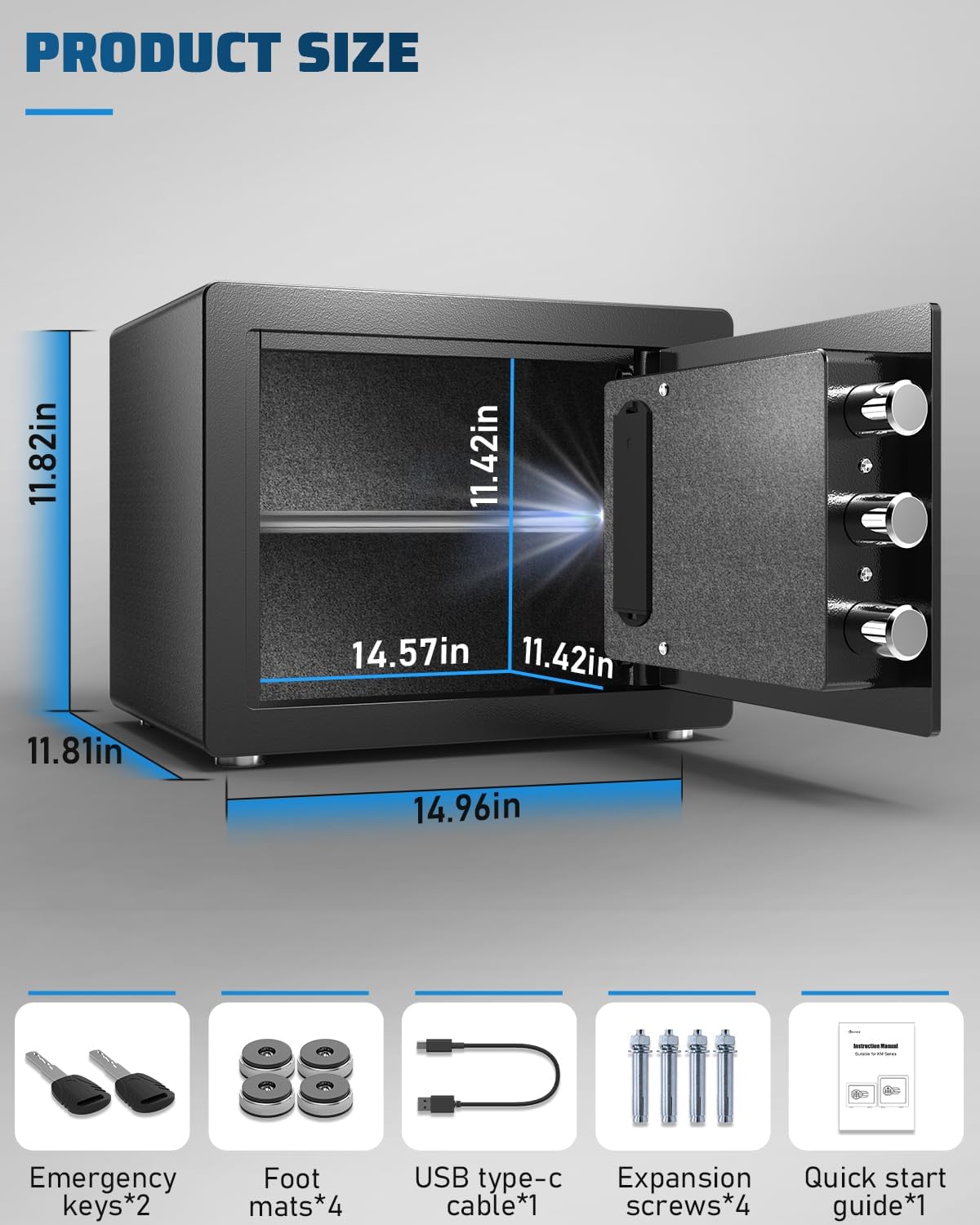
Figuur 3: Produkafmetings en ingeslote bykomstighede.
4. Opstelling
4.1 Initial Opening
Upon receiving your safe, it will be locked. Use one of the provided emergency keys to open it for the first time.
- Locate the hidden keyhole, usually behind the Kavey logo or a removable panel on the keypad.
- Plaas die noodsleutel in en draai dit kloksgewys.
- While the key is turned, rotate the knob on the safe door clockwise to open the safe.
4.2 Battery installasie
The safe requires 4 AA batteries (not included) to power the digital keypad. The battery compartment is located on the inside of the safe door.
- Open the safe using the emergency key.
- Vind die batteryklepdeksel aan die binnekant van die deur.
- Verwyder die deksel en plaas 4 nuwe AA-batterye, en maak seker dat die polariteit (+/-) korrek is.
- Plaas die deksel van die batterykompartement terug.
4.3 Montering van die kluis
For enhanced security, it is recommended to mount the safe to a floor or wall using the provided expansion screws.

Figure 4: Safe Mounting Instructions.
- Kies 'n geskikte plek vir die kluis.
- Place the safe in the desired position and mark the drilling spots through the pre-drilled holes on the back or bottom of the safe.
- Move the safe and drill holes (approximately 10mm diameter) in the wall or floor using a drill bit appropriate for the surface material.
- Plaas die kluis oor die geboorde gate.
- Insert the expansion screws through the safe's holes and into the drilled holes.
- Tighten the screws securely to fix the safe in place.
5. Bedryfsinstruksies
5.1 Setting/Changing the Password
The safe comes with a default password (usually '1234' or '000000'). It is highly recommended to change this immediately.
- With the safe door open, press the internal red reset button (usually located on the inside of the door near the hinge). The keypad will beep, and the indicator light will flash.
- Enter your new password (3-8 digits) on the keypad.
- Press the '#' button to confirm. The safe will beep twice, indicating successful password change.
5.2 Die kluis oopmaak
There are three primary methods to open the safe:
- Gebruik van wagwoord: Enter your 3-8 digit password, then press '#'. Rotate the knob clockwise within 5 seconds to open the door.
- Gebruik van Noodsleutel: If batteries are dead or you forget the password, use the emergency key as described in Section 4.1.
- Using USB Type-C Power + Password: If batteries are dead and emergency keys are not preferred, connect a USB Type-C cable to the external power jack on the keypad. This will temporarily power the keypad, allowing you to enter your password and open the safe.

Figure 5: Three Opening Methods.
5.3 Dempfunksie
To enable or disable the keypad sound:
- Press '1' twice, then press '#'. The safe will confirm the change in sound status.

Figure 6: Mute Function for Silent Operation.
5.4 Dubbele Alarmstelsel
The safe is equipped with a dual alarm system for enhanced security:
- Verkeerde wagwoordalarm: If an incorrect password is entered 3 consecutive times, the alarm will sound for 60 seconds.
- Vibrasie alarm: If the safe experiences violent vibration or movement, the alarm will activate for 60 seconds.
The alarm emits a sound of up to 70 decibels, audible throughout your home.

Figure 7: Dual Alarm System Coverage.
5.5 Binne-LED-lig
The internal LED light illuminates the safe's interior when opened, allowing for easy visibility of contents in low-light conditions.
5.6 Verstelbare rak
The safe includes a removable and adjustable shelf, providing flexible storage space to accommodate items of various sizes.
6. Onderhoud
6.1 Batteryvervanging
Wanneer die battery voltage drops below 4.8V, the safe will emit a prompt sound to remind you to replace the batteries. Replace all 4 AA batteries promptly to ensure continuous operation of the digital keypad.
6.2 Skoonmaak
Maak die buitekant van die kluis skoon met 'n sagte, damp lap. Vermy die gebruik van skuurmiddels of oplosmiddels wat die afwerking kan beskadig.
7. Probleemoplossing
- Safe does not open with password:
a. Ensure batteries are not depleted. Use the USB Type-C cable for temporary power or the emergency key.
b. Re-enter the password carefully. If you suspect you forgot it, use the emergency key to open and reset the password. - Sleutelbord reageer nie:
a. Check battery levels and replace if necessary.
b. Use the USB Type-C cable to provide external power. - Alarm lui onverwags:
a. Check if the safe has been moved or vibrated significantly.
b. Ensure no one has attempted to enter an incorrect password multiple times. - Lae Voltage Waarskuwing: If the safe emits a prompt sound indicating low voltage, replace the batteries immediately.
8. Spesifikasies
| Kenmerk | Spesifikasie |
|---|---|
| Handelsmerk | Kavey |
| Modelnommer | KM-30 |
| Kapasiteit | 1.2 kubieke voet |
| Produk Afmetings (D x B x H) | 11.81" D x 14.96" B x 11.81" H |
| Item gewig | 26.4 pond (11.99 kilogram) |
| Tipe slot | Elektronies |
| Materiaal | Laekoolstofstaal |
| Spesiale kenmerke | Alarm System, Anti-Theft, Mute Function, LED Light |
| Montage tipe | Vloermontering, Muurmontering |
| Batterye benodig | Yes (4 x AA, not included) |
| Waterweerstandvlak | Nie waterbestand nie |
9. Waarborg en Ondersteuning
Kavey offers comprehensive customer support for your safe:
- Produkdiens: One-year product service from the date of purchase.
- Terugsendings: 90-day unconditional returns policy.
- Key Matching Service: Available for lost or damaged keys.
- Kliëntediens: 24-hour online customer service. If you encounter any issues with your safe, please contact us directly. Our experienced customer service team will respond within 24 hours to assist you.
How to Find the Seller on Amazon:
- Log in to your Amazon buyer's account.
- Go to 'Your Orders'.
- Find your Kavey safe order and click 'Get help' or 'Contact Seller'.

Figure 8: Kavey Professional After-Sales Service.