
1. Inleiding
Thank you for choosing the techno line WT2600 Digital Calendar. This device provides accurate time, date, indoor temperature, and humidity readings, along with alarm functions. This manual will guide you through the setup, operation, and maintenance of your new digital calendar.
2. Veiligheidsinligting
- Moenie die toestel blootstel aan uiterste temperature, direkte sonlig of hoë humiditeit nie.
- Vermy om die toestel te laat val of om dit aan sterk impakte te onderwerp.
- Moenie probeer om die eenheid self uitmekaar te haal of te herstel nie. Raadpleeg gekwalifiseerde dienspersoneel.
- Gooi gebruikte batterye verantwoordelik volgens plaaslike regulasies weg.
- Hou die toestel buite bereik van kinders.
3. Pakketinhoud
Kontroleer asseblief dat alle items in u pakket teenwoordig is:
- techno line WT2600 Digital Calendar Unit
- Gebruikershandleiding (hierdie dokument)
- Batteries (may be included depending on region)
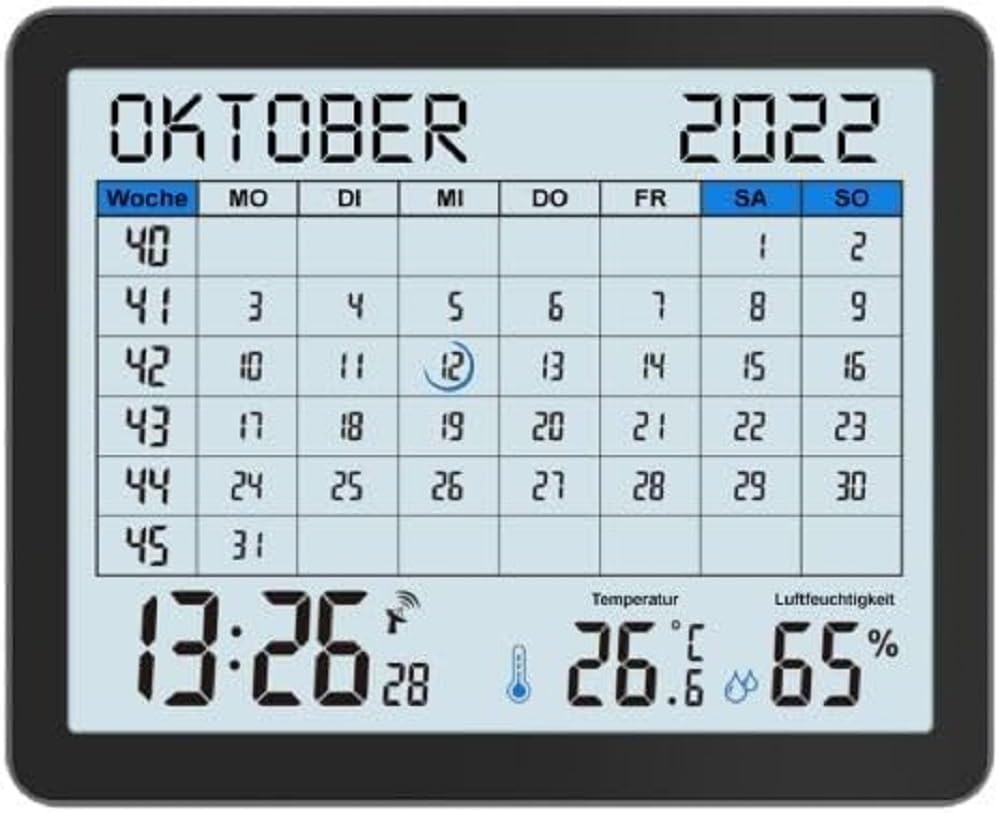
Image of the techno line WT2600 Digital Calendar packaging, showing the device and its key features.
4. Produkkenmerke
The techno line WT2600 Digital Calendar offers the following key features:
- DCF-77 Radio-Controlled Clock: Automatic time synchronization for precise timekeeping, with an option for manual setting.
- 12/24 Hour Time Display: Select your preferred time format.
- Kalender vertoon: Shows the current date, day of the week, and month.
- 7-Language Month Display: Choose from seven languages for the month display.
- Binne temperatuur vertoon: Shows indoor temperature in Celsius (°C) or Fahrenheit (°F).
- Binnenshuise humiditeitsaanwyser: Displays the current indoor humidity level.
- MIN/MAX Display: Records and displays the minimum and maximum temperature and humidity values.
- Dual Alarms with Snooze: Set two independent alarms with a convenient snooze function.
- Lae battery aanwyser: Waarsku jou wanneer batterye vervang moet word.
- Veelsydige plasing: Designed for both wall mounting and table standing.

Voorkant view of the techno line WT2600 Digital Calendar display, showing the calendar grid, current time, temperature, and humidity.
5. Opstelling
5.1 Battery installasie
- Vind die batterykompartement aan die agterkant van die eenheid.
- Maak die batteryvakdeksel oop.
- Insert the required batteries (e.g., 2 x AAA, not specified in data, common for such devices) according to the polarity markings (+ and -).
- Maak die batterykompartement se deksel stewig toe.
5.2 Initial Power On and DCF-77 Signal Reception
Upon battery insertion, the device will power on and automatically begin searching for the DCF-77 radio signal. This process may take several minutes. For optimal reception, place the unit near a window and away from electronic interference.
- A signal icon (e.g., an antenna symbol) will flash during signal search.
- Once the signal is received, the time and date will be set automatically, and the signal icon will become solid.
- If no signal is received after 10-15 minutes, try repositioning the unit.
5.3 Handmatige Tyd- en Datuminstelling
If automatic synchronization is not desired or unsuccessful, you can set the time and date manually.
- Press and hold the 'SET' button (or similar, refer to device buttons) for a few seconds to enter manual setting mode.
- Use the '+' or '-' buttons to adjust the flashing value (e.g., hour, minute, year, month, day).
- Press 'SET' again to confirm the current setting and move to the next adjustable parameter.
- Repeat until all settings are complete.
5.4 Taalinstelling
To change the display language for the month:
- Enter the setting mode (e.g., by pressing 'SET').
- Navigate through the settings until the language option appears.
- Use the '+' or '-' buttons to cycle through the available 7 languages.
- Bevestig jou keuse.
6. Bedryf
6.1 ViewTyd, Datum, Temperatuur en Humiditeit
The main display continuously shows the current time, date, indoor temperature, and indoor humidity. You can switch between 12-hour and 24-hour time formats by pressing a dedicated button (e.g., '12/24H' or 'MODE').
6.2 Alarms instel
The device features two independent alarms.
- Press the 'ALARM' button (or similar) to view Alarm 1 keer.
- Press and hold 'ALARM' to enter Alarm 1 setting mode.
- Use '+' or '-' to adjust the hour and minute, pressing 'ALARM' to confirm each.
- Repeat for Alarm 2.
- Om 'n alarm te aktiveer/deaktiveer, druk herhaaldelik 'ALARM' totdat die alarmikoon verskyn/verdwyn.
6.3 Using Snooze
When an alarm sounds, press the 'SNOOZE' button (or similar, often a large button on top) to temporarily silence the alarm. The alarm will sound again after a few minutes (typically 5-10 minutes). To stop the alarm completely, press any other button.
6.4 MIN/MAX Display Function
The device records the minimum and maximum temperature and humidity values since the last reset.
- Press the 'MIN/MAX' button (or similar) once to view die maksimum aangetekende waardes.
- Press it again to view die minimum aangetekende waardes.
- To reset the MIN/MAX records, press and hold the 'MIN/MAX' button while viewrekords opneem.

Close-up of the techno line WT2600 Digital Calendar display, highlighting the time, temperature, and humidity readings.
7. Onderhoud
7.1 Skoonmaak
Vee die toestel af met 'n sagte, damp lap. Moenie skuurmiddels of oplosmiddels gebruik nie, aangesien dit die skerm ofasing.
7.2 Batteryvervanging
When the low battery indicator appears on the display, replace all batteries with new ones of the same type. Follow the battery installation steps in Section 5.1.
8. Probleemoplossing
- Geen skerm: Kontroleer die polariteit van die batterye en maak seker dat die batterye vars is.
- Verkeerde tyd/datum: Ensure the DCF-77 signal icon is solid. If not, reposition the unit or set the time manually (Section 5.3). Check your time zone setting if applicable (not explicitly mentioned in data, but common).
- Temperature/Humidity Readings Seem Inaccurate: Ensure the unit is placed in a location with good air circulation, away from direct heat sources or drafts. Allow some time for readings to stabilize after initial setup or relocation.
- Alarm klink nie: Verify that the alarm is activated (alarm icon displayed) and the alarm time is set correctly.
9. Spesifikasies
| Kenmerk | Spesifikasie |
|---|---|
| Modelnommer | WT2600 |
| Afmetings (L x B x H) | 17.3 x 3.81 x 14 cm |
| Gewig | 380 g |
| Kleur | Swart |
| Materiaal | Plastiek |
| Kragbron | Battery aangedrewe |
| Tipe vertoon | Digitaal |
| Binne/buiteluggebruik | Binneshuise |
10. Waarborg en Ondersteuning
Information regarding product warranty and customer support was not available in the provided product data. Please refer to the retailer or manufacturer's official website for details on warranty coverage and support options.