
De'Longhi EXAM440.55.G
De'Longhi Rivelia EXAM440.55.G Automatic Bean-to-Cup Coffee Machine
Gebruikershandleiding
1. Inleiding
This manual provides instructions for the safe and efficient operation, maintenance, and troubleshooting of your De'Longhi Rivelia EXAM440.55.G automatic bean-to-cup coffee machine. Please read this manual thoroughly before using the appliance and keep it for future reference.

Image 1: De'Longhi Rivelia EXAM440.55.G Automatic Bean-to-Cup Coffee Machine. This image shows the machine with its milk carafe, water tank, and a bean container, along with a cup of coffee and a cup of latte.
2. Belangrike veiligheidsinstruksies
Volg altyd basiese veiligheidsmaatreëls wanneer elektriese toestelle gebruik word om die risiko van brand, elektriese skok en beserings aan persone te verminder. Hierdie toestel is slegs bedoel vir huishoudelike gebruik.
- Moenie die toestel, kragkabel of prop in water of ander vloeistowwe dompel nie.
- Verseker die voltagDie volume wat op die toestel aangedui word, stem ooreen met jou netspanning.tage.
- Moenie die toestel gebruik met 'n beskadigde koord of prop, of nadat die toestel wanfunksioneer of op enige manier beskadig is nie.
- Hou die toestel en sy snoer buite bereik van kinders.
- Ontkoppel altyd die toestel uit die kragtoevoer voor skoonmaak en wanneer dit nie gebruik word nie.
- Moenie bykomstighede gebruik wat nie deur die vervaardiger aanbeveel word nie.
- Place the appliance on a stable, level surface, away from hot surfaces or open flames.
3. Komponente verbyview
Familiarize yourself with the main parts of your De'Longhi Rivelia coffee machine.
- Watertenk: Removable tank for fresh water, 1.4 L capacity.
- Bean Container (Bean Switch System): Two interchangeable 250g containers for different coffee beans.
- Gemaalde Koffietregter: Vir voorafgemaalde koffie.
- Milk Carafe (LatteCrema Hot System): For automatic milk frothing.
- Lekbak: Verwyderbaar vir maklike skoonmaak.
- Koffiespuitjies: Verstelbare hoogte vir verskillende koppiegroottes.
- Beheerpaneel: 3.5" Full-Touch TFT color display for intuitive operation.
- Geïntegreerde slypmasjien: Adjustable up to 13 grind levels.
- Brou Eenheid: Internal component for coffee extraction.
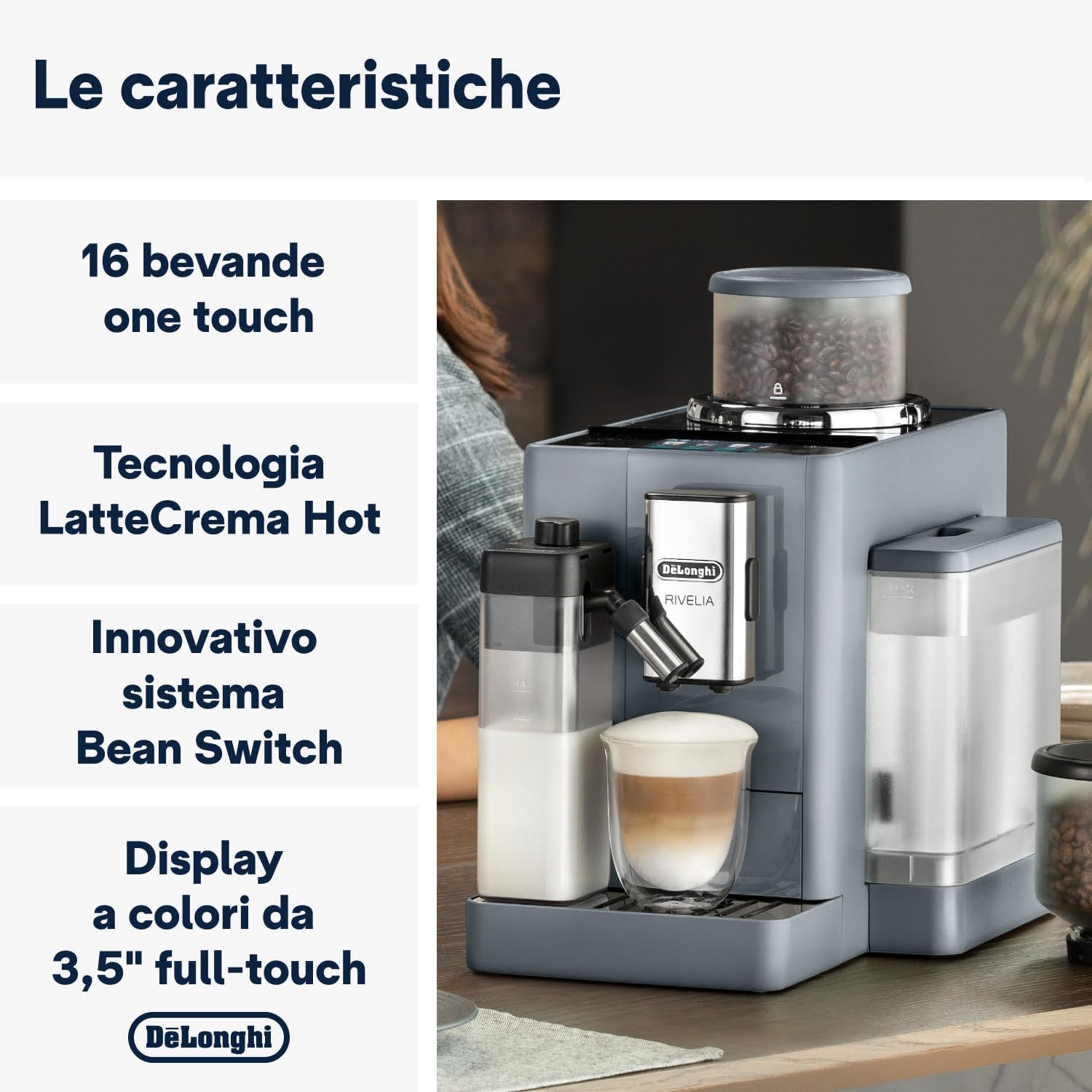
Image 2: Key features of the De'Longhi Rivelia, highlighting the 16 one-touch beverages, LatteCrema Hot technology, innovative Bean Switch System, and the 3.5-inch full-touch color display.
4. Aanvanklike Opstelling
- Uitpak: Haal die masjien versigtig uit die verpakking. Verwyder alle beskermende films en verpakkingsmateriaal.
- Posisionering: Place the machine on a stable, level surface, away from water splashes and heat sources. Ensure adequate space around the machine for ventilation.
- Watertenk: Remove the water tank, rinse it with fresh water, and fill it to the MAX level. Reinsert the tank securely.
- Boontjiehouer: Choose one of the two bean containers. Fill it with your preferred whole coffee beans (max 250g). Insert the container into the machine.
- Kragverbinding: Steek die kragsnoer in 'n geskikte elektriese aansluiting.
- First Use Wizard: The display will guide you through the initial setup process, including language selection, water hardness setting, and rinsing cycles. Follow the on-screen instructions.
5. Bedryfsinstruksies
5.1. Basic Coffee Preparation
- Ensure the water tank is filled and the bean container has coffee beans.
- Plaas 'n koppie onder die koffietuite.
- On the 3.5" full-touch display, select your desired coffee beverage (e.g., Espresso, Coffee).
- Die masjien sal outomaties die bone maal en jou koffie brou.
- Adjust coffee strength, temperature, and quantity via the display settings if desired.
5.2. Bean Switch System
The exclusive Bean Switch System allows you to easily switch between two different types of coffee beans.
- To change beans, ensure the machine is not brewing.
- Remove the currently used bean container by lifting it.
- Insert the second bean container with a different type of coffee beans.
- The machine will automatically detect the change and adjust settings if Bean Adapt Technology is active.

Image 3: The Bean Switch System, showing two interchangeable bean containers for easy variety changes.
5.3. LatteCrema Hot Technology (Milk Beverages)
Prepare creamy and dense hot milk foam for your favorite milk-based beverages.
- Fill the milk carafe with fresh milk (dairy or plant-based alternatives).
- Attach the milk carafe to the machine's milk frothing system.
- Plaas 'n koppie onder die koffie- en melktuitjies.
- Select a milk-based beverage from the display (e.g., Cappuccino, Latte Macchiato).
- The machine will automatically froth the milk and dispense it, followed by coffee.
- After use, the milk carafe has an automatic cleaning function. Follow the on-screen prompts to initiate cleaning.

Image 4: The LatteCrema Hot system in action, producing fine, rich, and automatic milk foam for beverages.
5.4. Bean Adapt Technology
This technology automatically adjusts the grinding degree, coffee dose, and brewing temperature to optimize the extraction for the specific coffee beans you are using, ensuring the best aroma and taste.
- The machine will prompt you to activate or configure Bean Adapt when a new bean type is introduced or selected.
- Follow the on-screen instructions to calibrate the settings for your beans.
5.5. Coffee Routines and User Profiles
The machine features 4 user profiles and a "Coffee Routines" function to personalize and save your preferred beverage settings.
- Gebruiker Profiles: Skep individuele profiles to save customized recipes, ensuring each user gets their perfect drink with a single touch.
- Coffee Routines: This function learns your coffee habits and suggests your favorite drinks at specific times of the day.

Image 5: The 3.5-inch full-touch color display with interactive animations, showing beverage options and user profile seleksie.
5.6. Beverage Selection
The De'Longhi Rivelia offers 16 unique beverages accessible at the touch of a button.

Image 6: A selection of 16 unique coffee and milk beverages that can be prepared by the machine, including espresso, cappuccino, and latte macchiato.
6. Onderhoud en Skoonmaak
Gereelde skoonmaak en onderhoud verseker optimale werkverrigting en lang lewensduur van u koffiemasjien.
6.1. Daaglikse skoonmaak
- Lekbak: Maak die drupbak en koffiedikhouer daagliks leeg en spoel dit af.
- Melkkaraf: After each use, perform the automatic cleaning cycle for the milk carafe. Detach and rinse the components regularly.
- Koffiespuitjies: Vee die koffiespuitstukke af met advertensiemateriaalamp lap.
6.2. Weeklikse Skoonmaak
- Brou Eenheid: Remove the brewing unit (refer to the display for instructions), rinse it under running water, and let it air dry before reinserting.
- Watertenk: Rinse the water tank thoroughly.
- Boontjiehouer: Empty and clean the bean containers, especially when switching bean types.
6.3. Ontkalking
The machine will indicate when descaling is required. Use only De'Longhi descaling solution and follow the on-screen instructions precisely. Descaling regularly prevents limescale buildup and ensures proper machine function.
Let wel: Die toestel is nie skottelgoedwasser veilig nie.
7. Probleemoplossing
Hierdie afdeling spreek algemene probleme aan wat jy mag teëkom. Vir meer komplekse probleme, kontak kliëntediens.
| Probleem | Moontlike oorsaak | Oplossing |
|---|---|---|
| Masjien kan nie aanskakel nie. | Nie ingeprop nie; krag aftage. | Kontroleer die kragkabelverbinding; kontroleer die kragtoevoer. |
| Geen koffie word uitgedeel nie. | Watertenk leeg; koffiebone leeg; brou-eenheid verstop. | Fill water tank; fill bean container; clean brewing unit. |
| Melk skuim nie behoorlik nie. | Melkkaraf vuil; melksoort ongeskik; melk te warm. | Clean milk carafe; use cold, fresh milk (dairy or suitable plant-based); ensure carafe is correctly assembled. |
| "Descale" message appears. | Kalkaanslag. | Perform descaling cycle as instructed by the machine. |
8. Tegniese spesifikasies
| Kenmerk | Spesifikasie |
|---|---|
| Model Naam | Rivelia |
| Modelnommer | EXAM440.55.G |
| Afmetings (L x B x H) | 43 x 24.5 x 38.5 cm |
| Gewig | 9.7 kilogram |
| Watertenk kapasiteit | 1.4 liter |
| Krag | 1450 Watt |
| Voltage | 240 V |
| Koppelvlak | 3.5" Full-Touch TFT Color Display |
| Koffietipe | Whole Bean, Ground Coffee |
| Spesiale kenmerke | Bean Switch System, Bean Adapt Technology, LatteCrema Hot Technology, 16 Beverages, 4 User Profiles, Coffee Routines |
| Ingesluit komponente | Coffee bean containers, ground coffee funnel, milk carafe |
| Skottelgoedwasser veilig | Nee |
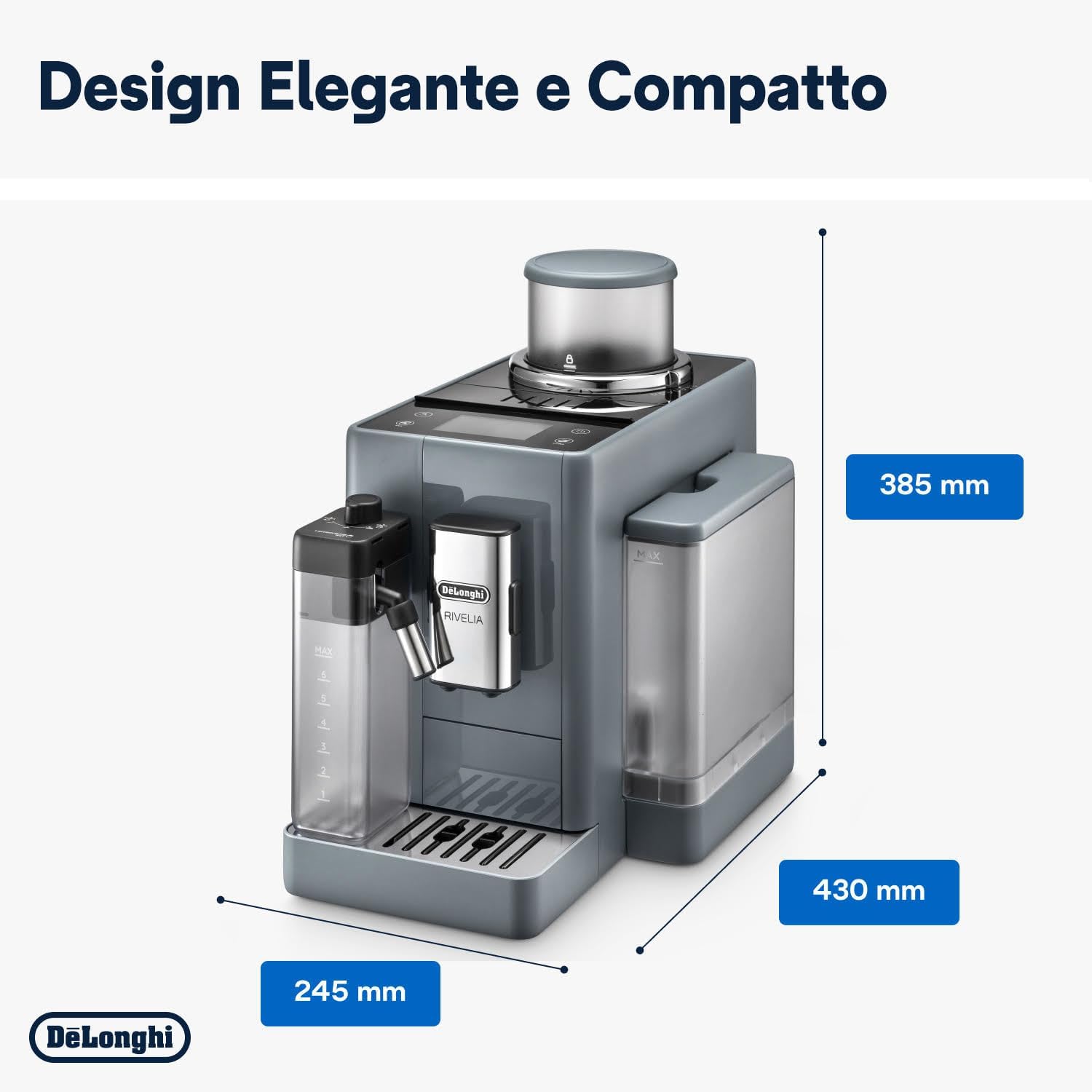
Image 7: Dimensions of the De'Longhi Rivelia coffee machine, showing its compact design.
9. Waarborg en Ondersteuning
Vir waarborginligting, verwys asseblief na die waarborgkaart wat by u produk ingesluit is of besoek die amptelike De'Longhi website. For technical support, spare parts, or repairs, please contact De'Longhi customer service in your region. Always provide your product model number (EXAM440.55.G) when contacting support.
You can find contact information for your local De'Longhi service center on their official webwebwerf: www.delonghi.com