
Inleiding
This manual provides essential instructions for the installation, operation, and maintenance of your Fermax Sup Milo Digital Intercom System. Please read this manual thoroughly before installation and use to ensure proper function and safety. Keep this manual for future reference.
The Fermax Sup Milo Digital Intercom System is designed to provide clear communication and enhanced security for residential and commercial premises. It integrates advanced technology with a robust design to offer reliable access control and communication solutions.
Veiligheidsinligting
Always follow basic safety precautions to reduce the risk of fire, electric shock, and injury to persons. This product should only be installed and serviced by qualified personnel.
- Ontkoppel krag voor installasie of diens.
- Moenie die eenheid aan reën of vog blootstel nie.
- Maak seker dat alle bedradingsverbindings veilig is en aan plaaslike elektriese kodes voldoen.
- Moenie probeer om die eenheid self te herstel nie. Verwys alle diens na gekwalifiseerde dienspersoneel.
Pakketinhoud
Verifieer dat alle komponente teenwoordig is voordat u met die installasie begin. Die pakket sluit tipies die volgende in:
- Fermax Sup Milo Digital Intercom Unit (Aluminum Plate)
- Monteer hardeware
- Connection cables (may vary by kit)
- Gebruikershandleiding (hierdie dokument)
Note: Specific components may vary based on the purchased kit.
Opstelling en installasie
This section outlines the general steps for installing the Fermax Sup Milo Digital Intercom System. Professional installation is recommended.
1. Terreinvoorbereiding
- Choose a suitable mounting location, typically near an entrance, at an accessible height.
- Maak seker dat die oppervlak plat en stabiel is.
- Verify access to necessary power and communication wiring.
2. Monteer die eenheid
- Carefully remove the front panel of the intercom unit to access mounting holes.
- Position the unit and mark the drilling points on the wall.
- Boor gate en plaas gepaste muurankers indien nodig.
- Secure the intercom unit to the wall using the provided mounting screws.
3. Bedradingsverbindings
Refer to the wiring diagram specific to your system configuration. General connections include:
- Kragtoevoer: Connect to a stable 100V power source. Ensure correct polarity.
- Communication Bus: Connect the digital bus lines to the indoor units and central control unit.
- Deurvrystelling: Connect the door release mechanism (e.g., electric strike) to the designated terminals.
- Auxiliary Inputs/Outputs: Connect any additional devices such as external cameras or sensors as required.
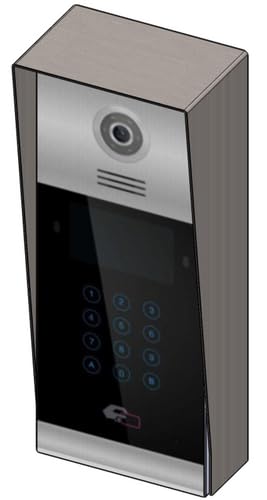 Beeld 1: Voorkant view of the Fermax Sup Milo Digital Intercom System, showing the aluminum plate and digital keypad. This image illustrates the exterior design of the main unit.
4. Aanvanklike aanskakeling en konfigurasie
- Sodra alle bedrading voltooi en veilig is, herstel die kragtoevoer na die stelsel.
- The unit will perform a self-test. Observe any indicator lights or sounds.
- Follow the system's programming guide (usually provided separately or accessible via a master unit) to configure apartment numbers, access codes, and other settings.
Bedryfsinstruksies
Making a Call from the Outdoor Panel
- To call an apartment: Enter the apartment number using the digital keypad.
- Press the "Call" button (often represented by a bell icon or similar).
- The indoor unit will ring. Once answered, communication can begin.
Receiving a Call and Opening the Door (Indoor Unit)
- When the indoor unit rings, press the "Answer" button to establish communication with the visitor.
- To open the door, press the "Door Release" button on your indoor unit.
- The door will unlock for a short period.
Using Access Codes
If configured, authorized users can enter a pre-programmed access code on the outdoor digital keypad to unlock the door without needing to call an indoor unit.
- Enter your personal access code using the digital keypad.
- Press the "Enter" or "Door Release" button.
- Die deur gaan oop.
Onderhoud
Regular maintenance ensures the longevity and optimal performance of your Fermax intercom system.
Skoonmaak
- Maak die buitekant van die eenheid skoon met 'n sagte, damp lap.
- Moenie skuurmiddels, oplosmiddels of chemiese spuitmiddels gebruik nie, aangesien dit die afwerking en elektroniese komponente kan beskadig.
- Maak seker dat geen vloeistof die openinge van die eenheid binnedring nie.
Inspeksies
- Periodically check for any visible damage to the unit or wiring.
- Maak seker dat alle monteerskroewe styf vas is.
- Test the communication and door release functions regularly.
Sagteware-opdaterings
If applicable, consult your installer or Fermax support for information on firmware updates that may improve performance or add new features.
Probleemoplossing
Hierdie afdeling spreek algemene probleme aan wat jy mag teëkom. Vir meer komplekse probleme, kontak tegniese ondersteuning.
| Probleem | Moontlike oorsaak | Oplossing |
|---|---|---|
| No communication with indoor unit. |
|
|
| Deuropener werk nie. |
|
|
| Sleutelbord reageer nie. |
|
|
Spesifikasies
Technical specifications for the Fermax Sup Milo Digital Intercom System (Model: 8424299951713).
- Model: Fermax Sup Milo Digital Intercom System
- Onderdeelnommer: 8424299951713
- Vervaardiger: Fermax
- Afmetings (Pakket): Ongeveer 0.1 x 0.1 x 0.1 cm
- Weight (Unit): 108 gram
- Materiaal: Metal, Plastic, Polycarbonate (Aluminum Plate)
- Kragbron: External Power Supply (100V)
- Voltage: 100 V
- Wattage: 100 W
- Batterye benodig: Nee
- Kleur: Multicolored (referring to internal components or subtle design elements, main plate is aluminum)
Waarborg inligting
Fermax products are manufactured to high-quality standards. For specific warranty terms and conditions, please refer to the warranty card included with your product or visit the official Fermax webwebwerf. Bewaar u bewys van aankoop vir waarborgeise.
Typically, warranty covers manufacturing defects for a specified period from the date of purchase. Damage due to improper installation, misuse, or unauthorized repairs is generally not covered.
Kliënte ondersteuning
If you require technical assistance, have questions about your product, or need to report a problem, please contact your local Fermax distributor or visit the official Fermax webwebwerf vir ondersteuningsbronne.
Webwebwerf: www.fermax.com
Hou asseblief u modelnommer (8424299951713) en aankoopbesonderhede gereed wanneer u ondersteuning kontak.