
1. Inleiding
Dankie vir die aankoopasing the Butterfly Elite V3 Induction Cooktop, Model AG-2200. This appliance is designed for efficient and safe cooking using induction heating technology. Please read this manual thoroughly before operating the cooktop to ensure proper use, maintenance, and to prevent any potential hazards.
Bewaar hierdie handleiding vir toekomstige verwysing.
2. Belangrike veiligheidsinstruksies
Om die risiko van brand, elektriese skok, besering aan persone of skade aan die toestel te verminder, moet basiese veiligheidsmaatreëls altyd gevolg word, insluitend die volgende:
- Lees alle instruksies sorgvuldig deur voordat u die toestel gebruik.
- Moenie aan warm oppervlaktes raak nie. Gebruik handvatsels of knoppe.
- Om teen elektriese skok te beskerm, moenie die koord, proppe of die toestel in water of ander vloeistof dompel nie.
- Noukeurige toesig is nodig wanneer enige toestel deur of naby kinders gebruik word.
- Trek uit die stopcontact wanneer dit nie gebruik word nie en voor skoonmaak. Laat afkoel voor jy dele aan- of afhaal.
- Do not operate any appliance with a damaged cord or plug or after the appliance malfunctions or has been damaged in any manner. Contact the manufacturer for examination, repair, or adjustment.
- Die gebruik van bykomstighede wat nie deur die toestelvervaardiger aanbeveel word nie, kan beserings veroorsaak.
- Moenie buite gebruik nie.
- Moenie dat koord oor die rand van tafel of toonbank hang, of aan warm oppervlaktes raak nie.
- Moenie op of naby 'n warm gas- of elektriese brander, of in 'n verhitte oond plaas nie.
- Uiterste versigtigheid moet gebruik word wanneer 'n toestel wat warm olie of ander warm vloeistowwe bevat, verskuif word.
- Koppel altyd eers die prop aan die toestel, en steek dan die koord in die muursok. Om te ontkoppel, draai enige beheer na "af" en verwyder dan die prop uit die muursok.
- Moenie die toestel vir ander as die bedoeling gebruik nie.
- Gebruik slegs induksie-versoenbare kookgerei.
- Do not place metallic objects such as knives, forks, spoons, lids, cans, or aluminum foil on the induction cooktop surface as they can become hot.
- Verseker behoorlike ventilasie rondom die kookplaat.
3. Produk verbyview en kenmerke
The Butterfly Elite V3 Induction Cooktop is designed for modern kitchens, offering efficient and precise cooking. Key features include:
- 2200W krag: For faster cooking and heating.
- Aesthetic and Compact Design: Sleek black glass surface with a modern look.
- Feather Touch Control: Easy and intuitive operation with a smooth touch panel.
- 4 Digit Dual Digital Display: Provides clear feedback on settings and cooking status.
- Auto Shut-off without Pot: Enhances safety by automatically turning off when no compatible cookware is detected.
- Oor hitte beskerming: Prevents damage to the appliance from excessive temperatures.
- Duursame materiale: Constructed with a glass heater surface and plastic body.
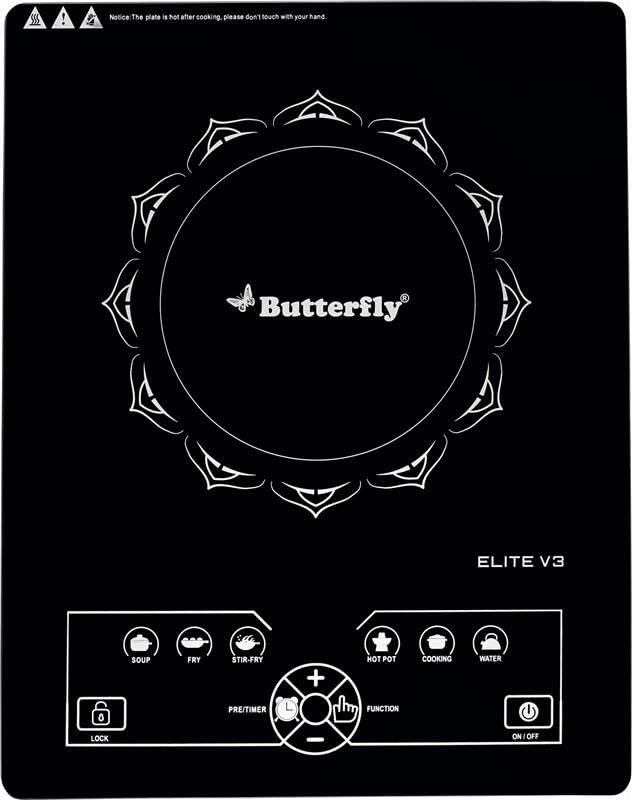
Figure 1: Butterfly Elite V3 Induction Cooktop (AG-2200)
4. Opstelling en installering
- Uitpak: Carefully remove the induction cooktop from its packaging. Retain the packaging materials for future storage or transport.
- Inspeksie: Inspekteer die toestel vir enige tekens van skade. Moenie gebruik as dit beskadig is nie.
- Plasing: Place the cooktop on a stable, flat, heat-resistant surface. Ensure there is adequate ventilation around the unit (at least 10 cm clearance from walls or other appliances). Do not place it on a metallic surface.
- Kragverbinding: Plug the power cord into a standard 240V AC electrical outlet. Ensure the outlet is properly grounded and can support the 2200W power requirement of the cooktop.
- Kookware: Use only induction-compatible cookware. These typically have a flat bottom and are made of magnetic materials like cast iron, enameled iron, or stainless steel with a magnetic base.
5. Bedryfsinstruksies
The Butterfly Elite V3 Induction Cooktop features intuitive feather touch controls. Refer to Figure 2 for an overview van die beheerpaneel.
Figure 2: Control Panel of Butterfly Elite V3 Induction Cooktop
5.1 Basiese werking
- Krag aan: Place a suitable induction-compatible pot with food on the center of the cooktop surface. Press the AAN/AF knoppie. Die skerm sal aanskakel.
- Select Function/Mode: Druk die FUNKSIE button to cycle through various cooking modes or power settings. The 4-digit digital display will show the selected power level or temperature.
- Pas instellings aan: Gebruik die + en - buttons to increase or decrease the power level or temperature.
- Vooraf ingestelde modusse: The cooktop may include preset cooking modes (e.g., Fry, Curry, Dosa, Idly, Milk, Water). Select these directly by touching the corresponding icon.
- Skakel af: Na gaarmaak, druk die AAN/AF button to turn off the cooktop. The fan may continue to run for a short period to cool down the internal components.
5.2 Veiligheidskenmerke
- Outo-afskakel: If no compatible pot is detected on the cooktop surface for a certain period after powering on, or if the pot is removed during operation, the cooktop will automatically shut off.
- Oorverhittingbeskerming: The cooktop is equipped with a sensor that monitors the internal temperature. If it detects overheating, it will automatically reduce power or shut down to prevent damage.
6. Onderhoud en Skoonmaak
Regular cleaning and maintenance will ensure the longevity and optimal performance of your induction cooktop.
- Voor skoonmaak: Ontkoppel altyd die kookplaat van die kragtoevoer en laat dit heeltemal afkoel voordat jy dit skoonmaak.
- Kookplaat oppervlak: Vee die glasoppervlak af met 'n sagte, damp cloth and a mild detergent. For stubborn stains, use a non-abrasive cleaner specifically designed for glass cooktops. Rinse with a clean, damp doek en droog deeglik af.
- Beheerpaneel: Gently wipe the feather touch control panel with a soft, damp cloth. Do not use excessive water or abrasive cleaners.
- Buitekant: Maak die buitekant van die plastiekonderdele skoon met 'n sagte, damp lap.
- Moenie onderdompel nie: Never immerse the cooktop, power cord, or plug in water or any other liquid.
- Ventilasie openinge: Ensure the ventilation openings on the bottom and sides of the cooktop are free from dust and debris to prevent overheating.
7. Probleemoplossing
If you encounter issues with your Butterfly Elite V3 Induction Cooktop, refer to the following common problems and solutions:
| Probleem | Moontlike oorsaak | Oplossing |
|---|---|---|
| Cooktop does not power on. | No power supply; loose plug; power outage. | Check if the plug is securely inserted. Verify power supply to the outlet. Check household circuit breaker. |
| Cooktop powers on but does not heat. | Incompatible cookware; no pot detected; pot not centered. | Ensure you are using induction-compatible cookware. Place the pot centrally on the cooking zone. |
| Die skerm wys 'n foutkode. | Specific error (e.g., overheating, sensor issue). | Refer to the specific error code in the full user manual (if available) or contact customer support. For overheating, allow the unit to cool down. |
| Cooktop makes unusual noise. | Normal fan operation; cookware vibration. | A slight humming sound from the fan is normal. Some cookware may vibrate slightly. If the noise is excessive or unusual, contact support. |
If the problem persists after attempting these solutions, please contact Butterfly customer support.
8. Spesifikasies
| Modelnommer | AG-2200 |
| Handelsmerk | Skoenlapper |
| Kragverbruik | 2200 W |
| Voltage | 240 Volt |
| Tipe beheer | Feather Touch Control |
| Vertoon | 4 Digit Dual Digital Display |
| Brander tipe | Induksie |
| Verhittingselemente | 1 |
| Materiaal | Glass (Heater Surface), Plastic (Body) |
| Item gewig | 2280 gram |
| Kleur | Swart |
9. Waarborg en Kliëntediens
Your Butterfly Elite V3 Induction Cooktop comes with a warranty card included in the packaging. Please refer to the warranty card for specific terms and conditions.
For any product-related queries, technical assistance, or service requests, please contact Butterfly customer support:
- Vervaardiger: Butterfly Gandhimathi Appliances Limited
- Kontaknommer: +91 9362 01 9362
Please have your model number (AG-2200) and purchase details ready when contacting support.