
1. Produk verbyview
The Generac GP18000EFI portable gas generator is engineered to provide reliable power for various applications, from emergency home backup to demanding jobsite tasks. Featuring an 816cc Electronic Fuel Injection (EFI) engine, this generator delivers efficient power with extended run times. It incorporates advanced safety features such as COsense Technology for carbon monoxide detection and TruePower Technology for safely operating sensitive electronics. Designed with a heavy-duty frame and a never-flat wheel kit, it offers durability and ease of transport.
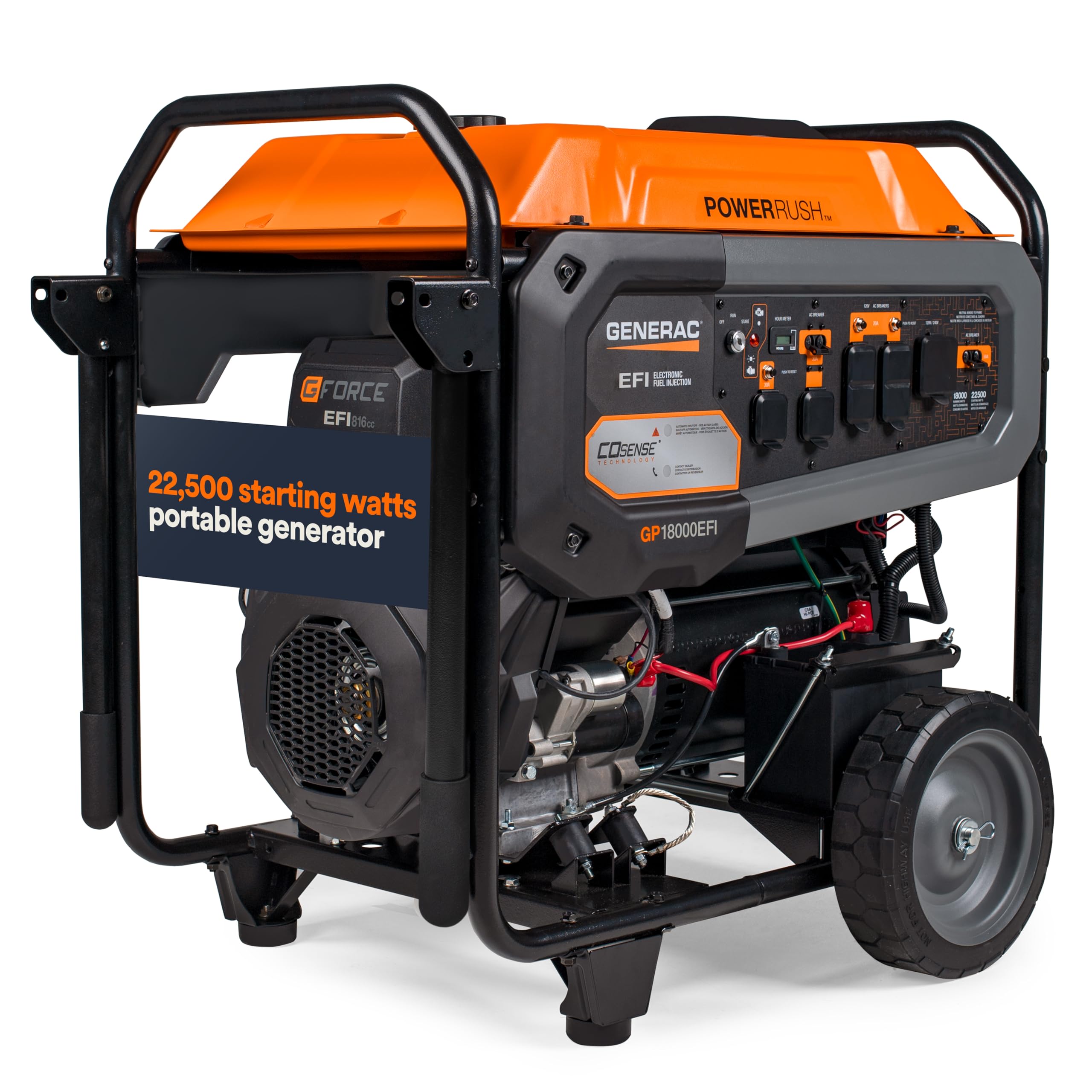
Figuur 1: Voorkant view of the Generac GP18000EFI Portable Gas Generator.
2. Belangrike veiligheidsinligting
Always operate the generator outdoors in a well-ventilated area, far away from windows, doors, and vents to prevent carbon monoxide accumulation. Carbon monoxide is an odorless, colorless gas that can cause serious injury or death. The generator is equipped with COsense Technology, which automatically shuts down the unit if hazardous levels of carbon monoxide are detected. Ensure the exhaust is pointed away from occupied areas.
Read and understand the entire owner's manual before operating the generator. Keep children and pets away from the generator during operation. Always ensure proper grounding of the unit.
3. Opstelling
3.1 Uitpak en monteer
Carefully remove the generator and all components from the packaging. Inspect for any shipping damage. The package typically includes the generator, owner's manual, engine oil, oil funnel, wheels, and necessary hardware for assembly.
- Attach the wheels to the generator frame using the provided hardware.
- Install the support legs to ensure stability.
- Attach the handle assembly to the frame.
3.2 Byvoeging van enjinolie
The generator is shipped without engine oil. Before first use, add the recommended amount of 10W-30 engine oil (approximately 1.2 quarts or 1.1 liters) using the provided funnel. Do not overfill. The low-oil pressure shutdown feature will prevent the engine from starting or running if the oil level is too low.
3.3 Brandstof byvoeg
Use fresh, unleaded gasoline with an octane rating of 87 or higher. The fuel tank has a large capacity of 14.2 Imperial Gallons (approximately 17 US gallons). Fill the tank slowly to avoid spills. Do not fill the tank completely to allow for fuel expansion. Always ensure the fuel cap is securely tightened after filling.

Figuur 2: Kant view of the generator, showing the fuel tank and engine area.
4. Operasie
4.1 Aanvang van die kragopwekker
Ensure the generator is on a level surface and all electrical loads are disconnected before starting.
- Draai die brandstofklep na die 'AAN'-posisie.
- Move the choke lever to the 'FULL CHOKE' position (if the engine is cold).
- Vir Elektriese aansit: Press and hold the start button until the engine starts. Release the button once the engine is running.
- Vir Manual Pull Start: Grasp the recoil starter handle and pull slowly until resistance is felt, then pull quickly and firmly. Repeat if necessary until the engine starts.
- Sodra die enjin begin, skuif die choke-hefboom geleidelik na die 'RUN'-posisie.
4.2 Verbinding van elektriese laste
The generator features multiple outlets, including 120V AC and 120V/240V AC options. Connect your appliances or extension cords to the appropriate outlets. The TruePower Technology ensures less than 5% Total Harmonic Distortion (THD), making it safe for sensitive electronics.

Figure 3: Generator control panel with various outlets and switches.
4.3 Monitoring and Shutdown
Monitor the fuel gauge to ensure continuous operation. The generator provides a long runtime, offering up to 9 hours at 50% load. To shut down the generator, first disconnect all electrical loads, then turn the engine switch to 'OFF', and finally turn the fuel valve to 'OFF'.
5. Onderhoud
Regular maintenance is crucial for the longevity and optimal performance of your generator. Refer to the owner's manual for a detailed maintenance schedule.
- Enjin olie: Check oil level before each use. Change engine oil after the first 20 hours of operation, then every 100 hours or annually.
- Lugfilter: Inspect and clean the air filter every 50 hours or more frequently in dusty conditions. Replace if damaged.
- Vonkprop: Inspect and clean the spark plug every 100 hours. Replace if worn or fouled.
- Brandstofstelsel: Drain the fuel system if storing the generator for more than 30 days to prevent fuel degradation. Use a fuel stabilizer if draining is not possible.

Figure 4: Engine area, highlighting components for routine maintenance.
6. Probleemoplossing
| Probleem | Moontlike oorsaak | Oplossing |
|---|---|---|
| Enjin sal nie begin nie | No fuel; Low oil level; Choke not set correctly; Spark plug issue | Add fuel; Add oil; Adjust choke; Inspect/replace spark plug |
| Geen kraguitset nie | Circuit breaker tripped; Overload; Faulty connection | Reset circuit breakers; Reduce load; Check connections |
| Die enjin loop rof | Stale fuel; Dirty air filter; Fouled spark plug | Drain and refill with fresh fuel; Clean/replace air filter; Clean/replace spark plug |
7. Spesifikasies
| Kenmerk | Detail |
|---|---|
| Handelsmerk | Generac |
| Model Naam | GP18000EFI |
| Item Modelnommer | 8917 |
| Begin Wattage | 22,500 Watt |
| Hardloop Wattage | 18,000 Watt |
| Brandstof tipe | Petrol |
| Kragbron | Brandstof aangedryf |
| Enjin tipe | 816cc EFI Engine |
| Enjin verplasing | 816 kubieke sentimeter |
| Ontstekingstelseltipe | Elektronies |
| Voltage | 120 Volt |
| Totale kragpunte | 3 |
| Tenk Volume | 14.2 Imperial Gallons |
| Produk afmetings | 30.9 cm L x 58.5 cm B x 36.5 cm H |
| Item gewig | 427 pond |
| Spesiale kenmerk | Draagbaar |
| Aanbevole gebruike | Residensieel |
8. Waarborginligting
This Generac generator comes with a manufacturer's warranty. Please refer to the warranty section in your included owner's manual for specific terms, conditions, and registration details. Keep your proof of purchase for warranty claims.
9. Kliëntediens
For technical assistance, parts, or service, please contact Generac Customer Support. Contact information can be found in your owner's manual or on the official Generac website. Always provide your model number (GP18000EFI) and serial number when contacting support.


