
1. Inleiding
This instruction manual provides detailed information on the safe operation, maintenance, and troubleshooting of your PHALANX 3.7V Mini Cordless Rotary Tool Kit (Model: PRT-R3). Please read this manual thoroughly before using the tool to ensure proper function and to prevent injury or damage. This tool is designed for light-duty applications such as sanding, carving, polishing, engraving, and pet grooming.
2. Belangrike veiligheidsinligting
Volg altyd basiese veiligheidsmaatreëls wanneer u elektriese gereedskap gebruik om die risiko van brand, elektriese skok en persoonlike besering te verminder.
- Lees alle instruksies: Maak jouself vertroud met die werking en veiligheidsriglyne van die gereedskap.
- Dra oogbeskerming: Dra altyd veiligheidsbril of veiligheidsbril met syskerms.
- Bevestig werkstuk: Altyd clamp of andersins die werkstuk vasmaak om beweging tydens werking te voorkom.
- Handhaaf 'n skoon werkarea: Deurmekaar areas nooi ongelukke uit.
- Vermy gevaarlike omgewings: Moenie elektriese gereedskap in d gebruik nieamp of nat plekke, of stel dit bloot aan reën. Hou die werkarea goed belig.
- Hou kinders weg: Alle besoekers moet op 'n veilige afstand van die werkarea gehou word.
- Trek behoorlik aan: Moenie los klere of juwele dra nie. Bevat lang hare.
- Use proper accessories: Gebruik slegs bykomstighede wat deur die vervaardiger aanbeveel word.
- Disconnect tool: Ontkoppel die gereedskap van die kragbron voordat jy enige aanpassings maak, bykomstighede verander of die gereedskap berg.
- Vermy per ongeluk begin: Maak seker dat die skakelaar in die AF-posisie is voordat die batterypak ingesit word.
- Moenie oorskry nie: Hou te alle tye behoorlike voet en balans.
- Onderhou gereedskap met sorg: Hou snygereedskap skerp en skoon vir beter en veiliger werkverrigting. Volg die instruksies vir die smering en vervanging van bykomstighede.
- Kontroleer vir beskadigde dele: Voordat die gereedskap verder gebruik word, moet 'n beskermer of ander deel wat beskadig is noukeurig nagegaan word om te bepaal dat dit behoorlik sal werk en sy beoogde funksie sal verrig.
- Battery veiligheid: Use only the specified charging cable. Do not expose batteries to extreme temperatures or fire.
3. Pakketinhoud
Nadat u die pakkie oopgemaak het, maak seker dat al die items wat hieronder gelys word, teenwoordig en onbeskadig is:
- PHALANX Mini Cordless Rotary Tool (x1)
- 70 PCS Accessories (various types for grinding, carving, polishing, cutting, sanding, drilling)
- Accessory Storage Bag (x1)
- Type-C Fast Charging Cable (x1)

Image: The PHALANX Mini Cordless Rotary Tool Kit, displaying the main tool, a Type-C charging cable, a wrench, and a wide assortment of 70 accessories including grinding stones, diamond bits, cutting wheels, sanding drums, polishing felts, and drill bits.
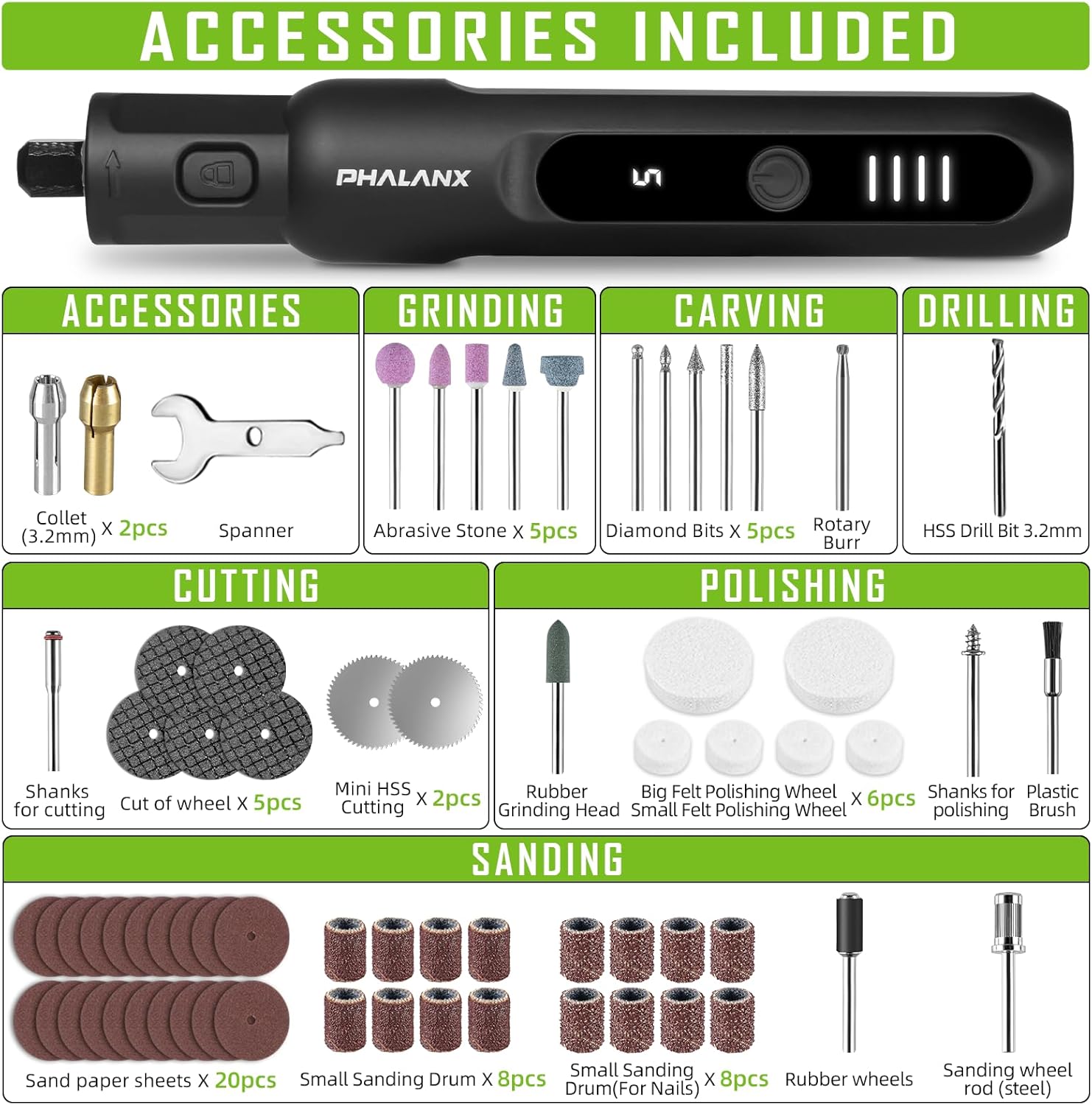
Image: A comprehensive visual guide to the 70 accessories included with the rotary tool. Categories shown are Collet (3.2mm) x2, Spanner x1, Abrasive Stone x5, Diamond Bits x5, Rotary Burr x1, HSS Drill Bit 3.2mm x1, Shanks for cutting x1, Cut of wheel x5, Mini HSS Cutting x2, Rubber Grinding Head x1, Small Felt Polishing Wheel x4, Big Felt Polishing Wheel x2, Shanks for polishing x1, Plastic Brush x1, Sand paper sheets x20, Small Sanding Drum x8, Small Sanding Drum (For Nails) x8, Rubber wheels x1, Sanding wheel rod (steel) x1, and USB Type-C Charging Cable.
4. Produk verbyview
The PHALANX Mini Cordless Rotary Tool is designed for precision work with its pen-like form factor and variable speed control. Key features include:
- Kompakte en liggewig ontwerp: Ergonomically designed for comfortable one-handed operation.
- Digitale skerm: Shows current speed setting and battery level.
- 5 Veranderlike snelhede: Adjustable from 5000 RPM to 20000 RPM for various tasks.
- Power-On Memory Function: Remembers the last used speed setting.
- 360° Full Coverage Working Light: Illuminates the workpiece for improved visibility.
- Non-slip Rubber Grip: Enhances comfort and control during use.
- Tipe C Laai: Gerieflike en vinnige laai.

Beeld: 'n Gedetailleerde view of the rotary tool's control panel. It highlights the ON/OFF button (1), which requires a 1.5-second long press to activate or deactivate. The LED Digital Display (2) shows the current speed setting (e.g., '5') and includes a memory function. The Power Indicator (3) consists of four LED bars, providing a soft light for eye protection and indicating the remaining battery charge.

Image: This image illustrates the core functionalities of the PHALANX 3.7V Cordless Rotary Tool, including its 5-speed regulation, a speed range of 5000-20000 RPM, a power-on memory function that recalls the last speed setting, an LED digital display for speed and battery, and 360-degree full coverage lighting for enhanced visibility during operation.
5. Opstelling
5.1 Aanvanklike laai
Before first use, fully charge the rotary tool. The battery is partially charged from the factory but a full charge is recommended for optimal performance.
- Connect the provided Type-C charging cable to the charging port at the bottom of the rotary tool.
- Koppel die ander kant van die USB-kabel aan 'n versoenbare USB-kragadapter (nie ingesluit nie) of 'n rekenaar se USB-poort.
- The power indicator lights will illuminate and show charging progress. All four bars will be solid when fully charged.
5.2 Installering/Verandering van Toebehore
Always ensure the tool is turned OFF before installing or changing accessories.
- Locate the spindle lock button near the chuck. Press and hold this button to lock the spindle.
- Using the provided spanner wrench, loosen the collet nut by turning it counter-clockwise.
- Steek die verlangde bykomstige skag in die spantang. Maak seker dat die skag volledig vas is.
- While still holding the spindle lock button, tighten the collet nut clockwise with the spanner wrench until the accessory is securely held. Do not overtighten.
- Laat die spilslotknoppie los.
6. Operasie
6.1 Aan-/afskakel
- To turn the tool ON, long press the ON/OFF button for approximately 1.5 seconds. The LED digital display will light up, showing the last used speed setting.
- To turn the tool OFF, long press the ON/OFF button for approximately 1.5 seconds again.
6.2 Aanpassing van spoed
The tool features 5 variable speed settings, ranging from 5000 RPM to 20000 RPM.
- Once the tool is ON, short press the ON/OFF button to cycle through the 5 speed settings. The digital display will show the current speed level (1-5).
- Select the appropriate speed for your application. Lower speeds are suitable for polishing and delicate work, while higher speeds are for cutting and grinding.

Image: This graphic illustrates the core functionalities of the PHALANX rotary tool, including its 5-speed regulation, a speed range of 5000-20000 RPM, a power-on memory function that recalls the last speed setting, an LED digital display for speed and battery, and 360-degree full coverage lighting for enhanced visibility during operation.

Image: This visual demonstrates the power-on memory function of the PHALANX rotary tool, which automatically remembers the last used speed setting. It also highlights the real-time speed and battery display, providing immediate feedback on the tool's operational status and remaining charge.
6.3 Aansoeke
The PHALANX Mini Cordless Rotary Tool is versatile and can be used for a variety of tasks with the appropriate accessories:
- skuur: Use sanding drums or sandpaper sheets for smoothing surfaces.
- Kerfwerk: Utilize diamond bits or rotary burrs for intricate designs on wood, plastic, or soft metals.
- Poleer: Apply felt polishing wheels with polishing compound for a high-gloss finish.
- Gravure: Employ fine diamond bits for detailed engraving on various materials.
- Sny: Use mini HSS cutting wheels or cut-off wheels for light cutting tasks.
- Boor: Use HSS drill bits for small holes.
- Pet Grooming: Specifically, for pet nail sanding using appropriate sanding drums.

Image: A collage demonstrating the wide range of applications for the PHALANX rotary tool, including drilling into wood, grinding metal, cutting thin materials, sanding pet nails, carving intricate details, and sanding wood surfaces.
7. Onderhoud
Gereelde onderhoud verseker die lang lewensduur en optimale werkverrigting van u roterende gereedskap.
- Skoonmaak: After each use, wipe down the tool with a clean, dry cloth. Use a soft brush to remove dust and debris from vents and the chuck area. Do not use harsh chemicals or abrasive cleaners.
- Bybehore berging: Store all accessories in the provided storage bag or a suitable container to prevent loss and damage.
- Gereedskapberging: Store the rotary tool in a dry, cool place, away from direct sunlight and out of reach of children.
- Batterysorg: For long-term storage, charge the battery to about 50% capacity. Recharge every 3-6 months if not in use to maintain battery health.
8. Probleemoplossing
If you encounter issues with your PHALANX Mini Cordless Rotary Tool, refer to the table below for common problems and solutions.
| Probleem | Moontlike oorsaak | Oplossing |
|---|---|---|
| Gereedskap skakel nie aan nie. | Battery is leeg. Aan/af-knoppie nie korrek gedruk nie. | Charge the tool fully. Druk die AAN/UIT-knoppie lank vir 1.5 sekondes. |
| Toebehore wiebel of val uit. | Collet nut is loose. Accessory shank is not fully inserted. Incorrect collet size. | Tighten the collet nut securely. Ensure accessory shank is fully seated. Use the correct collet for the accessory shank size. |
| Tool slows down or stops under light pressure. | Battery is laag. Speed setting is too low for the task. Oorladingsbeskerming geaktiveer. | Herlaai die battery. Verhoog die spoedinstelling. Reduce pressure on the tool. Allow tool to cool if it overheats. |
| LED-skerm werk nie. | Tool is off. Wanfunksie. | Skakel die gereedskap aan. Kontak kliëntediens as die probleem na laai voortduur. |
If the problem persists after attempting these solutions, please contact PHALANX customer support.
9. Spesifikasies
| Kenmerk | Detail |
|---|---|
| Handelsmerk | FALANKS |
| Modelnommer | PRT-R3 |
| Voltage | 3.7 Volt (DC) |
| Kragbron | Batteryaangedrewe (1 litiumioonbattery ingesluit) |
| Maksimum rotasiespoed | 20000 RPM |
| Minimum rotasiespoed | 5000 RPM |
| Spoedinstellings | 5 Veranderlike snelhede |
| Spesiale kenmerke | Cordless, Digital Display, Pen-like design, 360° Working Light, Power-on Memory Function |
| Item gewig | 13.4 onse |
| Produkafmetings (L x B x H) | 6.02 x 0.78 x 0.78 duim |
| Ingesluit komponente | Mini Rotary tool x1, 70 PCS accessories, Type-C Fast Charging Cable |
10. Waarborg en Kliëntediens
PHALANX is committed to providing quality products and customer satisfaction. While specific warranty details are not provided in this manual, most PHALANX products come with a standard manufacturer's warranty covering defects in materials and workmanship.
For warranty claims, technical assistance, or any questions regarding your PHALANX 3.7V Mini Cordless Rotary Tool Kit, please contact PHALANX customer service through the retailer where the product was purchased or visit the official PHALANX webwebwerf vir ondersteuning kontak inligting.
You are welcome to reach out to PHALANX anytime, a quality after sales team will be at your service.
PHALANX Official Store: Visit PHALANX Store on Amazon