
WONDOM ADAU1701
WONDOM ADAU1701 DSP Preamp: 2-In 4-Out Digital Signal Processor Instruction Manual
Model: ADAU1701
Inleiding
This manual provides detailed instructions for the installation, operation, and maintenance of your WONDOM ADAU1701 DSP Preamp. This unit is designed for advanced audio signal processing, offering a 2-input, 4-output configuration with digital crossover capabilities and support for SigmaStudio programming.
Sleutel kenmerke sluit in:
- Powered by ADAU1701 DSP, a 28/56bit Digital Signal Processor Engine.
- 24bit ADC/DAC Resolution Ratio with a 48kHz Sampling Tarief.
- Unbalanced 2-Input, 4-Output Preamp Eenheid.
- USB Type-C Port for DC 5V Power.
- Four Potentiometers for High-Pass Filter (HPF), Low-Pass Filter (LPF), and Volume Control.
- Integrated Mute & Phase Switches.
- Supports SigmaStudio Programming when connected with an ICP5 programmer.
- Open-sourced Demo Program & HEX Files are provided for restoring factory settings.
Pakketinhoud
Verifieer asseblief dat alle items in die pakket teenwoordig is:
- WONDOM ADAU1701 DSP Preamp Eenheid
- USB Type-C Cable (for power)
- Gebruikershandleiding (hierdie dokument)
- (Optional: ICP5 Programmer, sold separately for advanced programming)
Veiligheidsinligting
- Ensure the power supply matches the device's requirements (DC 5V, 1A via USB Type-C).
- Moenie die eenheid aan vog of uiterste temperature blootstel nie.
- Avoid opening the enclosure unless you are a qualified technician.
- Hou buite bereik van kinders.
Opstelling
1. Fisiese verbindings
Refer to the diagrams below for proper connection of audio inputs, outputs, and power.

Figuur 1: Agterpaneelverbindings. This image shows the rear panel of the ADAU1701 DSP Preamp, highlighting the DC Input (5V, 1A), ICP Port, Line In (ADC0 Left, ADC1 Right), and Line Out (DAC0 Right, DAC1 Left, DAC2 Right, DAC3 Left) RCA jacks.
- Kragverbinding: Connect a DC 5V, 1A power supply to the USB Type-C port labeled "DC INPUT 5V, 1A" on the rear panel.
- Oudio-invoer: Connect your audio source (e.g., media player, pre-amplifier) to the "LINE IN" RCA jacks (ADC0 Left, ADC1 Right).
- Oudio-uitvoer: Koppel jou amplifiers or powered speakers to the "LINE OUT" RCA jacks. The default configuration provides 2-channel mid-range output (DAC2 Right, DAC3 Left) and 2-channel bass output (DAC0 Right, DAC1 Left) for a 2-way digital crossover setup.
- ICP Port: This port is used for connecting an ICP5 programmer (sold separately) for advanced SigmaStudio programming.
2. Aanvanklike aanskakeling
Once all connections are secure, apply power to the unit. The "POWER" LED on the front panel should illuminate, indicating the device is operational.
Bedryfsinstruksies
The WONDOM ADAU1701 DSP Preamp features several controls on its front panel for direct adjustment, as well as advanced programming capabilities via SigmaStudio.

Figure 2: Front Panel Controls. This image displays the front panel, showing the Power LED, Busy LED, SW1 (Mute) and SW2 (Phase) switches, and four potentiometers (POT1, POT2, POT3, POT4) for various audio adjustments.
Voorpaneelkontroles:
- KRAG-LED: Dui aan dat die eenheid aangeskakel is.
- BUSY LED: Indicates DSP activity.
- SW1 (Mute Switch): Toggles audio output mute on/off.
- SW2 (Phase Switch): Adjusts the phase of the audio output.
- POT1 (MP3 / ADC2): Controls the High-Pass Filter (HPF) for Bank B (3kHz-20kHz).
- POT2 (MP8 / ADC3): Controls the Low-Pass Filter (LPF) for Bank A (210Hz-3kHz).
- POT3 (MP9 / ADC0): Controls the High-Pass Filter (HPF) for Bank A (10Hz-310Hz).
- POT4 (VOL): Beheer die algehele volume.
Digital Crossover Configuration:
The unit's default output is configured as a 2-way digital crossover, providing dedicated outputs for bass and mid-range frequencies.
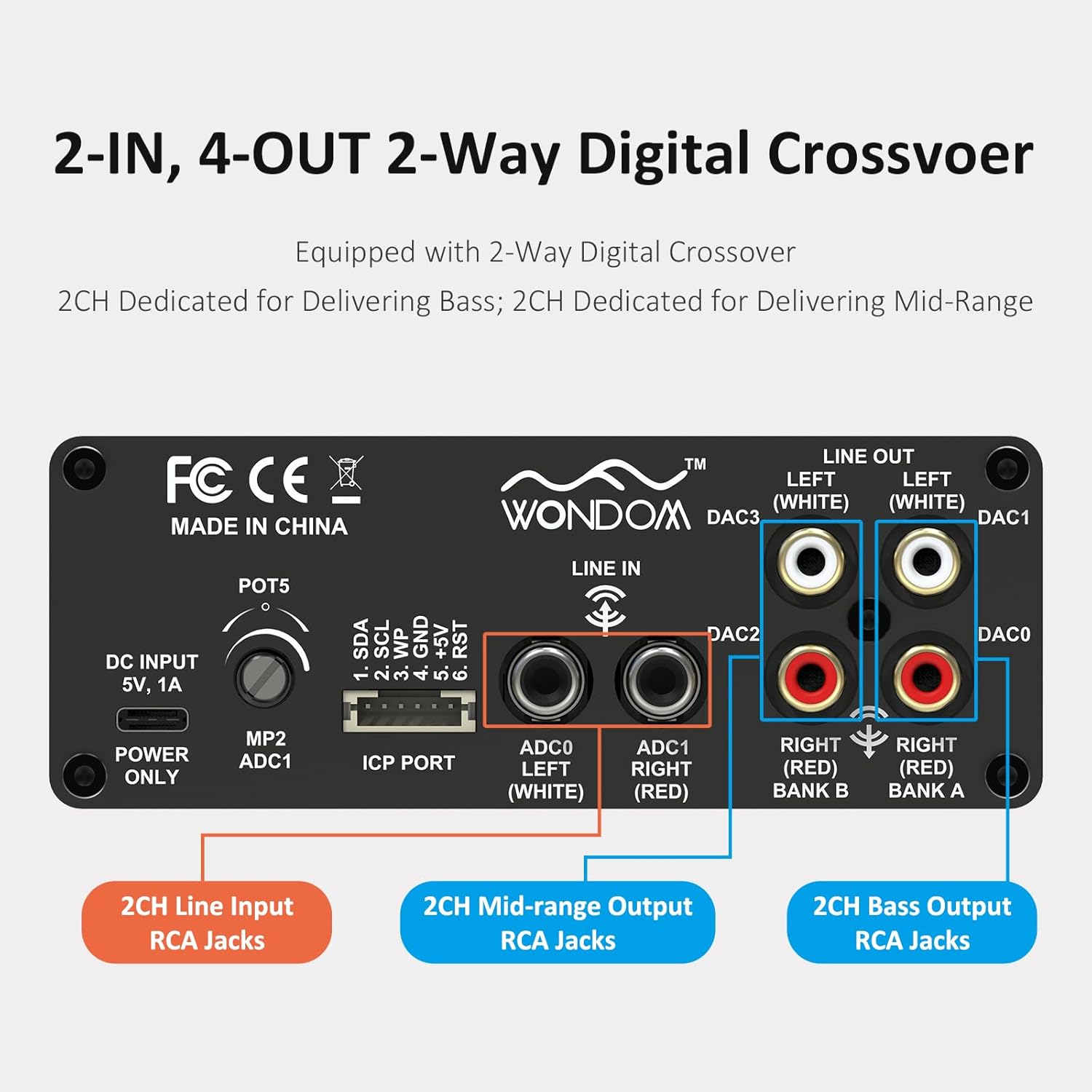
Figure 3: 2-In, 4-Out Digital Crossover. This diagram shows the RCA jack assignments for 2-channel Line Input, 2-channel Mid-range Output, and 2-channel Bass Output, facilitating a 2-way digital crossover setup.
- 2CH Line Input: ADC0 Left (White), ADC1 Right (Red).
- 2CH Mid-range Output: DAC2 Right (Red), DAC3 Left (White).
- 2CH Bass Output: DAC0 Right (Red), DAC1 Left (White).
SigmaStudio Programming:
For advanced customization and fine-tuning of the DSP functions, the unit supports programming via Analog Devices' SigmaStudio software. An ICP5 programmer (sold separately) is required to connect the DSP unit to your computer.

Figure 4: SigmaStudio Programming Setup. This image illustrates the connection between the DSP unit and an ICP5 programmer, along with a visual representation of the SigmaStudio graphical programming interface.
- Sagteware: Download and install SigmaStudio from the Analog Devices webwebwerf.
- Hardeware: Connect the ICP5 programmer to the ICP Port on the DSP unit and to your computer via USB.
- Programmering: Utilize the open-sourced demo program and HEX files provided by WONDOM to get started or to restore factory settings. All terminal functions can be tailored to specific needs using SigmaStudio.
Onderhoud
- Hou die eenheid skoon deur dit met 'n sagte, droë lap af te vee.
- Vermy die gebruik van harde chemikalieë of skuur skoonmakers.
- Verseker voldoende ventilasie rondom die eenheid om oorverhitting te voorkom.
- Regularly check all cable connections for secure fit.
Probleemoplossing
| Probleem | Moontlike oorsaak | Oplossing |
|---|---|---|
| Geen krag / Krag-LED af | Incorrect power supply, loose connection, faulty cable. | Verify DC 5V, 1A power supply. Check USB Type-C cable connection. Try a different power source or cable. |
| Geen oudio-uitvoer nie | Incorrect input/output connections, Mute switch engaged, volume too low, faulty audio cables. | Check all RCA connections. Ensure SW1 (Mute) is disengaged. Increase POT4 (Volume). Test with different audio cables. |
| Audible hiss or noise | Ground loop, interference, power supply noise, high gain settings. | Ensure all components are properly grounded. Use a high-quality, stable 5V power supply (a separate USB power bank/battery can help reduce noise from PC USB). Reduce gain settings if applicable. |
| Cannot connect to SigmaStudio | ICP5 programmer not connected or faulty, DSP not powered, incorrect software drivers. | Ensure ICP5 programmer is correctly connected to the DSP and computer. Verify DSP unit is powered on. Install SigmaStudio drivers in administrator mode (as suggested by user reviews). |
Spesifikasies
| Kenmerk | Detail |
|---|---|
| DSP-skyfie | ADAU1701 (28/56bit Digital Signal Processor) |
| ADC/DAC Resolution | 24-bis |
| Sampling Koers | 48 kHz |
| Invoerkonfigurasie | 2-Input (Unbalanced RCA) |
| Uitsetkonfigurasie | 4-Output (Unbalanced RCA, default 2-way digital crossover) |
| Kragtoevoer | DC 5V, 1A (via USB Type-C) |
| Kontroles | 4 Potentiometers (HPF/LPF/Volume), Mute Switch, Phase Switch |
| Programmeringsondersteuning | SigmaStudio (requires ICP5 programmer, sold separately) |
| Afmetings (L x B x H) | 4.72 x 4.72 x 1.77 duim |
| Gewig | 1.23 pond |
| Behuising | Sleek Aluminum Enclosure |
Waarborg en Ondersteuning
WONDOM products are manufactured by Sure Electronics. For warranty information, technical support, and further assistance, please refer to the official Sure Electronics webwebwerf of kontak hul kliëntediens direk. Bewaar u aankoopbewys as bewys van aankoop vir waarborgeise.
Manufacturer: Sure Electronics
For additional resources and community support regarding SigmaStudio programming, online forums and tutorials can be a valuable resource.