
CLY 42W Motion Light with remote control
CLY 42W LED Security Lights Motion Sensor Light Instruction Manual
Brand: CLY | Model: 42W Motion Light with remote control
1. Inleiding
The CLY 42W LED Security Light with Motion Sensor is designed to provide bright, reliable, and energy-efficient outdoor lighting for various applications such as garages, yards, eaves, and pathways. Featuring a remote control for convenient mode adjustments, this floodlight offers enhanced security and ease of use. Its robust design ensures durability and weather resistance for long-term performance.
Sleutel kenmerke sluit in:
- Afstandbeheer: Adjust settings from up to 12 meters away, eliminating the need for ladders.
- Vier beligtingsmodusse: Choose from 24 Hours Sensor Mode, Night Sensor Mode, Constant Light Mode, and Timing Mode (1H/2H/3H constant light, then sensor).
- Hoë helderheid: 56 LED beads deliver 3600 lumens, covering over 3000 sq. ft. with 270° wide-angle lighting.
- Gevorderde bewegingsopsporing: 180° detection range with a maximum 12m sensing distance.
- IP66 Waterdigte Gradering: Ontwerp om verskillende weerstoestande te weerstaan.
- Verstelbare instellings: Customize sensing distance (6m-12m), lighting duration (45s-10min), and brightness (10%-100%).

Figure 1: CLY 42W LED Security Light with Motion Sensor and Remote Control.
2. Wat is in die boks
Upon opening your CLY 42W LED Security Light package, you should find the following components:
- 1 x 3-Head Flood Light
- 1 x afstandbeheerder
- 1 x Set of Screws and mounting hardware
- 1 x handleiding
Video 1: Unboxing the CLY 3-Headed Motion Sensor Floodlights. This video provides a visual guide to the contents of the product package.
3. Spesifikasies
| Kenmerk | Spesifikasie |
|---|---|
| Wattage | 42 Watt |
| Helderheid | 3600 Lumen |
| Kleur temperatuur | 5000 Kelvin (Daylight White) |
| Bewegingsopsporingsreeks | 180° with max 12m (39ft) sensing distance |
| Straalhoek | 270° (adjustable heads) |
| Waterweerstandvlak | IP66 (Floodlight), IP65 (Infrared Sensor) |
| Beheer metode | Afstandbeheer |
| Kragbron | Elektries met koord |
| Produk afmetings | 5.3 cm L x 14.4 cm B x 2.5 cm H |
| Gemiddelde lewe | 50000 ure |
4. Installasiehandleiding
Belangrik: Always turn off the power supply at the circuit breaker before beginning any electrical installation. If you are unsure about any steps, consult a qualified electrician.
- Berei die monteeroppervlak voor: Ensure the installation area is clean and stable. If replacing an existing light, remove the old fixture and ensure the electrical box is accessible.
- Installeer die monteerplaat: Attach the provided metal mounting plate to your electrical box using the included screws. Ensure it is securely fastened.
- Koppel bedrading: Carefully connect the light's wires to your household wiring. Typically, this involves connecting the live (black) wire to the live wire, the neutral (white) wire to the neutral wire, and the ground (green/bare copper) wire to the ground wire. Use the provided wire nuts to secure connections.
- Heg die ligarmatuur aan: Align the light fixture with the mounting plate and secure it with the central screw. Ensure the foam gasket on the back of the light is properly seated to create a weather-tight seal.
- Adjust Light Heads and Sensor: Loosen the adjustment screws on the light heads and motion sensor to position them as desired. The three light heads can be adjusted to provide 270° wide-angle coverage. The motion sensor can also be angled for optimal detection. Tighten all screws once adjustments are complete.
- Herstel krag: Sodra die installasie voltooi is en alle verbindings veilig is, skakel die krag weer aan by die stroombreker.

Figure 2: Quick Installation Diagram. Follow these steps for a secure setup.
Video 2: Motion sensor light with remote control installation. This video demonstrates the physical installation process of the light fixture.
5. Operating Modes and Remote Control
The CLY 42W LED Security Light offers four distinct operating modes, easily selectable via the included remote control. The remote allows for convenient adjustment of brightness, sensing distance, and lighting duration.
5.1. Beligtingsmodusse
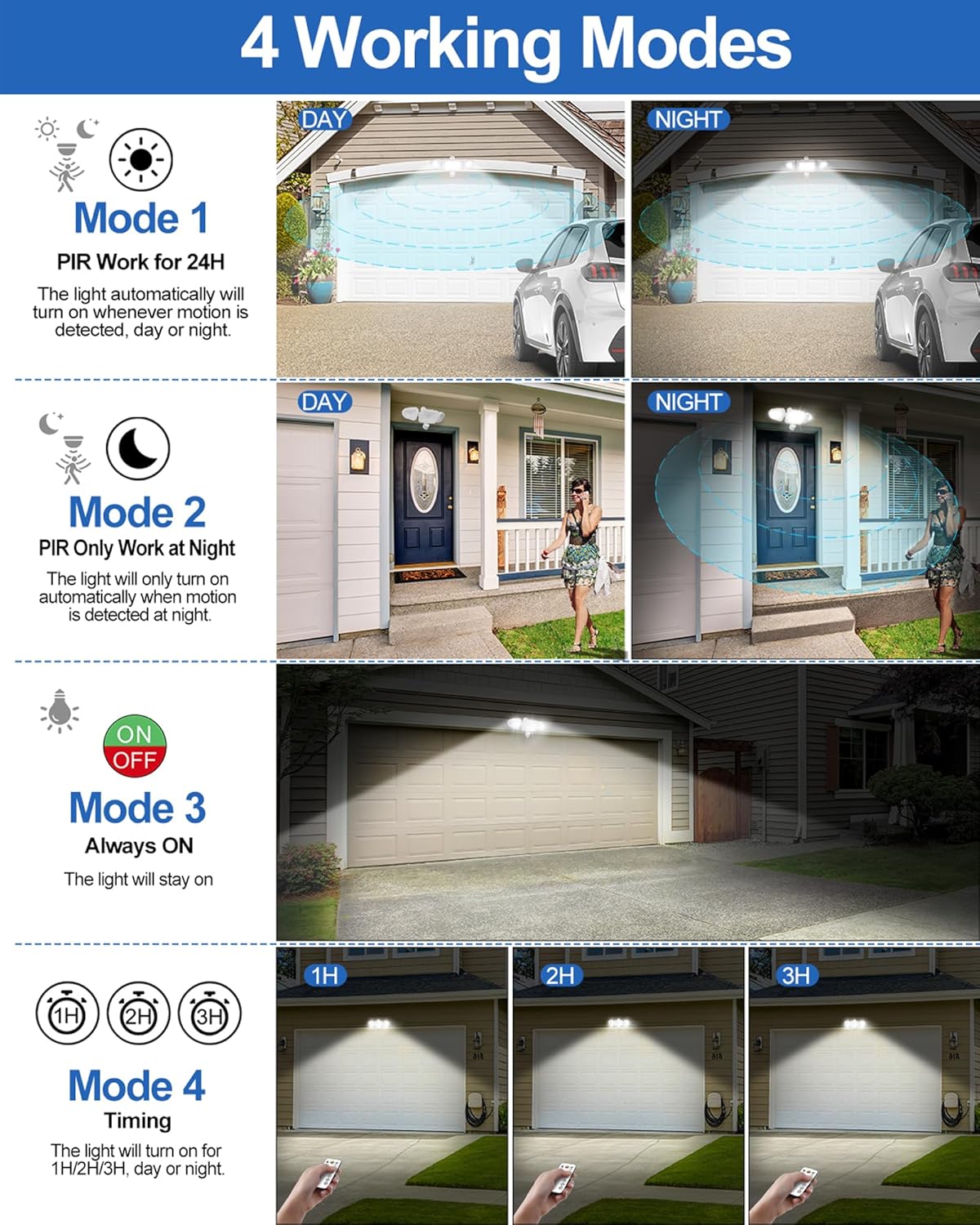
Figuur 3: oorview of the 4 Working Modes.
- ① 24 Hours Sensor Mode: The light will automatically turn on whenever motion is detected, day or night. Ideal for areas requiring constant monitoring.
- ② Night Sensor Mode: The light will only turn on at night if motion is detected. This mode is energy-saving, ensuring the light activates only when needed in dark conditions.
- ③ Constant Light Mode: The light stays on continuously. Use this mode when you need prolonged illumination for an area.
- ④ Timing Mode: Offers constant light for a set duration (1H/2H/3H), after which it automatically switches to Night Sensor Mode. Useful for temporary extended lighting.
5.2. Afstandbeheer funksies
The remote control provides full command over your security light's settings:
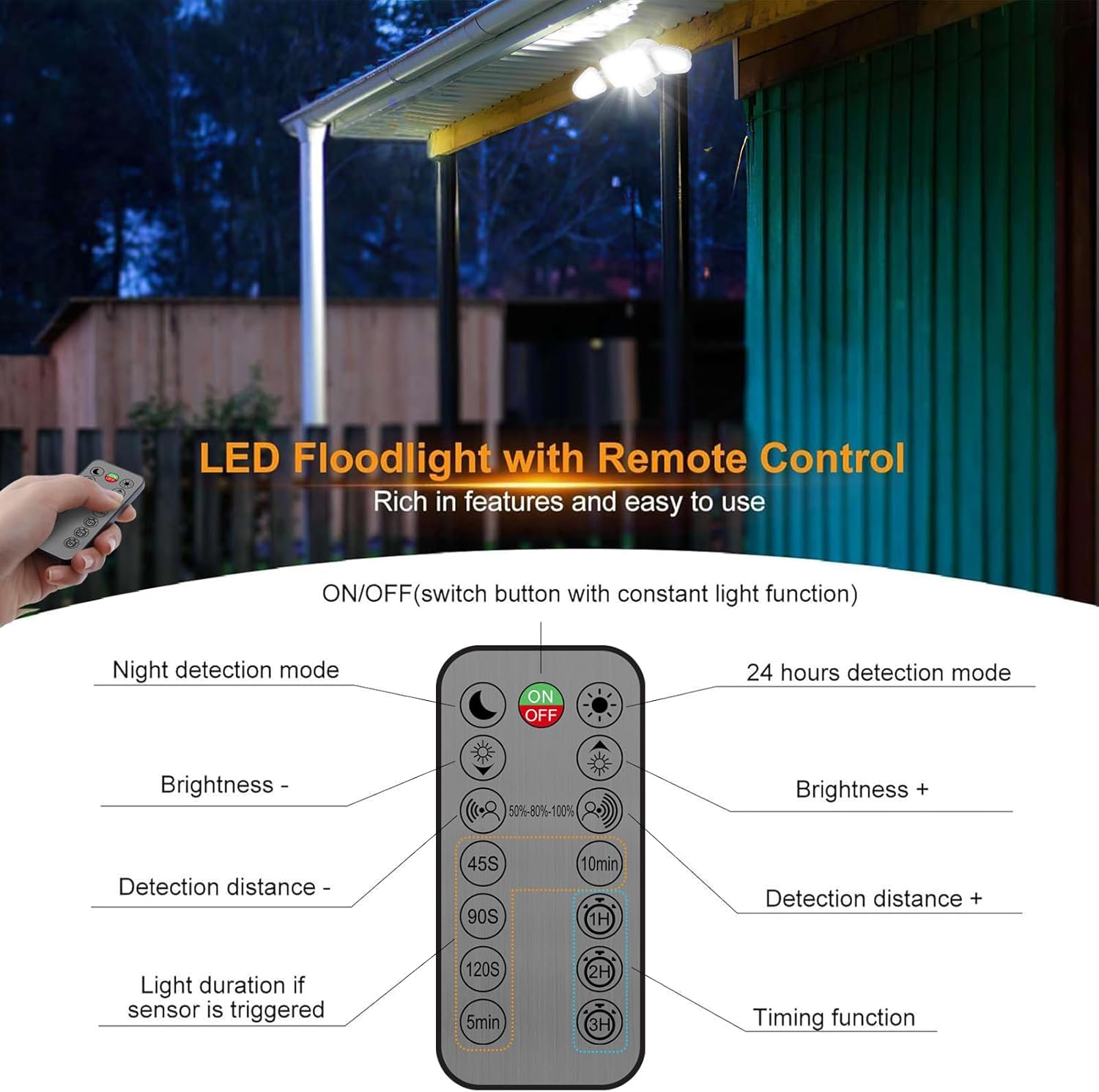
Figure 4: Remote Control Function Diagram.
- AAN/UIT: Skakel die lig aan of af.
- Helderheid aanpassing: Increase or decrease brightness from 10% to 100% (stepless dimming).
- Bespeuringsafstand: Adjust the motion sensing range (6m, 9m, 12m).
- Light Duration (Sensor Modes): Set how long the light stays on after motion is detected (45s, 90s, 120s, 5min, 10min).
- Tydsberekening funksie: Select 1H, 2H, or 3H for constant light duration before switching to sensor mode.
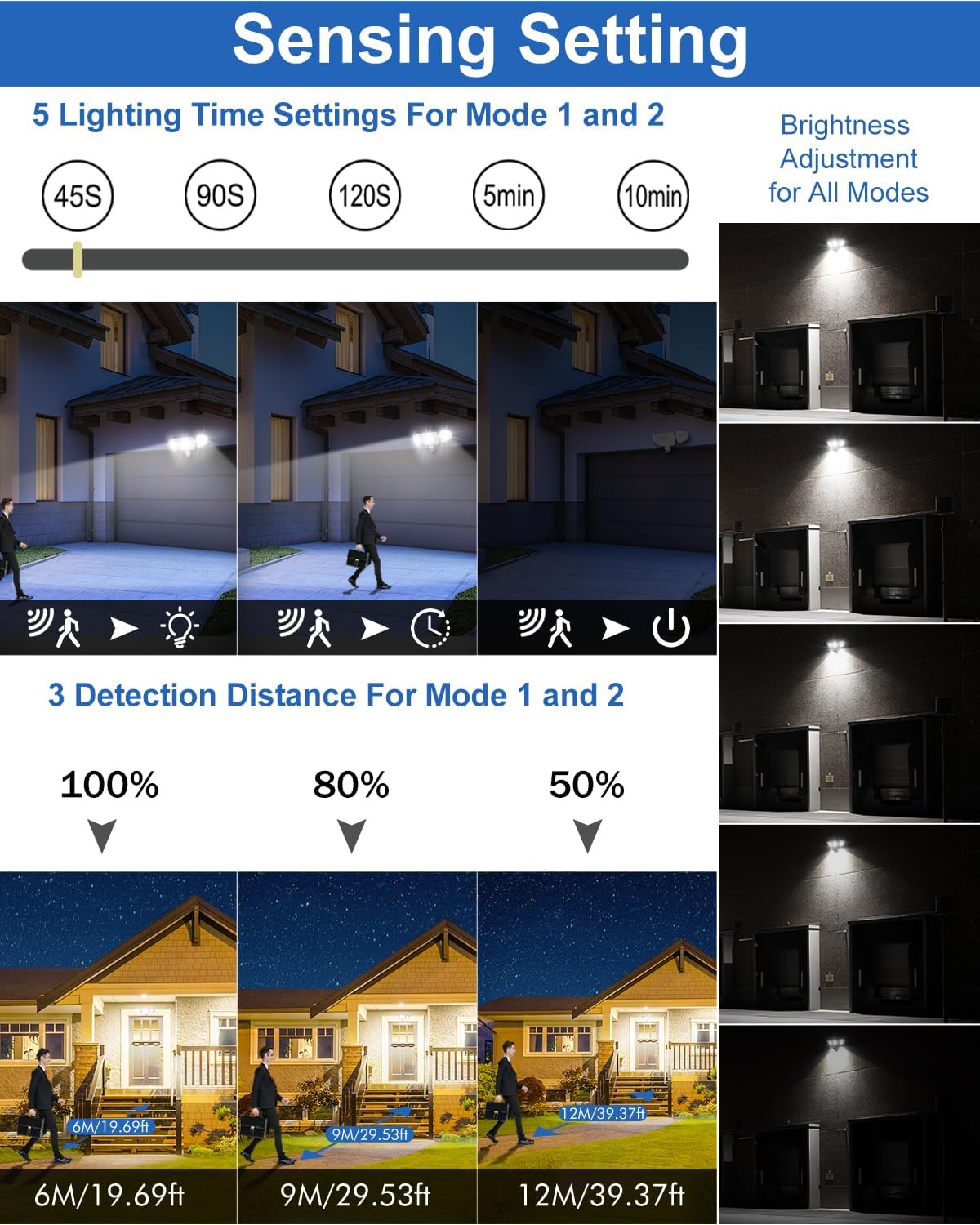
Figure 5: Sensing and Brightness Adjustment Settings.
Video 3: Setting the light mode using the remote control. This video demonstrates how to cycle through the different lighting modes and adjust settings.
6. Onderhoud
To ensure the longevity and optimal performance of your CLY LED Security Light, follow these maintenance guidelines:
- Skoonmaak: Periodically wipe the light fixture and motion sensor with a soft, damp lap om stof en puin te verwyder. Moenie skuurmiddels of oplosmiddels gebruik nie.
- Weerbeskerming: While the floodlight has an IP66 rating, the infrared sensor is rated IP65. It is recommended to install the floodlight in a location protected from direct heavy rain, such as under a roof or eave, to prevent potential water intrusion into the sensor housing.
- Hitteafvoer: The multi-slot design of the fixture provides excellent cooling. Ensure that the heat dissipation fins are not obstructed to maintain optimal operating temperature.
- Bedradinginspeksie: Annually inspect the wiring connections for any signs of wear, corrosion, or loosening. Ensure all connections remain secure.

Figure 6: IP66 Waterproof and Heat Resistance Features.
7. Probleemoplossing
If you encounter issues with your CLY LED Security Light, refer to the following common problems and solutions:
- Lig gaan nie aan nie:
- Check power supply: Ensure the circuit breaker is on and there is power to the fixture.
- Verify wiring: Confirm all electrical connections are secure and correct.
- Remote control battery: Replace the CR2032 battery in the remote control if it's not responding.
- Sensor mode: If in Night Sensor Mode, ensure it is dark enough for activation. Test in 24 Hours Sensor Mode.
- Lig bly aanhoudend aan:
- Check mode: Ensure the light is not set to Constant Light Mode.
- Motion sensor: Verify the motion sensor is not obstructed or detecting constant movement (e.g., tree branches, pets).
- Sensor sensitivity: Adjust the detection distance to a lower setting.
- Light Not Detecting Motion:
- Sensor placement: Ensure the sensor is angled correctly to cover the desired area.
- Obstructions: Clear any objects blocking the sensor's field of view.
- Sensing distance: Increase the detection distance setting using the remote.
- Power cycle: Turn off the power at the breaker for a few minutes, then turn it back on to reset the sensor.
- Afstandbeheer werk nie:
- Battery: Ensure the CR2032 battery is correctly inserted and has charge.
- Line of sight: The remote uses IR (infrared) and requires a direct line of sight to the sensor. Ensure no obstructions are between the remote and the light.
- Distance: Operate the remote within the specified 12m range.
- Water Intrusion in Sensor:
- Relocation: If possible, relocate the floodlight to a more sheltered area, such as under an eave or porch, to protect the sensor from direct rain.
- Seal integrity: Ensure the foam gasket between the light and the mounting surface is properly installed and intact.
8. Waarborg en Ondersteuning
CLY provides a 2-year replacement service for this product. If you experience any issues or have questions regarding your CLY 42W LED Security Light, please contact our customer service team.
You can find our Service Email Address on the manual included in the product packaging. Alternatively, you can reach us through Amazon, and we will endeavor to reply within 24 hours.
Please note that the LED module cannot be replaced. If the lamp is damaged or reaches the end of its service life, the entire lamp needs to be replaced. For safety, if the wire is damaged, the lamp can no longer be used and needs to be scrapped. If the lamp is exposed to water or moisture, the lamp can no longer be used and needs to be scrapped. Do not stare at the operating LED light source to prevent harm to the eye. The lamp vereis professionele elektrisiën om te installeer.
Ask a question about this manual
Ask about setup, troubleshooting, compatibility, parts, safety, or missing instructions. Manuals+ will review the question and use this page’s manual context to help answer it.