
Star Micronics MCL32CBI
Star Micronics mC-Label3 MCL32CBI Direkte Termiese Drukker Gebruikershandleiding
Model: MCL32CBI
Inleiding
This manual provides essential information for the setup, operation, maintenance, and troubleshooting of your Star Micronics mC-Label3 MCL32CBI Direct Thermal Printer. Please read this manual thoroughly before using the printer to ensure proper and safe operation.
Pakketinhoud
Verifieer dat al die items wat hieronder gelys word, in jou pakket ingesluit is:
- mC-Label3 Multifunctional Printer
- AC Adapter
- Kragkabel
- USB Cables (C-C 1.0m and C-A 1.8m)
- LAN-kabel (1m)
- Simple Setup Sheet Safety Guide

Beeld: Voorkant view of the Star Micronics mC-Label3 printer, showcasing sy kompakte ontwerp en etiket-uitvoergleuf.
Opstelling
1. Koppel die drukker
The mC-Label3 MCL32CBI printer offers multiple connectivity options:
- USB-C: Connect the printer directly to your PC, Android, or iOS device using the provided USB-C to USB-C or USB-C to USB-A cables.
- Ethernet (LAN): For network connectivity, connect the printer to your router or network switch using the supplied LAN cable.
- Bluetooth: The MCL32CBI model supports Bluetooth connectivity for iOS and Android devices. Ensure Bluetooth is enabled on your device and pair with the printer.

Beeld: Agter view of the mC-Label3 printer, highlighting the LAN, USB, and power ports for various connection types.
2. Laai media
The printer supports various media types, including linerless labels, die-cut labels, continuous labels, and thermal receipt paper.
- Open the top cover of the printer by lifting the latch.
- Place the media roll into the media compartment, ensuring the leading edge feeds out from the top.
- Pull a small amount of media past the print head and close the top cover securely.
- Ensure the media is properly aligned within the guides.

Beeld: Bo-onder view of the mC-Label3 printer with its cover open, illustrating the internal mechanism for loading thermal paper or label rolls.
Bedryfsinstruksies
1. Skakel aan/af
Connect the power cable to the printer and a power outlet. Press the power button located on the front of the printer to turn it on. The status indicator light will illuminate.
2. Printing Labels and Receipts
The mC-Label3 MCL32CBI printer is designed for efficient label and receipt printing. It supports various applications and cloud services.
- Sagteware-verenigbaarheid: Works seamlessly with PC, Android, and iOS applications.
- Wolkdienste: Utilize Star Micronics Cloud Services to design and manage labels.
- One Touch Label: This feature allows storing pre-made receipts and labels for quick and easy printing directly from the printer.
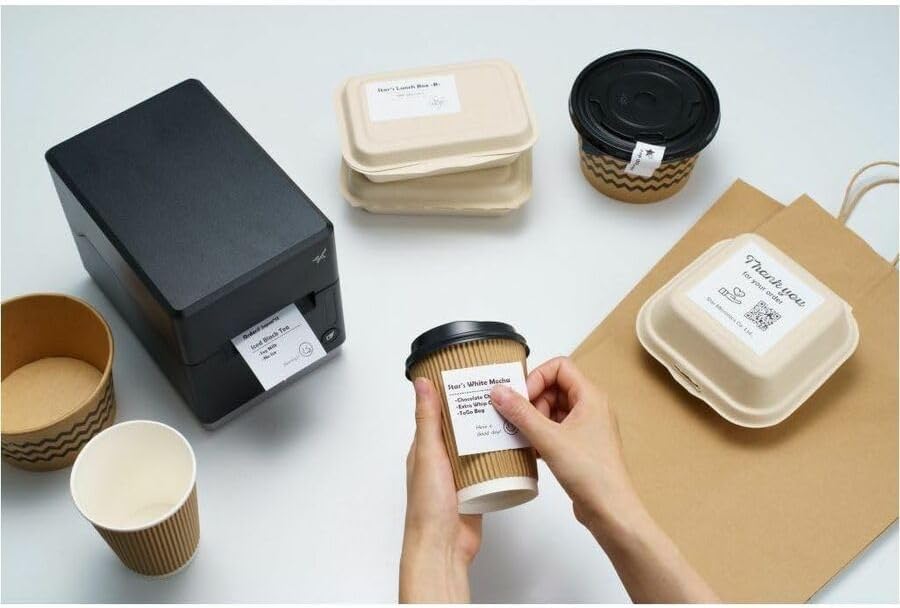
Image: A hand pressing the feed button on the mC-Label3 printer, demonstrating the printing of a 'Thank you' label.

Image: The mC-Label3 printer shown in a practical setting, printing labels for food containers and coffee cups, illustrating its versatility.
Onderhoud
1. Maak die drukker skoon
Regular cleaning ensures optimal performance and extends the life of your printer.
- Gebruik 'n sagte, pluisvrye lap dampmet isopropylalkohol om die drukkop skoon te maak.
- Wipe down the exterior of the printer with a soft, dry cloth.
- Vermy die gebruik van skuur skoonmakers of oplosmiddels.
2. Replacing Media
When the media roll is depleted, follow the media loading instructions in the Setup section to replace it.
3. Effortless Repairs
The mC-Label3 is designed for effortless, no-tools-required repairs with minimal upkeep, simplifying any necessary component replacements.
Probleemoplossing
Hierdie afdeling bied oplossings vir algemene probleme wat u mag teëkom.
| Probleem | Moontlike oorsaak | Oplossing |
|---|---|---|
| Drukker skakel nie aan nie | Kragkabel nie gekoppel nie; Probleem met die kragpunt | Maak seker dat die kragkabel stewig gekoppel is; Probeer 'n ander kragaansluiting. |
| Geen drukwerkuitvoer nie | Out of media; Media loaded incorrectly; Driver issue | Load new media; Re-load media correctly; Reinstall printer drivers. |
| Swak drukkwaliteit | Dirty print head; Low quality media | Clean the print head; Use recommended thermal media. |
| Konnektiwiteitskwessies | Incorrect cable connection; Bluetooth not paired; Network configuration | Check USB/Ethernet cables; Re-pair Bluetooth; Verify network settings. |
Spesifikasies
| Kenmerk | Detail |
|---|---|
| Model Naam | mC-etiket3 |
| Item Modelnommer | MCL32CBI |
| Druk tegnologie | Direkte termiese |
| Drukker Uitset | Monochroom |
| Maksimum druksnelheid monochroom | 23 dpm |
| Maksimum swart en wit druk resolusie | 203 DPI (203 x 203 DPI) |
| Druk Media | Labels (Linerless, Die-Cut, Continuous), Thermal Receipt |
| Verbindingstegnologie | Bluetooth, Wired (USB, Ethernet) |
| Hardeware-koppelvlak | USB-Ethernet |
| Versoenbare toestelle | PC, Android, iOS |
| Tipe beheerder | iOS, Android |
| Produk afmetings | 6.7"D x 5.6"B x 8.3"H (17.0 x 14.2 x 21.1 cm) |
| Item gewig | 7.2 pond (3.27 kg) |
| Geheue berging kapasiteit | 64 MB |
| Kleur | Swart |
| Vervaardiger | STAR MICRONICS |
| Land van oorsprong | China |
Waarborg inligting
The Star Micronics mC-Label3 MCL32CBI printer comes with a manufacturer's warranty. For specific terms and conditions, please refer to the warranty card included in your package or visit the official Star Micronics webwebwerf.
Waarborg tipe: Vervaardiger
Ondersteuning
For further assistance, technical support, or to download the latest drivers and firmware, please visit the official Star Micronics support webwebwerf of kontak hul kliëntediens.
Star Micronics Official Webwebwerf: www.starmicronics.com
Ondersteuningsskakel: www.starmicronics.com/support