
1. Produk verbyview
This FINTIE Keyboard Case is designed to enhance your tablet experience by providing both protection and functionality. It features a magnetically detachable wireless Bluetooth keyboard, multiple viewing angles, and durable construction, transforming your tablet into a versatile laptop-like device.
2. Verenigbaarheid
Hierdie sleutelbordkas is spesifiek ontwerp vir die volgende Samsung Galaxy Tab-modelle:
- Samsung Galaxy Tab A11+ / A11 Plus 11 Inch Model (SM-X230/X236/X238) 2025 Release
- Samsung Galaxy Tab A9+ / A9 Plus 11 Inch Model (SM-X210/X216/X218) 2023 Release
It is not compatible with any other tablet models. To verify your tablet model, navigate to Settings > About tablet > Model name op jou toestel.

Figure 2.1: Compatible tablet models and instructions for finding your tablet's model name.
3. Pakketinhoud
Die pakket sluit in:
- 1 x FINTIE Sleutelbordkas
- 1 x draadlose Bluetooth-sleutelbord
- 1 x mikro-USB-laaikabel
- 1 x Gebruikershandleiding
4. Opstelling en installering
4.1 Inserting Your Tablet into the Case
- Align your Samsung Galaxy Tab with the hard shell back cover of the case.
- Gently press the tablet into the case, ensuring all corners and edges are securely fitted.
- Confirm that all ports, buttons, and cameras are accessible and unobstructed.
4.2 Attaching and Detaching the Keyboard
The keyboard is magnetically detachable, allowing for flexible use.
- Om aan te heg: Place the keyboard onto the magnetic strip inside the case. It will snap into place.
- Om los te maak: Gently pull the keyboard away from the magnetic strip.

Figure 4.1: Magnetic attachment of the keyboard to the case.
4.3 Bluetooth Pairing Instructions
- Ensure the keyboard is charged (refer to Section 5).
- Slide the keyboard's AAN/AF skakel oor na die ON position. The power indicator light will illuminate briefly.
- Druk die 'Connect' knoppie op die sleutelbord. Die Bluetooth-aanwyserliggie sal begin flikker, wat aandui dat dit in paringsmodus is.
- Op jou Samsung Galaxy Tab, gaan na Instellings > Verbonde toestelle > Bluetooth and turn Bluetooth ON.
- Your tablet will search for available devices. Select 'FINTIE Keyboard' (or similar name) from the list.
- Volg enige aanwysings op die skerm om die paringsproses te voltooi. Sodra dit gekoppel is, sal die Bluetooth-aanwyserliggie op die sleutelbord ophou flikker.
Video 4.1: A demonstration of the FINTIE Keyboard Case, including tablet insertion, keyboard attachment, and Bluetooth pairing. This video is provided by the seller.
5. Laaiinstruksies
The keyboard features a built-in rechargeable battery.
- Connect the provided Micro USB charging cable to the keyboard's charging port.
- Koppel die ander kant van die kabel aan 'n USB-kragadapter (nie ingesluit nie) of 'n rekenaar se USB-poort.
- The 'Charge' indicator light on the keyboard will illuminate during charging.
- A full charge typically takes approximately 2 hours. The 'Charge' indicator light will turn off or change color when charging is complete.
The keyboard automatically enters an energy-saving mode after 10 minutes of inactivity to extend battery life.
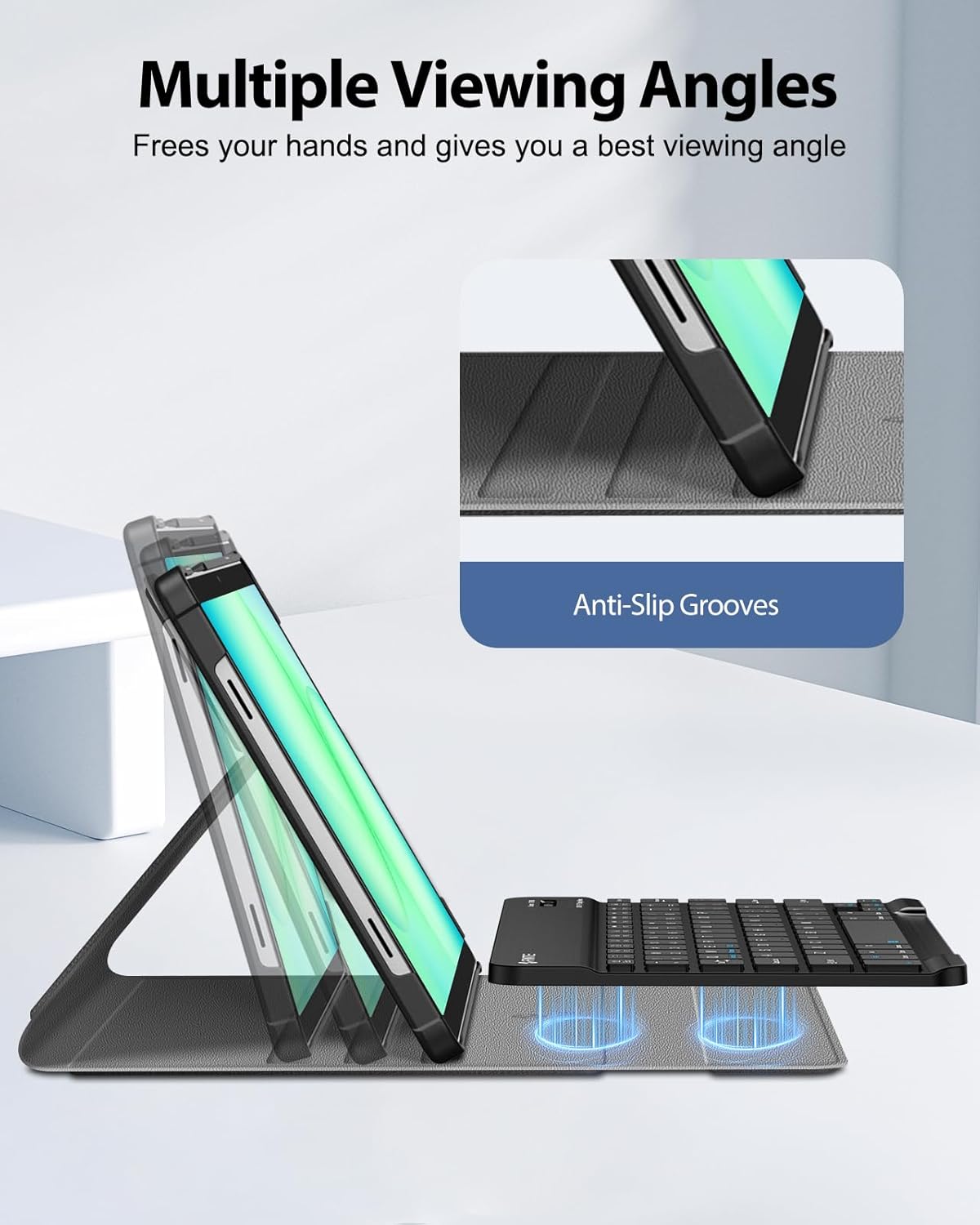
Figure 5.1: Keyboard charging port and indicator lights.
6. Bedryfsinstruksies
6.1 Die gebruik van die sleutelbord
Once paired, the keyboard functions like a standard computer keyboard. It is compatible with both iOS and Android operating systems, allowing for seamless switching between devices if needed.

Figure 6.1: User typing on the FINTIE keyboard case.
6.2 Aanpassing Viewing Hoeke
The case offers multiple viewing angles for comfortable use. The removable keyboard can be positioned to support the tablet. Adjust the keyboard's position along the case cover to achieve your preferred viewing angle. Built-in anti-slip grooves help secure the tablet in place.

Figuur 6.2: Veelvuldige viewing angles supported by the case.
7. Sleutel kenmerke
- Magneties afneembare sleutelbord: The super slim 7mm lightweight Bluetooth keyboard can be easily attached or detached, offering flexibility for typing or tablet-only use. It has a 10-meter operating range.
- Ergonomic Scissor-Switch Keys: Designed for a smoother, quieter typing experience with tactile feedback, reducing noise and providing comfort during extended use.
- Dubbele beskerming: Constructed with a durable PU leather cover, anti-slip rubber-lined interior, and a premium polycarbonate shell. This design provides comprehensive protection against drops and bumps while maintaining a slim profile. The case supports auto sleep/wake function when the keyboard is detached.

Figure 7.1: Scissor-switch keyboard mechanism.

Figure 7.2: Case material and craftsmanship for dual protection.
8. Spesifikasies
| Handelsmerk | FINTIE |
| Modelnommer | CSBJ002 |
| Versoenbare toestelle | Samsung Galaxy Tab A11 Plus 11'' 2025 (SM-X230/X236/X238), Samsung Galaxy Tab A9 Plus 11'' 2023 (SM-X210/X216/X218) |
| Verbindingstegnologie | Bluetooth |
| Sleutelbordbeskrywing | Ergonomiese sleutelbord |
| Spesiale kenmerk | Magnetically Removable Keyboard, Multiple Viewing Hoeke |
| Kleur | Swart |
| Produk afmetings | 8.07 cm L x 11.42 cm B x 1.57 cm H |
| Materiaal | PU Leather, Anti-Slip Rubber, Polycarbonate |
| Aantal batterye benodig | 1 |
| Kragbron | Battery aangedrewe |
| Sleutelborduitleg | QWERTY |
| Aantal sleutels | 78 |
| Minimum Required Operating System Version | Android 13.0 |
| UPC | 840173964354 |
9. Onderhoud
Om die lang lewensduur en optimale werkverrigting van jou FINTIE-sleutelbordkas te verseker, volg hierdie onderhoudsriglyne:
- Maak die saak skoon: Vee die buitekant van die kas af met 'n sagte, damp lap. Vermy harde chemikalieë of skuurmiddels.
- Maak die sleutelbord skoon: Use a soft, dry cloth to clean the keyboard. For dust between keys, use compressed air. Do not immerse the keyboard in water or any liquids.
- Berging: When not in use for extended periods, store the keyboard case in a cool, dry place. Ensure the keyboard is turned off to preserve battery life.
- Vermy uiterste temperature: Do not expose the product to extreme heat or cold, as this can damage the battery and electronic components.
10. Probleemoplossing
If you encounter issues with your FINTIE Keyboard Case, please refer to the following common solutions:
- Sleutelbord Koppel Nie:
- Ensure the keyboard is turned ON en volledig gelaai.
- Verify that Bluetooth is enabled on your tablet.
- Make sure the keyboard is in pairing mode (Bluetooth indicator blinking).
- Forget the device from your tablet's Bluetooth settings and attempt to re-pair.
- Restart both your tablet and the keyboard.
- Sleutels reageer nie:
- Kontroleer of die sleutelbord via Bluetooth gekoppel is.
- Ensure the keyboard battery is not depleted.
- If specific keys are not working, try cleaning around them.
- Tablet Not Entering Sleep/Wake Mode:
- Ensure the case cover is properly aligned and closed.
- Note that the auto sleep/wake function typically works in 'CASE ONLY' mode, meaning the keyboard might need to be detached or positioned correctly for optimal function.
11. Waarborg en Ondersteuning
FINTIE stands behind its products. This product is covered by a 90-day warranty from the initial purchase date. For any questions or support regarding your purchase, please contact FINTIE customer service.
For more information, you may visit the official FINTIE store: FINTIE Winkel op Amazon