
OTOFIX OTOFIX D1 MAX Scanner
OTOFIX D1 Max OE Volledige Stelsel Diagnostiese Skandeerder Gebruikershandleiding
Model: OTOFIX D1 MAX Scanner
1. Inleiding
The OTOFIX D1 Max is a new generation, high-end diagnostic scan tool designed for comprehensive vehicle diagnostics and maintenance. It combines powerful hardware with advanced software capabilities to provide efficient and accurate solutions for automotive professionals and enthusiasts. This manual provides detailed instructions on setting up, operating, maintaining, and troubleshooting your OTOFIX D1 Max scanner.

Image 1.1: OTOFIX D1 Max Scanner highlighting key features like 40+ HOT Services, 3X Faster AutoScan 2.0, All System Diagnostics, Guided Functions, Blu. Wireless VCI, Wide Coverage, CAN-FD & DoIP, 2015+ Renault SGW, and 2 Years Update.
2. Produk verbyview
The OTOFIX D1 Max is engineered for superior performance and user experience. It features a robust design and advanced functionalities to meet the demands of modern vehicle diagnostics.
2.1 Sleutelkenmerke
- ECU Coding & Offline ECU Programming: Advanced capabilities for vehicle personalization and module replacement.
- 40+ Diensfunksies: Comprehensive maintenance solutions including Oil Reset, TPMS Reset, Injector Coding, Suspension, and Throttle Matching.
- Aktiewe Toets (Tweerigtingbeheer): Perform component tests by sending commands to vehicle modules.
- OE-level Full-System Diagnostics: Access all available vehicle systems for reading/clearing codes, live data, and ECU information.
- Wye voertuigdekking: Supports over 80 brands and 10,000+ vehicle models (1996-2025).
- Gevorderde protokolle: Supports DoIP & CAN FD for faster data transfer and diagnostics.
- Veilige toegangspoort: Compatible with FCA (2018+) and Renault (2015+) SGW-equipped vehicles.
- Auto VIN 2.0: Faster and more accurate automatic vehicle identification.
- Wi-Fi Printing: Wirelessly print diagnostic reports.
- 2-Years Free Software Updates: Ensures continuous functionality and compatibility.
2.2 Hardeware-spesifikasies
| Komponent | Spesifikasie |
|---|---|
| Bedryfstelsel | Android 11.0 |
| Verwerker | Qualcomm CPU (4-Core, 1.8GHz) |
| Geheue | 4 GB RAM + 128 GB berging |
| Skerm grootte | 10.4 duim |
| Skermresolusie | 2000*1200 |
| Battery kapasiteit | 7250mAh litiumioon |
| Kameras | Front: 5MP; Rear: 8MP |
| Lower Computer (VCI) | V1 |
| Afmetings | 10.8 x 7.1 x 0.7 duim |
| Item gewig | 9.79 pond |

Image 2.1: Visual representation of OTOFIX D1 Max hardware specifications including Android 11.0, 4-Core CPU, 10.4" screen, 4+128G memory, 7250mAh battery, and 5MP/8MP cameras.
3. Opstelling
3.1 Uitpak en Aanvanklike Inspeksie
Upon receiving your OTOFIX D1 Max, carefully open the packaging and inspect all components for any signs of damage. Ensure all items listed in the package contents are present.
3.2 Pakketinhoud
The OTOFIX D1 Max package typically includes the following items:
- 1x OTOFIX D1 MAX Diagnostic Tool (Tablet)
- 1x OTOFIX V1 (Vehicle Communication Interface)
- 1x USB-C kabel
- 1x AC/DC Power Adapter (12V)
- 1x Dratas
- 1x Packing List
- 1x Vinnige Verwysingsgids
- 1x Soft Cloth
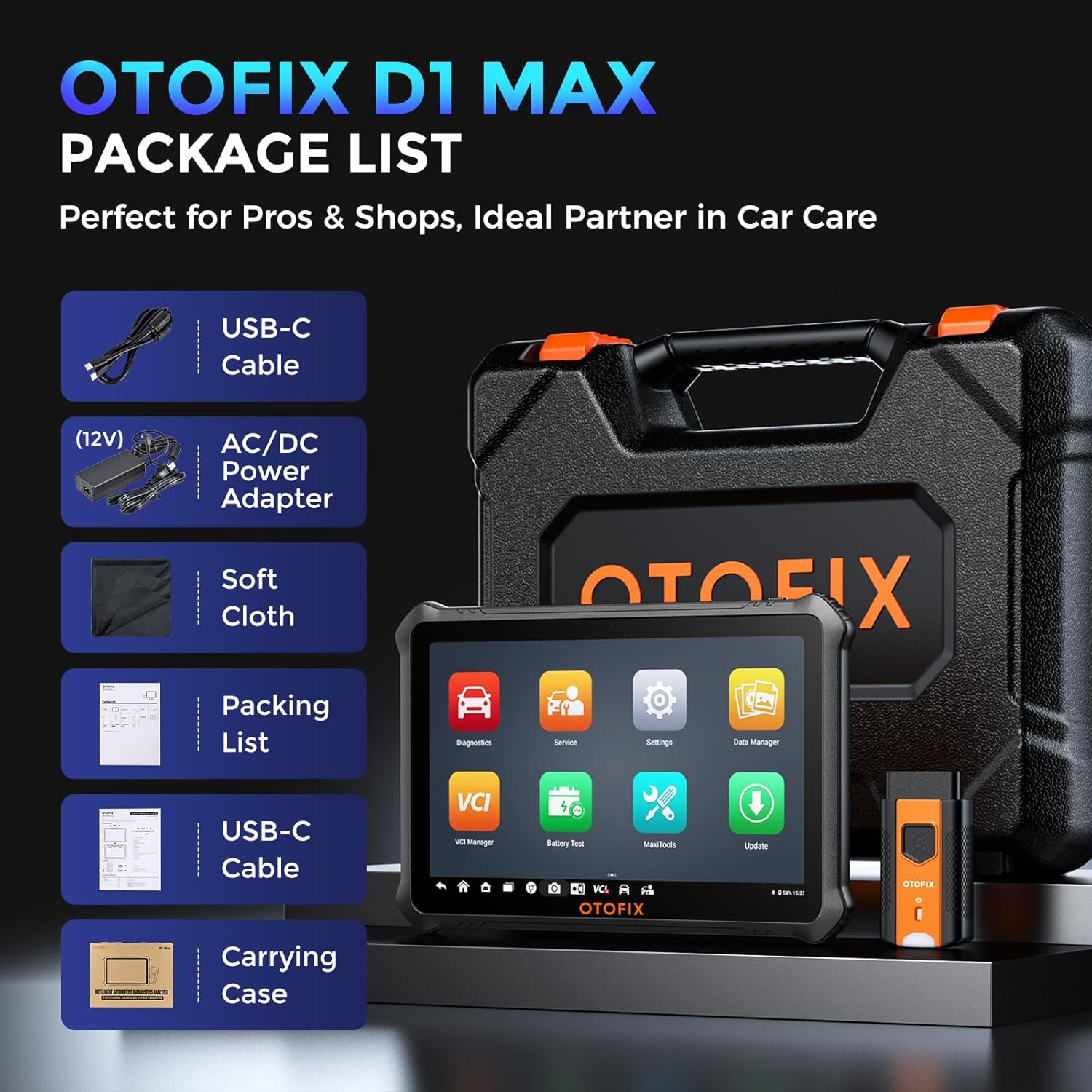
Image 3.1: Contents of the OTOFIX D1 Max package, including the tablet, VCI, cables, power adapter, carrying case, and documentation.
3.3 Aanskakeling en aanvanklike konfigurasie
- Connect the AC/DC Power Adapter to the OTOFIX D1 Max tablet and a power outlet to ensure the device is charged.
- Press and hold the Power button until the OTOFIX logo appears on the screen.
- Follow the on-screen prompts to complete the initial setup, including language selection, Wi-Fi connection, and time zone settings.
- Register your device and activate the software updates as prompted. A stable internet connection is required for this step.
4. Operasie
4.1 Koppel aan 'n voertuig
- Vind die voertuig se OBDII-poort, gewoonlik onder die paneelbord aan die bestuurderskant.
- Plug the OTOFIX V1 (VCI) into the vehicle's OBDII port. The VCI's indicator light should illuminate.
- On the OTOFIX D1 Max tablet, ensure Bluetooth is enabled and the VCI is paired. The VCI Manager application can be used to manage the connection.
- Draai die voertuig se aansitter na die AAN-posisie (enjin af).
4.2 OE-vlak Alle Stelseldiagnostiek
The OTOFIX D1 Max can access all available vehicle systems to perform comprehensive diagnostics.
- Lees kodes: Retrieve Diagnostic Trouble Codes (DTCs) from all control modules.
- Duidelike kodes: Vee DTC's uit nadat herstelwerk voltooi is.
- Regstreekse data: View real-time data streams from various sensors and components.
- Vries raamdata: Capture a snapshot of vehicle conditions when a DTC was set.
- ECU inligting: Retrieve detailed information about the Electronic Control Unit.

Image 4.1: Illustration of OE-level all system diagnostics, showing the scanner connected to a car and accessing various systems like Engine, ABS, EPB, and BMS.
4.3 ECU Coding & Advanced Functions
This function allows for advanced vehicle customization and module adaptation.
- Aanlyn Kodering: Automatically retrieves coding values from the server for quick and precise operations. Compatible with brands like Volkswagen, Audi, Skoda, Peugeot, Citroen, DS, Porsche, BMW, Mini, Nissan, Infiniti, Nissan GT-R, Renault.
- Vanlyn kodering: Allows manual input of coding values, suitable for experts and a wider range of car builds. Compatible with Ford, Ford AU, Ford EU, Subaru, Land Rover, Jaguar, Peugeot, Citroen, DS, Volkswagen, Volkswagen Brazil, Audi, Skoda, Volkswagen CV.
- Offline ECU Programming: Replace or update ECU software, program new blank ECUs, and fix software-controlled issues. Compatible with Ford, Ford AU, Ford EU, Land Rover, Jaguar, Opel, Vauxhall.
- Personalisering: Customize vehicle settings such as disabling auto start-stop, activating daytime running lights, and other comfort functions.
- VAG-begeleide funksies: Provides step-by-step procedures for complex diagnostics on Volkswagen, Audi, Skoda, and VW vehicles, skipping channel numbers and security codes.

Beeld 4.2: Gedetailleerd view of ECU Programming & Coding capabilities, including open/close functions, module matching, personalization, parameter reset, and fixing complex issues.
5. Diensfunksies
The OTOFIX D1 Max offers over 40 maintenance and service functions to address common vehicle issues.
- Olie-herstel: Herstel die olielewensduurstelsel na 'n olieverandering.
- TPMS-terugstelling: Herstel banddrukmoniteringstelsel.
- SAS-herstel: Kalibreer die stuurhoeksensor.
- EPB-terugstelling: Reset the electronic parking brake pads after replacement.
- Smoorklep-ooreenstemming: Leer die posisie van die smoorklep weer.
- BMS-herstel: Registreer die nuwe battery na vervanging.
- ABS-bloeding: Perform ABS brake bleeding to get a firm brake pad.
- Opskorting: Adjust the vehicle height sensor for suspension calibration.
- Clutch Learning: Perform clutch adaptation.

Beeld 5.1: verbyview of 40+ service functions, including Oil Reset, SAS Reset, EPB Reset, Injector Coding, Throttle, BMS Reset, and Clutch Learning.
6. Tweerigtingbeheer (Aktiewe Toets)
The bi-directional control feature allows the scanner to send commands to vehicle modules to perform specific tests, narrowing down diagnostic scope and quickly pinpointing problems.
- Activate components like windows, headlights, wipers, sunroof, radiator fans, fuel pump, A/C clutch, etc.
- Test the functionality of various actuators without disassembling the vehicle.
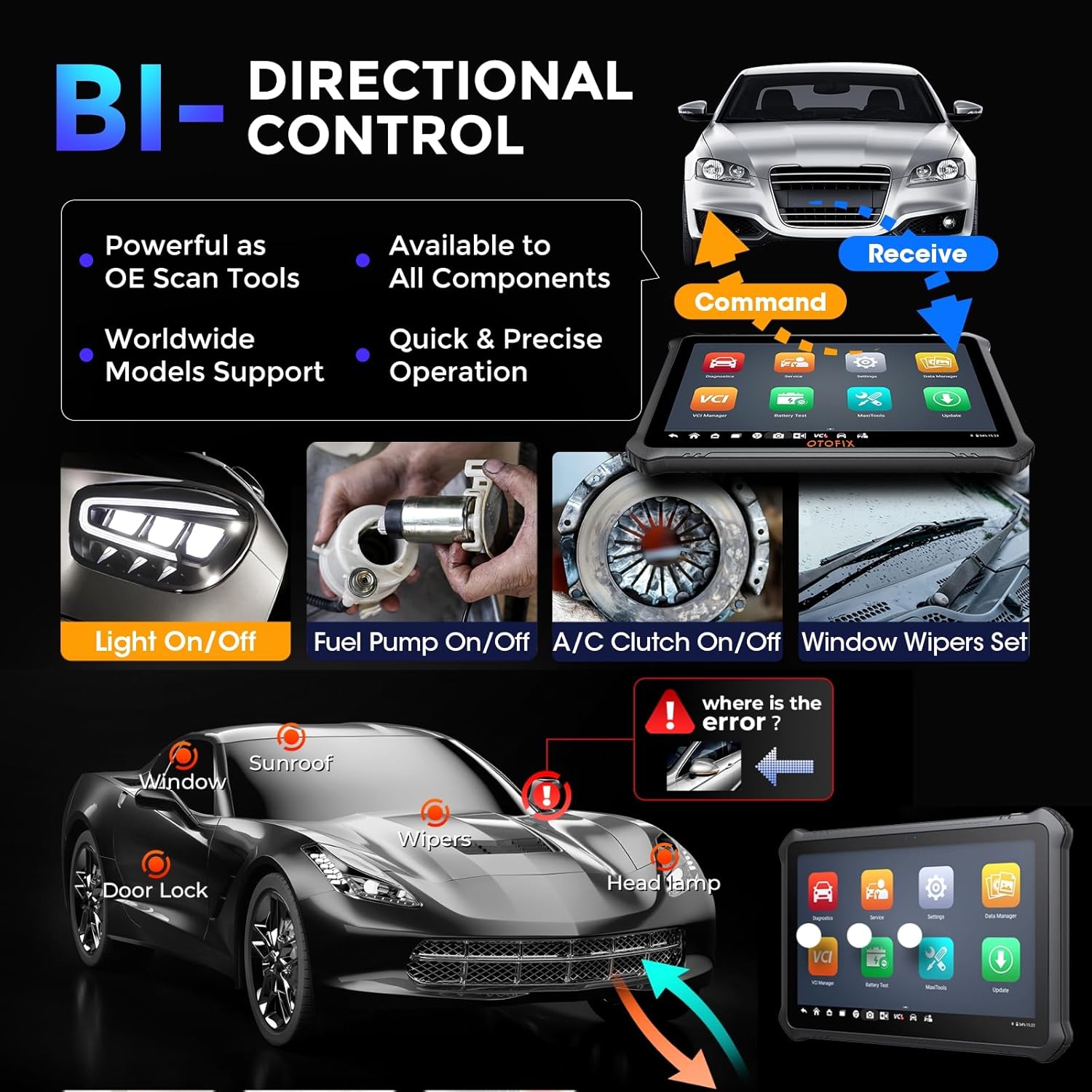
Image 6.1: Demonstration of bi-directional control, showing the scanner sending commands to vehicle components like lights, fuel pump, A/C clutch, and window wipers.
7. Onderhoud
Proper maintenance ensures the longevity and optimal performance of your OTOFIX D1 Max scanner.
- Sagteware-opdaterings: Regularly update the software to ensure compatibility with new vehicle models and access to the latest features. The device includes 2 years of free updates.
- Skoonmaak: Gebruik 'n sagte, damp lap om die tabletskerm en -liggaam skoon te maak. Vermy skuurmiddels of oplosmiddels.
- Berging: Bêre die toestel in sy draagtas op 'n koel, droë plek wanneer dit nie gebruik word nie. Vermy uiterste temperature.
- Batterysorg: Laai die battery gereeld, selfs al word die toestel nie gereeld gebruik nie, om die battery se gesondheid te handhaaf.
- VCI-sorg: Keep the VCI clean and free from debris. Ensure the OBDII connector pins are not bent or damaged.

Image 7.1: Information regarding the included 2 years of free software updates, emphasizing cost savings.
8. Probleemoplossing
This section provides solutions to common issues you might encounter with your OTOFIX D1 Max scanner.
8.1 Algemene kwessies en oplossings
- Toestel word nie aangeskakel nie: Maak seker dat die battery gelaai is. Koppel die kragadapter aan en probeer weer. Kontak ondersteuning as die probleem voortduur.
- VCI koppel nie: Check if the VCI is securely plugged into the vehicle's OBDII port. Ensure Bluetooth is enabled on the tablet and the VCI is paired. Restart both the tablet and the VCI.
- Nie in staat om met voertuig te kommunikeer nie: Verify the vehicle's ignition is ON. Check the OBDII port for power. Ensure the vehicle model and year are correctly selected in the software. Try a different vehicle to rule out vehicle-specific issues.
- Sagteware vries/stadige werkverrigting: Close unnecessary applications. Clear cache if available in settings. Ensure sufficient storage space. Perform a software update if available.
- Diagnostiese funksie werk nie: Ensure the vehicle supports the specific function. Some advanced functions may require specific vehicle conditions or procedures. Refer to the on-screen guided functions or vehicle service manual.
8.2 Kontak ondersteuning
If you encounter issues that cannot be resolved using the troubleshooting steps above, please contact OTOFIX customer support. Provide detailed information about the problem, including any error messages, vehicle details, and steps taken to troubleshoot.
E-pos: otofixaftersales-amz@outlook.com
Support is available Monday-Friday 9:00 AM - 6:00 PM EST, with 24/7 support available via email.
9. Spesifikasies
Detailed technical specifications for the OTOFIX D1 Max scanner.
| Eienskap | Waarde |
|---|---|
| Handelsmerk | Otofix |
| Model | OTOFIX D1 MAX Scanner |
| Bedryfstelsel | Android 11.0 |
| Verwerker | 4-kern, 1.8 GHz |
| Geheue | 4 GB RAM, 128 GB berging |
| Skerm grootte | 10.4 duim |
| Skermresolusie | 2000 x 1200 |
| Battery | 7250mAh Litiumioon (ingesluit) |
| Kameras | Front: 5MP; Rear: 8MP |
| Konnektiwiteit | Wi-Fi, Bluetooth |
| Ondersteunde protokolle | DoIP, CAN FD, J2534 (with VCI) |
| Afmetings (L x B x H) | 10.8 x 7.1 x 0.7 duim |
| Item gewig | 9.79 pond |
| Vervaardiger se deelnommer | OTOFIX D1 MAX Scanner |
| UPC | 850051166305 |
10. Waarborg en Ondersteuning
OTOFIX provides comprehensive support and warranty for the D1 Max scanner.
- Waarborg: 1-year quality undertaking.
- Sagteware-opdaterings: 2 years of free software updates included.
- Tegniese Bystand: Lewenslange tegniese bystand is beskikbaar.
- Retourbeleid: Hassle-free return policy within 30 days.
- Kliëntediens: 24/7 support via email.
For any inquiries or support needs, please contact OTOFIX at otofixaftersales-amz@outlook.com.
Ask a question about this manual
Ask about setup, troubleshooting, compatibility, parts, safety, or missing instructions. Manuals+ will review the question and use this page’s manual context to help answer it.