
Inleiding
Thank you for choosing the ROCAM Digital Projection Alarm Clock, Model CR1024. This device combines a digital alarm clock with a 270° rotatable projection feature, FM radio, dual alarm settings, and a USB charging port. Please read this manual carefully to ensure proper use and to fully enjoy all its features.

Image: The ROCAM Digital Projection Alarm Clock displaying time, date, temperature, and humidity, positioned on a bedside table next to a cup of coffee and a notebook.
Produk Kenmerke
- 270° Rotatable Projection: Project time onto your wall or ceiling with adjustable angle and focus.
- 5-Level Dimmable LED Display: Adjust the brightness of the main display to your preference.
- FM Radio & Sleep Timer: Enjoy your favorite radio stations and set a sleep timer for automatic shutdown.
- Dual Alarm with Weekend/Weekday Mode: Set two independent alarms with customizable schedules (Mon-Sun, Mon-Fri, Sat-Sun, One-Time).
- USB-C Power Input & USB-A Charging Output: Power the clock via USB-C and charge external devices like smartphones via USB-A.
- Battery-rugsteun: Handhaaf tyd- en alarminstellings tydens kragonderbrekingtages (batterye nie ingesluit nie).
- Temperatuur en humiditeit vertoon: Shows indoor temperature (°C/°F) and humidity.
- Nagligfunksie: Integrated night light for soft illumination.
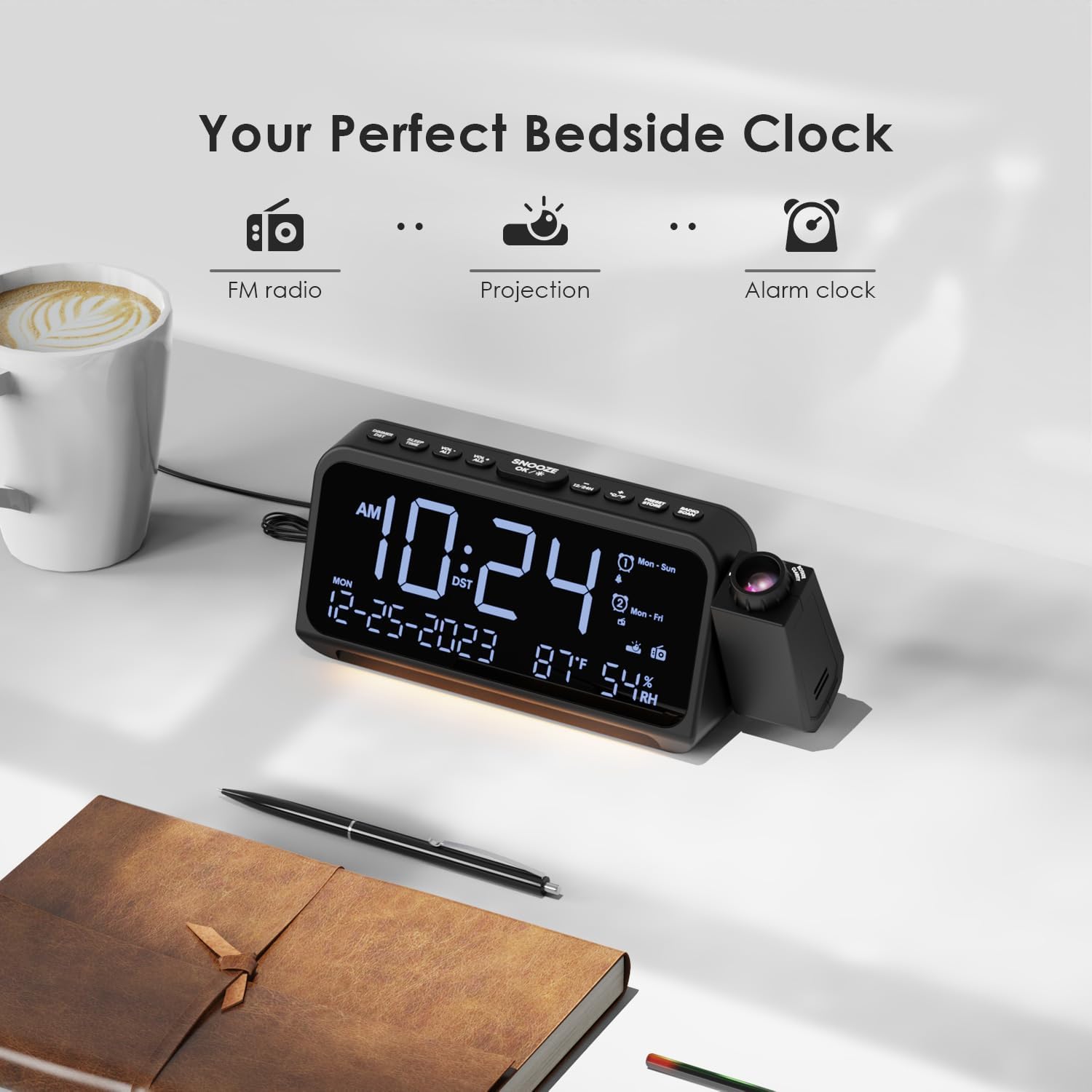
Image: Visual representation of the clock's main functions: FM radio, projection, and alarm clock.
Pakketinhoud
Kontroleer asseblief die pakket vir die volgende items:
- ROCAM Digital Projection Alarm Clock (CR1024)
- USB Tipe C-kragkabel
- Kragadapter
- Gebruikershandleiding
Note: 1 CR2 battery is required for backup functionality and is not included in the package.

Image: The alarm clock, USB-C cable, power adapter, and user manual laid out, with product dimensions (20cm x 8.7cm x 3.81cm) and weight (240g) indicated.
Produk verbyview
Boonste paneelknoppies:
- SNOOZE/OK/*: Snooze alarm, confirm settings, or activate night light.
- VOL-/AL1: Decrease volume, set Alarm 1.
- VOL+/AL2: Increase volume, set Alarm 2.
- 12/24H: Skakel tussen 12-uur en 24-uur tydformaat.
- °C/°F: Switch between Celsius and Fahrenheit temperature display.
- PRESET/STORE: Save FM radio presets.
- RADIO/SCAN: Turn FM radio on/off, scan for stations.
- TYDSTEL: Enter time setting mode.
- ALARMSTEL: Gaan na die alarminstellingsmodus.
Side Panel & Rear:
- Projeksie lens: Projects time onto a surface.
- Fokuswiel: Pas die helderheid van die geprojekteerde beeld aan.
- Projeksie rotasie: Allows 270° adjustment of the projection angle.
- DIM-knoppie: Adjusts projection brightness.
- Kragknoppie: Turns the projection on/off.
- Type-C Input (5V-2A): Main power connection.
- USB-A Output (5V-1A): Vir die laai van eksterne toestelle.
- FM-antenne: Verleng vir beter radio-ontvangs.
- Battery kompartement: For CR2 backup batteries.

Beeld: Gedetailleerd view of the top control buttons and the projection unit, highlighting the dual alarm settings.

Image: The back of the alarm clock, illustrating the Type-C power input and the USB-A output port for charging other devices.
Opstelling
1. Kragverbinding:
- Connect the provided USB Type-C cable to the Type-C input port on the back of the alarm clock.
- Plug the other end of the USB cable into the power adapter, then plug the adapter into a standard wall outlet.
- The display will light up, indicating the clock is powered on.

Image: The alarm clock is shown connected to a wall outlet via its USB-C power cable and adapter.
2. Battery Backup Installation:
- Vind die batterykompartement aan die onderkant van die horlosie.
- Maak die kompartement se deksel oop.
- Insert 1 CR2 battery (not included) according to the polarity markings (+/-).
- Close the battery compartment cover. This battery will preserve time and alarm settings during a power outage.

Image: The bottom of the alarm clock with the battery compartment open, showing where to insert CR2 batteries.
Bedryfsinstruksies
1. Stel tyd en datum in:
- Druk en hou die TYD BEREIK knoppie. Die uursyfers sal begin flikker.
- Gebruik VOL+ or VOL- knoppies om die uur aan te pas. Druk TYD BEREIK weer om te bevestig.
- Herhaal die proses vir minute, jaar, maand en dag.
- Druk 12/24H to switch between 12-hour and 24-hour format.
- Druk ° C / ° F. to switch between Celsius and Fahrenheit for temperature display.
2. Setting Alarms (Alarm 1 & Alarm 2):
- Druk en hou die ALARMSTEL button. The Alarm 1 icon and hour digits will flash.
- Gebruik VOL+ or VOL- to set the desired alarm hour. Press ALARMSTEL te bevestig.
- Herhaal vir minute.
- Select alarm mode (Mon-Sun, Mon-Fri, Sat-Sun, One-Time) using VOL+ or VOL-. Druk ALARMSTEL te bevestig.
- Choose alarm sound: buzzer or FM radio. Use VOL+ or VOL- te kies. Druk ALARMSTEL te bevestig.
- To set Alarm 2, briefly press ALARMSTEL again and repeat the steps.
- Om 'n alarm te aktiveer/deaktiveer, druk kortliks AL1 or AL2. The alarm icon will appear/disappear on the display.
Image: The clock display showing options for setting two alarms with different ringtone choices and day modes (Mon-Sun, Mon-Fri, Sat-Sun, One-Time).
3. Snooze Function:
Wanneer 'n alarm afgaan, druk die SNOOZE/OK/* knoppie om dit tydelik vir 9 minute stil te maak. Die alarm sal weer afgaan na die sluimerperiode.
4. Display Brightness (Dimmer):
Druk die SNOOZE/OK/* button repeatedly to cycle through 5 levels of display brightness (L-1 to L-5) or turn the display off.

Image: The clock display showing five different brightness levels (L-1 to L-5) for the main LED screen.
5. Projection Settings:
- Skakel aan/af: Druk die Kragknoppie on the side of the projection unit to turn the projection on or off.
- Pas Helderheid aan: Druk die DIM button on the side of the projection unit to cycle through 5 levels of projection brightness.
- Pas hoek aan: Rotate the projection unit up to 270° to direct the time onto your desired surface (wall or ceiling).
- Pas fokus aan: Draai die Fokuswiel on the projection unit to sharpen the projected image.

Image: The digital time '10:24' projected in red onto a dark wall, demonstrating the projection feature.

Image: The projection unit rotating 270 degrees, showing how the projected time can be adjusted for optimal viewing.

Image: The projected time showing five distinct brightness levels, from level 1 (dimmest) to level 5 (brightest).
6. FM-radiowerking:
- Verleng die FM-antenna vir beter ontvangs.
- Druk die RADIO/SCAN button to turn the FM radio on.
- Druk en hou RADIO/SCAN to automatically scan and save available stations.
- Gebruik VOL+ or VOL- to manually tune to a station or cycle through saved presets.
- Druk PRESET/STORE to save the current station as a preset.
- Druk RADIO/SCAN again to turn the FM radio off.

Image: The clock displaying an FM radio frequency (108.0 MHz) and options for a sleep timer (OFF, 15, 30, 60, 90 minutes).
7. Slaaptimer:
When the FM radio is on, press the SNOOZE/OK/* button repeatedly to set a sleep timer (15, 30, 60, 90 minutes, or OFF). The radio will automatically turn off after the selected duration.

Image: A hand pressing a button on the clock, with sleep timer options (P01, P06, P12, P15, P20) displayed, indicating timed radio playback.
8. USB Charging Output:
Connect your smartphone or other USB-powered device to the USB-A output port (5V-1A) on the back of the clock to charge it. Ensure the alarm clock is powered via its USB-C input.
Onderhoud
- Skoonmaak: Vee die horlosie af met 'n sagte, droë lap. Moenie skuurmiddels of oplosmiddels gebruik nie.
- Battery vervanging: As die horlosie tyd verloor tydens 'n kragonderbrekingtage, replace the CR2 backup battery.
- Plasing: Avoid placing the clock in direct sunlight, high temperatures, or high humidity.
Probleemoplossing
| Probleem | Oplossing |
|---|---|
| Die klokskerm is leeg. | Ensure the USB-C power cable is securely connected to both the clock and a working power outlet. Check if the display brightness is set to OFF. |
| Die alarm lui nie. | Verify that the alarm is activated (alarm icon visible). Check the alarm volume. Ensure the alarm mode (Mon-Sun, Mon-Fri, etc.) is correctly set for the current day. |
| Projeksie is vaag. | Draai die Fokuswiel on the projection unit until the image is clear. Ensure the projection surface is within optimal range. |
| Swak FM-radio-ontvangs. | Fully extend the FM antenna. Try repositioning the clock to improve signal. Perform an auto-scan to find stronger stations. |
| USB-laaipoort werk nie. | Ensure the alarm clock is powered by the USB-C input. Check the charging cable and the device being charged. |
Spesifikasies
- Modelnommer: CR1024
- Afmetings: 20 x 3.81 x 8.7 cm (L x B x H)
- Gewig: 240 g
- Kragtoevoer: USB Tipe-C, 5V-2A
- USB-uitset: USB Type-A, 5V-1A
- Battery-rugsteun: 1 x CR2 battery (nie ingesluit nie)
- FM frekwensie omvang: 87.5 - 108 MHz
Waarborg en Ondersteuning
ROCAM products are designed for reliability and performance. This product comes with a standard manufacturer's warranty. For specific warranty details, please refer to the warranty card included in your package or contact ROCAM customer support.
If you encounter any issues or have questions regarding your ROCAM Digital Projection Alarm Clock, please contact our customer support team. Contact information can typically be found on our official webwebwerf of op die produkverpakking.