
1. Inleiding
Thank you for choosing the FLEXISPOT L-Shaped Electric Standing Desk. This manual provides essential information for the safe assembly, operation, and maintenance of your new desk. Please read these instructions carefully before use and retain them for future reference. This desk is designed to provide a versatile and ergonomic workspace, allowing seamless transitions between sitting and standing positions.
2. Veiligheidsinstruksies
Om veilige werking te verseker en beserings of skade te voorkom, volg asseblief die volgende veiligheidsriglyne:
- Maak seker dat alle komponente stewig vasgemaak is voor gebruik.
- Hou kinders en troeteldiere weg van die lessenaar tydens werking.
- Do not place hands or other body parts near moving parts of the desk frame.
- Avoid overloading the desk. The maximum load capacity is 80 kg.
- Moenie op die lessenaar sit of staan nie.
- Only use the desk indoors in a dry environment.
- Ontkoppel krag voor skoonmaak of instandhouding.
- If any parts are damaged or missing, contact customer support immediately. Do not attempt to repair the desk yourself.
3. Pakketinhoud
Please verify that all parts are present and undamaged before beginning assembly. Refer to the assembly diagram for a complete list of components.
- L-Shaped Desktop (2 parts)
- 4-Leg Frame (Dual Motor Mechanism)
- Intelligente beheerpaneel
- Kragadapter en kabels
- Monteringshardeware (skroewe, gereedskap, ens.)
- Gebruikershandleiding
4. Opstelling en samestelling
Montering vereis gewoonlik twee mense. Volg hierdie stappe noukeurig:
- Pak komponente uit: Verwyder alle dele versigtig uit die verpakking en lê dit op 'n sagte, skoon oppervlak om skrape te voorkom.
- Assemble the 4-Leg Frame: Connect the frame components according to the included diagram. Ensure all bolts are tightened securely. The 4-leg design provides enhanced stability.
- Install Dual Motor Mechanism: The dual motor system is integrated into the frame. Ensure all motor connections are secure. This mechanism allows for smooth and precise height adjustments.
- Heg lessenaarpanele aan: Carefully place the two desktop panels onto the assembled frame. Align the pre-drilled holes and secure the desktop to the frame using the provided screws. The L-shaped design offers ampdie werkruimte.
- Monteer beheerpaneel: Attach the intelligent control panel to the underside of the desktop in an easily accessible location. Connect the control panel cable to the main control box.
- Koppel krag: Plug the power adapter into the control box, then plug the power cord into a standard electrical outlet.
- Initial Reset: After connecting power, perform an initial reset. Press and hold the 'Reset' button (usually marked with a circular arrow) until the desk reaches its lowest position and then slightly rises. This calibrates the desk.
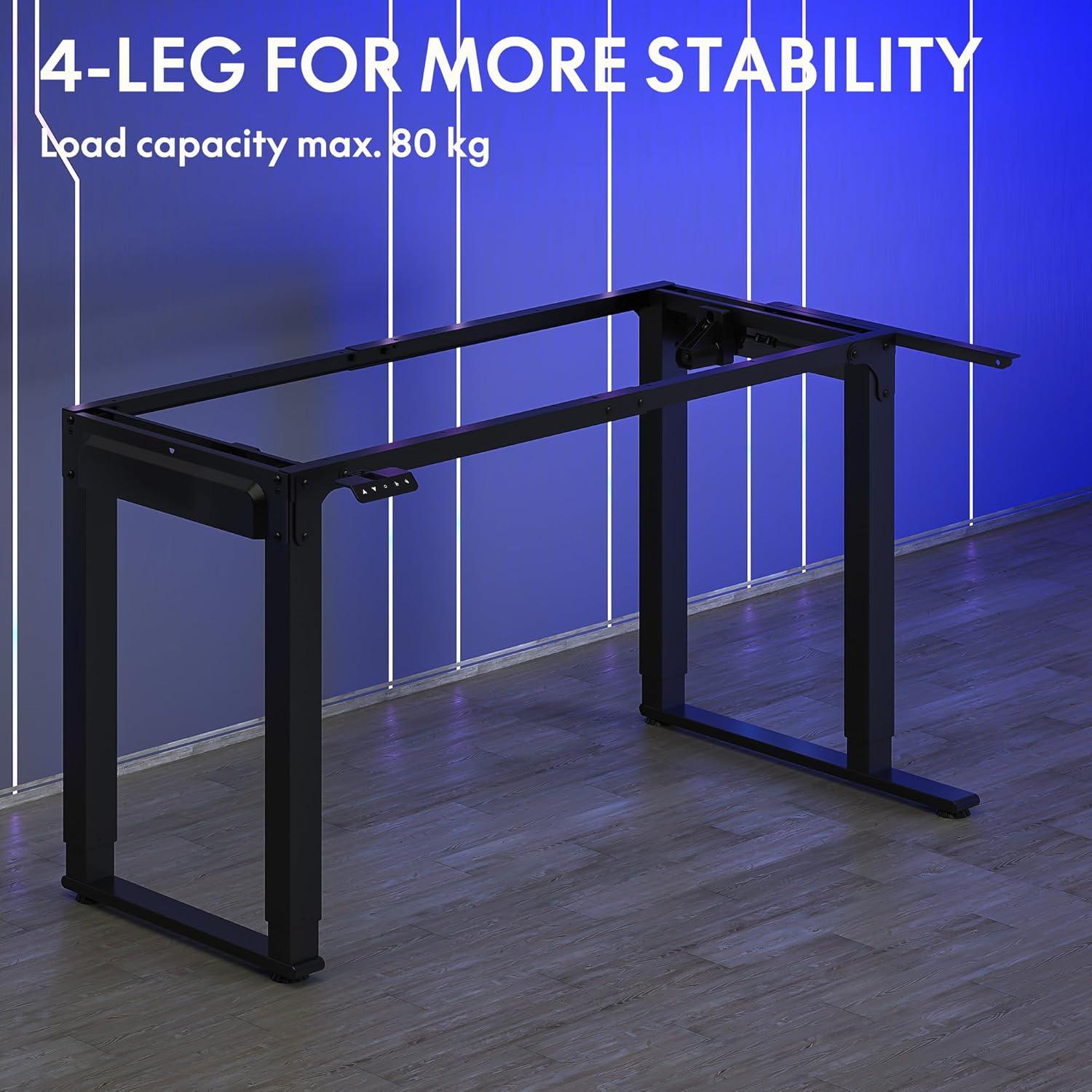
Image: The robust 4-leg frame provides superior stability for the L-shaped standing desk.

Image: Detail of the dual-motor mechanism, ensuring accurate and smooth height positioning.
5. Bedryfsinstruksies
Your FLEXISPOT L-Shaped Electric Standing Desk features an intelligent control panel for easy height adjustment and memory presets.
5.1 Beheerpaneelfunksies

Image: The intelligent control panel with clearly labeled buttons for desk operation.
- Op/Af-knoppies (▲ / ▼): Press and hold to continuously adjust the desk height up or down. Release to stop at the desired height.
- Reset Button (↺): Used for initial calibration or to reset the desk if an error occurs. Press and hold until the desk moves to its lowest point and slightly rises.
- Sitting Preset Button (👭): Press to automatically move the desk to your programmed sitting height.
- Standing Preset Button (👭 with upward arrow): Press to automatically move the desk to your programmed standing height.
5.2 Geheuevoorinstellings instel
To save your preferred sitting or standing height:
- Verstel die lessenaar tot die verlangde hoogte met die Op/Af-knoppies.
- Press and hold the desired preset button (Sitting or Standing) for approximately 3-5 seconds until you hear a beep or see the display flash. This indicates the height has been saved.

Image: The desk can be adjusted from a minimum height of 72cm to a maximum of 117cm.

Image: The spacious L-shaped desktop (180cm x 110cm) provides ample room for multiple computers and accessories.
6. Onderhoud
Gereelde onderhoud verseker die lang lewensduur en optimale prestasie van u lessenaar.
- Skoonmaak: Vee die lessenaar en raam af met 'n sagte, damp lap. Vermy harde chemikalieë of skuurmiddels.
- Inspeksie: Kontroleer gereeld alle skroewe en verbindings om te verseker dat hulle styf vas is. Draai weer vas indien nodig.
- Kabelbestuur: Ensure power cables and other device cables are properly managed to prevent entanglement or damage during height adjustments.
- Motorversorging: The dual motors are designed for durability. Avoid obstructing the desk's movement or exceeding the weight limit to prevent strain on the motors.

Image: The desk features safe and stylish rounded corners.
7. Probleemoplossing
As jy probleme met jou lessenaar ondervind, raadpleeg die volgende algemene probleme en oplossings:
| Probleem | Moontlike oorsaak | Oplossing |
|---|---|---|
| Die lessenaar beweeg nie. | Power cable disconnected; Control panel cable loose; Overload protection activated. | Check power connections; Ensure control panel cable is secure; Reduce weight on desk and perform a reset. |
| Die lessenaar beweeg oneweredig of maak ongewone geraas. | Unbalanced load; Loose connections; Obstruction. | Distribute weight evenly; Check and tighten all frame connections; Remove any obstructions. Perform a reset. |
| Height presets are not working. | Voorinstellings nie korrek gestoor nie. | Re-save the desired height by holding the preset button until confirmation. |
| Desk stops mid-movement. | Overload protection; Overheating protection. | Reduce weight on the desk. Allow the desk to cool down for 20-30 minutes if it has been used continuously. |
If the problem persists after attempting these solutions, please contact FLEXISPOT customer support.
8. Spesifikasies
| Kenmerk | Detail |
|---|---|
| Modelnommer | QS2LB-1811 |
| Handelsmerk | FLEXISPOT |
| Tipe tafel | L-vormige elektriese staande lessenaar |
| Motor tipe | Dubbelmotor |
| Raam tipe | 4-Leg Frame |
| Hoogteaanpassingsreeks | 72 cm tot 117 cm |
| Desktop Dimensions (L x W) | 180 cm x 110 cm |
| Maksimum laaikapasiteit | 80 kg |
| Geraasvlak | < 50 dB |
| Materiaal | Legeringstaal (raam) |
| Kleur | Swart |
| Item gewig | 30 kilogram |
9. Waarborg en Ondersteuning
FLEXISPOT products are designed for quality and durability. For specific warranty information, please refer to the warranty card included with your purchase or visit the official FLEXISPOT website. If you require technical assistance, have questions about assembly, or need to report a missing/damaged part, please contact FLEXISPOT customer support directly. Ensure you have your model number (QS2LB-1811) and purchase details available when contacting support.
Kontakinligting: Please refer to the contact details provided on the FLEXISPOT official webwebwerf of jou aankoopdokumentasie vir die mees onlangse ondersteuningskanale.