
Vorago BSP-500-V2
Vorago BSP-500-V2 Bluetooth Speaker User Manual
Model: BSP-500-V2
Handelsmerk: Vorago
1. Produk verbyview
The Vorago BSP-500-V2 is a portable Bluetooth speaker designed for robust performance and durability. It features IPX5 water resistance, making it suitable for various environments, including outdoor adventures and parties. This manual provides detailed instructions for setting up, operating, and maintaining your speaker.
Sleutel kenmerke:
- Ware draadlose stereo (TWS) konnektiwiteit: Connect two BSP-500-V2 speakers for an immersive stereo sound experience.
- Verlengde batterylewe: Enjoy up to 7 hours of music playback at 70% volume, thanks to its 2000 mAh battery.
- USB Tipe C Laai: Convenient and modern USB-C port for charging.
- Veelsydige verbindings: Supports Bluetooth for wireless streaming and a 3.5mm auxiliary input for wired connections.
- IPX5 Waterweerstand: Beskerm teen laedrukwaterstrale uit enige rigting.
Pakketinhoud:
- Vorago BSP-500-V2 Bluetooth-luidspreker
- USB Type-C laaikabel
- 3.5 mm oudio kabel
- Gebruikershandleiding (hierdie dokument)
Produkdiagram:

Figuur 1.1: Voorkant view of the Vorago BSP-500-V2 Bluetooth speaker, showcasing its mesh grille and central Vorago logo.

Figuur 1.2: Hoekig view of the speaker, highlighting its robust, rectangular design and integrated carrying strap.

Figuur 1.3: Bo view showing the control panel with power, volume down, play/pause, and volume up buttons.
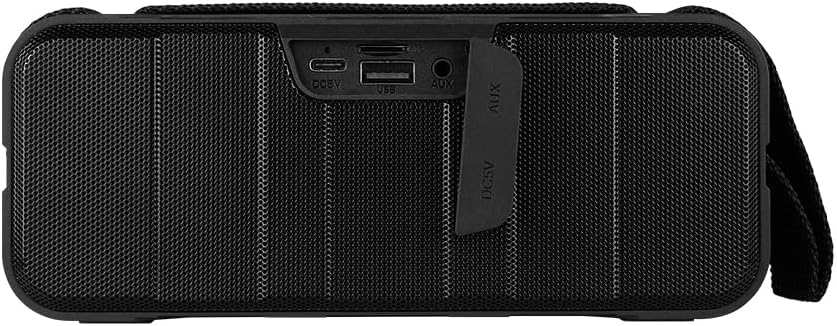
Figuur 1.4: Agter view of the speaker, showing the protective flap covering the input ports.

Figure 1.5: Close-up of the input ports, including DC 5V (USB-C), USB-A, and AUX (3.5mm) inputs, protected by a rubber cover.
2. Veiligheidsinligting
- Moenie die luidspreker aan uiterste temperature (warm of koud) blootstel nie.
- Vermy om die luidspreker te laat val of aan sterk impakte te onderwerp.
- Keep the speaker away from direct sunlight and heat sources.
- Do not disassemble, repair, or modify the speaker yourself. This will void the warranty.
- Ensure the port cover is securely closed when using the speaker near water to maintain IPX5 water resistance.
- Do not immerse the speaker in water. IPX5 rating protects against splashes and light rain, not submersion.
- Use only the provided charging cable or a certified USB Type-C cable for charging.
- Maak die luidspreker skoon met 'n sagte, droë lap. Moenie skuurmiddels of oplosmiddels gebruik nie.
3. Opstelling
3.1 Laai die luidspreker
- Open the protective rubber cover on the rear of the speaker to access the charging port.
- Connect the USB Type-C end of the charging cable to the speaker's DC 5V port.
- Koppel die ander kant van die USB-kabel aan 'n USB-kragadapter (nie ingesluit nie) of 'n rekenaar se USB-poort.
- Die laai-aanwyserliggie sal tydens laai brand en afskakel wanneer dit volledig gelaai is.
- Once charging is complete, securely close the protective rubber cover to maintain water resistance.
3.2 Aan-/afskakel
- Om aan te skakel: Druk en hou die Kragknoppie on the top panel for approximately 3 seconds until you hear an audible prompt.
- Om af te skakel: Druk en hou die Kragknoppie vir ongeveer 3 sekondes totdat u 'n hoorbare aanwysing hoor.
3.3 Bluetooth -koppeling
- Ensure the speaker is powered on. It will automatically enter Bluetooth pairing mode, indicated by a flashing LED light.
- Aktiveer Bluetooth op jou toestel (slimfoon, tablet, skootrekenaar) en soek vir beskikbare toestelle.
- Select "BSP-500-V2" from the list of found devices.
- Once successfully paired, the speaker will emit an audible confirmation, and the LED light will stop flashing and remain solid.
- Die luidspreker sal outomaties weer aan die laaste gekoppelde toestel koppel wanneer dit aangeskakel word, indien die toestel binne bereik is en Bluetooth geaktiveer is.
3.4 Ware Draadlose Stereo (TWS) Paring
TWS allows you to connect two BSP-500-V2 speakers together for a true stereo sound experience.
- Ensure both BSP-500-V2 speakers are powered on and not connected to any other Bluetooth device.
- On one of the speakers (this will be the primary speaker), double-press the Speel/Pause-knoppie. The speaker will enter TWS pairing mode.
- The two speakers will automatically search for and connect to each other. You will hear an audible confirmation once they are successfully paired.
- Once TWS is established, connect your device to the primary speaker via Bluetooth as described in Section 3.3.
- To disconnect TWS, double-press the Speel/Pause-knoppie op enige spreker.
3.5 Hulpverbinding (AUX).
For devices without Bluetooth, you can use the 3.5mm audio cable.
- Open the protective rubber cover on the rear of the speaker.
- Connect one end of the 3.5mm audio cable to the speaker's AUX port.
- Connect the other end of the cable to the audio output jack of your device.
- Die luidspreker sal outomaties na AUX-modus oorskakel.
- Once disconnected, securely close the protective rubber cover.
4. Bedryfsinstruksies
4.1 Knoppiefunksies:
| Knoppie | Funksie (Kort Druk) | Funksie (Lang druk) |
|---|---|---|
| Kragknoppie | NVT | Krag aan/af |
| Volume af-knoppie | Verminder volume | Vorige Snit |
| Speel/Pause-knoppie | Speel/Pauseer Musiek, Beantwoord/Beëindig Oproep | Reject Call, Double-press for TWS Pairing |
| Volume op-knoppie | Verhoog volume | Volgende Snit |
5. Onderhoud
- Skoonmaak: Use a soft, dry, lint-free cloth to clean the speaker's surface. For stubborn dirt, slightly dampMaak die lap met water skoon. Moenie harde chemikalieë, skoonmaakmiddels of sterk skoonmaakmiddels gebruik nie.
- Waterweerstandsorg: Always ensure the rubber port cover on the back of the speaker is fully and securely sealed when using the speaker outdoors or near water. This maintains its IPX5 water resistance. After exposure to water, wipe the speaker dry before opening the port cover for charging or auxiliary connections.
- Berging: When not in use for extended periods, store the speaker in a cool, dry place, away from direct sunlight and extreme temperatures. It is recommended to charge the speaker fully before storing and to recharge it every few months to maintain battery health.
- Batterysorg: To prolong battery life, avoid fully discharging the battery frequently. Charge the speaker when the low battery indicator is active.
6. Probleemoplossing
| Probleem | Moontlike oorsaak | Oplossing |
|---|---|---|
| Luidspreker skakel nie aan nie. | Lae battery. | Charge the speaker fully using the provided USB Type-C cable. |
| Kan nie via Bluetooth koppel nie. | Speaker is not in pairing mode; Device's Bluetooth is off; Speaker is already connected to another device; Device is too far from speaker. | Ensure speaker is powered on and flashing (pairing mode). Turn on Bluetooth on your device. Disconnect from other devices. Move device closer to speaker (within 10 meters). |
| Geen geluid of lae volume nie. | Volume te laag op luidspreker of toestel; Verkeerde invoermodus; Luidspreker nie gekoppel nie. | Increase volume on both speaker and connected device. Ensure correct mode (Bluetooth or AUX) is active. Verify successful Bluetooth pairing or AUX cable connection. |
| Klank vervorming. | Volume te hoog; Toestel te ver van luidspreker; Steuring. | Reduce volume on speaker and/or device. Move device closer to speaker. Avoid obstacles between speaker and device. |
| TWS-paring misluk. | Speakers are already paired to a device; Speakers are too far apart. | Ensure both speakers are disconnected from any Bluetooth devices. Place speakers close to each other during TWS pairing. |
7. Spesifikasies
| Kenmerk | Detail |
|---|---|
| Model Naam | BSP-500-V2 |
| Tipe luidspreker | Multimedia |
| Spesiale kenmerk | Bluetooth |
| Aanbevole gebruik | Vir musiekspelers |
| Versoenbare toestelle | Skootrekenaar, MP3-speler, slimfoon, tablet |
| Tipe beheerder | Knoppie |
| Surround Sound Channel-konfigurasie | 5.0 |
| Batterylewe | 7 ure |
| Komponente ingesluit | Spreker |
| Produk afmetings | 5D x 15W x 18H sentimeter |
| Produk Gewig | 1 Kilogram |
| Waterdig | Ja (IPX5) |
| Battery kapasiteit | 2000 mAh |
| Amplewendiger tipe | Aktief |
| Kragbron | Battery |
| Frekwensierespons | 180 Hz |
| Verbindingstegnologie | Bluetooth |
| Klankuitvoermodus | Stereo |
| Montage tipe | Tafelblad Mount |
8. Waarborg en Ondersteuning
The Vorago BSP-500-V2 Bluetooth Speaker comes with a limited warranty. Please refer to the warranty card included with your product for specific terms and conditions, or visit the official Vorago webwebwerf vir meer besonderhede.
For technical support, troubleshooting assistance, or warranty claims, please contact Vorago customer service through their official channels. You can find more information and contact details on the Vorago Brand Store on Amazon of hul amptenaar webwebwerf.
Bewaar asseblief u aankoopbewys vir waarborgdoeleindes.