
1. Inleiding
Dankie vir die aankoopasing the Blaupunkt Rock & Roll PS150 Wireless Bluetooth Outdoor Party Speaker. This manual provides essential information for the safe and efficient operation of your device. Please read it thoroughly before use and retain it for future reference.
2. Veiligheidsinligting
- Moenie die luidspreker blootstel aan uiterste temperature, direkte sonlig of hoë humiditeit nie.
- Vermy om die luidspreker te laat val of aan sterk impakte te onderwerp.
- Do not attempt to disassemble or modify the speaker. Repairs should only be performed by qualified service personnel.
- Keep the speaker away from water and other liquids to prevent electric shock or damage.
- Verseker behoorlike ventilasie wanneer die luidspreker gebruik word.
3. Wat is in die boks
- Blaupunkt Rock & Roll PS150 Party Speaker
- Karaoke mikrofoon
- Laai kabel
- Gebruikershandleiding
4. Produk verbyview
The Blaupunkt Rock & Roll PS150 is a portable outdoor party speaker designed for robust audio performance and ease of transport. It features a powerful 100W output, X-Bass enhancement, and multiple connectivity options.

Figuur 1: Voorkant view of the Blaupunkt Rock & Roll PS150 Party Speaker.
5. Kontroles en verbindings
The control panel on top of the speaker provides access to all functions.

Figuur 2: Gedetailleerd view van die luidspreker se beheerpaneel.
- Kragknoppie: Press to turn the speaker ON/OFF.
- Bron knoppie: Select input source (Bluetooth, AUX, USB).
- X-Bass Button: Activate or deactivate the X-Bass sound enhancement.
- Kieslys-knoppie: Access various settings.
- Track Select Buttons (< / >): Navigate between tracks.
- TWS-knoppie: Inisieer Ware Draadlose Stereo-paring.
- Volumeknop: Pas die hoofvolume aan.
- Genommerde knoppies (1-6): For direct track selection or preset functions.
- AUX IN-poort: Koppel eksterne oudiotoestelle via 'n 3.5 mm-oudiokabel.
- USB-poort: For USB playback and charging (5V, 2000mAh).
6. Opstelling en laai
6.1 Aanvanklike laai
Before first use, fully charge the speaker. Connect the charging cable to the speaker's charging port and a suitable power adapter. The charging indicator will illuminate. A full charge ensures optimal battery life for the 4500mAh battery.
6.2 Aan-/afskakel
Press and hold the Power button on the control panel to turn the speaker ON or OFF.
7. Operasie
7.1 Bluetooth -koppeling
- Turn on the speaker. The Bluetooth indicator will flash, indicating it's in pairing mode.
- Aktiveer Bluetooth op jou slimfoon of tablet en soek vir beskikbare toestelle.
- Select "Blaupunkt PS150" from the list.
- Sodra dit gekoppel is, sal die Bluetooth-aanwyser ophou flikker en konstant bly.
7.2 AUX-in-modus
Connect an external audio device (e.g., MP3 player) to the AUX IN port using a 3.5mm audio cable. Press the Source button to select AUX mode.
7.3 USB-terugspeel
Plaas 'n USB-stasie met oudio files into the USB port. The speaker will automatically switch to USB mode and begin playback. Use the track select buttons to navigate.
7.4 Karaoke-funksie
Connect the provided karaoke microphone to the designated microphone input. Adjust the microphone volume as needed. The speaker is ready for karaoke performances.

Figure 3: Using the karaoke function with the PS150 speaker.
7.5 X-Bass Feature
Press the X-Bass button to enhance the bass output for a deeper, more impactful sound experience.

Figure 4: Visual representation of the X-Bass feature.
8. Draagbaarheid en Ontwerp
The PS150 is designed for portability with integrated wheels and a retractable handle, making it easy to transport to any location.
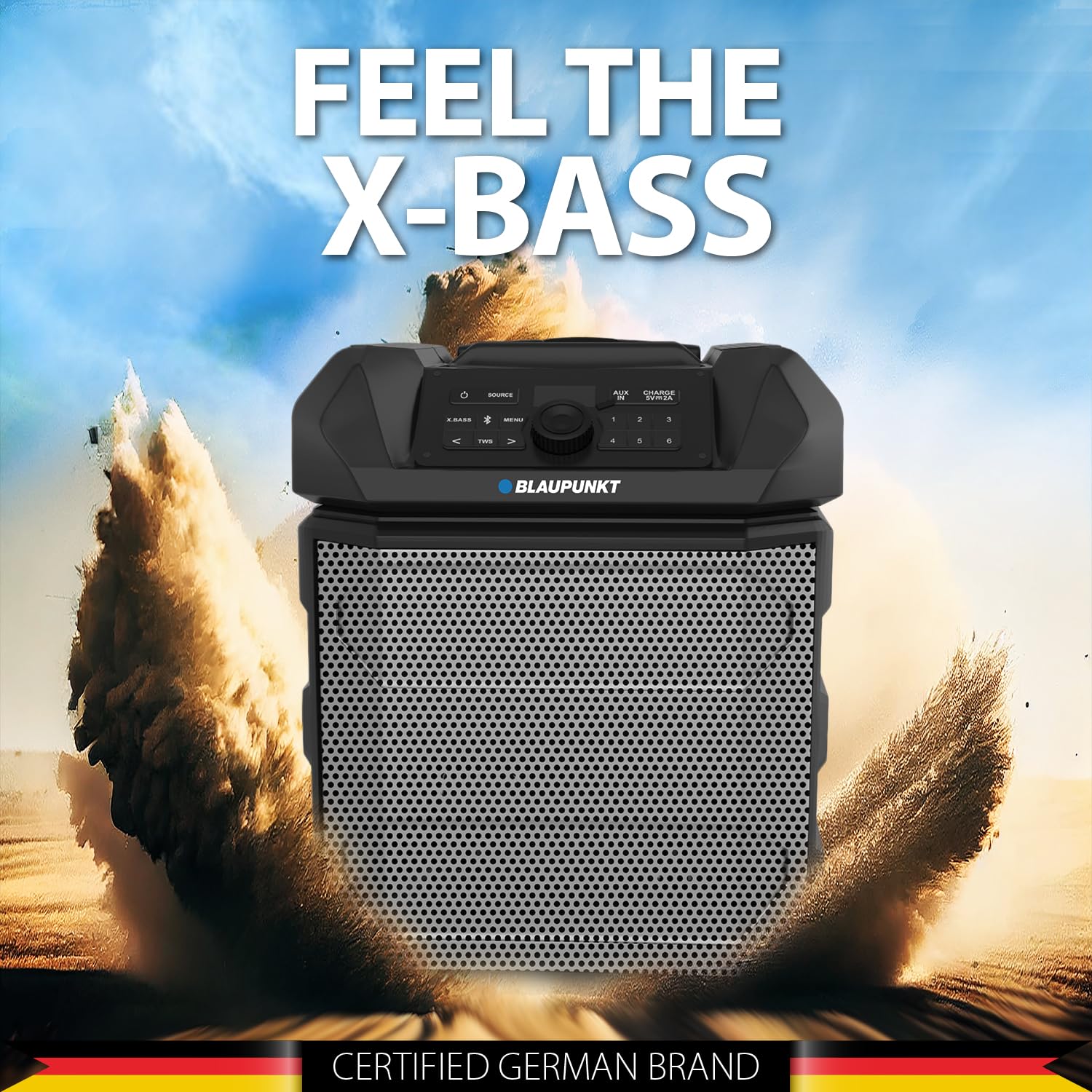
Figure 5: The PS150 speaker being transported with its wheels and handle.
9. Spesifikasies
| Kenmerk | Spesifikasie |
|---|---|
| Handelsmerk | BLAUPUNKT |
| Modelnommer | PS150 BK |
| Uitset Wattage | 100 Watt |
| Verbindingstegnologie | Bluetooth |
| Versoenbare toestelle | Slimfoon, tablet |
| Kragbron | Battery aangedrewe |
| Battery kapasiteit | 4500mAh |
| Oudio-invoer | Hulp |
| USB-uitset | 5V, 2000mAh |
| Itemafmetings (L x B x H) | 43 x 31.5 x 52.5 sentimeter |
| Item gewig | 7500 gram |
| Omhulselmateriaal | Akrielnitril Butadieen Styreen (ABS) |
10. Onderhoud
- Maak die luidspreker skoon met 'n sagte, droë lap. Moenie skuurmiddels of oplosmiddels gebruik nie.
- Berg die luidspreker op 'n koel, droë plek wanneer dit nie gebruik word nie.
- Vermy langdurige blootstelling aan direkte sonlig of uiterste temperature.
11. Probleemoplossing
11.1 Geen krag
- Maak seker dat die luidspreker ten volle gelaai is.
- Kontroleer of die kragkabel stewig gekoppel is.
- Druk en hou die aan/af-knoppie vir 'n paar sekondes in om seker te maak dit is nie net 'n kort druk nie.
11.2 Geen klank nie
- Increase the volume on both the speaker and the connected device.
- Ensure the correct input source (Bluetooth, AUX, USB) is selected.
- As jy Bluetooth gebruik, maak seker dat die toestel behoorlik gekoppel is.
- As jy AUX gebruik, kontroleer die kabelverbinding.
11.3 Bluetooth-ontkoppeling
- Ensure the connected device is within the Bluetooth range (typically 10 meters).
- Avoid obstacles between the speaker and the device that may interfere with the signal.
- Probeer om die toestel te ontkoppel en weer te koppel.
12. Waarborg en Ondersteuning
The Blaupunkt Rock & Roll PS150 comes with a 1-year warranty from the date of purchase. For warranty claims, technical support, or any other inquiries, please contact:
- Vervaardiger: Envent Worldwide Pvt Ltd
- Kliëntediens WhatsApp-ondersteuning: 8860022600
- E-pos ID: wecare@blaupunktaudio.in