
1. Inleiding
Dankie vir die aankoopasing the BLOW 4625FHD DVB-T2 H.265 Digital Terrestrial TV Tuner. This device allows you to receive digital terrestrial television broadcasts (DVB-T2) with H.265 (HEVC) compression, offering high-definition video quality. This manual provides essential information for the safe and efficient setup, operation, and maintenance of your new tuner. Please read it thoroughly before use and retain it for future reference.
2. Veiligheidsinligting
- Elektriese veiligheid: Om elektriese skok te voorkom, moenie die c oopmaak nieasing. Verwys alle diens na gekwalifiseerde personeel.
- Kragbron: Gebruik slegs die gespesifiseerde kragadapter. Maak seker dat die volumetage pas by die vereistes van die toestel.
- Ventilasie: Moenie ventilasie-openinge blokkeer nie. Verseker voldoende lugvloei rondom die toestel om oorverhitting te voorkom.
- Vog: Keep the device away from water, rain, and excessive humidity.
- Skoonmaak: Disconnect the power before cleaning. Use a soft, dry cloth. Do not use liquid cleaners or aerosols.
- Plasing: Place the device on a stable, flat surface. Avoid placing it near heat sources or in direct sunlight.
3. Pakketinhoud
Nadat u die verpakking oopgemaak het, maak asseblief seker dat alle komponente teenwoordig en in 'n goeie toestand is:
- BLOW 4625FHD DVB-T2 Tuner Unit
- Afstandbeheer
- Power Adapter (integrated cable)
- Gebruikershandleiding (hierdie dokument)

Image 3.1: Retail packaging of the BLOW 4625FHD DVB-T2 Tuner, showing the tuner unit and remote control.
4. Produk verbyview
4.1. Voorpaneel
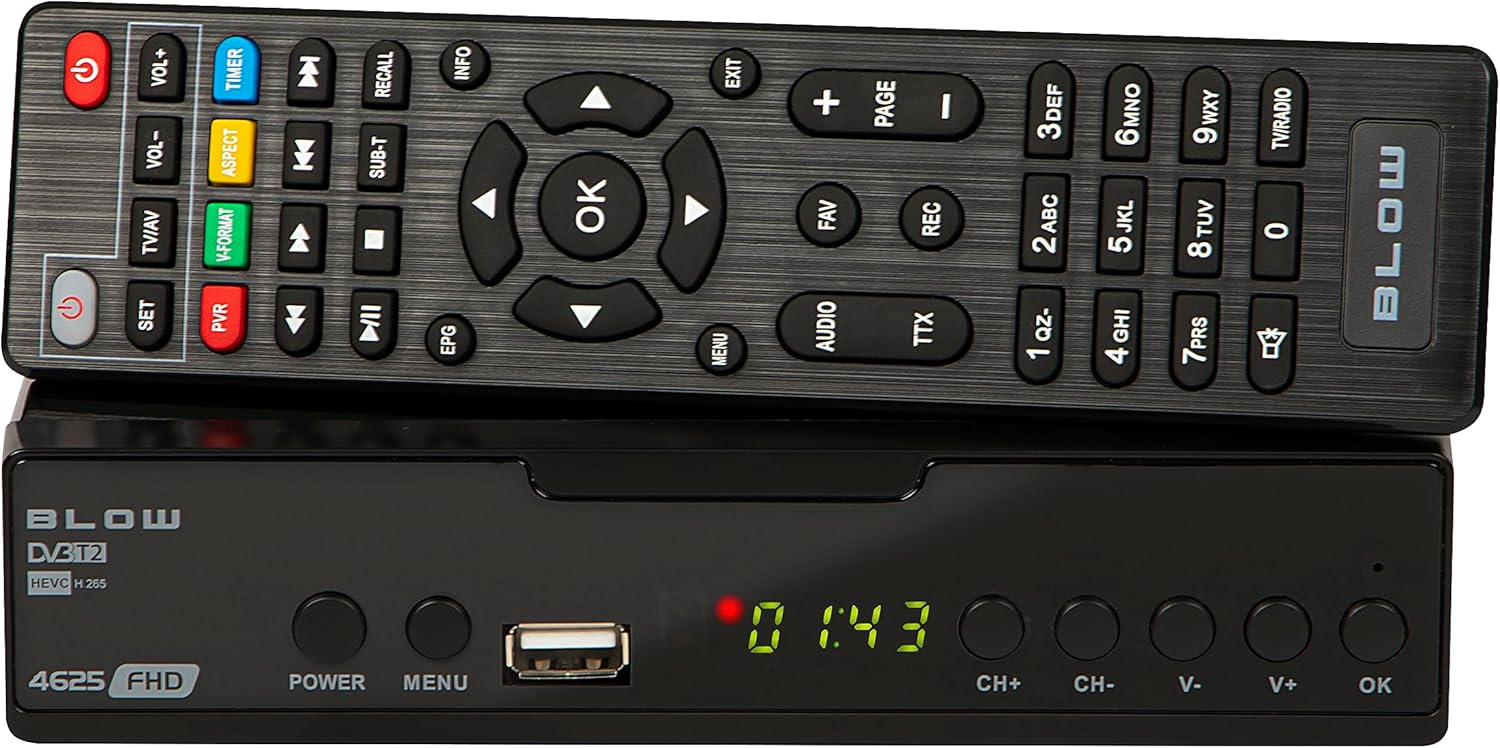
Beeld 4.1: Voorkant view of the BLOW 4625FHD DVB-T2 Tuner with its remote control.
The front panel features a digital display, a USB port for media playback and PVR functions, and essential control buttons:
- Vertoon: Shows channel number, time, or menu information.
- KRAG: Turns the device on or off (standby).
- SPYSKAART: Verkry toegang tot die hoofkieslys.
- USB-poort: Vir die koppeling van USB-bergingstoestelle.
- CH+/CH-: Verander kanale op of af.
- V+/V-: Pas volume op of af.
- OK: Bevestig keuses in die kieslys.
4.2. Agterpaneel

Image 4.2: Rear panel of the BLOW 4625FHD DVB-T2 Tuner, showing various input and output ports.
Die agterpaneel bied al die nodige verbindingspoorte:
- RF IN: Connects to your terrestrial antenna.
- RF UIT: For looping the antenna signal to another device (e.g., another TV or tuner).
- KOAKSIALE: Digitale oudio-uitvoer.
- HDMI: High-Definition Multimedia Interface output for connecting to modern TVs.
- SCART: Analog video and audio output for connecting to older TVs.
- AC IN: Kraginvoer vir die toestel.
4.3. Afstandbeheer
The remote control provides full functionality for operating the tuner. Familiarize yourself with its buttons for easy navigation and control.
- KRAG: Skakel die ontvanger aan/af.
- VOL+/VOL-: Pas volume aan.
- CH+/CH-: Verander kanale.
- OK: Bevestig keuses.
- Navigasieknoppies (Op/Af/Links/Regs): Navigates menus.
- SPYSKAART: Maak die hoofkieslys oop.
- UITGANG: Verlaat huidige kieslys of skerm.
- EPG: Vertoon die elektroniese programgids.
- PVR: Accesses Personal Video Recorder functions.
- REK: Starts recording the current program.
- Gunsteling: Accesses favorite channel list.
- TV/AV: Switches between TV and AV input modes on the tuner.
- V-FORMAAT: Changes video output format.
- OUDIO: Selects audio track (if available).
- TTX: Teletext function.
- Getalknoppies (0-9): Direkte kanaalkeuse.
5. Opstelling
5.1. Connecting the Tuner
- Antenna verbinding: Koppel jou terrestriële antennakabel aan die RF IN port on the rear panel of the tuner.
- TV-verbinding (HDMI): For best picture quality, connect an HDMI cable from the HDMI port on the tuner to an available HDMI input on your television.
- TV Connection (SCART): If your TV does not have an HDMI input, connect a SCART cable from the SCART port on the tuner to the SCART input on your television.
- Kragverbinding: Koppel die kragadapter aan die AC IN port on the tuner, then plug the adapter into a wall outlet.
5.2. First Time Installation and Channel Scan
- Turn on your television and select the correct input source (HDMI or SCART) corresponding to where you connected the tuner.
- Druk die KRAG button on the tuner or remote control to turn on the device.
- The first time you power on the tuner, a "First Time Installation" wizard will appear. Follow the on-screen prompts.
- Select your preferred language, country, and other initial settings.
- Initiate the "Auto Scan" or "Channel Search" function. The tuner will automatically search for available DVB-T2 channels in your area. This process may take several minutes.
- Once the scan is complete, the tuner will save the channels and display the first available channel.
6. Bedryf
6.1. Basic TV Viewing
- Veranderende kanale: Gebruik die CH + / CH- buttons on the remote or front panel, or enter the channel number directly using the number buttons.
- Verstel volume: Gebruik die VOL + / VOL- knoppies op die afstandsbediening.
- Demp: Druk die Demp button on the remote to mute/unmute audio.
- Information Bar: Druk die INLIGTING button on the remote to display current program information.
6.2. Electronic Program Guide (EPG)
Druk die EPG button on the remote control to access the Electronic Program Guide. This displays program schedules for all available channels. Use the navigation buttons to browse through channels and programs. Press OK aan view details or set a reminder/recording.
6.3. Mediaweergawe (USB)
The BLOW 4625FHD supports media playback from a USB storage device. Insert a USB drive into the front USB port. Navigate to the "Multimedia" or "USB" section in the main menu to browse and play supported audio (MP3, WMA) and video files.
6.4. Personal Video Recorder (PVR)
To use the PVR function, connect a USB storage device (e.g., USB flash drive or external hard drive) to the USB port. The device must be formatted correctly (usually FAT32 or NTFS). You can record live TV programs by pressing the REC button on the remote. Scheduled recordings can be set via the EPG or the PVR menu.
- Onmiddellike opname: Terwyl jy na 'n program kyk, druk REC om op te neem. Druk STOP om te eindig.
- Geskeduleerde opname: In the EPG, select a program and press OK, then choose the option to schedule a recording.
- Afspeel opnames: Access recorded content through the PVR or Multimedia menu.
7. Onderhoud
- Skoonmaak: Ensure the device is unplugged before cleaning. Use a soft, dry, lint-free cloth to wipe the exterior. Do not use abrasive cleaners, waxes, or solvents.
- Ventilasie: Kontroleer gereeld dat die ventilasiegleuwe nie deur stof of puin verstop word nie.
- Sagteware-opdaterings: Kontroleer die vervaardiger se gereeld website for any available software updates. Follow the instructions provided with the update carefully.
8. Probleemoplossing
| Probleem | Moontlike oorsaak/oplossing |
|---|---|
| Geen beeld of klank nie |
|
| "Geen sein"-boodskap |
|
| Afstandbeheer werk nie |
|
| Picture freezes or pixelates |
|
9. Spesifikasies
| Model | BLOW 4625FHD (77-048) |
| Afmetings (L x B x H) | 9D x 9B x 2.5H cm |
| Gewig | 428 gram |
| Konnektiwiteit | HDMI, USB, SCART, Coaxial, RF IN/OUT |
| Resolusie vir video-uitvoer | 1080p |
| Ondersteunde Standaarde | DVB-T2, H.265 (HEVC), H.264 |
| Frekwensiereeks | VHF: 170-230MHz, UHF: 470-860MHz |
| Oudioformate | MP3, WMA |
| Klankuitvoermodus | Stereo, Omring |
| Kragtoevoer | 12 Volt, 43 Milliampere (Operating) |
| Standby-kragverbruik | <0.5W |
| Aanbevole gebruik | Digital terrestrial TV viewing en opname |
| Vervaardiger | Blaas |
10. Waarborg
The BLOW 4625FHD DVB-T2 H.265 Digital Terrestrial TV Tuner comes with a 2-jaar vervaardigerswaarborg from the date of purchase. This warranty covers defects in materials and workmanship under normal use. It does not cover damage caused by misuse, accident, unauthorized modification, or external causes. Please retain your proof of purchase for warranty claims.
11. Ondersteuning
If you encounter any issues that cannot be resolved using the troubleshooting guide, or if you require further assistance, please contact your retailer or the manufacturer's customer support. Refer to the product packaging or the manufacturer's official webwebwerf vir kontakbesonderhede.