
Inleiding
This manual provides essential instructions for the safe and efficient operation of your Sanyo PLC-WXU700A 3LCD Projector. The PLC-WXU700A is a WXGA conference room projector featuring 3LCD technology, delivering 3,800 lumens brightness and a native resolution of 1280x800. Please read this manual thoroughly before using the projector and retain it for future reference.
Pakketinhoud
Verifieer dat alle items in jou pakket teenwoordig is:
- Sanyo PLC-WXU700A 3LCD Projector
- Afstandbeheer
- Kragkabel
- HDMI kabel
- Gebruikershandleiding (hierdie dokument)
Opstelling
1. Projektorplasing
Position the projector on a stable, flat surface or mount it securely. Ensure adequate ventilation around the projector to prevent overheating. The projector is designed to be portable, allowing for flexible placement in various environments.
2. Aansluitkrag
- Connect the supplied power cable to the AC inlet on the rear of the projector.
- Steek die ander kant van die kragkabel in 'n geaarde elektriese aansluiting.
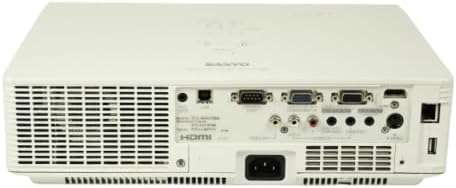
Image: Rear panel of the Sanyo PLC-WXU700A projector, highlighting the power input and connectivity ports.
3. Koppeling van invoerbronne
The Sanyo PLC-WXU700A offers multiple connectivity options:
- HDMI: Connect the supplied HDMI cable from your source device (e.g., laptop, Blu-ray player) to the HDMI input port on the projector.
- VGA (D-Sub 15-pin): For analog computer connections, use a VGA cable to connect to the D-Sub 15-pin input ports.
- Saamgestelde video: Use RCA cables for composite video input.
- Klankinsette: Separate audio input jacks are available for various sources.

Image: Side-rear perspective of the projector, illustrating the array of input ports and side ventilation grilles.
Bedryfsinstruksies
1. Skakel aan/af
- Om aan te skakel: Druk die KRAG knoppie op die projektor se beheerpaneel of die afstandbeheerder. Die kragaanwyserliggie sal brand.
- Om af te skakel: Druk die KRAG button twice. The projector will enter a cooling down cycle before completely shutting off. Do not unplug the projector during the cooling cycle.
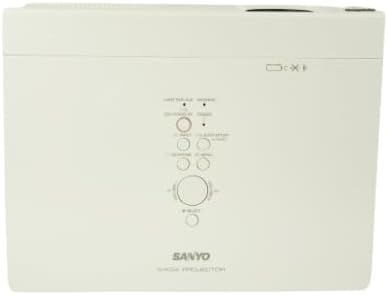
Beeld: Bo-onder view of the projector, displaying the integrated control panel with various buttons for power, menu navigation, and input selection.
2. Kies van invoerbron
Druk die INSET or BRON button on the projector or remote control to cycle through available input sources (HDMI, VGA, Video). Select the input corresponding to your connected device.
3. Beeld aanpas
- Fokusring: Rotate the focus ring on the projector lens to achieve a sharp image.
- Zoemhefboom: Adjust the zoom lever on the projector lens to change the image size without moving the projector.
- Keystone-korreksie: If the image appears trapezoidal, use the keystone correction function (usually found in the projector's menu or via dedicated buttons on the remote) to square the image.
Onderhoud
1. Skoonmaak van die Projektor
- Buitekant: Vee die projektor c afasing with a soft, dry cloth. For stubborn dirt, use a slightly damp lap met 'n sagte skoonmaakmiddel en vee dit dan droog.
- Lens: Gently clean the projector lens with a lens cleaning cloth or lens paper. Avoid using abrasive materials.
- Lugfilters: Regularly check and clean the air filters to ensure proper ventilation and prevent overheating. Refer to the full service manual for filter replacement instructions.
2. Lamp Vervanging
The Sanyo PLC-WXU700A uses a lamp-based illumination system. The lamp has a finite lifespan and will eventually need replacement. When the lamp indicator light illuminates or the image brightness significantly decreases, it is time to replace the lamp.
- Ensure the projector is powered off and completely cooled down before attempting lamp vervanging.
- Vind die lamp cover (often on the top or bottom of the projector).
- Skroef die l afamp bedek en verwyder die ou l versigtigamp module.
- Install a new, genuine Sanyo replacement lamp module, en maak seker dat dit stewig vas is.
- Vervang die lamp bedek en draai die skroewe vas.
- Stel die l terugamp timer in the projector's OSD (On-Screen Display) menu.
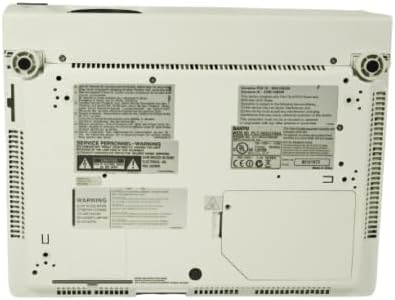
Image: Underside of the projector, displaying product labels, warning information, and potential access panels for maintenance like lamp vervanging.
Probleemoplossing
Indien u probleme met u projektor ondervind, raadpleeg die volgende algemene probleme en oplossings:
- Geen beeld vertoon nie:
- Maak seker dat die projektor aangeskakel is en dat die kragkabel stewig gekoppel is.
- Verify that the input source is correctly selected on the projector.
- Check the connection cable (HDMI, VGA) between the source device and the projector. Try a different cable if possible.
- Ensure the source device is outputting a signal.
- Beeld is vaag:
- Verstel die fokusring op die projektorlens.
- Ensure the projector is at an appropriate distance from the screen.
- Beeld is trapesiumvormig:
- Adjust the keystone correction setting in the projector's menu.
- Ensure the projector is placed perpendicular to the screen as much as possible.
- Projektor oorverhit of skakel af:
- Ensure all ventilation vents are clear and not obstructed.
- Maak die lugfilters skoon.
- Gebruik die projektor in 'n goed geventileerde area.
- Afstandbeheer werk nie:
- Kontroleer en vervang die batterye in die afstandbeheerder.
- Maak seker dat daar geen obstruksies tussen die afstandbeheerder en die projektor se IR-ontvanger is nie.
Spesifikasies
| Kenmerk | Detail |
|---|---|
| Handelsmerk | Sanyo (Tekswamp) |
| Model | PLC-WXU700A |
| Vertoon tegnologie | 3LCD |
| Wit Helderheid | 3,800 ANSI lumen |
| Inheemse resolusie | 1280x800 (WXGA) |
| Kontrasverhouding | 500:1 |
| Verbindingstegnologie | HDMI, VGA |
| Produk afmetings | 10 x 13.1 x 3.1 duim |
| Spesiale kenmerk | Draagbaar |
| Aanbevole gebruike | Besigheid |
Waarborg en Ondersteuning
For warranty information and technical support, please refer to the documentation provided at the time of purchase or contact your vendor. Keep your purchase receipt as proof of purchase for warranty claims.