
Morpheus 360 HS6500SBT
Morpheus 360 Advantage Stereo Wireless Headset User Manual
Model: HS6500SBT | Brand: Morpheus 360
Inleiding
This manual provides detailed instructions for the setup, operation, and maintenance of your Morpheus 360 Advantage Stereo Wireless Headset. Designed for seamless communication and audio, this headset features Bluetooth 5.3 connectivity, a detachable noise-cancelling boom microphone, and comfortable protein leather ear cushions, making it ideal for both work and gaming environments.

The Morpheus 360 Advantage Stereo Wireless Headset, showcasing its design and included USB-A and USB-C dongles for versatile connectivity.
Sleutel kenmerke:
- Seamless Multi-Device Connection: Bluetooth 5.3 technology allows connection to multiple devices, facilitating easy switching between phone calls and video conferences.
- Wear All Day Comfort: Lightweight design with protein leather ear cushions and memory foam for extended wear.
- Noise-Free Communication: Detachable noise-cancelling boom microphone with 120-degree rotation filters background noise for clear calls.
- Universele verenigbaarheid: Complies with UC standard, ensuring seamless operation with communication software like Zoom, Skype, and MS Teams.
- Geïntegreerde kontroles: Built-in call and volume controls for convenient management.
Pakketinhoud
Verifieer dat alle items in jou pakket teenwoordig is:
- Morpheus 360 Advantage Stereo Wireless Headset
- Afneembare boommikrofoon
- USB-A Receiver-Dongle
- USB-C Adapter (for USB-A dongle)
- USB-laadkabel (USB-A na USB-C)
- Gebruikershandleiding (hierdie dokument)
Produk verbyview
Familiarize yourself with the components of your headset:

Left earcup with microphone port and control buttons.
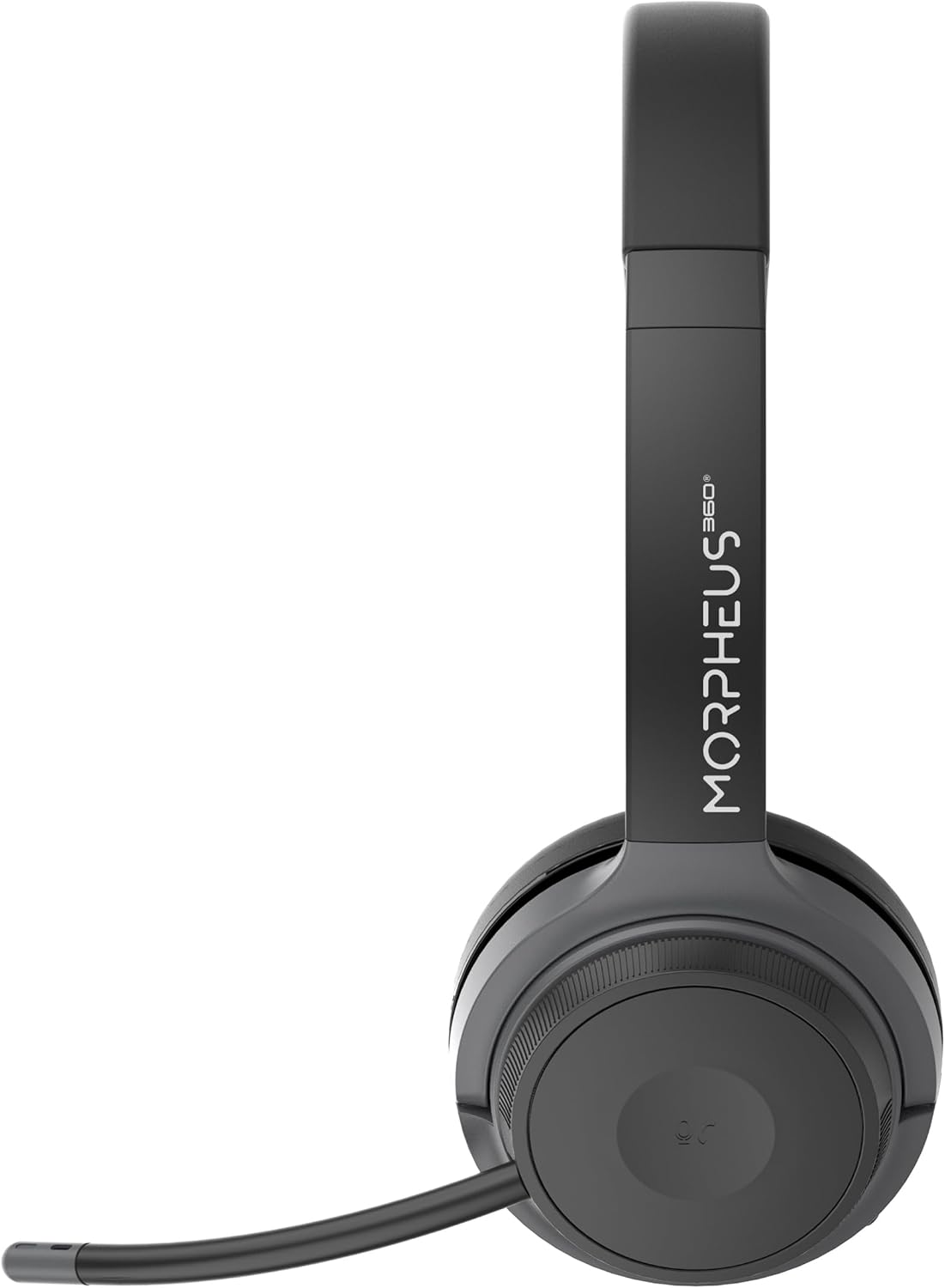
Right earcup featuring the volume control dial and USB-C charging port.
- Hoofband: Verstelbaar vir gemaklike pasvorm.
- Oorkussings: Soft protein leather with memory foam for comfort.
- Mikrofoonpoort: Located on the left earcup for attaching the boom microphone.
- Power/Pair Button: Controls power and initiates Bluetooth pairing.
- Volumebeheerknop: Located on the right earcup, allows for precise volume adjustments.
- USB-C-laaipoort: For charging the headset battery.
- Mediabeheerknoppies: Play/Pause, Next/Previous Track (functionality may vary by device).
- Oproepbeheerknoppie: Answer/End/Reject calls.
Opstelling
1. Laai die headset
Laai die oorfone volledig voor die eerste gebruik. 'n Volle lading neem ongeveer 2 uur.
- Connect the USB charging cable to the USB-C port on the headset.
- Koppel die ander kant van die kabel aan 'n USB-kragbron (bv. rekenaar se USB-poort, muuradapter).
- Die LED-aanwyser sal die laaistatus wys (verwys na die LED-aanwyser-afdeling vir besonderhede).
2. Attaching the Boom Microphone
The boom microphone is detachable and can be inserted into the microphone port on the left earcup. Ensure it clicks securely into place. The microphone can be rotated 120 degrees for optimal positioning.
3. Verbinding met toestelle
Your headset offers two primary connection methods: Bluetooth and 2.4GHz Wireless (via USB dongle).
Bluetooth-verbinding:
- Maak seker dat die oorfone gelaai en afgeskakel is.
- Press and hold the Power/Pairing button until the LED indicator flashes blue and red, indicating pairing mode.
- Aktiveer Bluetooth op jou toestel (slimfoon, tablet, skootrekenaar) en soek vir nuwe toestelle.
- Select "Morpheus 360 Advantage" from the list of available devices.
- Once connected, the LED indicator will show a solid blue light.

The headset supports Bluetooth 5.3 for stable connections and Universal Communication (UC) standards for broad compatibility.
2.4GHz Wireless Connection (via USB Dongle):
This method is ideal for devices without Bluetooth or for a more stable connection, particularly with PCs and Macs.
- Plug the USB-A receiver-dongle into an available USB-A port on your computer. If your computer only has USB-C ports, use the included USB-A to USB-C adapter.
- Power on the headset. It should automatically connect to the dongle.
- The LED indicator on both the headset and dongle will show a solid blue light when connected.
- Ensure the Morpheus 360 headset is selected as the default audio input and output device in your computer's sound settings.
Bedryfsinstruksies
Krag aan/af:
- Krag aan: Press and hold the Power/Pairing button for approximately 3 seconds until the LED indicator lights up.
- Skakel af: Press and hold the Power/Pairing button for approximately 5 seconds until the LED indicator turns off.
Volumebeheer:
Rotate the volume control dial on the right earcup:
- Draai kloksgewys om volume te verhoog.
- Draai antikloksgewys om die volume te verlaag.
Oproepbestuur:
- Beantwoord oproep: Druk die Oproepbeheer-knoppie een keer.
- Beëindig oproep: Press the Call Control button once during a call.
- Verwerp oproep: Druk en hou die Oproepbeheer-knoppie vir 2 sekondes in.

The headset provides comfortable wear for extended periods, ideal for calls and online meetings.
Mediaspeel:
- Speel/pouse: Druk die Speel/Pause-knoppie een keer.
- Volgende snit: Druk die Volgende Spoor-knoppie een keer.
- Vorige snit: Druk die Vorige snit-knoppie een keer.
Mikrofoongebruik:
- Demp/Ontdemp: Use the dedicated mute button on the microphone boom or the headset controls (if available).
- Posisionering: Adjust the 120-degree rotatable boom microphone for optimal voice pickup, ensuring it is close to your mouth.
Onderhoud
Skoonmaak:
- Vee die oorfone af met 'n sagte, droë, pluisvrye lap.
- Vir oorkussings, gebruik 'n effens damp lap met sagte seep indien nodig, en vee dit dan dadelik droog.
- Moenie skuurmiddels, alkohol of chemiese oplosmiddels gebruik nie.
Berging:
- Bêre die oorfone op 'n koel, droë plek weg van direkte sonlig en uiterste temperature.
- Vermy die plasing van swaar voorwerpe op die oorfone.
Batterysorg:
- Charge the headset regularly, even if not in frequent use, to maintain battery health.
- Vermy om die battery gereeld heeltemal te ontlaai.
Probleemoplossing
| Probleem | Moontlike oorsaak | Oplossing |
|---|---|---|
| Die oorfone skakel nie aan nie. | Lae battery. | Laai die oorfone volledig. |
| Kan nie via Bluetooth koppel nie. | Headset not in pairing mode; Device Bluetooth off; Out of range. | Ensure headset is in pairing mode (flashing blue/red). Turn device Bluetooth on. Move headset closer to device (within 10 meters). |
| Geen klank of swak klankgehalte. | Volume too low; Incorrect audio output selected; Headset not connected properly. | Increase headset and device volume. Select "Morpheus 360 Advantage" as audio output. Reconnect headset. |
| Mikrofoon werk nie. | Microphone muted; Not properly attached; Incorrect input device selected. | Unmute microphone. Ensure microphone is securely attached. Select "Morpheus 360 Advantage" as audio input in device settings. |
| Onderbroke verbinding. | Interference; Out of range; Low battery. | Move away from other wireless devices. Stay within 10 meters of connected device. Charge headset. |
Spesifikasies
| Kenmerk | Detail |
|---|---|
| Model Naam | HS6500SBT |
| Verbindingstegnologie | Wireless (Bluetooth 5.3, 2.4GHz via USB Dongle) |
| Bluetooth weergawe | 5.3 |
| Bluetooth-reeks | Tot 10 meter (33 voet) |
| Batterylewe | Up to 30 Hours (Talk/Playtime) |
| Laai tyd | Ongeveer 2 ure |
| Geraasbeheer | Passiewe ruisonderdrukking |
| Mikrofoon | Detachable Noise Cancelling Boom Microphone (120-degree rotation) |
| Oorplasing | Oor Oor |
| Materiaal | Faux Leather (Protein Leather Ear Cushions) |
| Versoenbare toestelle | Laptops, Desktops, Tablets, Telephones, Smartphones, Communication Software (UC Standard) |
| Produk afmetings | 8.75 x 3 x 8.5 duim |
| Item gewig | 9.6 onse |
| Impedansie | 30 ohm |
| UPC | 856816008538 |
Waarborg inligting
Morpheus 360 products are designed and manufactured to the highest quality standards. For detailed warranty information, including terms, conditions, and registration, please refer to the official Morpheus 360 webwebwerf of die waarborgkaart wat by u produk ingesluit is.
Behou asseblief jou aankoopbewys vir waarborgeise.
Ondersteuning
For further assistance, technical support, or frequently asked questions, please visit the official Morpheus 360 support webwebwerf:
You may also find helpful resources and contact information on the product's Amazon listing page.
Ask a question about this manual
Ask about setup, troubleshooting, compatibility, parts, safety, or missing instructions. Manuals+ will review the question and use this page’s manual context to help answer it.