
Inleiding
This manual provides detailed instructions for the safe and efficient use of your Blow Portable Bluetooth Speaker, Model 30-391. Please read this manual thoroughly before operating the device and retain it for future reference.
The Blow 30-391 is a versatile portable Bluetooth speaker designed for universal use with smartphones, tablets, computers, and other audio devices. It features Bluetooth 5.0 connectivity, AUX input, Micro USB port, and an integrated microphone for various audio applications.
Pakketinhoud
Verifieer dat al die items wat hieronder gelys word, in u pakket teenwoordig is:
- Blow Portable Bluetooth Speaker (Model 30-391)
- USB-laaikabel
- Mikrofoon kabel
- Gebruikershandleiding (hierdie dokument)
- Afstandbeheer

Beeld: Voorkant view of the Blow Portable Bluetooth Speaker 30-391, showcasing its RGB lighting, included remote control, and wired microphone.

Image: The USB charging cable and the microphone cable that come with the speaker.
Produk Kenmerke
- Verbinding: Bluetooth 5.0, AUX-in (3.5mm), Micro USB, USB port, MicroSD card slot.
- Oudio-uitvoer: 10 Watts maximum speaker output.
- Battery: Integrated 4500 mAh rechargeable battery.
- Spesiale kenmerke: Integrated microphone, RGB lighting effects, voice control capability.
- Draagbaarheid: Compact design with a handle for easy transport.
- Verenigbaarheid: Universal compatibility with desktop computers, laptops, smartphones, and tablets.
Opstelling
1. Laai die luidspreker op
Before first use, fully charge the speaker. Connect the supplied USB charging cable to the Micro USB port on the speaker and the other end to a standard USB power adapter (not included) or a computer's USB port. The charging indicator light will illuminate during charging and turn off when fully charged.
2. Skakel aan/af
Locate the power switch on the top panel of the speaker. Slide the switch to the "ON" position to power on the speaker. Slide it to the "OFF" position to power off the speaker.

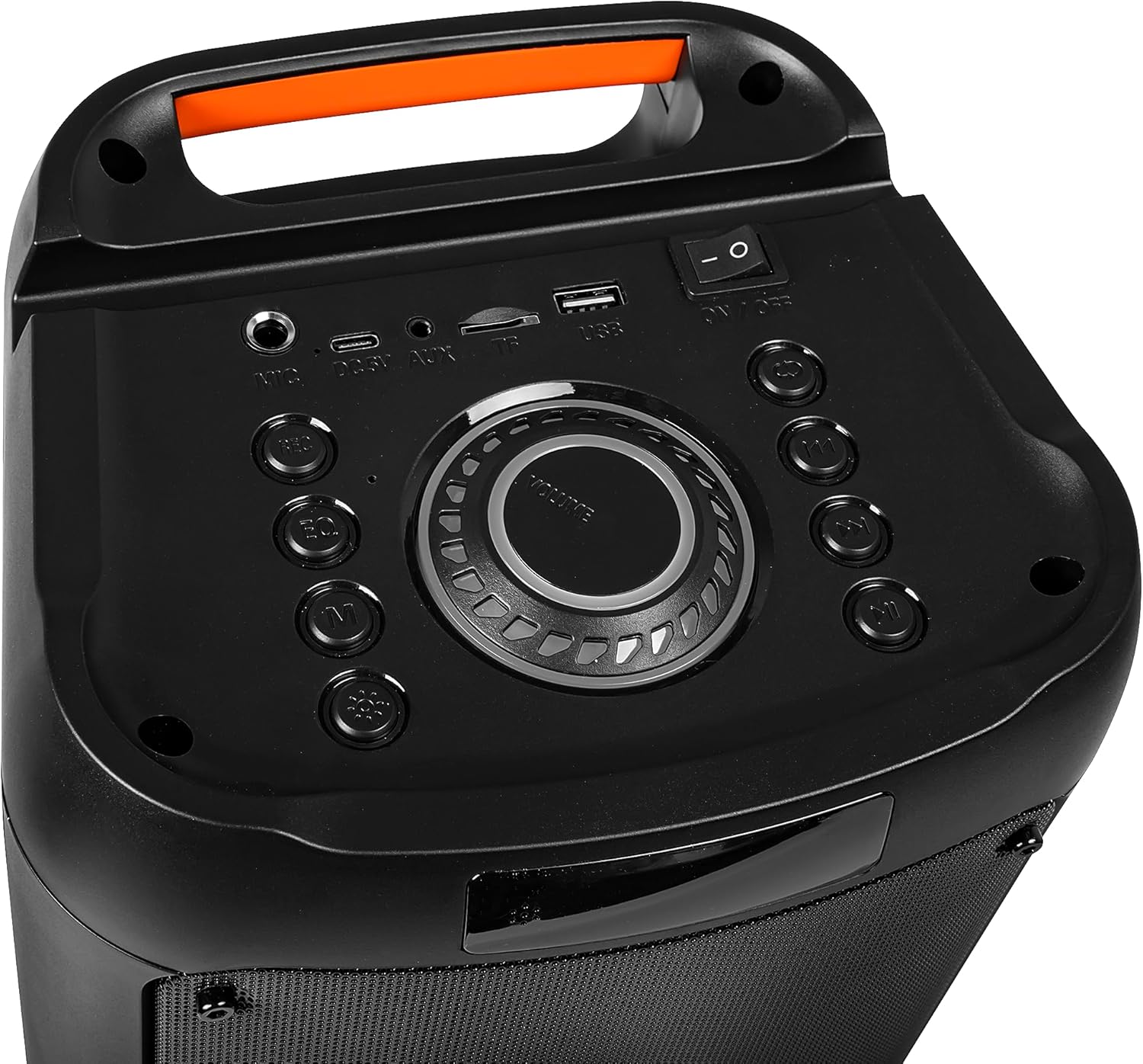
Image: Close-up of the speaker's top control panel, showing the power switch, volume knob, and various input ports.
3. Bluetooth-koppeling
- Power on the speaker. It will automatically enter Bluetooth pairing mode, indicated by a flashing LED light.
- Aktiveer Bluetooth op jou mobiele toestel (slimfoon, tablet, ens.) en soek vir beskikbare toestelle.
- Select "Blow 30-391" from the list of devices.
- Sodra dit gekoppel is, sal die luidspreker 'n hoorbare bevestiging uitstraal, en die LED-liggie sal ophou flikker.
- Die luidspreker sal outomaties weer aan die laaste gekoppelde toestel koppel wanneer dit aangeskakel word, indien die toestel binne bereik is en Bluetooth geaktiveer is.
4. AUX-verbinding
To connect an external audio device via AUX, use a 3.5mm audio cable (not included). Plug one end into the AUX-in port on the speaker and the other end into the headphone jack or audio output of your device. The speaker will automatically switch to AUX mode.
5. USB/MicroSD Playback
Insert a USB flash drive or a MicroSD card (up to 32GB) containing MP3 audio files into the respective port on the speaker. The speaker will automatically detect the storage device and begin playing music. Use the control buttons to navigate tracks.
Bedryfsinstruksies
1. Beheer oorview
The speaker features a control panel on the top for easy operation. Refer to the image in the "Setup" section for button layout.
- Krag skakelaar: AAN/AF.
- Volumeknop: Rotate to adjust master volume.
- Modusknoppie: Press to switch between Bluetooth, AUX, USB, and MicroSD modes.
- Speel/Pause-knoppie: Druk om oudio te speel of te onderbreek.
- Vorige/Volgende Snit-knoppies: Druk om na die vorige of volgende snit oor te gaan.
- EQ-knoppie: Press to cycle through equalizer presets.
- Ligmodus-knoppie: Press to change RGB lighting effects.
- Mikrofooninvoer: Connect the wired microphone here.
2. Gebruik die mikrofoon
Connect the supplied wired microphone to the microphone input port on the speaker. Adjust the microphone volume using the dedicated control (if available) or the main volume knob. The integrated microphone allows for voice control and hands-free calling when connected via Bluetooth.
3. RGB-beligtingseffekte
The speaker features dynamic RGB lighting. Press the "Light Mode" button on the control panel or remote control to cycle through different lighting patterns or to turn the lights off.
Onderhoud
- Skoonmaak: Gebruik 'n sagte, droë lap om die buitekant van die luidspreker skoon te maak. Moenie skuurmiddels of oplosmiddels gebruik nie.
- Batterysorg: Om die batterylewe te verleng, vermy om die battery gereeld heeltemal te ontlaai. Laai die luidspreker gereeld, selfs al word dit nie vir lang tye gebruik nie.
- Berging: Bêre die luidspreker op 'n koel, droë plek weg van direkte sonlig en uiterste temperature.
- Waterweerstand: Hierdie luidspreker is NIE waterdig nie. Vermy blootstelling aan water of oormatige vog.
Probleemoplossing
| Probleem | Moontlike Oplossing |
|---|---|
| Luidspreker skakel nie aan nie. | Ensure the battery is charged. Connect the speaker to a power source using the USB cable. Check the power switch position. |
| Kan nie via Bluetooth koppel nie. | Ensure the speaker is in pairing mode (flashing LED). Make sure your device's Bluetooth is enabled and within range (up to 10 meters). Forget previous pairings on your device and try again. |
| Geen klank nie. | Check the volume level on both the speaker and your connected device. Ensure the correct input mode (Bluetooth, AUX, USB, MicroSD) is selected. Check cable connections for AUX mode. |
| Swak klankgehalte. | Ensure the speaker is not too far from the Bluetooth device. Avoid obstacles between the speaker and the device. Try a different audio source or file. |
| Mikrofoon werk nie. | Ensure the microphone is securely connected to the input port. Check microphone volume settings. |
Spesifikasies
| Modelnommer | 30-391 |
| Handelsmerk | Blaas |
| Verbindingstegnologie | Bluetooth 5.0, Auxiliary (3.5mm), Micro USB, USB |
| Klankuitvoermodus | AUX, Bluetooth |
| Maksimum luidspreker-uitsetkrag | 10 Watt |
| Battery kapasiteit | 4500 mAh |
| Max Memory Card Size | 32 GB (MikroSD) |
| Spesiale kenmerke | Integrated Microphone, RGB Lighting, Voice Control |
| Kragbron | Battery aangedrewe |
| Produkafmetings (L x B x H) | 26 x 46 x 24 cm (ongeveer) |
| Produk Gewig | 3.67 kg (ongeveer) |
| Kleur | Black (with multicolor RGB lighting) |

Beeld: Sykant view of the Blow Portable Bluetooth Speaker 30-391, showing its vertical orientation.
Beeld: Agterkant view of the Blow Portable Bluetooth Speaker 30-391, highlighting the integrated carrying handle.
Beeld: Gedetailleerd view of the top control panel, including the power switch, volume knob, and various input ports.

Image: The retail packaging for the Blow Portable Bluetooth Speaker 30-391, showing product features and accessories.
Waarborg en Ondersteuning
The Blow Portable Bluetooth Speaker 30-391 comes with a limited warranty. Please refer to the warranty card included in your package for specific terms and conditions. For technical support, troubleshooting assistance, or warranty claims, please contact your retailer or the manufacturer directly. Contact information can typically be found on the product packaging or the manufacturer's official webwebwerf.
Vervaardiger: Blaas
ASIN: B0CDXQRT9Q