
Inleiding
This manual provides comprehensive instructions for the installation, operation, and maintenance of your RTX DTS1419 Three-Phase DIN Rail Energy Meter with WiFi connectivity. Please read this manual thoroughly before installation and use to ensure proper function and safety.
Produk Kenmerke
The RTX DTS1419 is an intelligent three-phase energy meter designed for DIN rail mounting. It offers advanced energy monitoring and control capabilities through WiFi connectivity and the Tuya Smart Life application.
Sleutel kenmerke sluit in:
- Real-time monitoring of voltage (V), current (A), and power (kW) for each phase.
- Remote control for switching power on or off.
- Clear LCD display for sequential data viewing.
- Integrated status indicator lights.
- Prepayment function with notifications for exceeding set energy limits.
- Detailed energy consumption statistics for each phase.
- Easy installation on a standard DIN rail.
- Maksimum stroomkapasiteit van 80A.
- Continuous current rating of 10A per phase.
- Voice control compatibility with Google Home and Amazon Alexa.
- 2.4 GHz WiFi communication for direct router connection (no gateway required).
- Automated scenarios based on predefined measurement values (e.g., automatic shutdown if voltage exceeds limit).
- Archiving function for historical energy data.
Veiligheidsinligting
Veiligheidsmaatreëls
WAARSKUWING: Installation and maintenance should only be performed by qualified electricians. Disconnect power before installation or servicing to prevent electric shock.
- Ensure all local electrical codes and regulations are followed during installation.
- Moenie die toestel gebruik as dit beskadig lyk nie.
- Hou die toestel weg van water en hoë humiditeit.
- Moenie die maksimum stroomgradering van 80A oorskry nie.
- Verseker behoorlike aarding.
Opstelling
1. Installasie
The RTX DTS1419 is designed for DIN rail mounting within an electrical panel.
- Montering: Securely attach the energy meter to a standard 35mm DIN rail. Ensure the clip at the bottom locks into place.
- Bedrading: Refer to the wiring diagram below for correct connection of the three phases (L1, L2, L3) and neutral (N). Ensure all connections are tight and secure.

Prentbeskrywing: A detailed wiring diagram showing the connection points for the three phases (L1, L2, L3) and neutral (N) on the RTX DTS1419 energy meter. Input terminals are on the left, output terminals on the right. Each phase is clearly labeled with corresponding wire colors (brown, black, grey for phases, blue for neutral) and arrows indicating current flow.
- Krag aan: After verifying all connections, restore power to the circuit. The LCD display on the meter should illuminate.
2. App Connection (Tuya Smart Life)
- Laai die app af: Download the "Tuya Smart Life" app from your smartphone's app store (iOS or Android).
- Registreer/Teken aan: Open the app and register a new account or log in to an existing one.
- Voeg toestel by: In the app, tap the "+" icon to add a new device. Select "Electrical" > "Energy Meter (Wi-Fi)".
- Paringsmodus: On the RTX DTS1419 meter, press and hold the "SET" button until the network indicator light (blue LED) starts blinking rapidly. This indicates pairing mode.
- Koppel aan Wi-Fi: Follow the on-screen instructions in the app to connect the device to your 2.4 GHz Wi-Fi network. Ensure your phone is also connected to the same 2.4 GHz network.
- Toestel bygevoeg: Once successfully paired, the network indicator light will become solid, and the device will appear in your Tuya Smart Life app.
Prentbeskrywing: The RTX DTS1419 energy meter displayed next to a smartphone showing the Tuya Smart Life application interface. The app displays real-time energy data such as current, active power, and voltage, indicating successful connection and monitoring.
Bedryfsinstruksies
1. Intydse monitering
Once connected to the Tuya Smart Life app, you can monitor various electrical parameters:
- Current Electrical Consumption (I): View the current draw in Amperes (A).
- Current Power Consumption (P): View the active power in Kilowatts (kW).
- Current Supply Voltage (V): View die voltage vir elke fase.
- Current Energy Consumption (kW.h): Track accumulated energy usage in kilowatt-hours.
The meter's LCD display also cycles through these values directly on the device.

Prentbeskrywing: 'n Naby-voorkant view of the RTX DTS1419 Three-Phase DIN Rail Energy Meter. The LCD screen clearly displays "U 235.0", indicating a voltage reading of 235.0 Volts. Status indicator lights for Relay, Alert, Active, and Network are visible on the right side, along with the RTX and Tuya logos.
2. Afstandbeheer
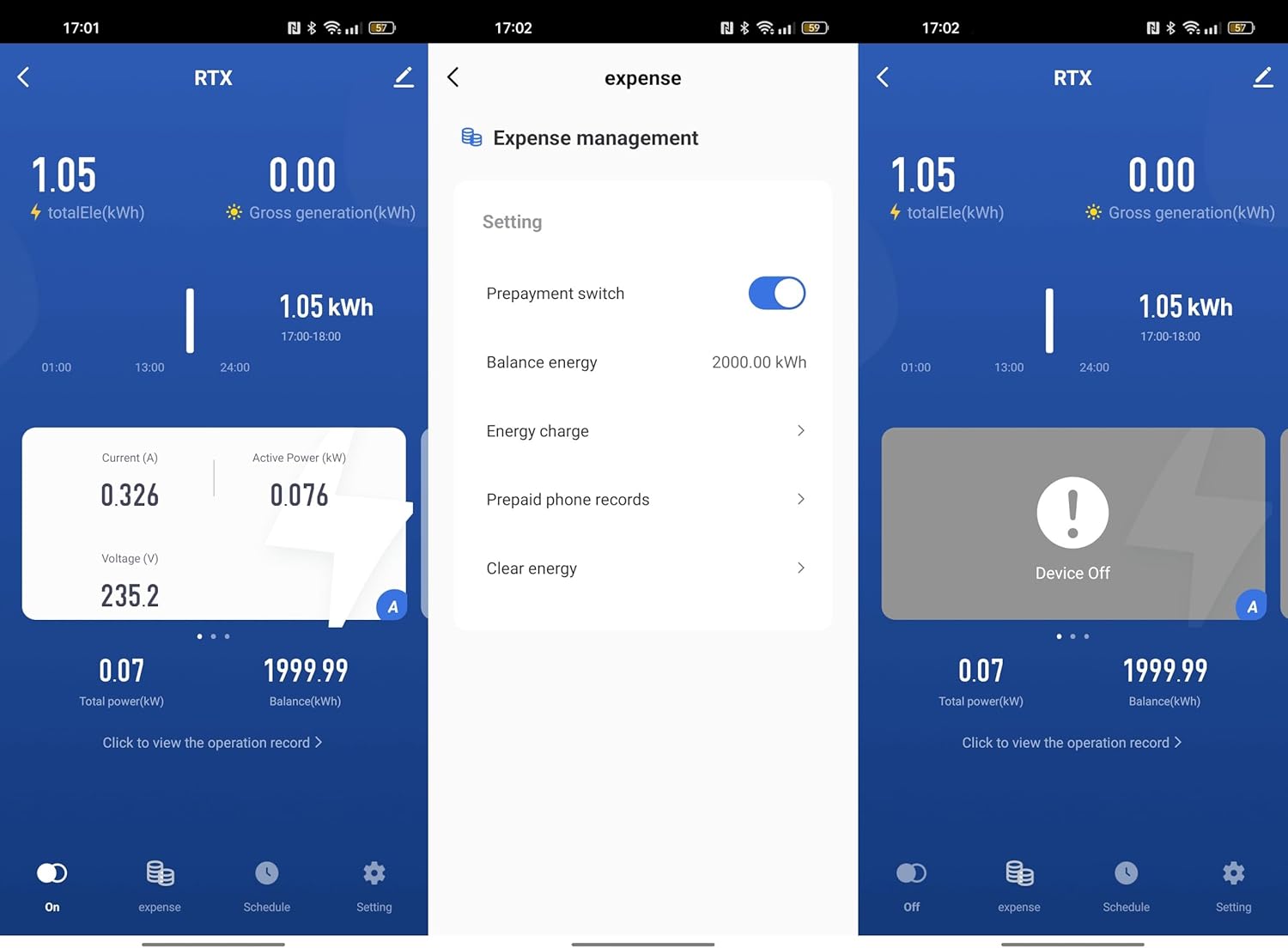
The Tuya Smart Life app allows you to remotely switch the power on or off for the connected circuit. This function activates the integrated relay within the meter.
- Open the device interface in the Tuya Smart Life app.
- Locate the "On/Off" toggle or button to control the power supply.
3. Energy Statistics and Archiving
The app provides independent energy consumption statistics for each phase and an archiving function for historical data. You can review daily, weekly, or monthly consumption trends.

Prentbeskrywing: A screenshot of the Tuya Smart Life app interface, highlighting sections for "totalEle(kWh)" (total energy consumption) and "Gross generation(kWh)". This illustrates the app's capability to display both consumed and potentially generated energy data.
4. Prepayment Function
Set an energy limit within the Tuya Smart Life app. The device will notify you if this limit is exceeded, allowing for better energy budget management.

Prentbeskrywing: A series of three screenshots from the Tuya Smart Life app. The first shows the main device interface. The second shows the "Expense management" screen with options for "Prepayment switch", "Balance energy", "Energy charge", and "Prepaid phone records". The third shows the device in an "Off" state, indicating remote control functionality.
5. Stembeheer
Integrate the RTX DTS1419 with Google Home or Amazon Alexa for voice-activated control. Follow the instructions provided by Google Home or Alexa for connecting Tuya Smart Life devices.
- Enable the "Tuya Smart Life" skill/action in your voice assistant app.
- Link your Tuya account.
- Ontdek toestelle.
- Use voice commands such as "Alexa, turn off the main power" or "Hey Google, what is the energy consumption of the meter?" (Specific commands may vary based on setup).
6. Automatic Scenarios
Configure automated actions within the Tuya Smart Life app based on predefined measurement values. For example, you can set the device to automatically shut off if the voltage exceeds a safe limit.
- Navigate to the "Smart" or "Automation" section in the Tuya Smart Life app.
- Create a new automation.
- Set conditions based on voltage, current, or power readings from the DTS1419.
- Define actions, such as turning off the meter or sending a notification.
Onderhoud
- Skoonmaak: Vee die toestel af met 'n droë, sagte lap. Moenie skuurmiddels of oplosmiddels gebruik nie.
- Firmware -opdaterings: Periodically check the Tuya Smart Life app for available firmware updates for the device to ensure optimal performance and security.
- Verbindingskontrole: Regularly inspect wiring connections for tightness and signs of wear.
Probleemoplossing
| Probleem | Moontlike oorsaak | Oplossing |
|---|---|---|
| Toestel skakel nie aan nie. | Geen kragtoevoer nie; verkeerde bedrading. | Check circuit breaker. Verify wiring connections according to the diagram. |
| Kan nie aan Wi-Fi koppel nie. | Incorrect Wi-Fi password; 5GHz network; device not in pairing mode; weak signal. | Ensure correct 2.4 GHz Wi-Fi password. Put device in pairing mode (blinking blue LED). Move router closer or use a Wi-Fi extender. |
| Onakkurate lesings. | Loose wiring connections; faulty device. | Check all wiring connections for tightness. If problem persists, contact support. |
| Afstandbeheer werk nie. | Geen internetverbinding nie; toepassingprobleem; toestel vanlyn. | Check your home internet connection. Ensure the device is online in the Tuya app. Restart the app. |
Spesifikasies
- Model: DTS1419
- Handelsmerk: RTX
- Tipe: Three-Phase DIN Rail Energy Meter
- Verbinding: Wi-Fi (2.4 GHz)
- Maksimum stroom: 80A
- Deurlopende stroom: 10A per fase
- Voltage: 3x230/400V 50Hz
- Polskonstante: 800imp/kWh
- Akkuraatheidsklas: 1
- Verenigbaarheid: Tuya Smart Life App, Google Home, Amazon Alexa
- Montering: 35 mm DIN-reling
- ASIN: B0CDVLZV9B
Waarborg en Ondersteuning
For warranty information, please refer to the documentation provided with your purchase or contact your retailer. For technical support, please visit the RTX webwebwerf of kontak hul kliëntediensafdeling.
Vervaardiger: RTX