
Thomson 24HA2S13C
THOMSON 24HA2S13C 24-duim 12V HD Slim Android TV Gebruikershandleiding
Model: 24HA2S13C
Belangrike veiligheidsinligting
Read all instructions before operating the TV. Keep this manual for future reference. Follow all warnings and instructions marked on the product.
- Moenie ventilasie-openinge blokkeer nie.
- Moenie naby hittebronne installeer nie.
- Beskerm die kragkabel teen geloop of vasgeknyp.
- Gebruik slegs aanhegsels/bykomstighede gespesifiseer deur die vervaardiger.
- Ontkoppel tydens weerligstorms of wanneer dit vir lang tye ongebruik word.
- Verwys alle diens na gekwalifiseerde dienspersoneel.
Produk verbyview
The THOMSON 24HA2S13C is a 24-inch HD Smart Android TV designed for versatile use, including camping with its 12V power supply. It features Google Assistant, Wi-Fi, Bluetooth, Dolby Digital audio, and a triple-tuner for various signal reception.

Beeld: Voorkant view of the THOMSON 24HA2S13C 24-inch Smart Android TV, showing the screen displaying streaming service logos and a family enjoying the TV in a camping-instelling.
Pakketinhoud
Verifieer dat alle items in die pakket ingesluit is:
- THOMSON 24HA2S13C Smart Android TV
- Afstandbeheer
- Power Adapter (12V compatible)
- TV-staanders (2)
- Skroewe vir TV -staanders
- Gebruikershandleiding (hierdie dokument)
- Vinnige Begingids
Opstelling
1. Bevestig die TV-staanders
- Plaas die TV versigtig met die gesig na onder op 'n sagte, plat oppervlak om skermskade te voorkom.
- Align the TV stands with the mounting holes on the bottom of the TV.
- Maak die staanplekke vas met die meegeleverde skroewe. Maak seker dat hulle stewig vasgedraai is.

Image: The THOMSON 24HA2S13C TV showing two possible stand positions for different furniture widths. The image highlights the flexibility in stand placement.
2. Aansluitkrag
Connect the 12V power adapter to the TV's power input and then to a suitable power source. For camping or mobile use, connect to a 12V DC power outlet.

Image: The THOMSON 24HA2S13C TV mounted in a caravan, with a 12V power adapter shown, illustrating its suitability for mobile use.
3. Verbinding van eksterne toestelle
Die TV bied verskeie poorte vir die koppeling van eksterne toestelle:
- HDMI: For high-definition audio and video devices (e.g., game consoles, Blu-ray players).
- USB: Vir die koppeling van USB-bergingstoestelle om media te speel.
- LAN: Vir bedrade internetverbinding.
- Antenne/Satelliet: Vir die ontvangs van uitsaaiseine.
- AV IN: Vir ouer analoog toestelle.
- Oudio-uitvoer (opties): Vir die koppeling aan eksterne klankstelsels.
- CI+: Vir voorwaardelike toegangsmodules.

Beeld: Agter view of the THOMSON 24HA2S13C TV, detailing the various input and output ports available for connectivity.
Bedien die TV
1. Aanvanklike Opstelling Wizard
Wanneer die TV vir die eerste keer aangeskakel word, sal dit jou deur 'n aanvanklike opstellingsproses lei. Dit sluit in:
- Taalkeuse.
- Netwerkverbinding (Wi-Fi of Ethernet).
- Google account sign-in (optional, but recommended for full Smart TV features).
- Channel scanning (for DVB-T2/C/S2).
2. Afstandbeheer funksies
The included remote control provides access to all TV functions. It features backlit buttons for use in low light and a dedicated "Favorite" button for quick access to your preferred app.

Image: The remote control for the THOMSON 24HA2S13C TV, highlighting its ergonomic design, backlit buttons, and voice control capabilities.
3. Slim-TV-funksies (Android TV)
This TV runs on Android TV, providing access to a wide range of applications and services:
- Stroomdienste: Access Netflix, Prime Video, YouTube, Disney+, and more.
- Google Assistent: Use voice commands to search for content, control playback, and get information. Activate by pressing the Google Assistant button on the remote.
- Chromecast Ingeboude: Cast content from compatible smartphones, tablets, or computers directly to your TV.
- Google Play Winkel: Laai bykomende programme en speletjies af.

Image: The THOMSON 24HA2S13C TV screen showing the Android TV home interface with popular streaming applications and content recommendations.
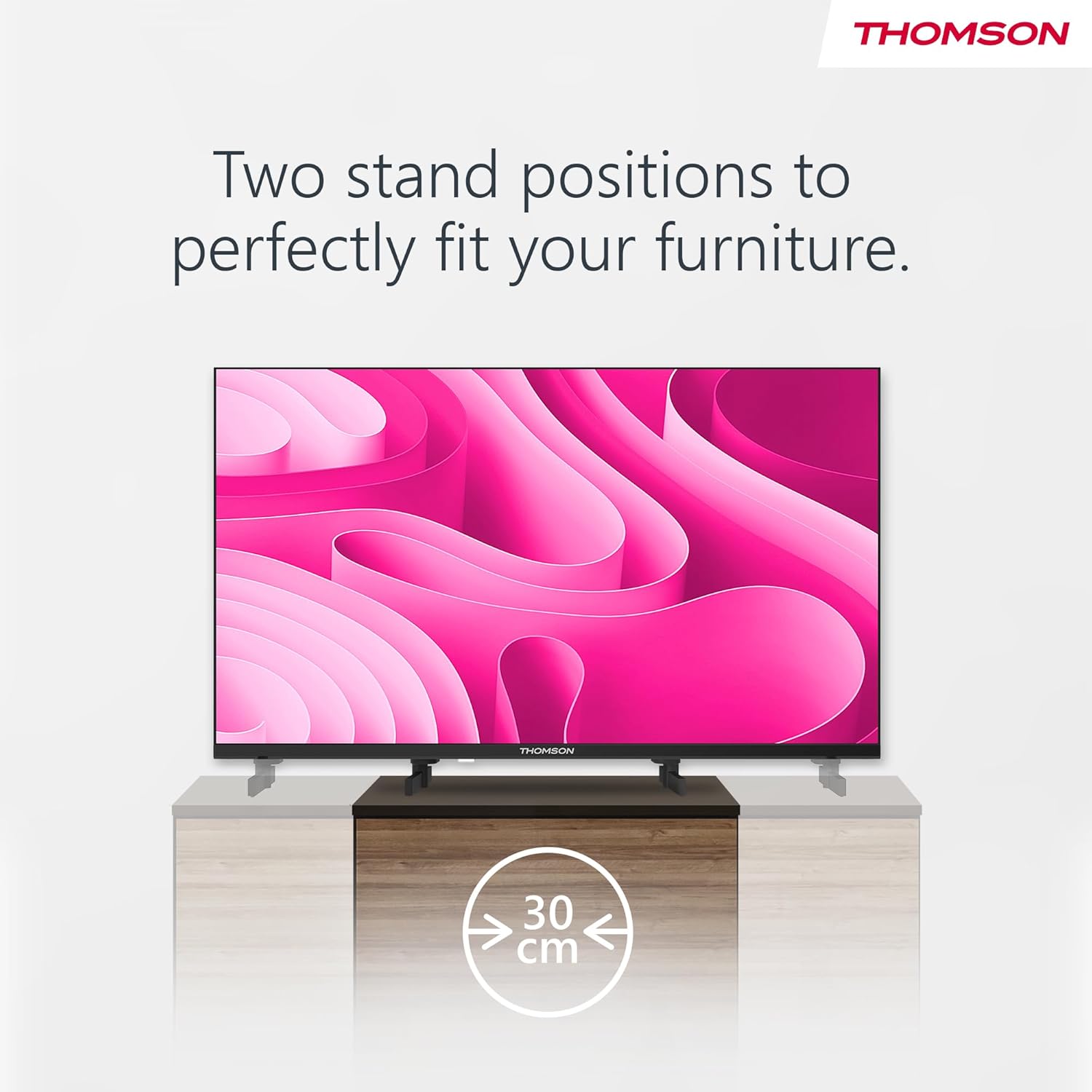
Image: A person using the voice control feature of the THOMSON TV remote, demonstrating interaction with Google Assistant.
Onderhoud
Maak die TV skoon
- Ontkoppel altyd die TV voordat u skoonmaak.
- Use a soft, dry cloth to wipe the screen and cabinet. Do not use liquid cleaners or aerosol sprays.
- Vir hardnekkige merke, liggiesampen a microfiber cloth with water and gently wipe. Avoid excessive moisture.
Sagteware-opdaterings
The TV may receive software updates to improve performance and add new features. Ensure your TV is connected to the internet to receive these updates. You can usually check for updates in the TV's settings menu.
Probleemoplossing
| Probleem | Moontlike oorsaak | Oplossing |
|---|---|---|
| Geen krag nie | Kragkabel nie gekoppel nie; kragaansluiting nie aktief nie. | Kontroleer die kragkabelverbinding. Toets die aansluiting met 'n ander toestel. |
| Geen beeld nie, maar klank is teenwoordig | Verkeerde invoerbron gekies; agterligprobleem. | Press the "Input" button on the remote to select the correct source. Contact support if issue persists. |
| Geen klank nie, maar beeld is teenwoordig | Volume too low or muted; audio cables loose. | Increase volume. Check mute status. Ensure audio cables are securely connected. |
| Afstandbeheer werk nie | Batterye is leeg; obstruksie tussen afstandbeheerder en TV. | Vervang batterye. Verwyder enige obstruksies. Maak seker dat die afstandbeheerder op die TV se IR-sensor gerig is. |
| Kan nie aan Wi-Fi koppel nie | Verkeerde wagwoord; routerprobleme; TV te ver van router af. | Verify Wi-Fi password. Restart router. Move TV closer to router or use a wired connection. |
Spesifikasies
| Kenmerk | Detail |
|---|---|
| Handelsmerk | Thomson |
| Model | 24HA2S13C |
| Skerm grootte | 24 duim (60 cm) |
| Vertoon tegnologie | LED |
| Resolusie | 1366 768 x XNUMX (HD) |
| Bedryfstelsel | Android TV |
| Spesiale kenmerke | Google Assistant, Chromecast Built-in, 12V Power Supply, Dolby Audio, Triple Tuner (DVB-T2/C/S2) |
| Konnektiwiteit | Wi-Fi, Bluetooth, HDMI (x3), USB (x2), LAN, Optical Audio Out, AV In, CI+ |
| Voltage | 12 Volt (DC) |
| Produkafmetings (B x D x H) | 53.5 x 15.1 x 35.3 cm (met staander) |
| Gewig | 3.5 kg |
For detailed energy efficiency information, please refer to the EU EPREL database: https://eprel.ec.europa.eu/qr/1456673

Image: The EU Energy Label for the THOMSON 24HA2S13C TV, showing an energy efficiency rating of E and power consumption of 18 kWh/1000h.
Waarborg en Ondersteuning
This Thomson TV comes with a 3-year guarantee. For technical support, warranty claims, or service inquiries, please contact your local Thomson service provider or refer to the manufacturer's webwebwerf.
Manufacturer: STREAMVIEW GMBH
Webwebwerf: www.stroomview.com
E-pos: kontak@stroomview.com
Amptelike Produkvideo
Kyk na hierdie video vir 'n visuele oorsigview of the Thomson 24-inch Easy TV.
Video: 'n Kort oorsigview of the Thomson 24-inch Easy TV, showcasing its design and features. This video is provided by the vendor Streamview GmbH.
Ask a question about this manual
Ask about setup, troubleshooting, compatibility, parts, safety, or missing instructions. Manuals+ will review the question and use this page’s manual context to help answer it.