
PELADN HA-2
PELADN HA-2 Mini PC User Manual
Model: HA-2
Inleiding
This manual provides essential information for setting up, operating, and maintaining your PELADN HA-2 Mini PC. Please read it thoroughly before using the device to ensure optimal performance and longevity.
The PELADN HA-2 is a compact desktop computer featuring an AMD Ryzen 7 5800U processor, 16GB DDR4 RAM, and a 512GB NVME SSD, designed for efficient computing and multimedia tasks.
Pakketinhoud
Verifieer dat alle items in die pakket teenwoordig is:
- PELADN HA-2 Mini PC
- Kragadapter DC 12V
- HDMI 2.0-kabel
- VESA Mount
- Gebruikershandleiding (hierdie dokument)

Image: Contents of the PELADN HA-2 Mini PC package, including the mini PC unit, power adapter, HDMI cable, and VESA mount.
Produk verbyview
Komponent Diagram

Beeld: Ontplof view of the PELADN HA-2 Mini PC, illustrating key internal components such as the AMD Ryzen 7 5800U processor, 512GB M.2 NVME SSD, and 16GB DDR4 3200MHz RAM.
Poortuitleg

Beeld: Gedetailleerd view of the front and rear ports on the PELADN HA-2 Mini PC. Front ports include Headphone jack, 2x USB 3.0, and Type-C. Rear ports include Power Supply (19.0V), LAN 2.5G, LAN 1G, HDMI, DisplayPort (DP), and 2x USB 2.0.
Opstel instruksies
- Koppel randapparatuur: Connect your keyboard, mouse, and monitor(s) to the appropriate USB, HDMI, or DisplayPort connections. The device supports triple display output.
- Kragverbinding: Connect the DC 12V power adapter to the power input port on the rear of the Mini PC, then plug the adapter into a power outlet.
- Netwerk konneksie: For wired internet, connect an Ethernet cable to either the LAN 2.5G or LAN 1G port. For wireless internet, the device supports WiFi 5.
- Krag aan: Druk die aan/af-knoppie wat aan die voorkant van die Mini-rekenaar geleë is.
- Aanvanklike opstelling: Follow the on-screen instructions to complete the operating system setup.
VESA Mount Installasie
Die ingeslote VESA-montering laat jou toe om die Mini-rekenaar aan die agterkant van 'n versoenbare monitor te heg, wat lessenaarruimte bespaar.
- Fix the VESA bracket to the Mini PC using screws.
- Fix the bracket to the back of your display using screws.
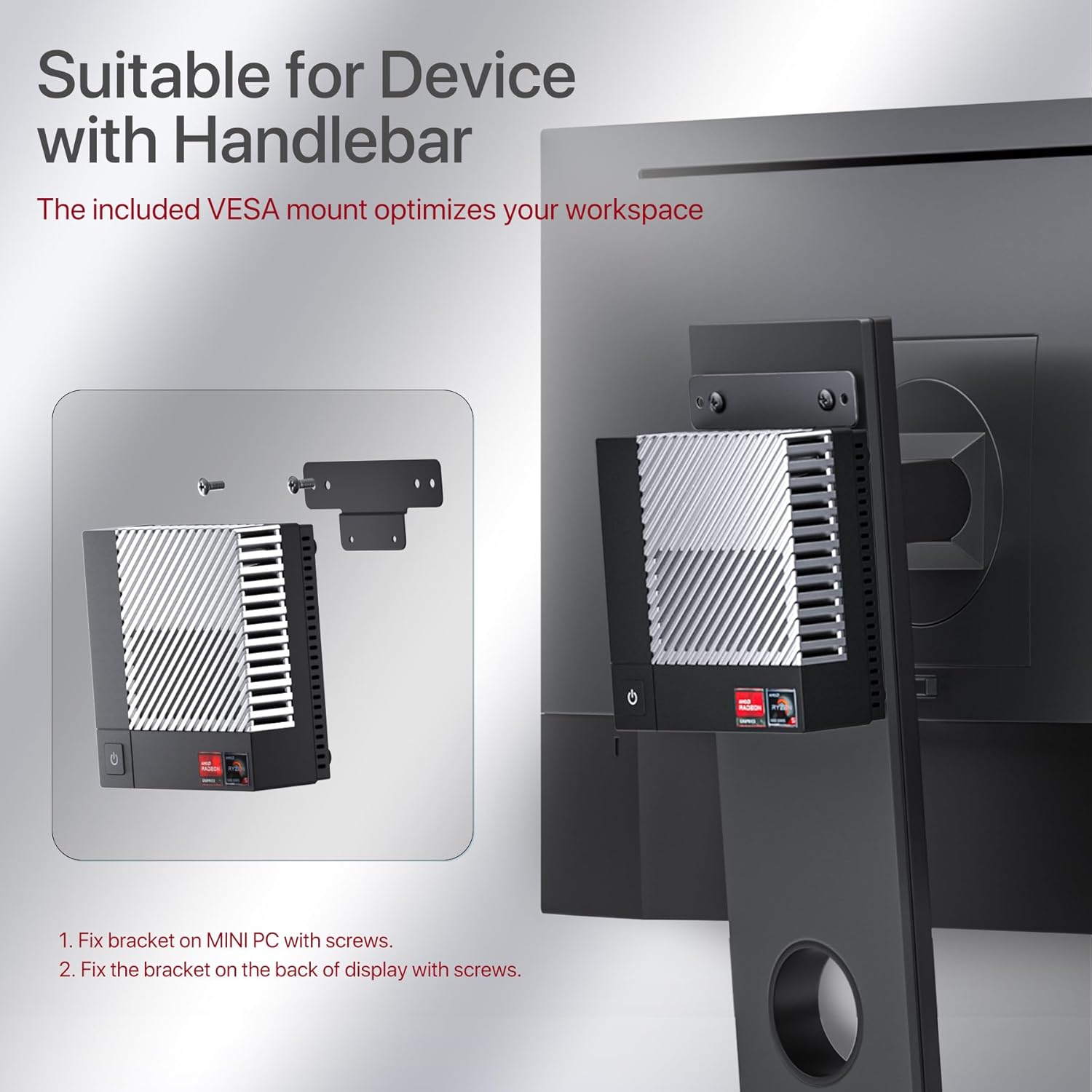
Image: Step-by-step diagram illustrating the installation of the PELADN HA-2 Mini PC using the VESA mount on the back of a monitor.
Bedryfsinstruksies
Krag aan/af
- Om aan te skakel: Druk een keer die kragknoppie.
- Om af te sluit: Use the operating system's shutdown procedure. Alternatively, press and hold the power button for 5 seconds to force a shutdown (not recommended for regular use).
Koppel aan skerms
The PELADN HA-2 supports up to three 4K displays simultaneously via HDMI, DisplayPort, and Type-C ports.

Image: A PELADN HA-2 Mini PC connected to three 4K monitors, demonstrating its triple display output capability for enhanced productivity or entertainment.
Draadlose konneksie
- Wi-Fi: The Mini PC features Wi-Fi 5 (802.11ac) for wireless network connections. Access Wi-Fi settings through your operating system.
- Bluetooth: Bluetooth 4.2 is integrated for connecting wireless peripherals such as keyboards, mice, and headphones.
Onderhoud en opgraderings
Skoonmaak
- Maak seker die toestel is afgeskakel en ontkoppel voordat dit skoongemaak word.
- Gebruik 'n sagte, droë lap om die buitekant af te vee.
- For dust accumulation in vents, use compressed air.
Berging Uitbreiding
The Mini PC comes with a 512GB NVME 2280 SSD. Storage can be expanded up to 2TB with an additional 2.5-inch SSD (not included).
RAM Upgrade
The device ships with 16GB DDR4 RAM and has an additional slot for memory expansion. Consult the manufacturer for compatible RAM modules and installation instructions.
Probleemoplossing
| Probleem | Moontlike oorsaak | Oplossing |
|---|---|---|
| Geen krag nie | Kragadapter nie gekoppel nie of foutiewe stopcontact. | Ensure power adapter is securely connected to the PC and a working power outlet. |
| Geen vertoonuitset nie | Monitor not connected, incorrect input selected, or faulty cable. | Check HDMI/DisplayPort cable connections. Ensure monitor is on and set to the correct input source. Try a different cable or monitor. |
| Wi-Fi verbind nie | Incorrect password, router issue, or Wi-Fi driver problem. | Verify Wi-Fi password. Restart router. Check operating system's network settings and ensure Wi-Fi drivers are installed. |
| Stelsel oorverhit | Blocked ventilation or heavy workload. | Ensure vents are clear of obstructions. Reduce demanding tasks. Consider cleaning internal components if comfortable. |
If issues persist, please contact PELADN customer support.
Spesifikasies
| Kenmerk | Detail |
|---|---|
| Verwerker | AMD Ryzen 7 5800U (8 Kerne/16 Drade, tot 4.4 GHz) |
| Grafika | Radeon RX Vega 8 Graphics (1750 MHz) |
| RAM | 16 GB DDR4 (3200 MHz) |
| Berging | 512GB NVME 2280 SSD (Expandable up to 2TB with 2.5" SSD) |
| Video-uitset | HDMI, DisplayPort, Type-C (Supports Triple 4K@60Hz Display) |
| Draadlose konneksie | Wi-Fi 5 (802.11ac), Bluetooth 4.2 |
| LAN-poorte | 1x 2.5G LAN, 1x 1G LAN |
| USB-poorte | 2x USB 3.0, 2x USB 2.0, 1x Tipe-C |
| Oudio | 1x Headphone Jack |
| Bedryfstelsel | OS 64bit (as per product description) |
| Afmetings | Ongeveer 5 x 5 x 2 duim |
| Gewig | Ongeveer 2.9 pond |
Waarborg en Ondersteuning
PELADN provides customer support for its products. For warranty claims, technical assistance, or further inquiries, please refer to the contact information provided with your purchase or visit the official PELADN webwebwerf.
Let wel: Modifying the device's hardware beyond specified upgrade options may void your warranty. Always consult official support channels for guidance on upgrades or repairs.
Ask a question about this manual
Ask about setup, troubleshooting, compatibility, parts, safety, or missing instructions. Manuals+ will review the question and use this page’s manual context to help answer it.