
Inleiding
The EKSA E1000WT Wireless Gaming Headset is designed to provide an immersive audio experience for gamers across multiple platforms. Featuring 2.4GHz ultra-low latency wireless technology, 7.1 surround sound, and an AI noise-cancelling microphone, this headset ensures clear communication and precise audio positioning. Its ergonomic design and long battery life make it suitable for extended gaming sessions.

The EKSA E1000WT Wireless Gaming Headset, featuring vibrant RGB lighting on the earcups and a detachable microphone, shown alongside its compact USB dongle for wireless connectivity.
Sleutel kenmerke
- 2.4GHz Ultra-Low Latency: Ensures stable and lossless sound quality transmission with less than 35ms delay for an immersive, lag-free wireless gaming experience.
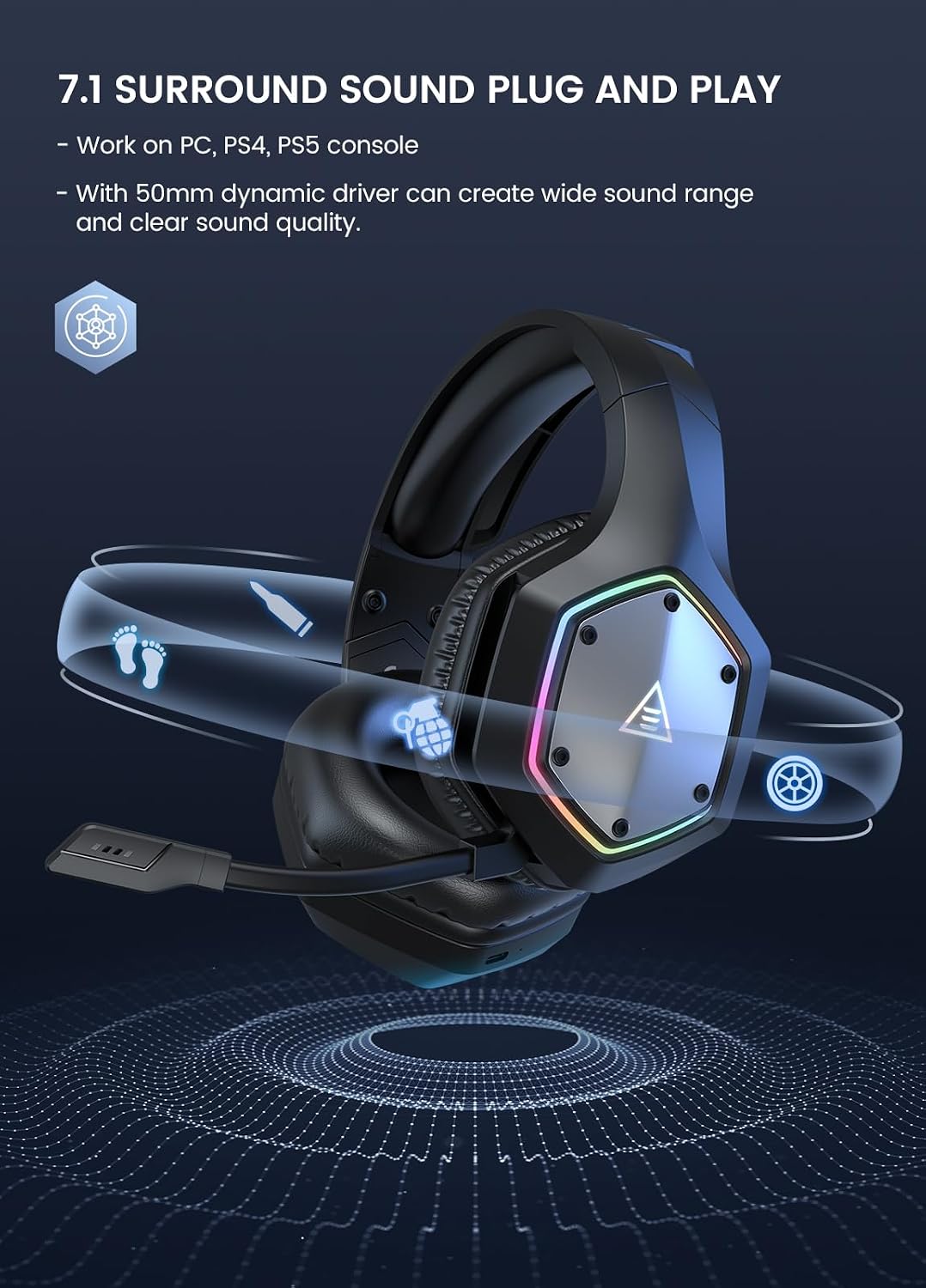
- Plug and Play 7.1 Surround Sound: Upgraded 50mm drivers deliver powerful bass and immersive sound, allowing precise audio positioning for footsteps and gunshots. No additional software is required for 7.1 surround sound on compatible devices.
- Lang batterylewe: Equipped with a 1500mAh rechargeable battery, providing up to 36 hours of continuous wireless use (lights off) on a 2.5-hour charge. Includes a 3.5mm audio cable for wired mode.
- AI Noise Cancelling Microphone: Built-in AI chip isolates voice and eliminates up to 96% of distracting background noise, ensuring clear in-game communication.
- Stress-Free Wear: Premium soft memory protein sponge earpads and an adjustable headband provide extreme comfort for extended periods.

A banner showcasing the key features of the EKSA E1000WT headset, including 2.4GHz mode, ENC noise-cancelling mic, 7.1 surround sound, 36-hour battery life, RGB lights, 50mm drivers, and wired mode.

'n ontplof view diagram illustrating the 50mm Neodymium Drivers, emphasizing their role in producing a wide sound range and clear sound quality.
Pakketinhoud
- EKSA E1000WT Headset
- USB-A Dongle
- 3.5 mm klank kabel
- Gebruikershandleiding
- Dra sakkie
- Vinnige gids

The EKSA E1000WT headset displayed with its USB dongle and 3.5mm audio cable, representing the core components included in the package.
Opstelling
Wireless Connection (2.4GHz)
For wireless use, simply plug the USB-A dongle into a compatible device. The headset will automatically connect, providing a stable and low-latency audio experience.
A close-up of the 2.4GHz USB dongle, highlighting its compact design and the wireless transmission technology.
Wired Connection (3.5mm)
For wired use, connect the provided 3.5mm audio cable to the headset's 3.5mm port and then to your desired device. This mode is ideal when battery power is low or for devices that do not support USB audio.
Verenigbaarheid
The EKSA E1000WT headset offers broad compatibility:
- Wireless (USB Dongle): PC, PS5, PS4, Laptops.
- Bedraad (3.5mm-klankkabel): PS4, PS5, Nintendo Switch, Xbox One S/X, Mobile Devices.

A visual representation of the headset's wide compatibility, showing connections to PC, Laptop, PS5, PS4 via USB dongle, and Xbox, PS4, PS5, Mobile Devices, and Switch via 3.5mm interface.
Bedryfsinstruksies
Oor-kontroles
The headset features convenient on-ear controls for easy adjustments during gameplay or calls:
- Volume Adjuster: Scroll up for Volume +, scroll down for Volume -.
- Mikrofoonknoppie: Press for 3 seconds for ENC (Environmental Noise Cancellation) On/Off. Click once for Microphone On/Off (with voice alert).
- Kragknoppie: Press for 3 seconds for Power On/Off. Click once for Surround Sound On/Off. Double-click for Light On/Off.
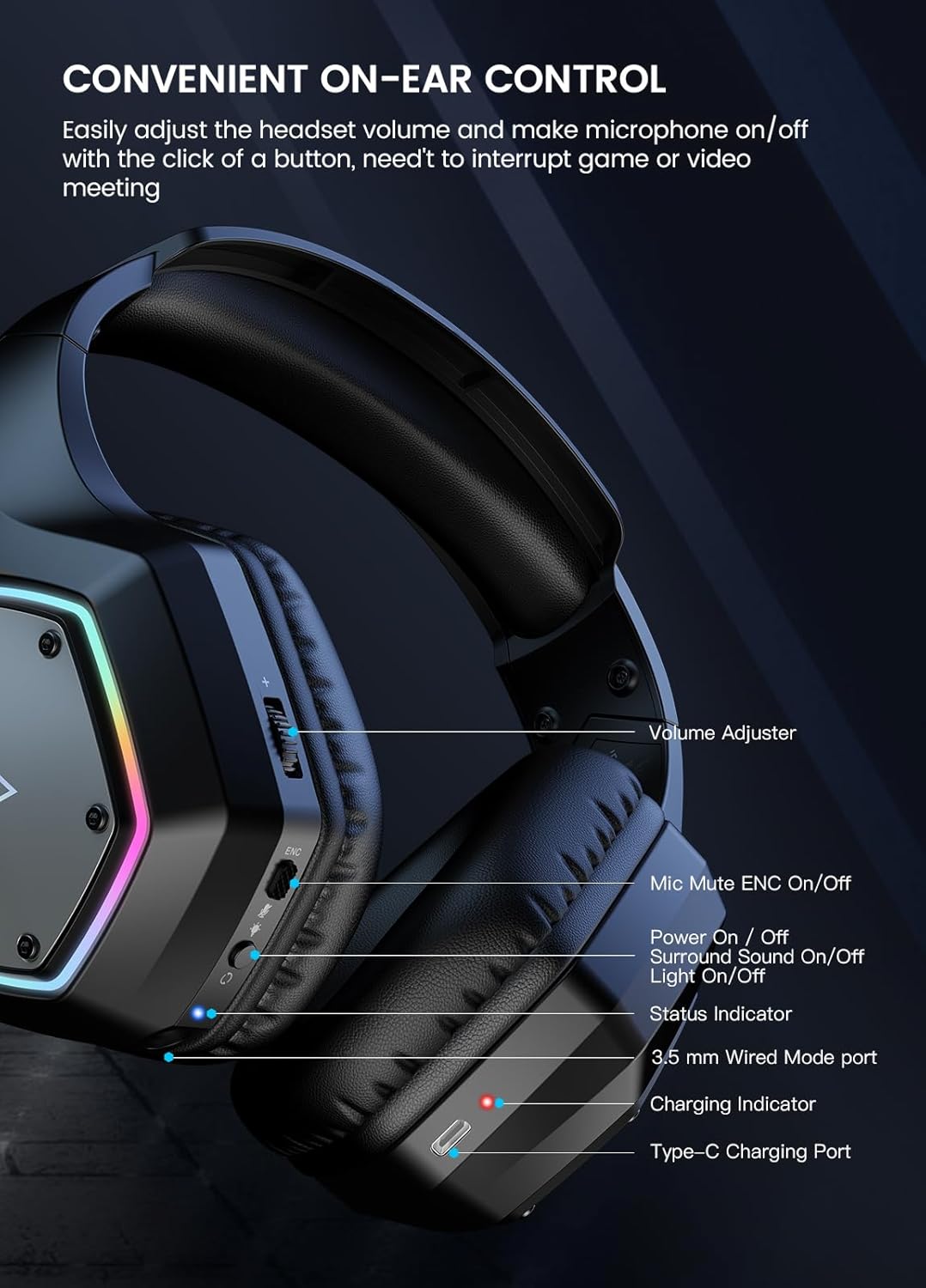
'n Gedetailleerde view of the left earcup, illustrating the various control buttons and ports, including the volume adjuster, mic mute, power button, status indicator, 3.5mm port, and Type-C charging port.
Mikrofoongebruik
The adjustable cardioid microphone with AI noise cancellation ensures your voice is captured clearly while minimizing background noise. Adjust the microphone's position for optimal voice pickup.

A close-up of the headset's AI Intelligent Noise Cancelling Microphone, highlighting its 360-degree extensive pickup and 120-degree flexible adjustable design.
RGB beligting
The headset features gradual colorful RGB lighting on the earcups. To extend battery life, you can turn off the RGB lights using the power button (double-click).

The EKSA E1000WT headset displayed on a stand, showcasing its gradual colorful RGB lighting on the earcups. A note advises turning off RGB lights to extend battery usage time.
Onderhoud
Proper maintenance ensures the longevity and optimal performance of your EKSA E1000WT headset:
- Skoonmaak: Gebruik 'n sagte, droë lap om die oorskelpe en kopband af te vee. Vermy die gebruik van harde chemikalieë of skuurmiddels.
- Berging: When not in use, store the headset in its provided carry pouch to protect it from dust and scratches.
- Kabelversorging: Vermy skerp draaie of oormatige trek aan die kabels om skade te voorkom.
- Battery: For optimal battery health, avoid fully discharging the headset frequently. Charge it regularly, even if not in constant use.
Probleemoplossing
| Probleem | Oplossing |
|---|---|
| Geen klank van die oorfone nie | Check volume levels on both headset and device. Ensure correct connection (USB dongle or 3.5mm cable). Verify headset is powered on. |
| Mikrofoon werk nie | Ensure microphone is not muted (check mic button). Verify microphone is enabled in device sound settings. Re-plug the headset/dongle. |
| Swak klankgehalte / Statiese | Ensure headset is within range of the USB dongle (if wireless). Check for interference from other 2.4GHz devices. Try a different USB port or 3.5mm jack. |
| Koptelefoon koppel nie draadloos nie | Ensure the USB dongle is properly inserted. Power cycle the headset and dongle. Check device drivers for the headset. |
| RGB-ligte werk nie | Double-click the power button to toggle RGB lights. Ensure headset has sufficient battery charge. |
Spesifikasies
| Kenmerk | Detail |
|---|---|
| Model Naam | EKSA E1000WT |
| Verbindingstegnologie | Wireless (2.4GHz RF) & Wired (3.5mm) |
| Koptelefoonaansluiting | USB & 3.5mm |
| Luidspreker deursnee | 50 mm |
| Frekwensiereeks | 20 Hz - 20 kHz |
| Mikrofoon sensitiwiteit | -42dB ± 3dB |
| Afmetings van mikrofone | 6.0mm*2.7mm |
| Batterylewe | Up to 36 Hours (lights off) |
| Laai tyd | 2.5 ure |
| Oudio-latensie | 35 millisekondes |
| Oorstukvorm | Ovaal |
| Item gewig | 1.23 pond |
Waarborg en Ondersteuning
EKSA products typically come with a manufacturer's warranty. For specific warranty details and duration, please refer to the warranty card included in your product packaging or visit the official EKSA webwebwerf.
For technical support, troubleshooting assistance, or any product-related inquiries, please contact EKSA customer support:
- E-pos: support@eksa.co.in (as per packaging information)
- Phone (India): +918929388620 (as per packaging information)
You may also find helpful resources and FAQs on the EKSA official webwebwerf.