
BOTHSTAR YJ42
Gebruikershandleiding
Double Sided Keyless Door Knob Lock with Fingerprint and Keypad
Brand: BOTHSTAR | Model: YJ42
1. Inleiding
Thank you for choosing the BOTHSTAR Double Sided Keyless Door Knob Lock. This advanced smart lock provides secure and convenient access control for both interior and exterior doors. With multiple unlocking methods including fingerprint, keypad code, and traditional key, it offers enhanced security and flexibility for homes, offices, and various other settings. This manual will guide you through the installation, setup, operation, and maintenance of your new smart doorknob.

Figure 1.1: BOTHSTAR Double Sided Keyless Door Knob Lock (Satin Nickel)
2. Belangrike veiligheidsinligting
- Lees alle instruksies noukeurig voor installasie en gebruik.
- Moenie probeer om die slot uitmekaar te haal of te wysig nie. Dit kan skade veroorsaak en die waarborg ongeldig maak.
- Keep backup keys in a secure location outside the property.
- Ensure proper battery installation and replace batteries when the low battery voice prompt is activated.
- This product is designed for specific door thickness and backset. Verify compatibility before installation.
- While the lock is IPX6 waterproof, avoid prolonged submersion or direct high-pressure water spray.
3. Pakketinhoud
Carefully unpack the box and ensure all components are present and in good condition. If any items are missing or damaged, please contact customer support.
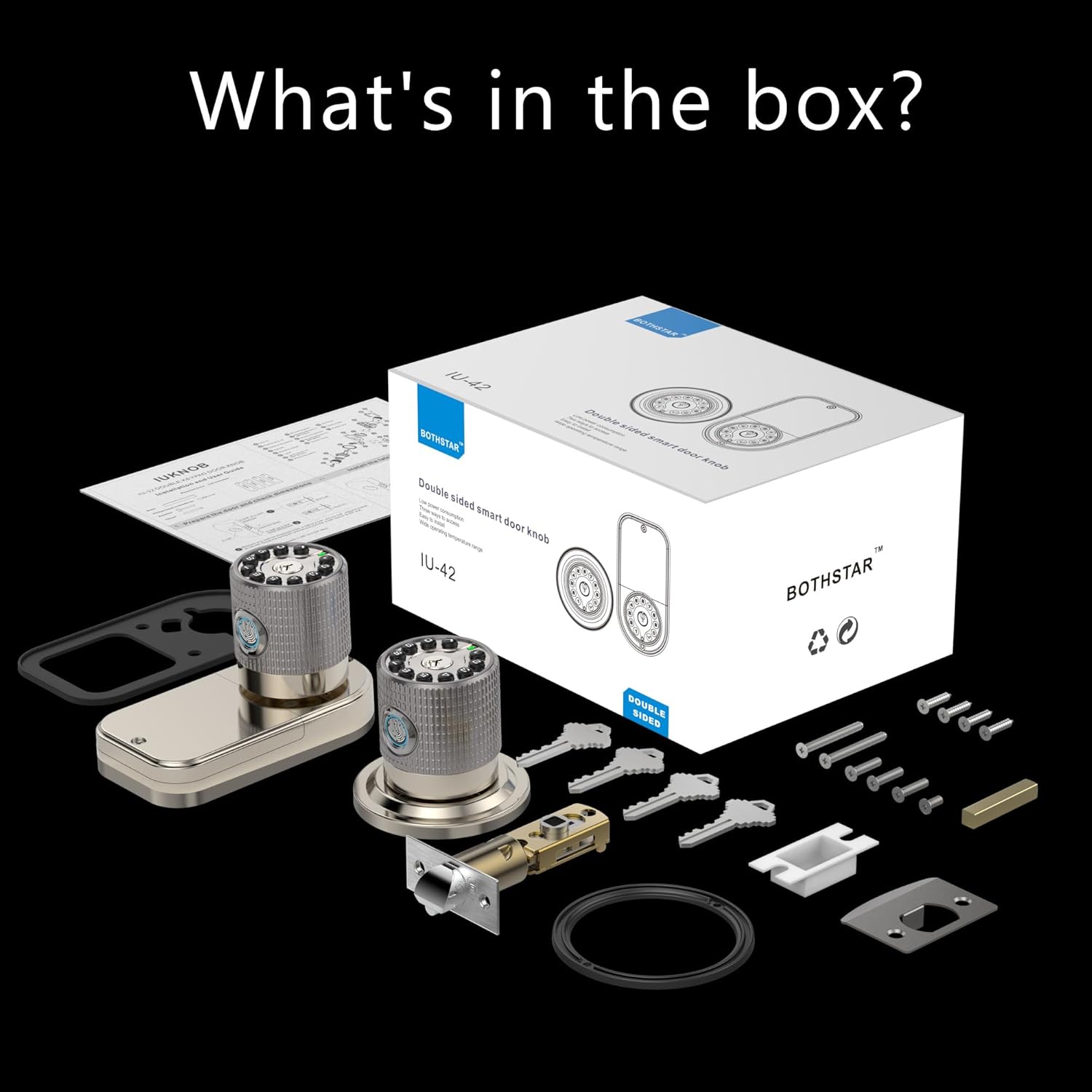
Figure 3.1: What's in the box?
- Double Sided Fingerprint Door Knob (Exterior)
- Double Sided Fingerprint Door Knob (Interior)
- Adjustable Latch (2-3/8" or 2-3/4")
- Stakplaat
- Monteringskroewe en hardeware
- Physical Keys (Set of 4)
- Installasie sjabloon
- Gebruikershandleiding
4. Installasiehandleiding
Before beginning installation, ensure your door meets the following specifications:
- Door Thickness: 1-1/4" to 3-7/8" (32mm to 98mm)
- Backset: Adjustable for 2-3/8" (60mm) or 2-3/4" (70mm)

Figure 4.1: Door thickness and latch dimensions
Installasie stappe:
- Berei die deur voor: If replacing an existing lock, remove it. Use the provided template to mark and drill holes if installing on a new door.
- Installeer die grendel: Insert the latch into the door edge. Ensure the latch bolt faces the correct direction (slanted side towards the door frame). Secure with screws.
- Install the Exterior Knob: Feed the cable from the exterior knob through the door hole. Align the knob with the latch and secure it.
- Installeer die binnekantknop: Connect the cable from the exterior knob to the interior knob. Align the interior knob with the mounting plate and secure it with screws.
- Plaas batterye in: Open the battery cover on the interior knob and insert 4 AAA batteries (not included), ensuring correct polarity.
- Toetswerking: After installation, test the mechanical operation of the latch and knobs.
5. Aanvanklike Opstelling en Programmering
The BOTHSTAR smart lock offers multiple functions for enhanced security and convenience.

Figure 5.1: Multi-function & Security Features
5.1 Adding Fingerprints (Up to 100)
- Press the 'Set' button on the interior knob. The lock will prompt for administrator fingerprint.
- Place your finger on the fingerprint sensor. The lock will beep and prompt you to lift and place your finger multiple times for a complete scan.
- Once successfully registered, the lock will confirm with a voice prompt.
- Herhaal vir bykomende vingerafdrukke.
5.2 Adding User Codes (Up to 50)
- Press the 'Set' button. Enter the administrator code (default is 123456) followed by '#'.
- Press '1' to add a user code.
- Enter your desired 6-10 digit user code, then press '#'.
- Re-enter the same user code and press '#' to confirm.
- The lock will confirm successful addition.
5.3 Setting Auto-Lock Function
The auto-lock feature can be set to automatically lock the door after a specified delay (2 seconds to 12 hours).
- Press the 'Set' button. Enter the administrator code followed by '#'.
- Press '3' to enter auto-lock settings.
- Enter the desired delay time in seconds (e.g., '5' for 5 seconds) or hours (e.g., '12H' for 12 hours), then press '#'.
- The lock will confirm the setting.
6. Operasie
The BOTHSTAR smart lock provides convenient access from both sides of the door.

Figure 6.1: Double-sided access with multiple unlock methods
6.1 Ontsluit met vingerafdruk
- Plaas 'n geregistreerde vinger op die vingerafdruksensor.
- The lock will verify the fingerprint (approx. 0.25s) and unlock.
- Draai die knop om die deur oop te maak.
6.2 Unlocking with Keypad Code
- Enter a registered user code on the keypad.
- Druk die '#'-sleutel.
- The lock will verify the code and unlock.
- Draai die knop om die deur oop te maak.
6.3 Ontsluit met Fisiese Sleutel
- Insert the physical key into the keyhole.
- Turn the key to unlock the door.
- Draai die knop om die deur oop te maak.
6.4 Deur sluit
- Outomatiese slot: If auto-lock is enabled, the door will lock automatically after the set delay once closed.
- Handmatige slot: Druk en hou die '#'-knoppie op die sleutelbord vir 2 sekondes in om die deur handmatig te sluit.
7. Onderhoud
7.1 Batteryvervanging
- The lock will provide a voice prompt when batteries are low.
- Maak die batteryklep op die binneste knop oop.
- Replace all 4 AAA batteries with new, high-quality alkaline batteries. Ensure correct polarity.
- In case of completely dead batteries, the lock can be temporarily powered via a 5V USB-C cord for emergency access.
7.2 Skoonmaak
- Clean the lock surface with a soft, damp lap.
- Moenie skuurmiddels, oplosmiddels of harde chemikalieë gebruik nie, aangesien dit die afwerking en elektroniese komponente kan beskadig.
- Keep the fingerprint sensor clean and dry for optimal performance.
8. Probleemoplossing
| Probleem | Moontlike oorsaak | Oplossing |
|---|---|---|
| Slot reageer nie. | Dooie batterye. | Replace batteries. Use USB-C for emergency power. |
| Vingerafdruk nie herken nie. | Finger is wet/dirty, sensor is dirty, or fingerprint not registered correctly. | Clean finger and sensor. Re-register fingerprint if necessary. |
| Keypad code not working. | Incorrect code entered, code not registered, or keypad malfunction. | Verify code. Re-register code. Check for keypad damage. |
| Lock does not auto-lock. | Auto-lock feature disabled or incorrect delay set. | Check auto-lock settings and enable/adjust as needed. |
| Slot maak ongewone geluide. | Meganiese obstruksie of interne probleem. | Check for obstructions around the latch. If problem persists, contact support. |
9. Produkspesifikasies
| Kenmerk | Spesifikasie |
|---|---|
| Handelsmerk | BOTHSTAR |
| Model Naam | YJ42 LOCK |
| Tipe slot | Kombinasie slot |
| Spesiale kenmerke | Double sided fingerprint, Double sided keypad |
| Materiaal | Zinc Alloy, Metal Handle |
| Kleur | Satyn Nikkel |
| Produk afmetings | 8 x 4 x 4 duim |
| Item gewig | 3.58 pond (1.63 kilogram) |
| Deurdikte-versoenbaarheid | 1-1/4" to 3-7/8" |
| Latch Bolt Specifications | 2-3/8" or 2-3/4" adjustable |
| Kragbron | 4 x AAA-batterye (nie ingesluit nie) |
| Noodkrag | 5V USB-C |
| Waterdigte gradering | IPX6 |
| Bedryfstemperatuur | -22°F tot +176°F (-30°C tot +80°C) |
| Vingerafdruk kapasiteit | 100 |
| Gebruikerskode Kapasiteit | 50 |
10. Waarborg en Ondersteuning
BOTHSTAR provides a comprehensive warranty and dedicated customer support for your smart lock.
Waarborginligting:
- Gratis vervanging: Enjoy a free replacement for your product within 1 year from the date of purchase.
- Lewenslange na-verkope kliëntediens: We are committed to providing support for the lifetime of your product.
Tegniese ondersteuning:
For any technical assistance, troubleshooting, or warranty claims, please contact our 24/7 online technical support. Refer to the contact information provided on the product packaging or the official BOTHSTAR webwebwerf.