
Acekool CF9
Acekool Draagbare Lugversorger Gebruikershandleiding
Model: CF9 | Handelsmerk: Acekoel
1. Inleiding
Thank you for choosing the Acekool Portable Air Conditioner. This 3-in-1 unit provides powerful cooling, efficient dehumidification, and effective air circulation through its fan mode. Designed for convenience and portability, it is ideal for cooling rooms up to 35 square meters. Please read this manual thoroughly before operation to ensure proper use, maintenance, and safety.
2. Veiligheidsinligting
Om die risiko van brand, elektriese skok of besering te verminder wanneer u lugversorger gebruik, volg hierdie basiese voorsorgmaatreëls:
- Always plug the unit into a grounded 220V AC outlet. Do not use extension cords or adapter plugs.
- Moenie die eenheid met 'n beskadigde koord of prop gebruik nie.
- Moenie luginlate of -uitlate blokkeer nie. Verseker voldoende speling rondom die eenheid vir behoorlike lugvloei.
- Hou die eenheid weg van hittebronne, direkte sonlig en vlambare materiale.
- Moenie vingers of vreemde voorwerpe in die luginlate of -uitlate steek nie.
- Ontkoppel die eenheid voordat u skoonmaak of enige onderhoud uitvoer.
- Hierdie toestel is nie bedoel vir gebruik deur persone (insluitend kinders) met verminderde fisiese, sensoriese of geestelike vermoëns, of 'n gebrek aan ervaring en kennis nie, tensy hulle toesig of instruksies oor die gebruik van die toestel gegee is deur 'n persoon wat verantwoordelik is vir hul veiligheid.
- Maak seker dat die eenheid op 'n plat, stabiele oppervlak geplaas word om te verhoed dat dit kantel.
3. Produkkenmerke
- Kragtig en Doeltreffend: Delivers strong cooling power to quickly and effectively cool your room. Enjoy personal comfort at the touch of a button.
- Flexible and Mobile: Equipped with wheels for easy movement between rooms. Provides a pleasant climate in bedrooms, living rooms, or offices. Adjustable settings allow customization of cooling needs.
- Easy to Use and Control: Features an intuitive control panel and remote control for setting temperature, timer, and fan speed. The convenient timer function allows pre-programming for energy saving.
- Energy-efficient and Environmentally Friendly: Designed for low power consumption, helping to reduce energy costs. Uses R290 refrigerant, contributing to environmental protection.
- Elegant en kompak: Boasts a sleek and modern design that blends seamlessly into any room, making it an attractive addition to your home or office.

Image: The unit's compact size delivers high cooling performance, suitable for rooms up to 300 sq. ft. with 9000 BTU cooling capacity and 350m³/h airflow.

Image: The unit uses environmentally friendly R290 refrigerant, promoting energy efficiency and cost savings.

Image: The 3-in-1 operation system includes cooling (down to 16°C), dehumidifying (up to 42L/day), and fan (2 speeds) functions.
4. Produkspesifikasies
| Spesifikasie | Waarde |
|---|---|
| Handelsmerk | Acekoel |
| Modelnommer | CF9 |
| Produkafmetings (L x B x H) | 45 x 89 x 44 cm |
| Gewig | 26 kilogram |
| Energiedoeltreffendheidgradering | A |
| Verkoelingskapasiteit | 9000 BTU |
| Ontvochtigingskapasiteit | 42 liter/dag |
| Jaarlikse kragverbruik | 1000 Watt |
| Geraasvlak | 55 dB |
| Installasie tipe | Venster |
| Spesiale kenmerk | Ontvochtiger |
| Kleur | Swart |
| Voltage | 220 Volt |
| Krag | 1000 Watt |
| Seisoenale Energie-doeltreffendheidsverhouding (SEER) | 2.6 |
5. Pakketinhoud
Kontroleer asseblief dat alle komponente teenwoordig en in 'n goeie toestand is:
- Acekool Portable Air Conditioner Unit
- Uitlaatslang
- Window Seal Kit (includes window slider kit and adapter)
- Afstandbeheer
- Drain Hose (for continuous drainage in dehumidifier mode)
- Gebruikershandleiding (hierdie dokument)
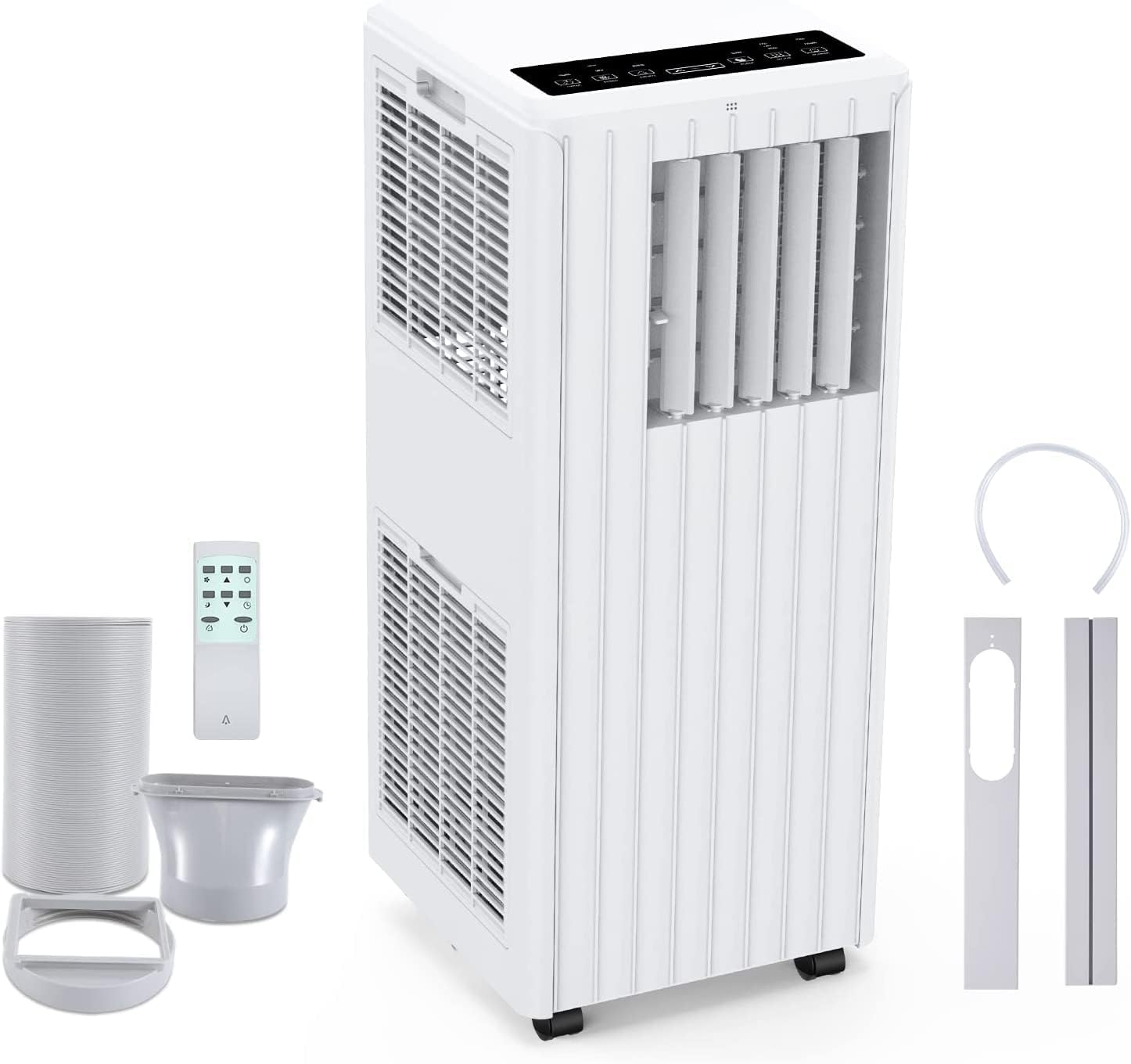
Image: All components included in the package: the main unit, exhaust hose, window sealing plate, remote control, and drain bucket.
6. Opstelling en installering
Volg hierdie stappe om jou draagbare lugversorger op te stel:
- Posisionering: Place the air conditioner on a flat, stable surface near a window and a grounded electrical outlet. Ensure there is at least 20 cm (8 inches) of space around the unit for proper airflow.
- Heg die uitlaatslang aan: Screw one end of the exhaust hose into the air outlet on the back of the unit.
- Install Window Seal Kit: Adjust the window slider kit to fit your window opening. Secure it in place.
- Koppel die uitlaatpyp aan die vensterstel: Attach the other end of the exhaust hose to the adapter on the window slider kit, ensuring a tight seal to prevent hot air from re-entering the room.
- Kragverbinding: Steek die kragkabel in 'n geaarde 220V AC-aansluiting.

Image: Visual guide for easy installation, showing how to connect the exhaust hose to the unit and the window sealing plate.
7. Bedryfsinstruksies
Your Acekool Portable Air Conditioner can be operated using the control panel on the unit or the included remote control.
Beheerpaneel en afstandbeheer
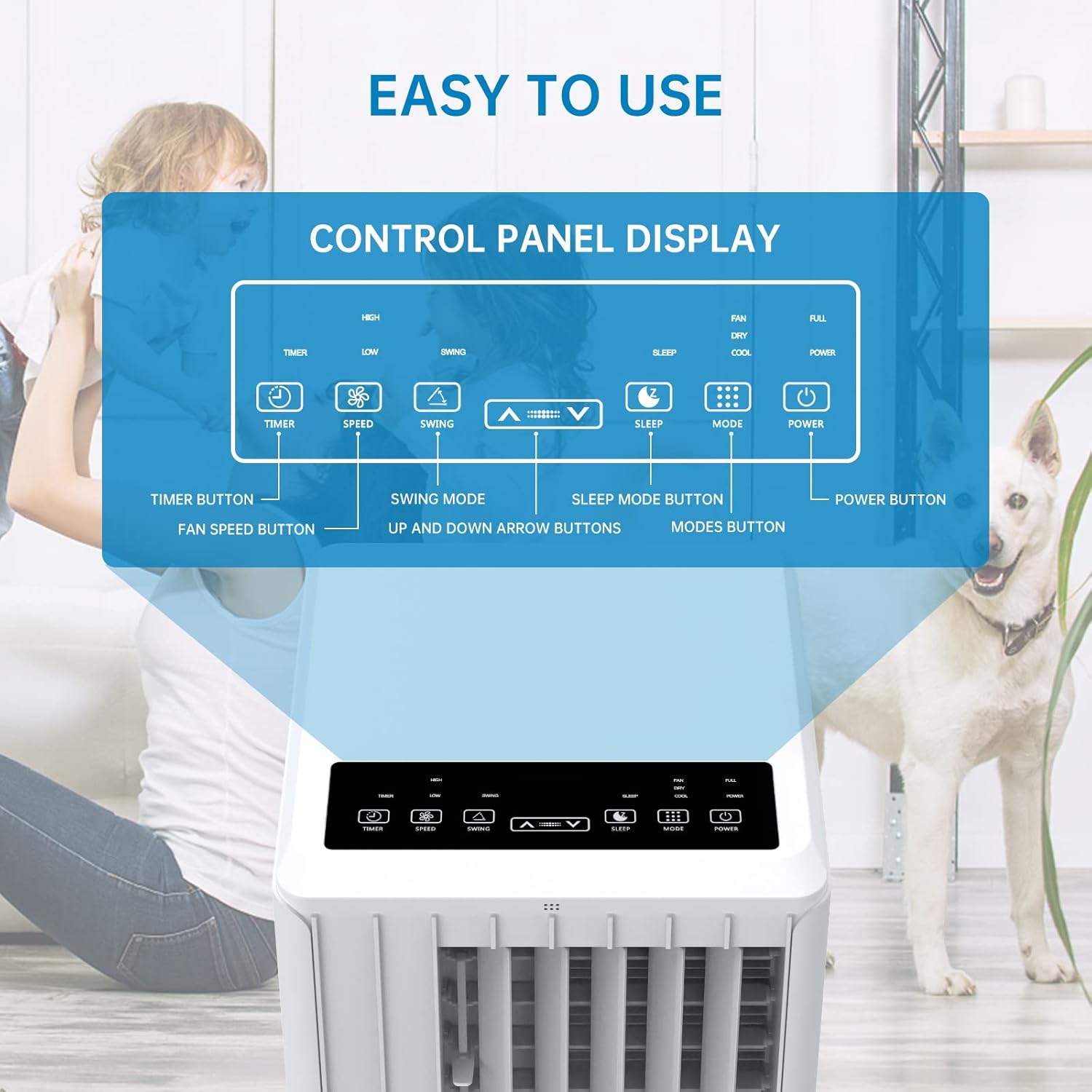
Beeld: Gedetailleerd view of the control panel display, indicating buttons for Timer, Speed, Swing, Sleep, Mode, and Power.

Image: The unit can be conveniently controlled via the remote control, and features a swing mode for wider air distribution.
Bedryfsmodusse

Beeld: Oorview of the main operating modes: Cool, Fan, Dry (Dehumidifying), and Sleep, along with smart timer functionality.
- Koel modus: Press the "Mode" button until the snowflake icon appears. Use the Up/Down arrows to set your desired temperature (16°C - 30°C). The unit will cool the room to the set temperature.
- Aanhangermodus: Press the "Mode" button until the fan icon appears. In this mode, the unit circulates air without cooling. Use the "Speed" button to adjust fan speed (Low/High).
- Dehumidify Mode (Dry): Press the "Mode" button until the water drop icon appears. The unit will remove excess moisture from the air. In this mode, the fan speed cannot be adjusted. Ensure the continuous drainage hose is connected for prolonged use.
- Slaap stelling: Press the "Sleep" button. In this mode, the unit operates quietly and gradually increases the temperature by 1°C after the first hour and another 1°C after the second hour, maintaining this temperature for 6 hours before returning to normal operation. This mode is ideal for nighttime use.

Image: The sleep mode offers automatic shut-off, quiet operation (55dB), and a 24-hour smart timer for comfortable nighttime use.
Bykomende funksies
- Timer funksie: Press the "Timer" button to set the desired operating time (1-24 hours) for automatic turn on/off.
- Fan Spoed: In Cool or Fan mode, press the "Speed" button to cycle through Low and High fan speeds.
- Swaai funksie: Press the "Swing" button to activate or deactivate the automatic vertical oscillation of the air louvers, distributing air more evenly.
8. Onderhoud
Regular maintenance ensures optimal performance and extends the lifespan of your air conditioner. Always unplug the unit before cleaning.
Maak die lugfilter skoon
Die lugfilter moet elke twee weke of meer gereeld skoongemaak word, afhangende van gebruik en luggehalte.
- Verwyder die lugfilter van die agterkant van die eenheid.
- Was die filter met warm seepwater. Spoel deeglik af.
- Laat die filter heeltemal lugdroog word voordat dit weer in die eenheid geplaas word.
Water dreineer
The unit has an internal water tank that collects condensed water. When the tank is full, the unit will stop operating and display a "FULL" indicator. You will need to drain the water manually.
- Place a shallow pan or bucket under the drain port at the bottom rear of the unit.
- Verwyder die dreinprop sodat die water kan uitvloei.
- Sodra dit gedreineer is, plaas die dreinprop stewig terug.
For continuous dehumidification, attach the provided drain hose to the continuous drain port.
Skoonmaak van die buitekant van die eenheid
Vee die buitekant van die eenheid af met 'n sagte, damp lap. Moenie harde chemikalieë of skuur skoonmaakmiddels gebruik nie.
Berging
Indien die eenheid vir 'n lang tydperk gestoor word:
- Dreineer al die water uit die eenheid.
- Maak die lugfilter skoon.
- Bêre die eenheid op 'n droë, koel plek, weg van direkte sonlig.
9. Probleemoplossing
Voordat u kliëntediens kontak, raadpleeg asseblief die volgende probleemoplossingsgids vir algemene probleme:
| Probleem | Moontlike oorsaak | Oplossing |
|---|---|---|
| Eenheid skakel nie aan nie | No power supply; Power cord unplugged; Circuit breaker tripped; Water tank full. | Kontroleer die kragaansluiting; Steek die kragkabel stewig in; Herstel die stroombreker; Dreineer die watertenk. |
| Eenheid verkoel nie effektief nie | Air filter dirty; Exhaust hose not properly installed/sealed; Room too large; Doors/windows open; Air inlet/outlet blocked. | Clean air filter; Ensure exhaust hose is properly installed and sealed; Close doors/windows; Clear obstructions from air inlets/outlets. |
| Die eenheid is raserig | Unit not on a flat surface; Air filter dirty; Internal components vibrating. | Place unit on a flat, stable surface; Clean air filter; If noise persists, contact customer support. |
| Waterlekkasies uit eenheid | Drain plug loose; Continuous drain hose not properly connected or blocked. | Ensure drain plug is secure; Check continuous drain hose for proper connection and clear any blockages. |
| Afstandbeheer werk nie | Batterye pap of verkeerd geplaas; Obstruksie tussen afstandbeheerder en eenheid. | Replace batteries; Ensure line of sight between remote and unit. |
10. Waarborg en Ondersteuning
For warranty information and customer support, please refer to the warranty card included with your product or visit the official Acekool website. Do not attempt to repair the unit yourself, as this may void the warranty and pose safety risks. For any issues not covered in this manual, please contact Acekool customer service.
Ask a question about this manual
Ask about setup, troubleshooting, compatibility, parts, safety, or missing instructions. Manuals+ will review the question and use this page’s manual context to help answer it.