
1. Inleiding
Thank you for choosing the LIFETIME GD-BL 44-Inch Ergonomic Z-Shaped Gaming Desk. This manual provides essential information for the safe assembly, operation, and maintenance of your new desk. Please read it thoroughly before use and retain it for future reference.
2. Veiligheidsinligting
- Gewigsbeperking: Do not exceed the maximum weight recommendation of 150 pounds (68 kg) on the desktop. Overloading can cause instability and damage.
- Vergadering: Follow assembly instructions carefully to ensure stability and safety. Ensure all screws and fasteners are tightened securely before use.
- Plasing: Place the desk on a flat, stable surface. Avoid placing it in areas with high humidity or direct sunlight to prevent material degradation.
- Kinders: Hou klein onderdele en verpakkingsmateriaal weg van kinders tydens montering om verstikkingsgevare te voorkom.
- kabels: Utilize the wire management features to prevent tripping hazards and protect cables from damage.
3. Pakketinhoud
Verifieer dat alle komponente teenwoordig is voordat u met montering begin. Indien enige onderdele ontbreek of beskadig is, kontak asseblief kliëntediens.
- Desktop (Carbon Fiber Surface)
- Z-vormige beenrame (legeringstaal)
- Crossbars/Support Beams
- Verstelbare nivelleringsvoete
- Bekerhouer
- Koptelefoonhaak
- Kabelbestuurbak
- Monteringshardeware (skroewe, inbussleutel, ens.)
- Instruksie Handleiding
4. Opstelling en samestelling
The desk requires assembly and includes all necessary tools. Follow the provided instructions for a quick setup in approximately 30 minutes.
- Pak komponente uit: Verwyder alle dele versigtig uit die verpakking en lê dit op 'n sagte, skoon oppervlak om skrape te voorkom.
- Attach Leg Frames: Secure the Z-shaped leg frames to the underside of the desktop using the provided screws and Allen wrench. Ensure the frames are oriented correctly.
- Installeer dwarsbalke: Attach any reinforcing crossbars or support beams between the leg frames as indicated in the detailed assembly diagram.
- Pas die nivelleringsvoete aan: Screw the adjustable leveling feet into the bottom of the leg frames. Adjust them to ensure the desk is stable and level on your floor.
- Heg bykomstighede aan: Install the cup holder, headphone hook, and cable management tray to the designated locations on the desk.
Video: Vergadering verbyview for a similar gaming desk. This video demonstrates the general process of assembling a desk with a metal frame and desktop, including attaching legs and ensuring stability. Note that specific steps may vary slightly from your model.

Prent: Visual representation of the desk dimensions, highlighting the 44-inch width, 23.5-inch depth, and 29.5-inch height. This helps in planning your space for the desk.
5. Bedryf en kenmerke
Your LIFETIME GD-BL gaming desk is designed for optimal functionality and comfort.
- Spacious Carbon Fiber Surface: The 44" x 23.5" desktop provides ample space for multiple monitors, keyboards, mice, and other gaming or work essentials. The carbon fiber texture is stylish and durable.
- Ergonomic Z-Shaped Design: The unique Z-shaped alloy steel legs offer superior stability and a modern aesthetic, minimizing wobble during intense use.
- Integrated Cup Holder: A convenient, expandable cup holder is attached to the side of the desk, keeping your beverages secure and preventing spills on the desktop.
- Koptelefoonhaak: A dedicated hook allows you to hang your gaming headset or headphones, keeping them within reach and off the desktop.
- Draadbestuur: The integrated cable management tray helps organize and conceal power cords and peripheral cables, maintaining a clean and clutter-free workspace.
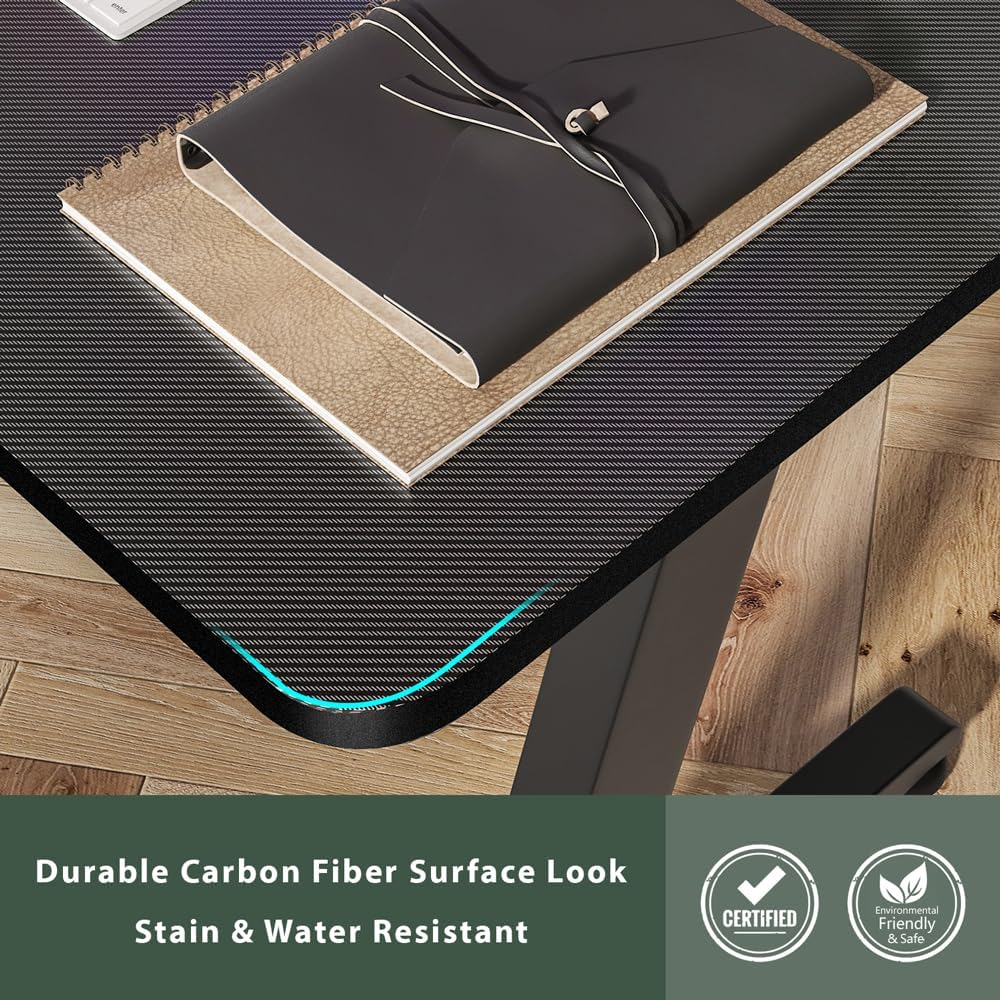
Prent: 'n Gedetailleerde view of the carbon fiber surface, showcasing its texture and finish. This surface is designed for durability and a modern aesthetic.

Prent: The desk set up in a room, demonstrating the practical use of the integrated cup holder and the overall spaciousness for a gaming setup.
6. Onderhoud
Om die lang lewensduur en voorkoms van jou lessenaar te verseker, volg hierdie onderhoudsriglyne:
- Skoonmaak: Vee die lessenaar en raam af met 'n sagte, damp lap. Vermy skuurmiddels of harde chemikalieë wat die afwerking kan beskadig.
- Gemors: Clean up spills immediately to prevent staining, especially on the carbon fiber surface.
- Bevestigingsmiddels: Kontroleer gereeld alle skroewe en bevestigingsmiddels om te verseker dat hulle styf bly. Draai weer vas indien nodig om stabiliteit te handhaaf.
- Vermy hitte: Do not place hot items directly on the desktop without a protective coaster.
7. Probleemoplossing
Indien u enige probleme met u lessenaar ondervind, raadpleeg die volgende algemene oplossings:
- Lessenaar is wankelrig:
- Maak seker dat alle monteerskroewe stewig vasgedraai is.
- Verstel die nivellerende voetjies aan die onderkant van die pote om te vergoed vir ongelyke vloeroppervlakke.
- Ontbrekende dele:
- Double-check all packaging materials. Small parts may be tucked away.
- Refer to the package contents list. If parts are genuinely missing, contact LIFETIME customer support.
- Oppervlakkrap:
- While the carbon fiber surface is durable, deep scratches may occur from sharp objects. Use a desk mat to protect the surface.
8. Spesifikasies
| Handelsmerk | LEWENSTYD |
| Modelnommer | GD-BL |
| Itemafmetings (L x B x H) | 44 x 23.5 x 29.5 duim |
| Tafelblad dikte | 1.2 duim |
| Maksimum gewig aanbeveling | 150 pond (68 kg) |
| Top materiaal tipe | Koolstofvesel |
| Basis materiaal | Allooi staal |
| Kleur | Swart |
| Monteringstyd (ongeveer) | 30 minute |
| Sluit alle monteergereedskap in | Ja |
9. Waarborg en Ondersteuning
LIFETIME is committed to providing high-quality products. For warranty information, product support, or to report missing/damaged parts, please visit the official LIFETIME webwebwerf of kontak hul kliëntediens direk. Bewaar u aankoopbewys vir waarborgeise.
For additional information and support, please visit the LIFETIME Store on Amazon.