
HOCO W25
HOCO Bluetooth Headphones W25 User Manual
Model: W25 | Brand: HOCO
Inleiding
The HOCO W25 Bluetooth Headphones are designed to provide a high-quality audio experience with deep bass and crisp sound. Featuring touch controls, a water-resistant and sweat-proof design, and extended battery life, these headphones are suitable for various activities, from daily commutes to workouts. They offer broad compatibility with Bluetooth-enabled devices, ensuring seamless connectivity and reliable performance.
Wat is in die boks
- HOCO W25 Bluetooth Headphones
- Laai kabel
Produk verbyview

Figuur 1: Hoekig view of the HOCO W25 Bluetooth Headphones in Black.
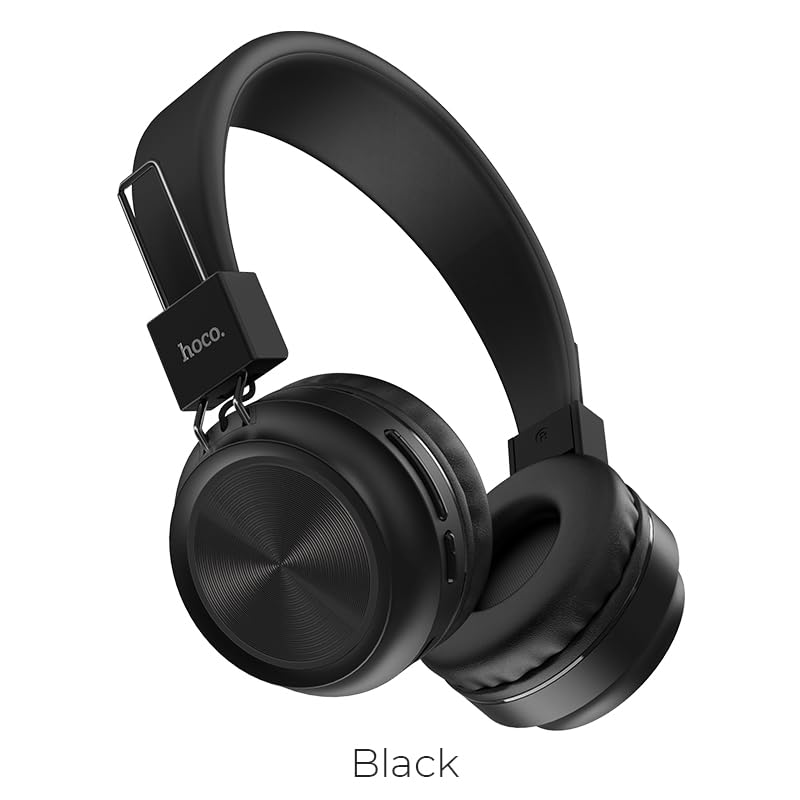
Figuur 2: Voorkant view of the HOCO W25 Bluetooth Headphones, highlighting the black color option.
Sleutel kenmerke:
- Uitstekende klankgehalte: Rich, deep bass and crystal-clear highs for an immersive audio experience.
- Water-Resistant and Sweat-Proof: Designed to withstand water and sweat, making them ideal for workouts and outdoor use.
- Raakkontroles: Convenient and intuitive control over music playback and calls.
- Bluetooth 5.3 Tegnologie: Ensures seamless pairing, stable connectivity, and reliable wireless performance.
- Speelmodus: Low latency performance for an enhanced gaming experience.
- Elegante en stylvolle ontwerp: Lightweight and comfortable over-ear design.
Opstelling
1. Laai die oorfone
Before first use, fully charge your HOCO W25 headphones. Connect the provided charging cable to the charging port on the headphones and the other end to a USB power source (e.g., computer USB port, wall adapter). The charging indicator light will show the charging status and turn off when fully charged. A full charge takes approximately 1 hour.
2. Koppel met 'n Bluetooth-toestel
- Maak seker dat die oorfone afgeskakel is.
- Press and hold the power button on the headphones until the indicator light flashes blue and red alternately, indicating pairing mode.
- Aktiveer Bluetooth op jou toestel (slimfoon, tablet, skootrekenaar) en soek vir beskikbare toestelle.
- Select "HOCO W25" from the list of found devices.
- Once connected, the indicator light on the headphones will turn solid blue or flash slowly.
Let wel: Die oorfone sal outomaties probeer om weer aan die laaste gekoppelde toestel te koppel wanneer dit aangeskakel word.
Bedryfsinstruksies
Krag aan/af:
- Krag aan: Druk en hou die kragknoppie vir 3 sekondes.
- Skakel af: Druk en hou die kragknoppie vir 5 sekondes.
Musiek speel:
- Speel/pouse: Single tap the multi-function button.
- Volgende snit: Double tap the multi-function button.
- Vorige snit: Triple tap the multi-function button.
- Volume op: Druk die knoppie Volume +.
- Volume af: Druk die Volume - knoppie.
Oproepbestuur:
- Beantwoord/beëindig oproep: Single tap the multi-function button.
- Verwerp oproep: Druk die multifunksionele knoppie vir 2 sekondes in.
- Herbel laaste nommer: Double tap the multi-function button when not on a call.
Stemassistent:
- Aktiveer stemassistent: Press and hold the multi-function button for 1 second.
Toestelversoenbaarheid
The HOCO W25 Bluetooth Headphones are designed for wide compatibility and can connect with virtually all Bluetooth-enabled devices, including:
- Slimfone (iOS en Android)
- Tablette
- Skootrekenaars
- Slim TV's
- Other Bluetooth audio devices
Batterylewe en laai
- Speeltyd: Up to 12 hours of continuous music playback or talk time on a single charge.
- Bystandtyd: Tot 200 uur.
- Laai tyd: Ongeveer 1 uur vir 'n volle lading.
- Laai aanwyser: Die LED-aanwyser sal die laaistatus wys en afskakel wanneer dit volledig gelaai is.
Actual battery life may vary based on volume level, audio content, and usage conditions.
Onderhoud
- Skoonmaak: Vee die oorfone af met 'n sagte, droë lap. Moenie skuurmiddels of oplosmiddels gebruik nie.
- Berging: Bêre die oorfone op 'n koel, droë plek weg van direkte sonlig en uiterste temperature.
- Waterblootstelling: While water-resistant and sweat-proof, avoid submerging the headphones in water. Dry thoroughly if exposed to moisture.
- Batterysorg: To prolong battery life, avoid fully discharging the headphones frequently. Charge regularly, even if not in use for extended periods.
Probleemoplossing
Geen krag:
- Maak seker dat die oorfone volledig gelaai is.
- Kontroleer die laaikabel en kragbron.
Kan nie koppel nie:
- Make sure the headphones are in pairing mode (flashing blue and red light).
- Maak seker dat Bluetooth op jou toestel geaktiveer is.
- Beweeg die oorfone nader aan jou toestel.
- Forget "HOCO W25" from your device's Bluetooth settings and try pairing again.
- Herbegin beide die oorfone en jou toestel.
Geen klank of lae volume:
- Verhoog die volume op beide die oorfone en jou gekoppelde toestel.
- Maak seker dat die oorfone behoorlik aan jou toestel gekoppel is.
- Check if another device is connected to the headphones.
Swak klankgehalte:
- Beweeg nader aan jou toestel om steuring te vermy.
- Maak seker dat daar geen hindernisse tussen die oorfone en jou toestel is nie.
- Probeer om verskillende klankbronne te speel.
Spesifikasies
| Kenmerk | Detail |
|---|---|
| Model Naam | W25 |
| Verbindingstegnologie | Draadloos (Bluetooth) |
| Bluetooth weergawe | 5.3 |
| Geraasbeheer | Klankisolasie |
| Waterweerstandvlak | Waterbestand |
| Tipe beheer | Aanraking, Volumebeheer |
| Batterylewe | 12 Hours (Playback) |
| Laai tyd | 1 uur |
| Bystandtyd | 200 ure |
| Vormfaktor | Over Ear, On Ear |
| Mikrofoonformaat | Ingeboude |
| Materiaal | Plastiek |
| Item gewig | 161 g |
| Vervaardiger | HOCO |
Amptelike Produkvideo
Hierdie video bied 'n oorview of the HOCO W25 Bluetooth Headphones, highlighting key features such as deep bass, touch controls, water resistance, and battery life. It also showcases the product's compatibility and design.
Waarborg & Ondersteuning
The HOCO W25 Bluetooth Headphones come with a standard brand warranty. For specific warranty terms and conditions, please refer to the warranty card included with your product or visit the official HOCO webwebwerf.
For further assistance, technical support, or troubleshooting beyond this manual, please contact HOCO customer service or visit the product detail page on the retailer's website where you purchased the item.
- Waarborg: 1 jaar waarborg
You can find more information and support resources by visiting the product page on Amazon.in.
Ask a question about this manual
Ask about setup, troubleshooting, compatibility, parts, safety, or missing instructions. Manuals+ will review the question and use this page’s manual context to help answer it.