
HOCO ES64_Green
HOCO Bluetooth Neck Band In-Ear Earphones User Manual
Model: ES64_Green | Brand: HOCO
1. Inleiding
The HOCO Bluetooth Neck Band In-Ear Earphones (Model ES64_Green) are designed to provide a high-quality audio experience with extended playback time and convenient features. This manual provides essential information for setting up, operating, and maintaining your earphones.
Sleutel kenmerke sluit in:
- Bluetooth 5.3 connectivity for stable and efficient pairing.
- Tot 30 uur se aaneenlopende gebruik op 'n enkele laai.
- Ergonomic neckband design for comfortable wear.
- Toggle switch button for convenient operation.
- Lightweight design at 26.5g.
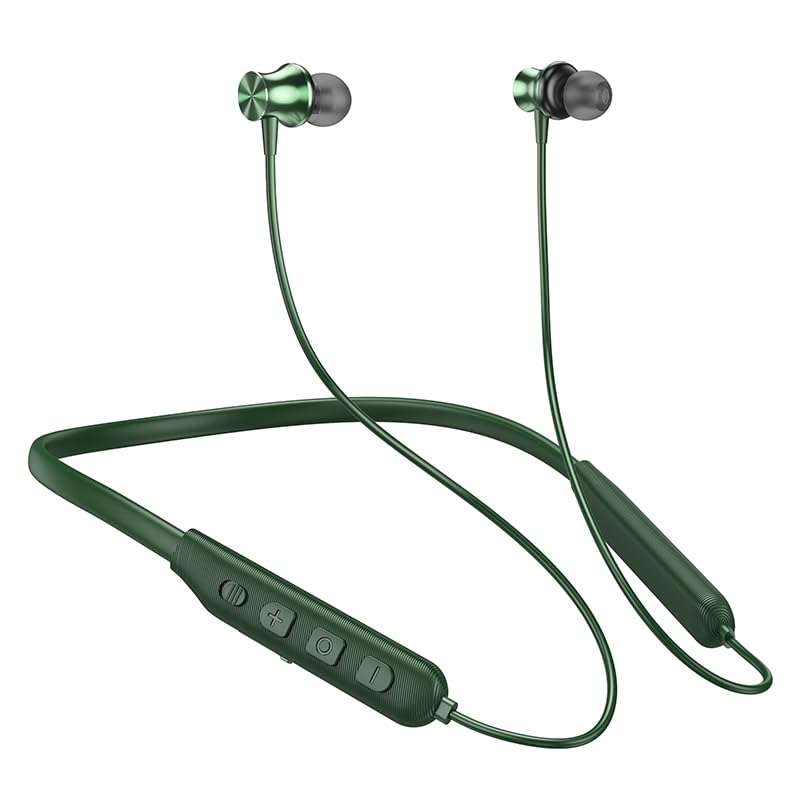
Image: The HOCO Bluetooth Neck Band in green, showcasing its in-ear design and flexible neckband.
2. Pakketinhoud
Kontroleer asseblief die pakket vir die volgende items:
- HOCO Bluetooth Neck Band In-Ear Earphones (ES64_Green)
- Ear Cushions (additional sizes may be included)
- Gebruikershandleiding (hierdie dokument)
- Charging Cable (not explicitly listed in "whats_in_the_box" but implied for charging)
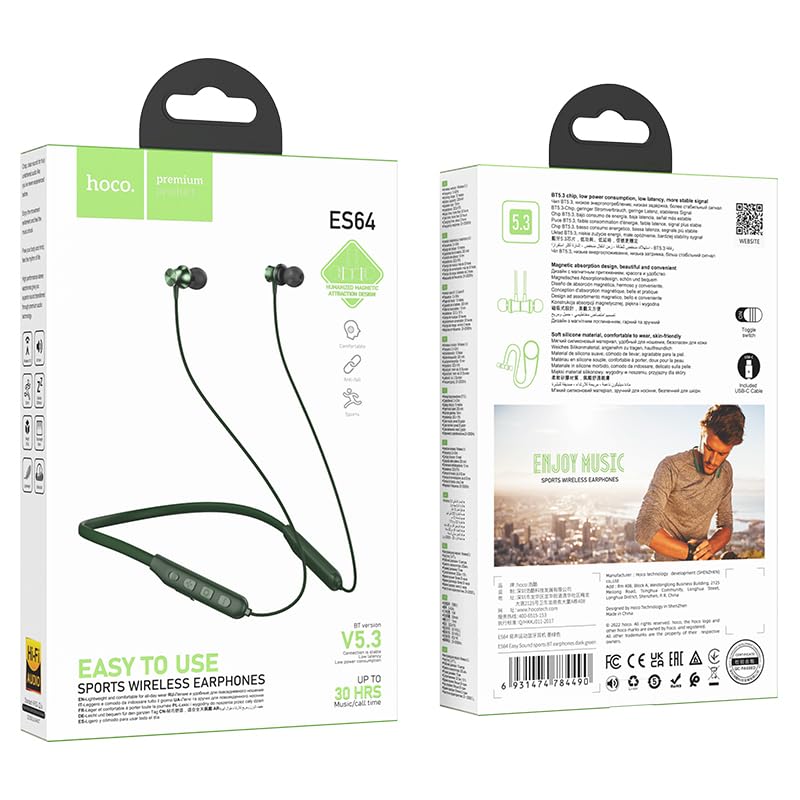
Beeld: Voor en agter view of the HOCO Bluetooth Neck Band product packaging, showing the earphones and key features.
3. Produk verbyview
Familiarize yourself with the components and controls of your HOCO Bluetooth Neck Band.
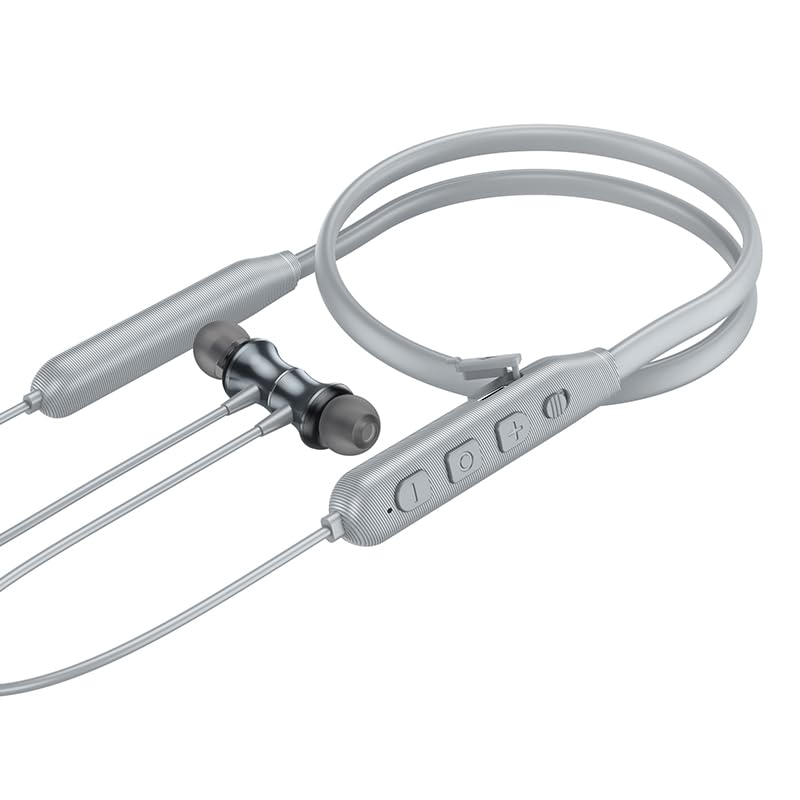
Beeld: Nabyskoot view of the control panel on the HOCO Bluetooth Neck Band, showing the toggle switch, volume buttons, and multi-function button.
Kontroles:
- Multifunksieknoppie (MFB): Power On/Off, Play/Pause, Answer/End Calls.
- Volume op (+): Verhoog volume, Volgende snit (lang druk).
- Volume af (-): Verlaag volume, Vorige snit (lang druk).
- Wissel skakelaar: Vir gerieflike kragbeheer.
- Laaipoort: USB Type-C (implied by modern devices, though not specified as Type-C).
- LED-aanwyser: Toon krag-, parings- en laaistatus.
4. Opstelling
4.1 Laai die oorfone
Before first use, fully charge your earphones. A full charge takes approximately 2 hours.
- Connect the charging cable to the charging port on the neckband.
- Koppel die ander kant van die kabel aan 'n USB-kragadapter (nie ingesluit nie) of 'n rekenaar se USB-poort.
- The LED indicator will show the charging status (e.g., red while charging, blue when fully charged).
The ASAP Charge feature allows for quick charging to provide additional playtime with a short charge.
4.2 Koppeling met 'n Bluetooth-toestel
Follow these steps to pair your HOCO Bluetooth Neck Band with your smartphone or other Bluetooth-enabled device:
- Ensure the earphones are fully charged and powered off.
- Slide the toggle switch to the "On" position or long-press the MFB until the LED indicator flashes rapidly (usually blue and red alternately), indicating pairing mode.
- Aktiveer Bluetooth op jou toestel en soek vir beskikbare toestelle.
- Select "HOCO ES64" (or similar name) from the list of found devices.
- Once connected, the LED indicator will typically show a slow blue flash or turn off, and you will hear an audible confirmation.
The earphones support Bluetooth v5.3 for stable connection and can connect to two devices simultaneously (specific instructions for dual pairing may vary by device, refer to your device's manual).
5. Bedryfsinstruksies
5.1 Krag aan/af
- Krag aan: Slide the toggle switch to "On" or long-press the MFB until the LED indicator lights up.
- Skakel af: Slide the toggle switch to "Off" or long-press the MFB until the LED indicator turns off.
5.2 Musiekweergawe
- Speel/pouse: Druk kort op die MFB.
- Volume op: Druk kort op die "+" knoppie.
- Volume af: Druk kort op die "-" knoppie.
- Volgende snit: Druk die "+" knoppie lank.
- Vorige snit: Druk die "-" knoppie lank.
5.3 Oproepbestuur
- Beantwoord oproep: Short press the MFB when an incoming call rings.
- Beëindig oproep: Druk kort op die MFB tydens 'n oproep.
- Verwerp oproep: Long press the MFB when an incoming call rings.
- Herbel laaste nommer: Dubbeldruk die MFB.

Image: A person wearing the HOCO Bluetooth Neck Band during a run, demonstrating its comfortable and secure fit for active use.
5.4 Videodemonstrasie
For a visual guide on the product's features and usage, please watch the official product video below:
Video: Official HOCO product video demonstrating the features and usage of the Bluetooth Neck Band, including its long playback time, ASAP Charge, and Bluetooth pairing capabilities.
6. Onderhoud
Behoorlike sorg sal die lewensduur van jou oorfone verleng:
- Skoonmaak: Gebruik 'n sagte, droë lap om die oorfone skoon te maak. Moenie harde chemikalieë of skuurmiddels gebruik nie.
- Berging: Bêre die oorfone op 'n koel, droë plek weg van direkte sonlig en uiterste temperature.
- Waterweerstand: The earphones are water resistant. Avoid submerging them in water or exposing them to heavy rain for prolonged periods. Dry them thoroughly if they get wet.
- Laai: Do not overcharge the battery. Disconnect the charger once the earphones are fully charged.
7. Probleemoplossing
If you encounter issues with your HOCO Bluetooth Neck Band, try the following solutions:
| Probleem | Moontlike Oplossing |
|---|---|
| Kan nie aanskakel nie | Maak seker dat die battery gelaai is. Koppel aan 'n kragbron en probeer weer. |
| Kan nie met toestel koppel nie |
|
| Geen klank of lae volume nie |
|
| Intermitterende verbinding |
|
8. Spesifikasies
| Kenmerk | Detail |
|---|---|
| Model Naam | ES64_Green |
| Verbindingstegnologie | Draadloos (Bluetooth) |
| Bluetooth weergawe | 5.3 (chip: JL AC7003) |
| Battery kapasiteit | 200mAh |
| Laai tyd | Ongeveer 2 ure |
| Gebruik Tyd | 30 uur |
| Bystandtyd | 350 uur |
| Earphones Total Length | 85 cm |
| Gewig | 26.5g |
| Materiaal | Plastiek |
| Tipe beheer | Physical Button, Toggle Switch |
| Waterweerstandvlak | Waterbestand |
| Sluit herlaaibare battery in | Ja |
| Vervaardiger | HOCO |
| Land van oorsprong | China |
9. Waarborg en Ondersteuning
Your HOCO Bluetooth Neck Band In-Ear Earphones come with a 1-jaar waarborg vanaf die aankoopdatum. Hierdie waarborg dek vervaardigingsdefekte en verseker dat die produk funksioneer soos bedoel onder normale gebruik.
For warranty claims, technical support, or any inquiries, please contact your retailer or the official HOCO customer service. Keep your purchase receipt as proof of purchase.
For more information, you may visit the official HOCO website (if available, a placeholder link would be here, but since none is provided, I will omit a specific URL).
Ask a question about this manual
Ask about setup, troubleshooting, compatibility, parts, safety, or missing instructions. Manuals+ will review the question and use this page’s manual context to help answer it.