
Tecno LH8n (256+8)
TECNO Pova 5 Pro 5G User Manual
Model: LH8n (256+8)
Inleiding
This manual provides essential information for the safe and efficient operation of your TECNO Pova 5 Pro 5G smartphone. Please read it thoroughly before using your device to ensure optimal performance and longevity.

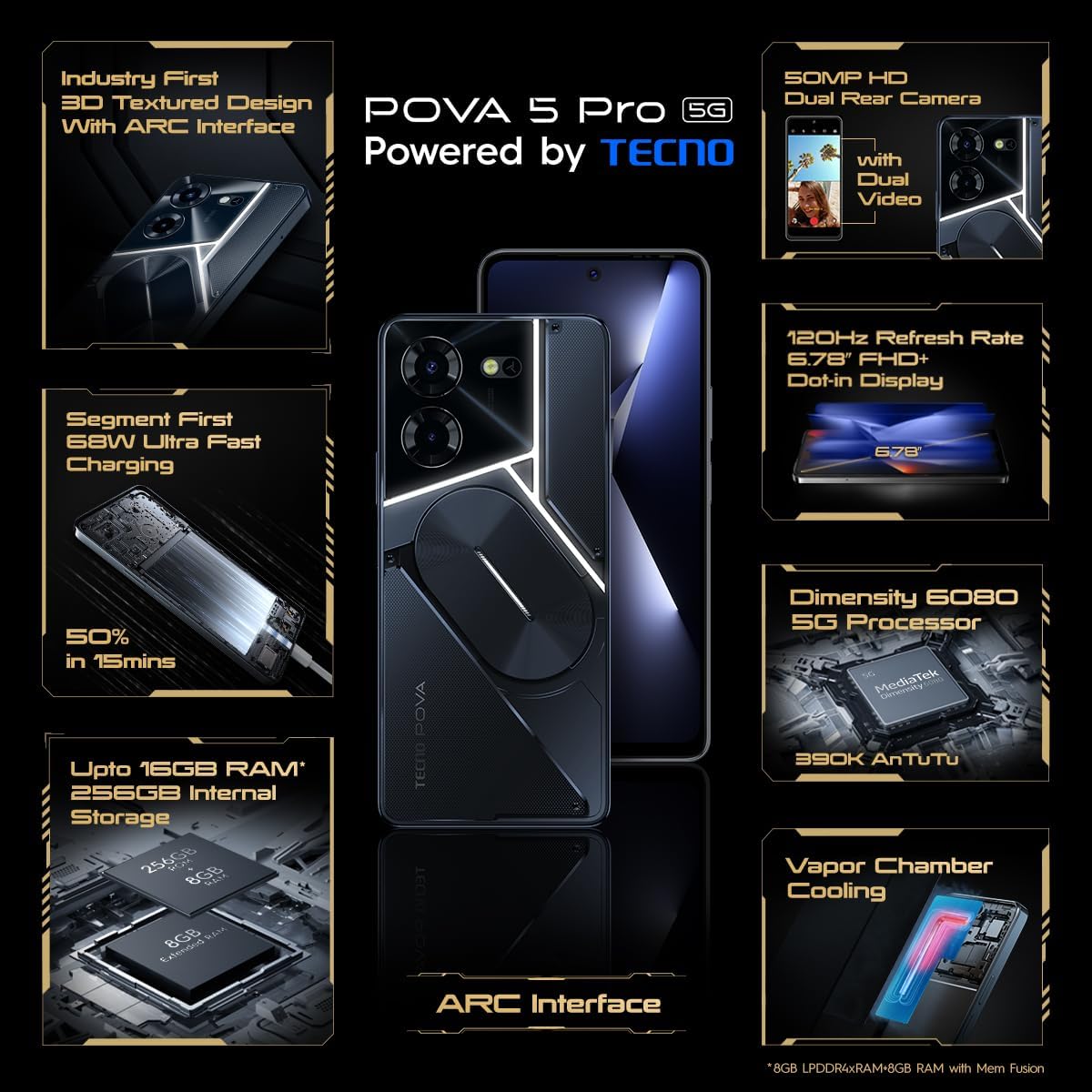
Image: The TECNO Pova 5 Pro 5G smartphone, showcasing its design and key feature of 68W Ultra Fast Charging.
Wat is in die boks
Verifieer dat alle items in die verpakking teenwoordig is:
- Slimfoon
- 68 W kragadapter
- Tipe C-kabel
- TPU Cover
- SIM -uitwerperhulpmiddel

Image: A flat lay of the TECNO Pova 5 Pro 5G packaging contents, showing the smartphone, 68W power adapter, USB-C cable, TPU protective cover, and the SIM ejector tool.
Opstelling
Aanvanklike opstelling
- Plaas SIM-/SD-kaart in: Locate the SIM tray on the side of the device. Use the provided SIM ejector tool to open the tray. Insert your Nano-SIM card(s) and/or microSD card into the designated slots. Ensure the tray is fully reinserted.
- Krag aan: Press and hold the Power button (located on the right side) until the TECNO logo appears.
- Volg die aanwysings op die skerm: The device will guide you through initial setup, including language selection, Wi-Fi connection, Google account setup, and security settings.
Laai die toestel
The TECNO Pova 5 Pro 5G supports 68W Ultra Fast Charging.
- Koppel die Tipe-C-kabel aan die laaipoort aan die onderkant van die foon.
- Koppel die ander kant van die kabel aan die 68W-kragadapter.
- Steek die kragadapter in 'n muuraansluiting.
- A full charge typically takes approximately 45 minutes, with 50% charge achievable in about 15 minutes.
Beeld: 'n Duidelike front view of the TECNO Pova 5 Pro 5G smartphone, highlighting its display and front camera.
Bedien die toestel
Basiese navigasie
- Raakskerm: Tik om te kies, swiep om te blaai, knyp om te zoem.
- Kragknoppie: Druk om die skerm wakker te maak/te slaap. Druk en hou om af te skakel of te herbegin.
- Volume knoppies: Pas mediavolume, oproepvolume of luitoonvolume aan.
Kameragebruik
The device features a 50MP AI Dual Rear Camera and a 16MP Selfie Camera.
- Maak die Kamera-app oop vanaf die tuisskerm of applaai.
- Select desired mode (Photo, Video, Portrait, etc.).
- Tik die sluiterknoppie om foto's te neem of video-opname te begin/stop.
- Utilize AI enhancements for optimized scene recognition and image quality.
ARC Interface and Notifications
The TECNO Pova 5 Pro 5G features a unique multi-color ARC interface with backlighting.
- The ARC interface provides customizable light effects for notifications, incoming calls, gaming, and music playback.
- Access settings to personalize the light patterns and colors for different alerts.

Beeld: Die agterkant view of the TECNO Pova 5 Pro 5G, showcasing its distinctive 3D textured design and the illuminated ARC interface.

Beeld: 'n Gedetailleerde view of the TECNO Pova 5 Pro 5G's ARC interface, illustrating the multi-color backlighting feature.
Onderhoud
- Batterysorg: To prolong battery life, avoid exposing the device to extreme temperatures. Do not fully discharge the battery regularly.
- Skoonmaak: Gebruik 'n sagte, pluisvrye lap om die skerm en liggaam skoon te maak. Vermy die gebruik van harde chemikalieë of skuurmiddels.
- Sagteware-opdaterings: Regularly check for and install system updates to ensure optimal performance, security, and access to new features. Navigate to Settings > System > System update.
- Bergingbestuur: Maak gereeld onnodige dinge skoon files en programme om voldoende stoorplek en toestelspoed te handhaaf.
Probleemoplossing
- Toestel skakel nie aan nie: Ensure the battery is charged. Connect the device to the charger for at least 15 minutes before attempting to power on again. If the issue persists, perform a forced restart by holding the Power button for 10-15 seconds.
- Laai kwessies: Verify that the charging cable and adapter are securely connected and undamaged. Try using a different outlet.
- App-ineenstorting/vries: Close the problematic app and reopen it. If the issue continues, clear the app's cache and data in Settings > Apps. As a last resort, uninstall and reinstall the app.
- Swak netwerkverbinding: Check if Airplane Mode is off. Restart the device. If using mobile data, ensure your SIM card is properly inserted and your data plan is active.
- Oorverhitting: Avoid using the device in direct sunlight or during intensive tasks for extended periods. Close background applications.
Spesifikasies
| Kenmerk | Spesifikasie |
|---|---|
| Model Naam | Pova 5 Pro 5G |
| Bedryfstelsel | Android 13.0 |
| Verwerker | Dimensity 6080 (2.4 GHz Octa-Core) |
| RAM | 8 GB (expandable up to 16 GB with Memory Fusion) |
| Interne berging | 256 GB (UMCP) |
| Vertoon | 6.78-inch FHD+ Dot-in Display |
| Herlaaitempo | 120 Hz |
| Agterste kamera | 50 MP AI Dual Camera |
| Voorste kamera | 16 MP Selfie Camera |
| Battery | 5000 mAh litium-polimeer |
| Laai | 68W Ultra Fast Charging |
| Afmetings | 16.9 x 7.7 x 16.9 cm |
| Gewig | 214 gram |
| Konnektiwiteit | 5G (10 bands supported), NFC, Bluetooth 5.1 |

Image: An internal diagram or view of the TECNO Pova 5 Pro 5G, illustrating its vapor chamber cooling system for efficient heat dissipation.
Waarborg en Ondersteuning
Your TECNO Pova 5 Pro 5G comes with a manufacturer's warranty. Please refer to the warranty card included in your product packaging for specific terms and conditions.
For technical support, service, or warranty claims, please contact TECNO customer service. TECNO maintains a large service network with over 1200 service centers in India.
You can find more information and support resources by visiting the official Tecno store on Amazon: Tecno Store
Ask a question about this manual
Ask about setup, troubleshooting, compatibility, parts, safety, or missing instructions. Manuals+ will review the question and use this page’s manual context to help answer it.