
Inleiding
This manual provides comprehensive instructions for the HOCO Y1 Pro Smart Sports Watch. Please read this manual carefully before using the device to ensure proper operation and to maximize its features. Keep this manual for future reference.
Pakketinhoud
Nadat u die pakkie oopgemaak het, maak seker dat alle items teenwoordig is:
- HOCO Y1 Pro Smart Sports Watch
- Laai kabel
- Gebruikershandleiding
Produk verbyview
The HOCO Y1 Pro Smart Sports Watch features a 1.91-inch TFT display and a durable design suitable for sports and daily wear.

Figuur 1: Voorkant view of the HOCO Y1 Pro Smart Watch, showing the main watch face with time, date, battery level, and activity data.

Figuur 2: Kant view illustrating the digital crown and the side button for navigation and control.
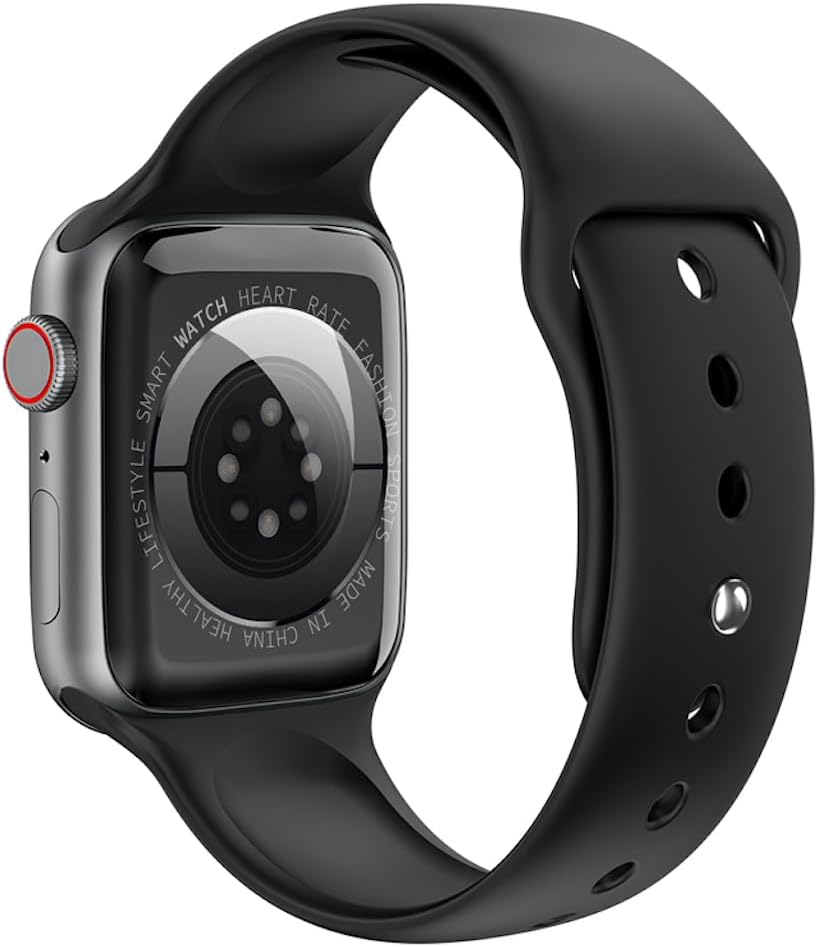
Figuur 3: Agter view of the watch, highlighting the optical heart rate sensors and charging contacts.
Komponente:
- Vertoon: 1.91-inch TFT color touchscreen.
- Digitale kroon: Word gebruik om deur spyskaarte te navigeer en instellings aan te pas.
- Syknoppie: Typically used for power on/off, returning to the home screen, or accessing specific functions.
- Hartklopsensor: Located on the back for continuous heart rate monitoring.
- Laai kontakte: Magnetic contacts on the back for connecting the charging cable.
Opstelling
1. Laai die toestel
Before initial use, fully charge your HOCO Y1 Pro Smart Watch. Connect the magnetic charging cable to the charging contacts on the back of the watch and plug the USB end into a power adapter (not included) or a computer's USB port.
- 'n Volle lading neem gewoonlik ongeveer 2 uur.
- Die batterykapasiteit is 280mAh.
- Expected battery life: 3 days with dual Bluetooth enabled, 5-7 days with calls turned off.
2. Skakel aan/af
- Krag aan: Press and hold the side button until the HOCO logo appears.
- Skakel af: Druk en hou die syknoppie in, en kies dan "Skakel af" op die skerm.
3. App-installasie en -paring
To unlock the full functionality of your HOCO Y1 Pro, download and install the companion application on your smartphone. Soek vir the official HOCO smartwatch app in your device's app store (e.g., Google Play Store or Apple App Store).
- Ensure your watch is powered on and fully charged.
- Aktiveer Bluetooth op jou slimfoon.
- Open the HOCO companion app and follow the on-screen instructions to create an account or log in.
- Within the app, select "Add Device" or "Pair New Device" and choose "HOCO Y1 Pro" from the list of available devices.
- Bevestig die paringsversoek op beide jou slimfoon en die horlosie.
- The watch supports dual Bluetooth for calls and data synchronization.
Bedryfsinstruksies
Basiese navigasie
- Swiep op/af: Blaai deur spyskaarte of kennisgewings.
- Swiep links/regs: Access quick functions or different watch faces.
- Tik: Kies 'n item of bevestig 'n aksie.
- Digitale kroon: Rotate to scroll, press to return to the home screen or open the app list.
- Syknoppie: Short press to return to the previous screen or home screen. Long press for power options.
Oproep funksie
With dual Bluetooth enabled and paired to your smartphone, the HOCO Y1 Pro supports making and receiving calls directly from your wrist.
- Maak oproepe: Access the dialer or contacts list on the watch to initiate a call.
- Ontvang oproepe: When a call comes in, you can answer or reject it from the watch screen.
Gesondheidsmonitering
- Hartslagdeteksie: Die horlosie monitor jou hartklop voortdurend. View intydse data op die horlosie of gedetailleerde tendense in die toepassing.
- Slaapmonitering: Wear the watch to bed to track your sleep patterns, including deep sleep, light sleep, and wake times.
- Exercise Pedometer: Tracks your daily steps, distance, and calories burned.
Sports Modes and GPS Track
The watch offers various sports modes to track your workouts. When connected to your phone's GPS, it can record your outdoor activity routes.
- Select a sports mode (e.g., running, walking) from the watch menu.
- Ensure GPS tracking is enabled in the app for outdoor activities.
Kennisgewings
Receive notifications for calls, messages, and app alerts directly on your watch. Configure notification settings within the companion app.
Bykomende funksies
- Remote Music: Control music playback on your smartphone from the watch.
- Real-time Weather: View current weather conditions and forecasts (requires app connection).
- Mobile Phone Search: Use the watch to locate your paired smartphone by making it ring.
Onderhoud
Skoonmaak
Maak jou horlosie gereeld skoon om optimale werkverrigting en higiëne te verseker.
- Vee die skerm en band af met 'n sagte, damp lap.
- Vermy die gebruik van harde chemikalieë of skuurmateriaal.
- Maak seker dat die laaikontakte skoon en droog is voor laai.
Waterbestandheid (IP68)
The HOCO Y1 Pro is IP68 waterproof, meaning it is resistant to dust and can withstand immersion in water up to 1.5 meters for up to 30 minutes. While it is suitable for daily use and light water activities, it is not recommended for diving, hot showers, or prolonged submersion.
- Moenie knoppies onder water gebruik nie.
- Droog die horlosie deeglik af na blootstelling aan water.
Probleemoplossing
| Kwessie | Moontlike Oplossing |
|---|---|
| Horlosie skakel nie aan nie. | Maak seker dat die horlosie volledig gelaai is. Koppel dit vir ten minste 30 minute aan die laaier. |
| Kan nie met slimfoon koppel nie. |
|
| Inaccurate heart rate or activity data. |
|
| Kennisgewings nie ontvang nie. |
|
| Skerm reageer nie. | Try restarting the watch by long-pressing the side button. If unresponsive, allow the battery to drain completely and then recharge. |
Spesifikasies
| Kenmerk | Detail |
|---|---|
| Model Naam | Y1 pro |
| Hoofskerm | TFT 1.91 inches; Resolution: 240*285 pixel |
| SVE | Realtek 8762CW |
| Geheue | RAM 192KB + ROM 64MB |
| Konnektiwiteit | Dual Bluetooth (supports calls) |
| Waterweerstand | IP68 waterdig |
| Battery kapasiteit | 280mAh litiumioon |
| Batterylewe | 3 days (dual Bluetooth on), 5-7 days (calls off) |
| Spesiale funksies | GPS track support, Information push, Heart rate detection, Sleep monitoring, Exercise pedometer, Remote music, Real-time weather, Mobile phone search |
| Ondersteunde tale | 22 language packs including Chinese, English, Russian, Arabic, Vietnamese, Danish, Thai, Polish, Persian, Spanish, Malay, Greek, French, Italian, German, Portuguese, Turkish, Latin, Romanian, Hebrew, Burmese, Ukrainian. |
| Pakket afmetings | 21.9 x 6.9 x 3.2 cm |
| Item gewig | 176 g |
Veiligheidsinligting
- Moenie probeer om die toestel uitmekaar te haal of te verander nie.
- Hou die toestel weg van uiterste temperature, direkte sonlig en oop vlamme.
- Vermy die blootstelling van die toestel aan sterk magnetiese velde.
- Gebruik slegs die meegeleverde laaikabel.
- Consult a medical professional before starting any new exercise regimen, especially if you have pre-existing health conditions. The heart rate data is for reference only and should not be used for medical diagnosis.
- Gooi die toestel en sy battery verantwoordelik weg volgens plaaslike regulasies.
Waarborg en Ondersteuning
For warranty information and technical support, please refer to the documentation included with your purchase or visit the official HOCO webwebwerf. Bewaar u bewys van aankoop vir waarborgeise.
Vervaardiger: Hoco
ASIN: B0CBVTSX1V
UPC/EAN: 6931474766106