
Hoco WE-1005004459784466-002
Hoco Smart Ear Wireless Bluetooth 5.3 Earbuds User Manual
Model: WE-1005004459784466-002
Produk verbyview
The Hoco Smart Ear Wireless Bluetooth 5.3 Earbuds offer a seamless audio experience with advanced features. These smart touch stereo earbuds come with a digital LED display charging case, providing convenience and clear battery status at a glance. Designed for comfort and high-quality sound, they are ideal for daily use with mobile phones and other compatible devices.
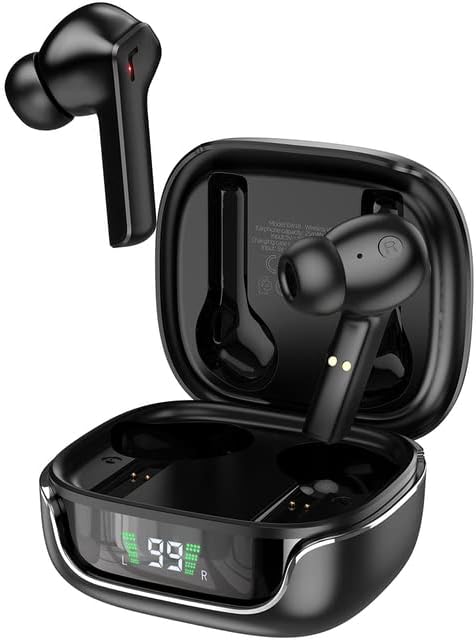
Image: The Hoco Smart Ear Wireless Bluetooth 5.3 Earbuds, showcasing both earbuds and their sleek charging case with a digital LED display.
Pakketinhoud
- Hoco Smart Ear Wireless Bluetooth 5.3 Earbuds
- Laaikas
- Gebruikershandleiding
- Laai kabel
Opstelling
Aanvanklike paring
To pair your Hoco Smart Ear Earbuds for the first time, ensure they are fully charged. Open the charging case; the earbuds will automatically enter pairing mode. On your device (e.g., smartphone), navigate to Bluetooth settings and select 'Hoco EW18' or a similar name from the list of available devices. Once connected, the earbuds are ready for use.

Image: A visual representation of the Hoco earbuds establishing a wireless connection using Bluetooth 5.3 technology, highlighting stable and low-power consumption.

Image: The earbuds and charging case next to a smartphone, illustrating the automatic pairing feature and the ability to switch between devices seamlessly.
Herkoppel tans
After initial pairing, the earbuds will automatically reconnect to the last paired device when taken out of the charging case and Bluetooth is enabled on the device.
Bedryfsinstruksies
The Hoco Smart Ear Earbuds feature intuitive touch controls for various functions:

Image: A detailed diagram illustrating the touch control functions of the Hoco earbuds, including playback, track navigation, call management, power, and voice assistant activation.
- Speel/pouse: Click the touch area once.
- Volgende snit: Double click the touch area.
- Vorige snit: Triple click the touch area.
- Beantwoord oproep: Click the touch area once.
- Bel oproep: Double click the touch area.
- Verwerp oproep: Druk die aanraakarea lank vir 2 sekondes.
- Skakel aan: Open the cover of the charging case (automatic boot).
- Word wakker Siri/stemassistent: Druk die aanraakarea lank vir 2 sekondes.
Onderhoud
Om die lang lewensduur en optimale werkverrigting van jou oorfone te verseker, volg hierdie onderhoudsriglyne:
- Skoonmaak: Maak die oorfone en laaikas gereeld skoon met 'n sagte, droë, pluisvrye lap. Moenie harde chemikalieë of skuurmiddels gebruik nie.
- Laai kontakte: Periodically clean the charging contacts on both the earbuds and inside the case to ensure a proper connection.
- Berging: Wanneer dit nie gebruik word nie, bêre die oordopjes in hul laaikassie om hulle teen stof en skade te beskerm.
- Vermy vog: Keep the earbuds and case away from water and excessive moisture.
- Temperatuur: Vermy blootstelling van die produk aan uiterste temperature.
Probleemoplossing
If you encounter issues with your Hoco Smart Ear Earbuds, refer to the following common solutions:
- Geen klank:
- Maak seker dat die oorfone gelaai is.
- Kontroleer toestelvolume en oorfone-volume.
- Verify Bluetooth connection. Try disconnecting and reconnecting.
- Oorfone koppel nie:
- Maak seker dat die oorfone in paringsmodus is (oop omhulsel).
- Skakel Bluetooth op jou toestel af en aan.
- Vergeet die toestel in jou foon se Bluetooth-instellings en koppel weer.
- Maak seker dat geen ander toestelle aan die oorfone gekoppel is nie.
- Laai kwessies:
- Kontroleer of die laaikabel stewig gekoppel is.
- Ensure the charging contacts on both earbuds and case are clean.
- Probeer 'n ander laaikabel of kragadapter.
- Intermitterende verbinding:
- Maak seker dat jy binne die effektiewe Bluetooth-reikwydte is.
- Minimaliseer interferensie van ander draadlose toestelle.
Spesifikasies
Detailed technical specifications for the Hoco Smart Ear Wireless Bluetooth 5.3 Earbuds:
| Kenmerk | Spesifikasie |
|---|---|
| Model | WE-1005004459784466-002 |
| Bluetooth weergawe | 5.3 |
| Aantal bestuurders | 2 |
| Bestuurder deursnee | 13 mm |
| Totale Harmoniese Vervorming | 15% |
| Impedansie | 32 ohm |
| Koptelefoonvormfaktor | In-Oor |
| Verbindingstegnologie | Bluetooth |
| Draadlose kommunikasietegnologie | Bluetooth |
| Versoenbare toestelle | Selfone |
| Kabelkenmerk | Cable-free (Wireless) |
| Kleur | Swart |
| Eerste Beskikbare Datum | 6 Julie 2023 |

Beeld: 'n Ontplofte view illustrating the 13mm moving coil driver and bio-carbon fiber composite diaphragm, designed for immersive sound quality.

Image: A person wearing the Hoco earbuds, highlighting the soft silicone ear caps and in-ear ergonomic design for comfortable wear and pure sound enjoyment.
Waarborg en Ondersteuning
Hoco is committed to customer satisfaction and product quality. We offer the following:
- 12 maande waarborg: Alle produkte kom met 'n 12-maande waarborg.
- Kliëntediens: If you experience any issues with defective or incorrect products, please contact us through the Amazon platform. We are dedicated to providing the best solution, including full refunds or product replacements, to ensure 100% customer satisfaction.
- Afleweringswaarborg: We ensure product delivery within the specified timeframe on our sales page.
Ask a question about this manual
Ask about setup, troubleshooting, compatibility, parts, safety, or missing instructions. Manuals+ will review the question and use this page’s manual context to help answer it.