
Alienware AW520H
Alienware AW520H Wired Gaming Headset User Manual
Model: AW520H
Inleiding
This manual provides instructions for the Alienware AW520H Wired Gaming Headset. It covers setup, operation, maintenance, and troubleshooting to ensure optimal performance and longevity of your device.
The Alienware AW520H headset is designed to deliver precision audio with Hi-Res certified drivers and Dolby Atmos spatial audio support, integrated into a comfortable and adjustable design.
Wat is in die boks
Verifieer dat alle komponente in die pakket teenwoordig is:
- Alienware AW520H Wired Gaming Headset
- Documentation (User Manual, Warranty Information)
Produk verbyview
Familiarize yourself with the key components and features of your Alienware AW520H headset.
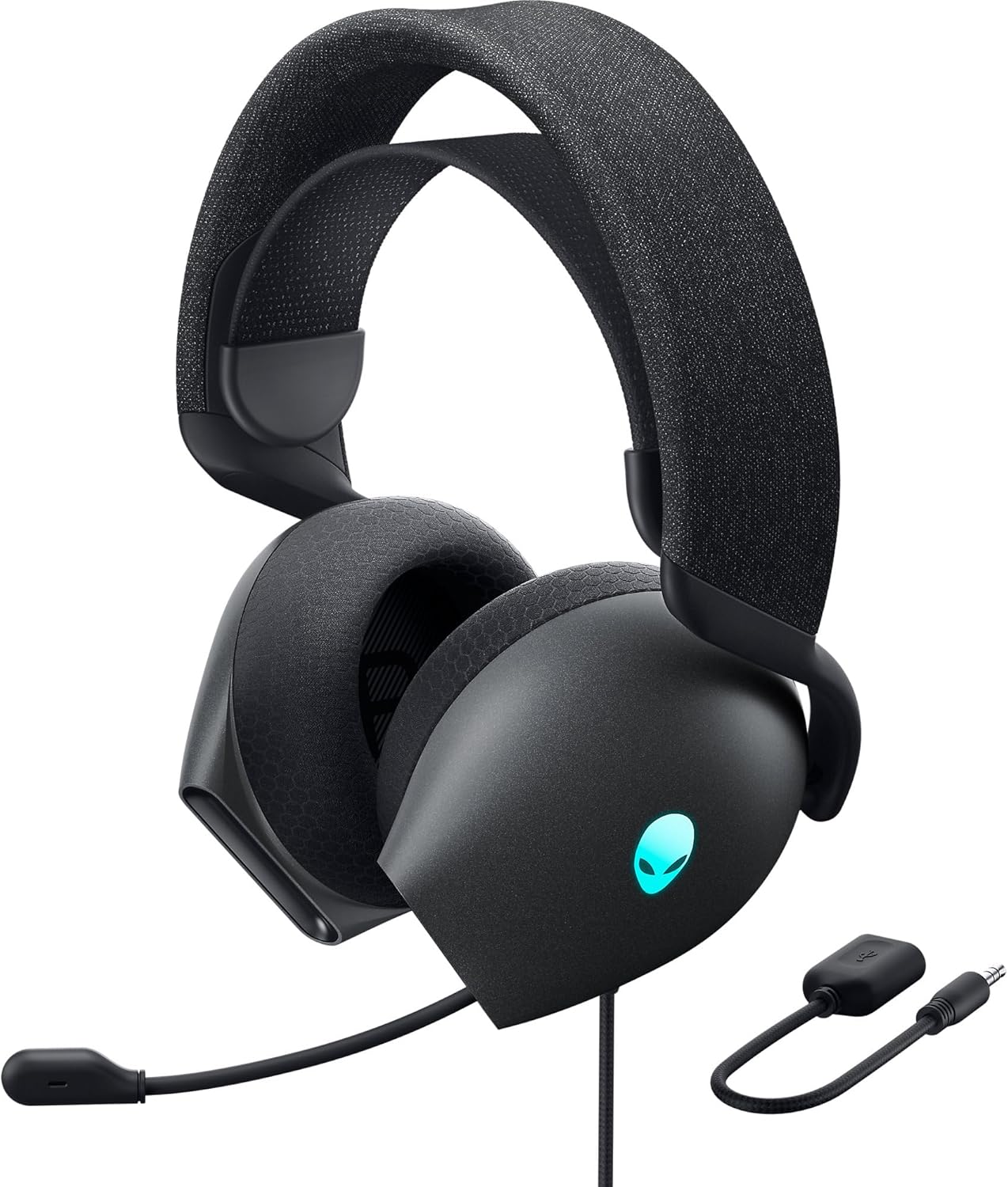

Sleutel kenmerke:
- Hi-Res Certified Drivers: Delivers clear and rich sound across a wide frequency range.
- Dolby Atmos Spatial Audio: Provides precise positional audio for an immersive experience.
- AI-Driven Noise Cancellation Microphone: Retractable boom mic focuses on your voice, reducing ambient noise.
- Gerieflike ontwerp: Features soft memory foam ear pads with breathable fabric and an adjustable suspension headband for extended wear.
- AlienFX RGB Lighting: Customizable RGB lighting on the earcups, controllable via Alienware Command Center.
- Veelsydige verbindings: Supports both USB and 3.5mm connections for broad compatibility.
Opstelling
Follow these steps to set up your Alienware AW520H headset.
1. Koppel die koptelefoon
The AW520H offers flexible connectivity options:
- 3.5 mm oudio-aansluiting: Connect the 3.5mm cable directly to your PC, gaming console controller, or any other compatible device with a 3.5mm audio port. This provides basic audio and microphone functionality.
- USB-verbinding: For full functionality, including Dolby Atmos spatial audio and AlienFX RGB lighting customization, connect the headset via USB to your PC. This typically involves using a 3.5mm to USB adapter if your PC does not have a combined audio jack.


2. Software Installation (Optional, for full features)
To unlock the full potential of your headset, including Dolby Atmos and AlienFX RGB lighting customization, install the Alienware Command Center software on your PC. This software allows for personalized audio profiles en beligtingseffekte.
- Download the latest version of Alienware Command Center from the official Alienware support webwebwerf.
- Volg die instruksies op die skerm om die installasie te voltooi.
- Connect your headset via USB to ensure it is recognized by the software.
Bedryfsinstruksies
Klankbeheer
The headset features integrated controls for convenient audio management:
- Volumewiel: Located on the earcup, rotate the wheel to increase or decrease the audio volume.
- Mikrofoondempknoppie: Press the button on the earcup to mute or unmute the microphone.

Mikrofoongebruik
The AW520H features an AI-driven noise-canceling retractable boom microphone:
- Uitbrei/Intrek: Gently pull the microphone boom out from the earcup to extend it for use. Push it back into the earcup to retract it when not needed.
- Posisionering: Vir optimale stemduidelikheid, plaas die mikrofoon ongeveer 1-2 duim van jou mond af.
- Ruisonderdrukking: The AI-driven noise cancellation automatically works to filter out ambient sounds, focusing on your voice.

Aanpassing vir gemak
The headset is designed for comfort during long gaming sessions:
- Suspension Headband: Slide the suspension headband up or down to find the ideal fit for your head size.
- Earcup Rotation: The earcups can slightly pivot to conform to the shape of your ears.
- Memory Foam Ear Pads: The soft memory foam ear pads with breathable fabric provide cushioning and ventilation.

AlienFX RGB Lighting
Customize the RGB lighting on your headset using the Alienware Command Center software:
- Maak Alienware Command Center oop.
- Navigate to the lighting settings for your AW520H headset.
- Select desired colors, effects, and brightness levels.
- Ensure the headset is connected via USB for lighting customization.
Onderhoud
Proper maintenance ensures the longevity and performance of your headset.
- Skoonmaak: Gebruik 'n sagte, droë lap om die oorskelpe en kopband af te vee. Vir hardnekkige vuiligheid, 'n effens droë lap.amp 'n Lap kan gebruik word, maar vermy oormatige vog. Moenie harde chemikalieë of skuurmiddels gebruik nie.
- Berging: Store the headset in a clean, dry place away from extreme temperatures and direct sunlight. Retract the microphone when not in use to protect it.
- Kabelversorging: Avoid sharp bends or kinks in the audio cable. Do not pull on the cable to disconnect the headset.
- Oorkussings: The ear pads are made of breathable fabric and memory foam. While durable, they are not designed for frequent removal. If replacement is needed, consult Alienware support.
Probleemoplossing
If you encounter issues with your Alienware AW520H headset, refer to the following common solutions:
No Audio or Low Volume
- Gaan verbindings na: Ensure the 3.5mm cable or USB connection is securely plugged into both the headset and your device.
- Volumevlakke: Verify that the volume wheel on the headset is turned up. Check the audio output settings on your PC or console to ensure the headset is selected as the default output device and volume is not muted.
- Sagteware/Drywers: If connected via USB, ensure Alienware Command Center is installed and updated. Check your operating system's sound settings for driver issues.
- Toets op 'n ander toestel: Connect the headset to a different device (e.g., smartphone, another PC) to determine if the issue is with the headset or the original device.
Mikrofoon werk nie
- Kontroleer die stilknoppie: Ensure the microphone mute button on the headset is not activated.
- Mikrofoonposisie: Verify the microphone boom is fully extended and positioned correctly.
- Invoerinstellings: Check your PC or console's sound input settings to ensure the headset microphone is selected as the default input device. Adjust microphone volume levels.
- Toepassingsinstellings: Some applications (e.g., Discord, Zoom) have their own microphone settings. Verify the correct microphone is selected within these applications.
- Sagteware/Drywers: If connected via USB, ensure Alienware Command Center is installed and updated.
AlienFX RGB Lighting Not Working
- USB-verbinding: Ensure the headset is connected via USB to your PC. RGB lighting functionality requires a USB connection.
- Alienware-bevelsentrum: Verify that Alienware Command Center is installed and running. Check the lighting settings within the software for the headset.
- Sagteware-opdatering: Ensure Alienware Command Center and headset firmware are up to date.
Spesifikasies
| Kenmerk | Detail |
|---|---|
| Model Naam | AW520H |
| Verbindingstegnologie | Wired (USB, 3.5 mm Jack) |
| Tipe oudiobestuurder | Dinamiese bestuurder |
| Frekwensierespons | 40 KHz (40,000 Hz) |
| Impedansie | 32 ohm |
| Geraasbeheer | Active Noise Cancellation (AI-driven for mic) |
| Mikrofoon | Retractable, Unidirectional |
| Kontroles | Volume Control, Microphone Mute (On-headset) |
| Oorplasing | Oor Oor |
| Vormfaktor | Op Oor |
| Materiaal | Memory foam, breathable fabric |
| Kleur | Dark Side of the Moon |
| Produk afmetings | 7.28 x 4.35 x 8.46 duim |
| Item gewig | 11.8 onse |
| Vervaardiger | Dell |
| Versoenbare toestelle | Windows, wired devices |
Waarborg en Ondersteuning
For warranty information and technical support, please refer to the documentation included with your product or visit the official Alienware support webwebwerf.
Vervaardiger: Dell
Modelnommer: AW520H
Eerste datum beskikbaar: 30 Junie 2023
For further assistance, please contact Alienware customer support through their official channels.
Ask a question about this manual
Ask about setup, troubleshooting, compatibility, parts, safety, or missing instructions. Manuals+ will review the question and use this page’s manual context to help answer it.