
1. Inleiding
This user manual provides essential information for the installation, operation, and maintenance of your Palit GeForce RTX 4060 StormX 8GB graphics card. Please read this manual thoroughly before installing and using the product to ensure proper functionality and to prevent damage.
2. Pakketinhoud
Verifieer dat alle items in u produkpakket teenwoordig is:
- Palit GeForce RTX 4060 8GB Storm X Graphics Card
- Vinnige installasiegids (indien ingesluit)
- Driver CD/DVD (if included, otherwise download latest drivers online)
3. Opstelling en installering
3.1 Kontrolelys voor die installasie
- Maak seker dat jou kragtoevoereenheid (PSU) aan die minimum watt voldoentage requirement (typically 550W or higher for an RTX 4060, check specific PSU recommendations).
- Maak seker dat jou moederbord 'n beskikbare PCI Express x16-gleuf het.
- Turn off your computer and disconnect the power cable before proceeding.
- Aard jouself om enige statiese elektrisiteit te ontlaai.
3.2 Hardeware installasie
- Maak jou rekenaarkas oop.
- Vind 'n beskikbare PCI Express x16-gleuf op jou moederbord.
- Verwyder enige uitbreidingsgleufdeksels wat die installasie belemmer.
- Rig die grafiese kaart versigtig met die PCIe-gleuf en druk dit stewig vas totdat dit stewig vas is. Maak seker dat die retensieklem vassluit.
- Bevestig die grafiese kaart aan die kas met skroewe.
- Connect the required 8-pin PCIe power connector from your power supply to the graphics card.
- Maak u rekenaarkas toe.

Figuur 1: Voorkant view of the Palit GeForce RTX 4060 StormX 8GB graphics card, showing the single fan cooling solution.
3.3 Bestuurderinstallasie
- Connect your display cable (HDMI or DisplayPort) from the graphics card to your monitor.
- Skakel jou rekenaar aan.
- Once the operating system loads, download the latest NVIDIA drivers for the GeForce RTX 4060 from the official NVIDIA webwerf (www.nvidia.com/drivers).
- Volg die instruksies op die skerm om die drywerinstallasie te voltooi. 'n Herbegin van die stelsel mag dalk nodig wees.
4. Bediening van die grafiese kaart
4.1 Skermverbindings
The Palit GeForce RTX 4060 StormX 8GB supports multiple display outputs. Connect your monitor(s) using the available ports:
- HDMI: For high-definition audio and video output.
- DisplayPort: Vir hoë-resolusie en hoë-verversingstempo-skerms.
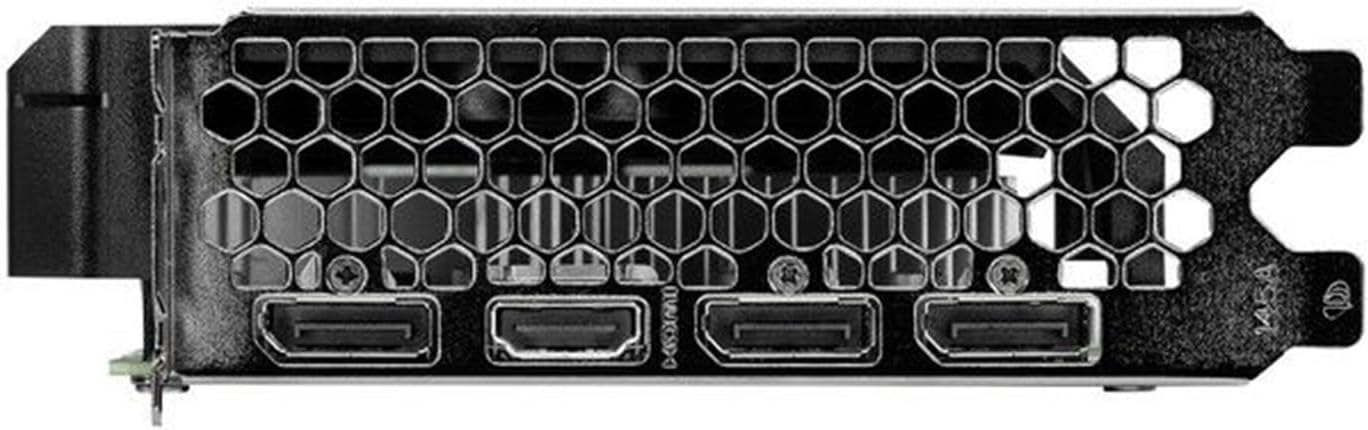
Figure 2: Rear I/O panel showing the HDMI and DisplayPort outputs.
4.2 Sleutelkenmerke
- NVIDIA G-SYNC: Enjoy smooth, tear-free gameplay at high refresh rates when paired with a compatible G-SYNC monitor.
- DLSS 3 & Ray Tracing: Experience enhanced visual fidelity and performance in supported games with NVIDIA's Deep Learning Super Sampling and real-time ray tracing technologies.
- 0dB Technology: The fan remains off during light workloads, ensuring silent operation. Fan activation occurs only under heavier loads to maintain optimal temperatures.
- ThunderMaster Utility: Palit's proprietary software allows you to monitor GPU status, adjust fan speeds, and manage overclocking settings for personalized performance. Download from the official Palit webwebwerf.
- Mini-ITX Form Factor Support: With a compact length of 17cm, this card is suitable for small form factor PC builds, offering powerful performance in a space-saving design.
5. Onderhoud
Gereelde onderhoud help om die lang lewensduur en optimale werkverrigting van jou grafiese kaart te verseker.
- Stofverwydering: Periodically clean dust from the graphics card heatsink and fan using compressed air. Ensure the computer is powered off and unplugged before cleaning. Hold the fan blades gently to prevent over-spinning during cleaning.
- Bestuurderopdaterings: Hou jou grafiese drywers opgedateer deur gereeld die amptelike NVIDIA-lisensies na te gaan. website for the latest versions. Driver updates often include performance improvements, bug fixes, and support for new games.
- Temperatuurmonitering: Use monitoring software (like Palit ThunderMaster or other third-party tools) to keep an eye on GPU temperatures, especially during heavy loads, to ensure it operates within safe limits.
6. Probleemoplossing
As jy probleme met jou grafiese kaart ondervind, raadpleeg die volgende algemene stappe vir probleemoplossing:
- Geen skermuitvoer:
- Maak seker dat die skermkabel stewig aan beide die grafiese kaart en die monitor gekoppel is.
- Verifieer dat die monitor aangeskakel is en op die korrekte invoerbron gestel is.
- Check if the graphics card is properly seated in the PCIe slot and the 8-pin power connector is firmly attached.
- Try connecting to a different display output port on the card or a different monitor if available.
- Bestuurder kwessies:
- Perform a clean installation of the latest drivers from the NVIDIA website. Use the 'Custom' installation option and select 'Perform a clean installation'.
- If issues persist, try rolling back to a previous stable driver version.
- Swak Prestasie/Omvalle:
- Ensure your system meets the minimum requirements for the applications or games you are running.
- Monitor GPU temperatures to rule out overheating.
- Kontroleer vir agtergrondtoepassings wat stelselbronne verbruik.
- Verify your power supply unit is sufficient and providing stable power.
- Waaiergeluid:
- Maak seker dat geen kabels of obstruksies die waaierlemme belemmer nie.
- Clean any dust buildup on the fan and heatsink.
- Use the ThunderMaster utility to adjust fan curves if desired, but avoid setting fan speeds too low under load.
If these steps do not resolve your issue, please contact Palit customer support or your retailer for further assistance.
7. Spesifikasies
| Kenmerk | Spesifikasie |
|---|---|
| Grafiese verwerker | NVIDIA GeForce RTX 4060 |
| CUDA Cores | 3072 |
| Boost Klok | 2460 MHz |
| Geheue grootte | 8 GB GDDR6 |
| Geheue-koppelvlak | 128-bis |
| Geheue spoed | 17 Gbps |
| Bus Tipe | PCI Express 4.0 x16 |
| Vertoon Uitsette | 1x HDMI, 3x DisplayPort |
| Maksimum Digitale Resolusie | 8K Ultra HD |
| Kragaansluiting | 1x 8-pen |
| TDP | 115 W |
| Verkoeling | Active (Single Fan) |
| Afmetings (LxBxH) | 12.6 x 7.09 x 2.36 duim (ongeveer 320 x 180 x 60 mm) |
| Item Modelnommer | NE64060019P1-1070F |
8. Waarborg en Ondersteuning
Palit products are manufactured to the highest quality standards. This product is covered by a limited warranty provided by Palit or your retailer. Please refer to the warranty information provided with your purchase or visit the official Palit webwebwerf vir gedetailleerde bepalings en voorwaardes.
For technical support, driver downloads, or further assistance, please visit the official Palit webwebwerf by www.palit.com or contact your local retailer.