
1. Produk verbyview
The MUSETEX G07 is a mid-tower ATX PC case designed for gaming and high-performance computing. It features double tempered glass panels for showcasing internal components and comes with six pre-installed PWM ARGB fans to ensure efficient cooling and customizable lighting. The case supports various motherboard sizes and offers ample space for storage and advanced cooling solutions.

Figure 1: MUSETEX G07 ATX PC Case with illuminated fans.
2. Sleutel kenmerke
- Pre-installed PWM ARGB Fans: Equipped with 6 addressable RGB (ARGB) fans that support Pulse Width Modulation (PWM) for adjustable speed and lighting in 16.8 million colors.
- Double Tempered Glass: Features two high-transparent tempered glass panels for a clear view of your PC hardware.
- Geoptimaliseerde lugvloei: Designed with multiple airflow channels to ensure efficient heat dissipation.
- Versatile Motherboard Support: Compatible with ATX, Micro ATX, and Mini ITX motherboards.
- AmpBergingsopsies: Supports up to 4 storage drives (e.g., 2 x 2.5" SSD + 2 x 3.5" HDD or 4 x 2.5" SSD).
- Flexible Cooling Solutions: Supports 280/240mm radiators on the top and up to 8 fans in total.
- Convenient I/O Panel: Includes two USB 3.0 ports and HD Audio with signal shielding for clear sound.
- Maklike instandhouding: Features magnetic dust filters on the top and a pull-out dust filter on the bottom.

Figure 2: Comparison of fan types, highlighting PWM ARGB fan capabilities.

Figure 3: Illustration of the case's multiple airflow channel design.
3. Opstelling en installering
3.1 Moederbord installasie
The G07 case supports ATX, Micro ATX, and Mini ITX motherboards. Ensure proper standoffs are installed for your motherboard size before mounting.
Video 1: MUSETEX G07 PC case overview and installation guide. This video demonstrates the installation of various components including the motherboard, GPU, and storage drives.
3.2 GPU-installasie
The case supports GPUs up to 390mm (15.35 inches) in length. It also allows for vertical GPU installation (requires a separate riser cable, not included).
3.3 PSU Installation
The power supply unit (PSU) can be installed at the rear, supporting units up to 230mm (9.05 inches) in length. Sponge pads are included in the power compartment to reduce vibration.
3.4 Installasie van stoorskyf
The G07 provides flexible storage options. You can install 2 x 2.5" SSDs and 2 x 3.5" HDDs, or up to 4 x 2.5" SSDs. Refer to the case's internal layout for specific mounting points.

Figure 4: Internal layout indicating SSD and HDD mounting locations.
3.5 Installasie van waaiers en verkoelers
The case comes with 6 pre-installed PWM ARGB fans. Additional fans can be installed, with support for up to 8 fans in total. Radiators of 280mm or 240mm can be installed on the top of the case.

Figure 5: Fan and radiator placement options within the case.
3.6 Connecting ARGB Fans
The pre-installed ARGB fans require a 5V3PIN RGB interface on your motherboard for lighting control. Ensure your motherboard has this interface before connecting the fans for full ARGB functionality.
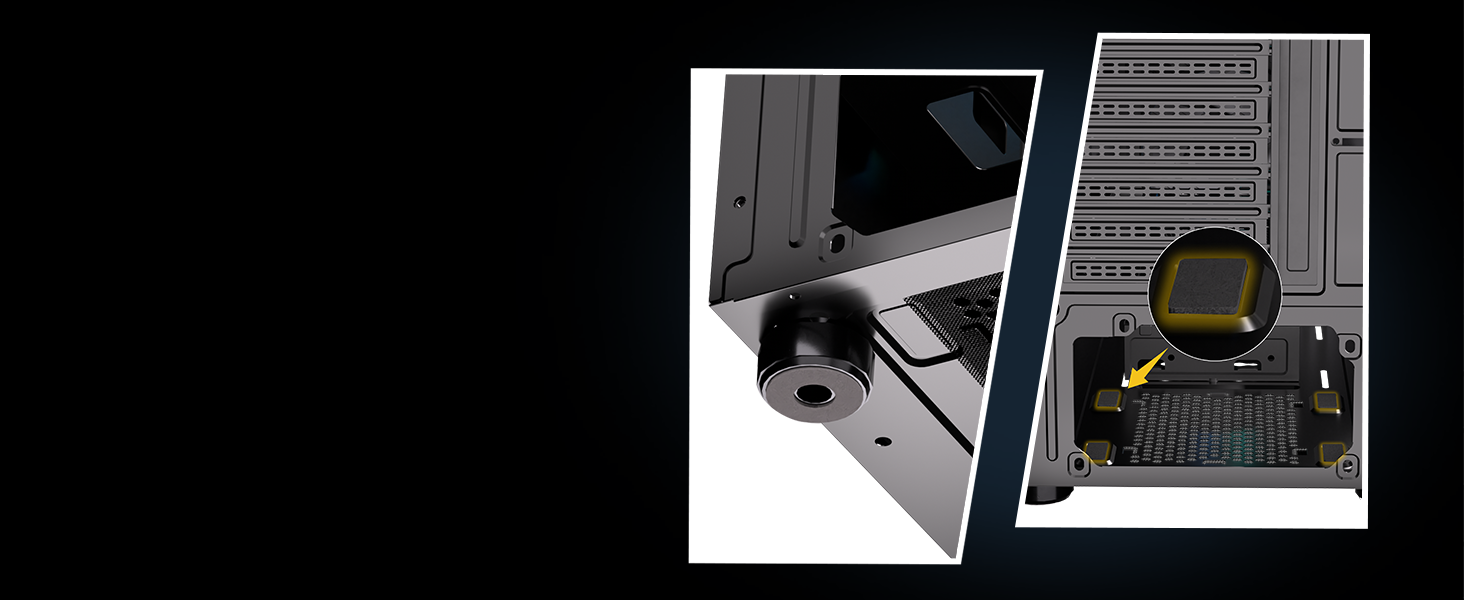
Figure 6: Proper connection of ARGB fans to the motherboard's 5V3PIN RGB interface.
4. Bedryfsinstruksies
4.1 I/O-paneelfunksies
Die boonste I/O-paneel bied gerieflike toegang tot noodsaaklike poorte:
- USB 3.0-poorte (x2): For high-speed data transfer and peripheral connectivity.
- HD-klank: Headphone and microphone jacks with signal shielding to prevent noise interference.
- Kragknoppie: To power on/off your system.
- Herstel-knoppie: Om jou stelsel te herbegin.

Figuur 7: Gedetailleerd view of the simple and smart I/O panel.
4.2 ARGB-beligtingsbeheer
The ARGB fans can be controlled via your motherboard's 5V3PIN RGB interface using compatible software (e.g., ASUS Aura Sync, MSI Mystic Light Sync, Gigabyte RGB Fusion). This allows for customization of colors and lighting effects.
5. Onderhoud
5.1 Skoonmaak van die stoffilter
To maintain optimal airflow and prevent dust buildup, regularly clean the dust filters:
- Top Magnetic Dust Filter: Easily removable for cleaning.
- Bottom Pull-out Dust Filter: Conveniently slides out for cleaning.
Regular cleaning helps extend the life of your computer components.

Figure 8: Location of the magnetic top dust filter and pull-out bottom dust filter.
6. Probleemoplossing
If you encounter any issues with your MUSETEX G07 PC case, please refer to the following general troubleshooting steps:
- Geen krag: Check all power connections, including the PSU, motherboard, and front panel connectors. Ensure the power switch on the PSU is in the 'on' position.
- Waaiers draai nie/geen RGB nie: Verify that the fans are correctly connected to the motherboard's fan headers and the 5V3PIN ARGB header. Check your motherboard's software for fan speed and RGB settings.
- Oorverhitting: Ensure all fans are spinning correctly and are not obstructed. Clean dust filters regularly. Verify proper installation of CPU cooler and thermal paste.
- Los verbindings: Recheck all internal cable connections, including power, data, and front panel cables.
For further assistance, please contact MUSETEX customer support.
7. Spesifikasies
| Kenmerk | Detail |
|---|---|
| Handelsmerk | MUSETEX |
| Model Naam | G07 |
| Soort saak | Mid Tower |
| Moederbordversoenbaarheid | ATX, Mikro ATX, Mini ITX |
| Vooraf geïnstalleerde waaiers | 6 PWM ARGB Fans |
| GPU-lengteondersteuning | Tot 390 mm (15.35 duim) |
| PSU Length Support | Tot 230 mm (9.05 duim) |
| Radiatorondersteuning (Bo) | 280 mm, 240 mm |
| Storage Drive Bays | 4 (e.g., 2x 2.5" SSD + 2x 3.5" HDD or 4x 2.5" SSD) |
| I/O-poorte | 2 x USB 3.0, HD Audio |
| Afmetings (LxBxH) | 15.28 x 8.86 x 18.43 duim |
| Item gewig | 13.2 pond |
| Materiaal | Metal, Plastic, Tempered Glass |
8. Waarborg en Ondersteuning
MUSETEX strives to provide the best support to customers. If you encounter any problems with your case, please feel free to contact us by clicking "Sold-by-MUSETEX" on the product page where you purchased the item. We will do our best to assist you.