
1. Inleiding
The Ankilo Mini Bluetooth 5.3 Receiver/Transmitter is a versatile 2-in-1 audio adapter designed to add Bluetooth functionality to non-Bluetooth devices. Featuring the latest Bluetooth 5.3 technology, it ensures stable connections and a transmission range of up to 33 feet (10 meters). This device is suitable for use with cars, speakers, stereo systems, and headphones, allowing you to enjoy wireless audio streaming and hands-free calling.

Figure 1: Ankilo Mini Bluetooth 5.3 Receiver/Transmitter.

Figure 2: Highlighting Bluetooth 5.3 for stable connections, auto reconnect in RX mode, 33 ft signal range, and fast transmission.
2. Produk verbyview
Maak jouself vertroud met die toestel se komponente:
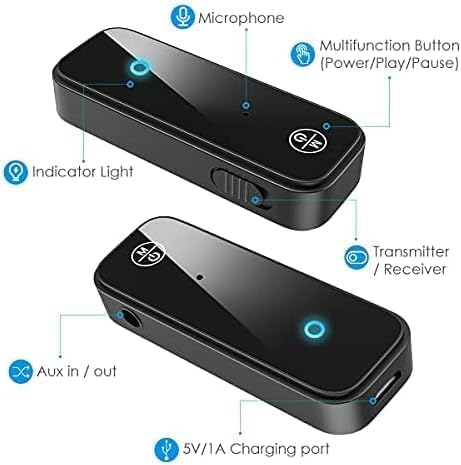
Figure 3: Labeled diagram of the Ankilo Bluetooth adapter. Key components include the Microphone, Multifunction Button (Power/Play/Pause), Indicator Light, Transmitter/Receiver (TX/RX) switch, Aux in/out port, and 5V/1A Charging port.
3. Pakketinhoud
Maak seker dat alle items in die pakket teenwoordig is:
- 1 x Ankilo Mini Bluetooth 5.3 Receiver/Transmitter
- 1 x 3.5mm Audio Connector (new and old versions may be sent randomly)
- 1 x USB-laaikabel
- 1 x Gebruikershandleiding
4. Opstelling en verbinding
4.1. Ontvangermodus (RX)
Use Receiver Mode to stream audio from your Bluetooth-enabled device (e.g., smartphone, laptop) to a non-Bluetooth audio system (e.g., car stereo, wired speakers, wired headphones).
- Skakel oor na RX-modus: Locate the TX/RX switch on the side of the adapter and slide it to the "RX" position.
- Koppel aan oudiostelsel: Plug the 3.5mm audio connector into the Aux in/out port of the Bluetooth adapter. Then, plug the other end of the 3.5mm audio connector into the auxiliary input port of your non-Bluetooth audio system.
- Skakel aan en koppel: Press and hold the Multifunction Button (power button) for 3 seconds to turn on the device. The indicator light will flash red and blue alternately, indicating it is in pairing mode.
- Bind saam met jou toestel: On your smartphone or other Bluetooth-enabled device, go to Bluetooth settings and search for "Ankilo" or "ZF-360" (or similar device name). Select it to connect. Once connected, the indicator light on the adapter will turn solid blue.

Figure 4: Step-by-step visual guide for connecting in both Receiver (RX) and Transmitter (TX) modes.
4.2. Sendermodus (TX)
Use Transmitter Mode to stream audio from a non-Bluetooth audio source (e.g., TV, computer, MP3 player) to your Bluetooth headphones or speakers.
- Skakel oor na TX-modus: Locate the TX/RX switch on the side of the adapter and slide it to the "TX" position.
- Koppel aan oudiobron: Plug the 3.5mm audio connector into the Aux in/out port of the Bluetooth adapter. Then, plug the other end of the 3.5mm audio connector into the auxiliary output port of your non-Bluetooth audio source (e.g., TV headphone jack).
- Skakel aan en koppel: Press and hold the Multifunction Button (power button) for 3 seconds to turn on the device. The indicator light will flash red and blue alternately, indicating it is in pairing mode.
- Pair with Bluetooth Headphones/Speakers: Put your Bluetooth headphones or speakers into pairing mode. The adapter will automatically search and connect to your headphones/speakers. Once connected, the indicator light on the adapter will turn solid red.
Video 1: General guide on how to use an Aux Bluetooth Adapter for Car. (Note: Product shown may vary slightly from Ankilo model.)
Video 2: Demonstration of ensuring the audio plug is firmly inserted for optimal sound quality. (Note: Product shown may vary slightly from Ankilo model.)
5. Bedryfsmodusse en -funksies
5.1. Handvrye oproepe
The adapter features a built-in HD microphone for convenient hands-free calling while driving or performing other tasks.
- Beantwoord/hang af: Druk een keer die multifunksieknoppie.
- Verwerp oproep: Druk en hou die Multifunction Button vir 2 sekondes.
- Herbel laaste nommer: Double-press the Multifunction Button.
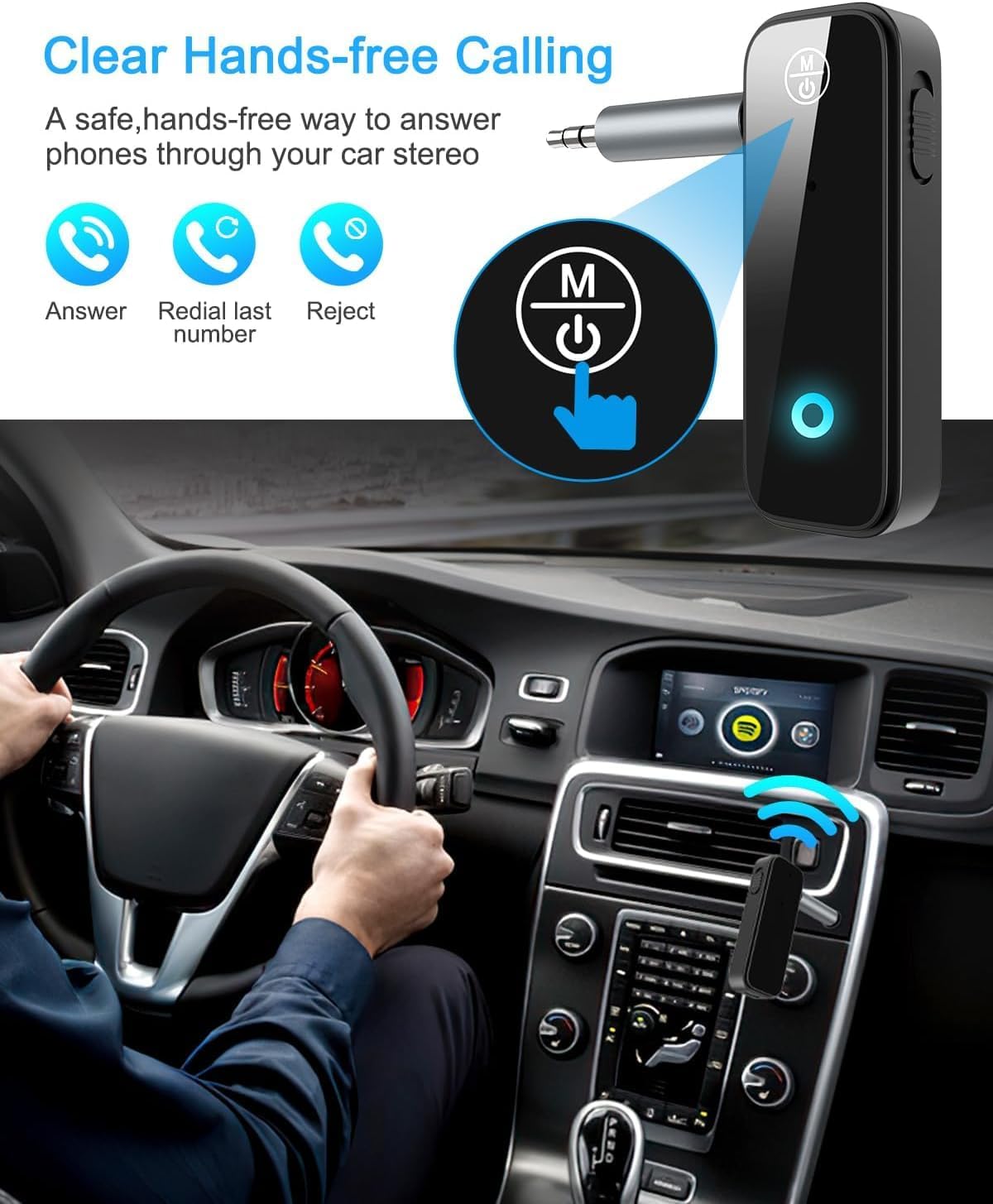
Figure 5: Visual representation of hands-free calling functionality in a vehicle.
5.2. Musiekweergawebeheer
- Speel/pouse: Druk een keer die multifunksieknoppie.
- Volgende snit: Press the "+" button once.
- Vorige snit: Press the "-" button once.
- Volume op: Druk en hou die "+" knoppie in.
- Volume af: Druk en hou die "-" knoppie in.
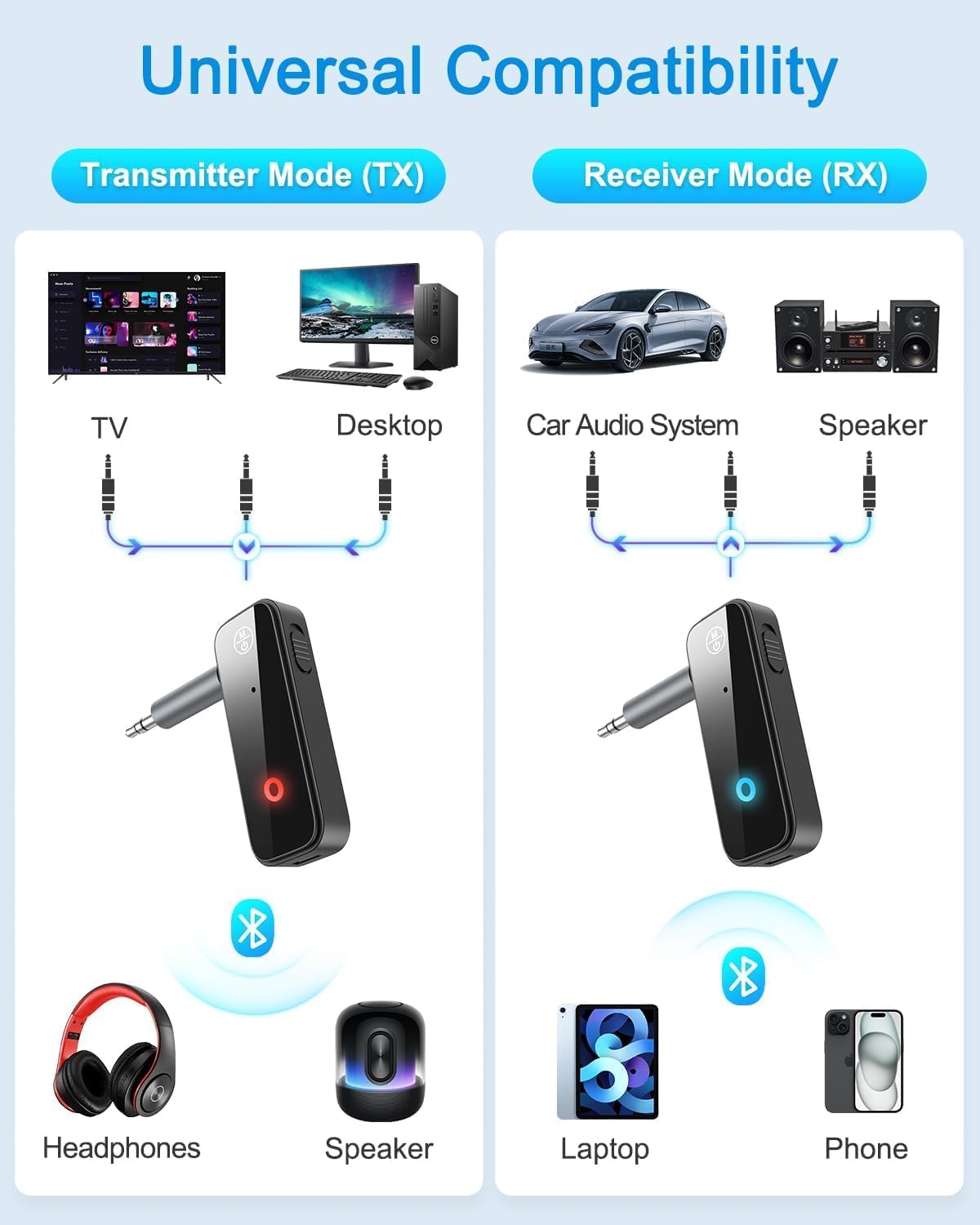
Figure 6: Illustrates the universal compatibility of the device in both Transmitter (TX) and Receiver (RX) modes with various devices like TVs, desktops, car audio systems, speakers, headphones, laptops, and phones.
6. Laai en batterylewe
The Ankilo Mini Bluetooth adapter is equipped with a built-in rechargeable battery. A full charge takes approximately 2 hours and provides up to 8 hours of music playback or call time.
- Laai: Connect the provided USB charging cable to the 5V/1A Charging port on the adapter and to a USB power source. The red indicator light will be solid during charging and turn off when fully charged.
- Lae battery aanduiding: When the battery is low, the red indicator light will flash.

Figure 7: Details on the device's 8-hour battery life, 2-hour fast charging, and USB charging port.
7. Spesifikasies
| Kenmerk | Detail |
|---|---|
| Handelsmerk | Ankilo |
| Model | CP210-MA06CA-KH |
| Bluetooth weergawe | 5.3 |
| Bedryfsmodusse | Receiver (RX) & Transmitter (TX) |
| Versendingsreeks | Tot 33 voet (10 meter) |
| Batterylewe | Approx. 8 hours (music/call) |
| Laai tyd | Ongeveer. 2 uur |
| Laaipoort | 5V/1A (USB) |
| Oudio-invoer/-uitvoer | 3.5 mm hulp |
| Ingeboude mikrofoon | Yes (HD) |
| Materiaal | Plastiek |
| Produk afmetings | 6.7 x 1.8 x 10 cm; 30 g |
8. Probleemoplossing
- Toestel word nie aangeskakel nie: Ensure the device is fully charged. Connect it to a power source using the USB cable.
- Kan nie met 'n toestel koppel nie:
- Ensure the adapter is in the correct TX or RX mode.
- Make sure the adapter is in pairing mode (red and blue lights flashing alternately).
- Ensure the target device (phone, headphones, speaker) is also in pairing mode.
- Turn off and on the Bluetooth function on your device and try searching again.
- Clear previous Bluetooth connections on both devices if necessary.
- No audio or low audio:
- Check that the 3.5mm audio connector is fully and firmly inserted into both the adapter and the audio system/source.
- Maak seker dat die volume op beide die adapter en die gekoppelde klanktoestel hardop gedraai is.
- Verify that the adapter is correctly connected to the audio source/system (TX mode for output, RX mode for input).
- Onderbroke verbinding: Ensure there are no significant obstacles (like walls) between the adapter and the connected Bluetooth device. Keep devices within the 33-foot (10-meter) range.
9. Veiligheidsinligting
- Moenie die toestel blootstel aan uiterste temperature, vog of korrosiewe omgewings nie.
- Moenie die toestel self uitmekaar haal of probeer herstel nie.
- Hou buite bereik van kinders.
- Note: This adapter is not suitable for SONY devices. Please confirm compatibility before purchase.
10. Waarborg en Ondersteuning
Ankilo offers a 12-month quality protection warranty and 60 days free replacement for this product. For any questions or concerns, please contact our customer support. We are committed to responding within 24 hours to assist you.