
Fenton RP118B
Fenton RP118B Bluetooth Draaitafel Gebruikershandleiding
Model: RP118B
1. Inleiding
This manual provides essential information for the safe and efficient operation of your Fenton RP118B Bluetooth Turntable. Please read it thoroughly before using the device and retain it for future reference.

Image 1.1: The Fenton RP118B Bluetooth Turntable in its open position, showcasing a vinyl record ready for playback.
2. Veiligheidsinstruksies
- Kragbron: Maak seker dat die kragtoevoer ooreenstem met die voltage gespesifiseer op die eenheid.
- Water en vog: Moenie die eenheid aan reën of vog blootstel nie. Moenie voorwerpe gevul met vloeistowwe, soos vase, op die eenheid plaas nie.
- Ventilasie: Ensure adequate ventilation. Do not cover ventilation openings.
- Hitte: Moenie die eenheid naby hittebronne soos verkoelers, hitteregisters, stowe of ander apparaat (insluitend ampversterkers) wat hitte produseer.
- Skoonmaak: Maak slegs skoon met 'n droë lap.
- Diens: Verwys alle diens na gekwalifiseerde dienspersoneel.
3. Pakketinhoud
Verifieer dat alle items teenwoordig is tydens uitpak:
- Fenton RP118B Bluetooth Turntable
- Kragadapter
- USB Cable (for PC encoding)
- Instruksie Handleiding
4. Produk verbyview
The Fenton RP118B turntable is designed for playing vinyl records. Its black polyurethane leather suitcase design provides a classic aesthetic. This turntable offers three playback speeds (33, 45, and 78 RPM). It features integrated stereo speakers for clear sound reproduction. Bluetooth connectivity allows for connecting external speakers, headphones, and other devices. The PC encoding function via USB enables conversion of vinyl records to MP3 files for digital archiving. The turntable includes a tonearm with manual or automatic stop functionality and a 3.5mm AUX input. Its belt drive system ensures stable record playback. The RP118B combines traditional vinyl playback with modern features in a compact format.

Beeld 4.1: verbyview of the Fenton RP118B's key features, including USB encoding, headphone output, integrated speakers, Bluetooth, and Line In.
4.1. Kontroles en verbindings

Beeld 4.2: Gedetailleerd view of the turntable's control panel and connection ports.
- Bord: Supports the vinyl record.
- Tonarm: Hou die stylus vas en volg die plaatgroewe.
- Stylus/Needle: Lees die klankinligting van die opname.
- Spoedkieser: Wissel tussen 33, 45 en 78 RPM.
- Outomatiese stopskakelaar: Enables or disables automatic tonearm stop at the end of a record.
- Krag/volumeknop: Skakel die eenheid aan/af en verstel die luidsprekervolume.
- Aanwyserlig: Toon krag en Bluetooth-status.
- Koptelefoonaansluiting: Vir die koppeling van koptelefoon.
- Line In (AUX) Jack: Vir die koppeling van eksterne klankbronne.
- USB-poort: For PC connection for MP3 encoding.
- Line Out (RCA) Jacks: Vir die koppeling aan eksterne amplewers of aangedrewe luidsprekers.
- DC 5V-invoer: Om die kragadapter aan te sluit.
- BT OUT/PHONO/BT IN Switch: Selects Bluetooth transmission, Phono output, or Bluetooth reception mode.
5. Opstelling
5.1. Uitpak en Plasing
- Verwyder die draaitafel versigtig uit sy verpakking.
- Place the unit on a stable, level surface away from direct sunlight, heat sources, and excessive dust or vibration.
- Remove any protective materials from the tonearm and stylus.
5.2. Kragverbinding
- Connect the DC 5V power adapter to the DC 5V input port on the turntable.
- Steek die adapter in 'n geskikte muuraansluiting.
5.3. External Audio Connections (Optional)
- To External Speakers/Amplewendiger: Connect RCA cables (not included) from the "Line Out" jacks on the turntable to the audio input of your ampverligter of aangedrewe luidsprekers.
- To Headphones: Koppel 3.5 mm-oorfone in die koptelefoonaansluiting.
- From External Audio Source (AUX In): Connect a 3.5mm audio cable (not included) from your external device (e.g., MP3 player, smartphone) to the "Line In" jack on the turntable.
6. Bedryfsinstruksies
6.1. Speel 'n vinielplaat
- Open the turntable lid.
- Place a vinyl record on the platter.
- Kies die toepaslike spoed (33, 45 of 78 RPM) met die spoedkeuseskakelaar. Vir 45 RPM-plate, plaas die ingeslote 45 RPM-adapter op die spil.
- Turn the Power/Volume knob clockwise to power on the unit.
- Set the BT OUT/PHONO/BT IN switch to "PHONO" mode.
- Lift the tonearm using the cue lever and position it over the desired track of the record.
- Laat sak die toonarm versigtig op die plaat met die keuhefboom. Die plaat sal begin speel.
- Verstel die volume met die Aan/Aan/Volume-knoppie.
- At the end of the record, if the Auto Stop switch is ON, the platter will stop rotating. If OFF, the platter will continue to rotate, and you must manually lift the tonearm.
- Om die terugspeel te stop, lig die toonarm op en plaas dit terug in sy rusposisie.

Image 6.1: The three-speed turntable platter, capable of playing 33 1/3, 45, and 78 RPM records.
6.2. Bluetooth Reception (BT IN)
Use this function to stream audio from your smartphone or tablet to the turntable's built-in speakers.
- Turn the Power/Volume knob clockwise to power on the unit.
- Set the BT OUT/PHONO/BT IN switch to "BT IN" mode. The indicator light will flash, indicating pairing mode.
- Enable Bluetooth on your smartphone or tablet and search for "Fenton RP118B" (or similar).
- Select the turntable from the list of available devices to pair. Once paired, the indicator light will stop flashing and remain solid.
- Play music from your device. Audio will be streamed through the turntable's speakers.
- Adjust the volume using the Power/Volume knob on the turntable and/or your connected device.

Image 6.2: The turntable utilizing Bluetooth wireless technology to receive audio from a smartphone.
6.3. Bluetooth Transmission (BT OUT)
Use this function to stream audio from your playing vinyl record to external Bluetooth speakers or headphones.
- Ensure your external Bluetooth speaker or headphones are in pairing mode.
- Turn the Power/Volume knob clockwise to power on the unit.
- Set the BT OUT/PHONO/BT IN switch to "BT OUT" mode. The indicator light will flash.
- The turntable will automatically search for and attempt to pair with nearby Bluetooth audio devices.
- Sodra dit gekoppel is, sal die aanwyserliggie ophou flikker.
- Begin playing a vinyl record as described in section 6.1. The audio will be transmitted to your paired Bluetooth device.
- Adjust the volume on your connected Bluetooth speaker or headphones.
6.4. USB Encoding (Vinyl to MP3)
This feature allows you to convert your vinyl records into digital MP3 files op jou rekenaar.
- Koppel die draaitafel aan jou rekenaar met die meegeleverde USB-kabel.
- Install the necessary recording software on your computer (software typically provided on a CD or available for download from the manufacturer's webwerf).
- Follow the instructions provided with the recording software to capture the audio from your vinyl record.
- Play the vinyl record on the turntable as you would normally. The audio will be sent to your computer for recording.
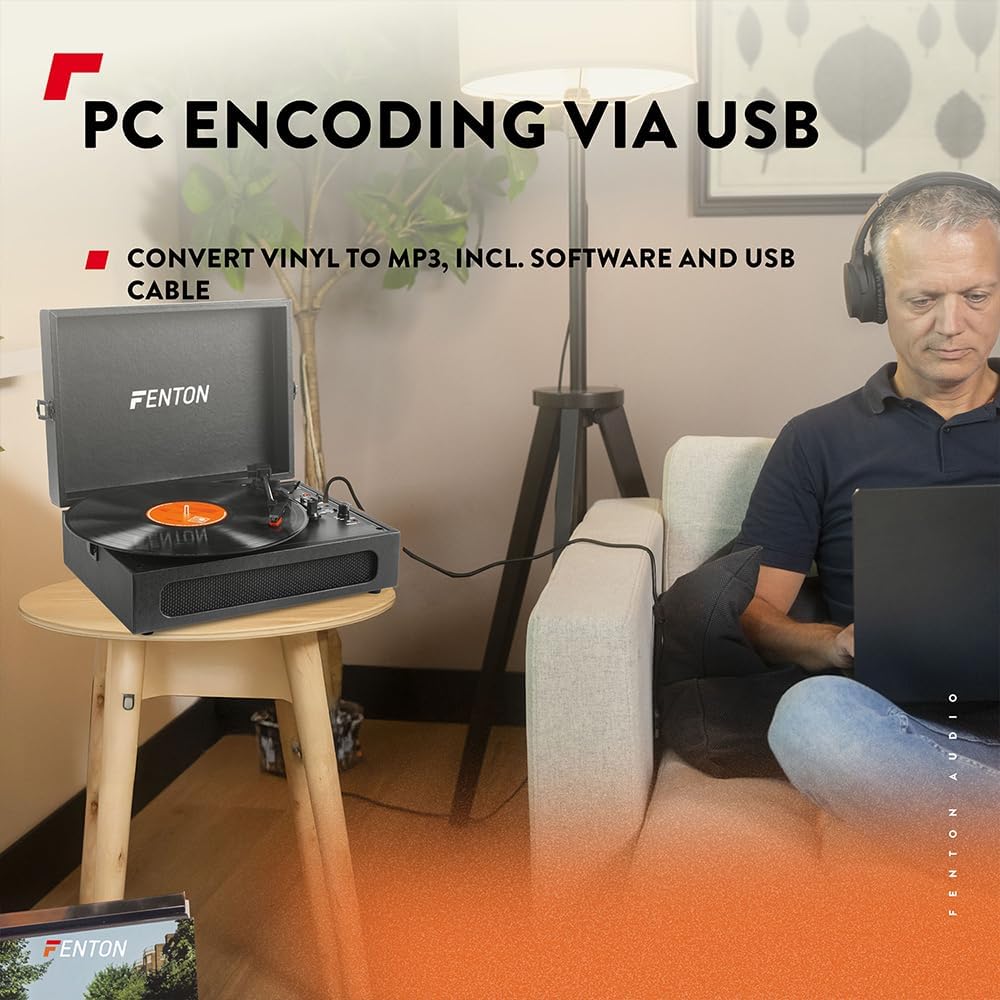
Image 6.3: USB encoding in progress, converting vinyl audio to MP3 files op 'n rekenaar.
6.5. Using the AUX Input (Line In)
Connect an external audio device (e.g., smartphone, MP3 player) to the turntable's built-in speakers.
- Connect a 3.5mm audio cable from your external device's headphone or line-out jack to the "Line In" jack on the turntable.
- Turn the Power/Volume knob clockwise to power on the unit.
- Ensure the BT OUT/PHONO/BT IN switch is not in "BT IN" mode (it can be in PHONO or BT OUT, as Line In is a separate input).
- Play audio from your external device. The sound will be routed through the turntable's speakers.
- Adjust the volume using the Power/Volume knob on the turntable and/or your connected device.
7. Onderhoud
7.1. Skoonmaak van die draaitafel
- Ontkoppel altyd die eenheid van die kragaansluiting voor skoonmaak.
- Use a soft, dry cloth to wipe the exterior surfaces. Do not use abrasive cleaners, waxes, or solvents.
- Gently brush the stylus with a soft brush designed for stylus cleaning, moving from back to front.
- Hou die stofdeksel toe wanneer dit nie gebruik word nie om stofophoping te voorkom.
7.2. Stylus Replacement
The stylus is a consumable part and will wear out over time. A worn stylus can damage your records and degrade sound quality. Replace the stylus after approximately 300-500 hours of playback, or if you notice a significant drop in sound quality or visible damage.
- Raadpleeg die vervaardiger se website or your retailer for compatible replacement styli.
- Follow the instructions provided with the replacement stylus for proper installation.
8. Probleemoplossing
| Probleem | Moontlike oorsaak | Oplossing |
|---|---|---|
| Geen krag nie | Power adapter not connected; Power outlet not working; Power/Volume knob off. | Ensure power adapter is securely connected. Try a different outlet. Turn Power/Volume knob clockwise to ON. |
| Geen geluid van luidsprekers nie | Volume too low; BT OUT/PHONO/BT IN switch in incorrect position; Headphones connected. | Increase volume. Set switch to "PHONO" for vinyl or "BT IN" for Bluetooth reception. Disconnect headphones. |
| Sound distorted or skipping | Record dirty or damaged; Stylus worn or dirty; Turntable not level. | Clean record. Clean or replace stylus. Place turntable on a level surface. |
| Probleme met Bluetooth-paring | Device too far; Turntable not in pairing mode; Incorrect BT mode selected. | Move device closer. Ensure turntable is in "BT IN" (for reception) or "BT OUT" (for transmission) mode and indicator is flashing. Restart both devices. |
| Record stops prematurely (Auto Stop) | Auto Stop switch is ON. | This is normal operation. If you prefer continuous rotation, set the Auto Stop switch to OFF. |
9. Spesifikasies
| Handelsmerk | Fenton |
| Modelnommer | RP118B |
| Kleur | Swart |
| Materiaal | Poliuretaan |
| Motor tipe | Riemgedrewe |
| Speelspoed | 33 1/3, 45, 78 RPM |
| Versoenbare toestelle | Personal computer, MP3 player, smartphone, headphones, speakers, tablet |
| Bluetooth weergawe | 5.0 (for reception and transmission) |
| USB-funksionaliteit | PC encoding (Vinyl to MP3) |
| Klankuitsette | RCA Line Out, 3.5mm Headphone Jack |
| Oudio-insette | 3.5 mm AUX in |
| Geïntegreerde luidsprekers | Yes, stereo |
| Item gewig | 3.25 kilogram |
| Kragtoevoer | DC 5V (Adapter included) |

Image 9.1: Dimensions of the Fenton RP118B turntable.
10. Waarborg en Ondersteuning
For warranty information, please refer to the documentation included with your purchase or visit the official Fenton website. For technical support or service inquiries, please contact your retailer or the manufacturer directly.
Manufacturer: Tronios B.V.