
Sny-310E-V
Generic RMF-TX800U RMF-TX900U Replacement Remote Control User Manual
For Sony 4K 8K HD TV X80K X90K X95K Series 2022 Models
1. Inleiding
This manual provides comprehensive instructions for the Generic RMF-TX800U RMF-TX900U replacement remote control. It is designed to function as a direct replacement for your original Sony TV remote, offering essential controls for your television. This remote utilizes infrared technology and requires no programming or pairing for most compatible Sony 4K and 8K HD TV models from 2022.
2. Verenigbaarheid
The RMF-TX800U RMF-TX900U replacement remote control is compatible with a wide range of Sony 4K 8K HD TV models from the 2022 series. This includes, but is not limited to, the following series and models:
- KD-reeks: KD-43X72K, KD-43X73K, KD-43X80K, KD-43X81K, KD-43X82K, KD-43X85K, KD-43X89K, KD-50X72K, KD-50X73K, KD-50X80K, KD-50X81K, KD-50X82K, KD-50X85K, KD-50X89K, KD-55X80K, KD-55X80CK, KD-55X81K, KD-55X82K, KD-55X85K, KD-55X89K, KD-65X80K, KD-65X80CK, KD-65X81K, KD-65X82K, KD-65X85K, KD-65X89K, KD-75X80K, KD-75X80CK, KD-75X81K, KD-75X82K, KD-75X85K, KD-75X89K, KD-85X85K, KD-85X89K, KD-43X85TK, KD-50X85TK, KD-55X85TK, KD-65X85TK, KD-75X85TK, KD-85X85TK
- XR-reeks: XR-42A90K, XR-48A90K, XR-50X90S, XR-50X92K, XR-50X94S, XR-55A75K, XR-55A80K, XR-55A80CK, XR-55A83K, XR-55A84K, XR-55A95K, XR-55X90K, XR-55X90CK, XR-55X92K, XR-55X93K, XR-55X94K, XR-65A75K, XR-65A80K, XR-65A80CK, XR-65A83K, XR-65A84K, XR-65A95K, XR-65X90K, XR-65X90CK, XR-65X92K, XR-65X93K, XR-65X94K, XR-65X95K, XR-75X90K, XR-75X90CK, XR-75X92K, XR-75X93K, XR-75X94K, XR-75X95K, XR-77A80CK, XR-77A83K, XR-77A84K, XR-85X90K, XR-85X90CK, XR-85X95K, XR-75Z9K, XR-85Z9K
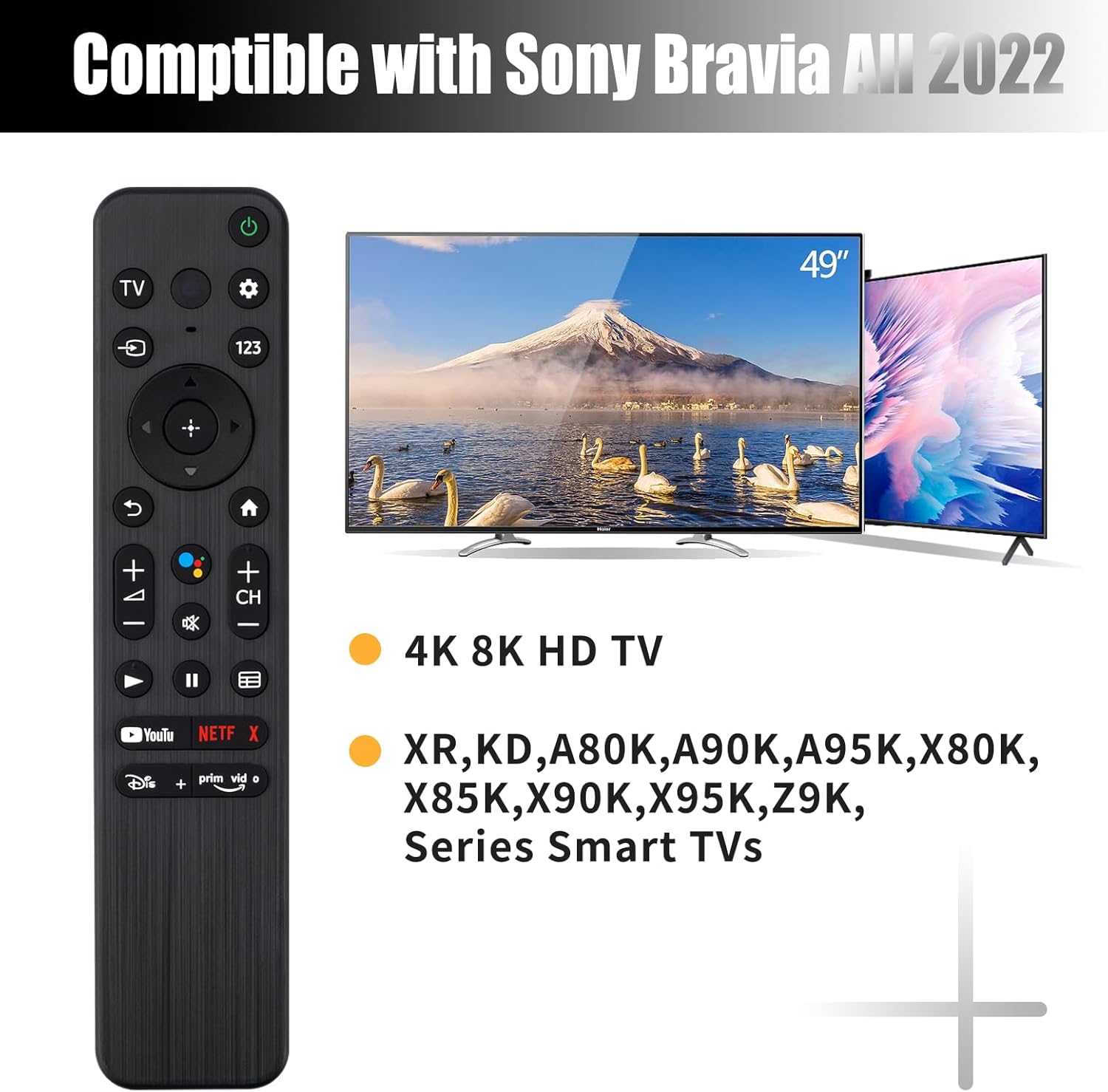
This image illustrates the remote control's compatibility with various Sony Bravia 2022 TV models, including 4K and 8K HD TVs across different series.
3. Opstelling
3.1 Battery installasie
The remote control requires two (2) AAA 1.5V batteries (not included). Follow these steps to install the batteries:
- Vind die batterykompartement aan die agterkant van die afstandbeheer.
- Skuif die batteryklep afwaarts of in die rigting wat deur die pyl aangedui word om dit oop te maak.
- Plaas twee AAA-batterye in en maak seker dat die positiewe (+) en negatiewe (-) terminale korrek in lyn is met die merke binne-in die kompartement.
- Maak die batteryklep toe deur dit terug te skuif totdat dit stewig klik.

This image demonstrates the correct method for installing two AAA batteries into the remote control's battery compartment.
3.2 Aanvanklike gebruik
This remote control utilizes upgraded infrared technology and does not require any programming or pairing with your Sony TV. Once the batteries are correctly installed, the remote is ready for immediate use. Simply point the remote towards your television and press the desired buttons.
4. Bedryfsinstruksies
4.1 Knoppiefunksies oorview
Familiarize yourself with the layout and functions of the remote control buttons:
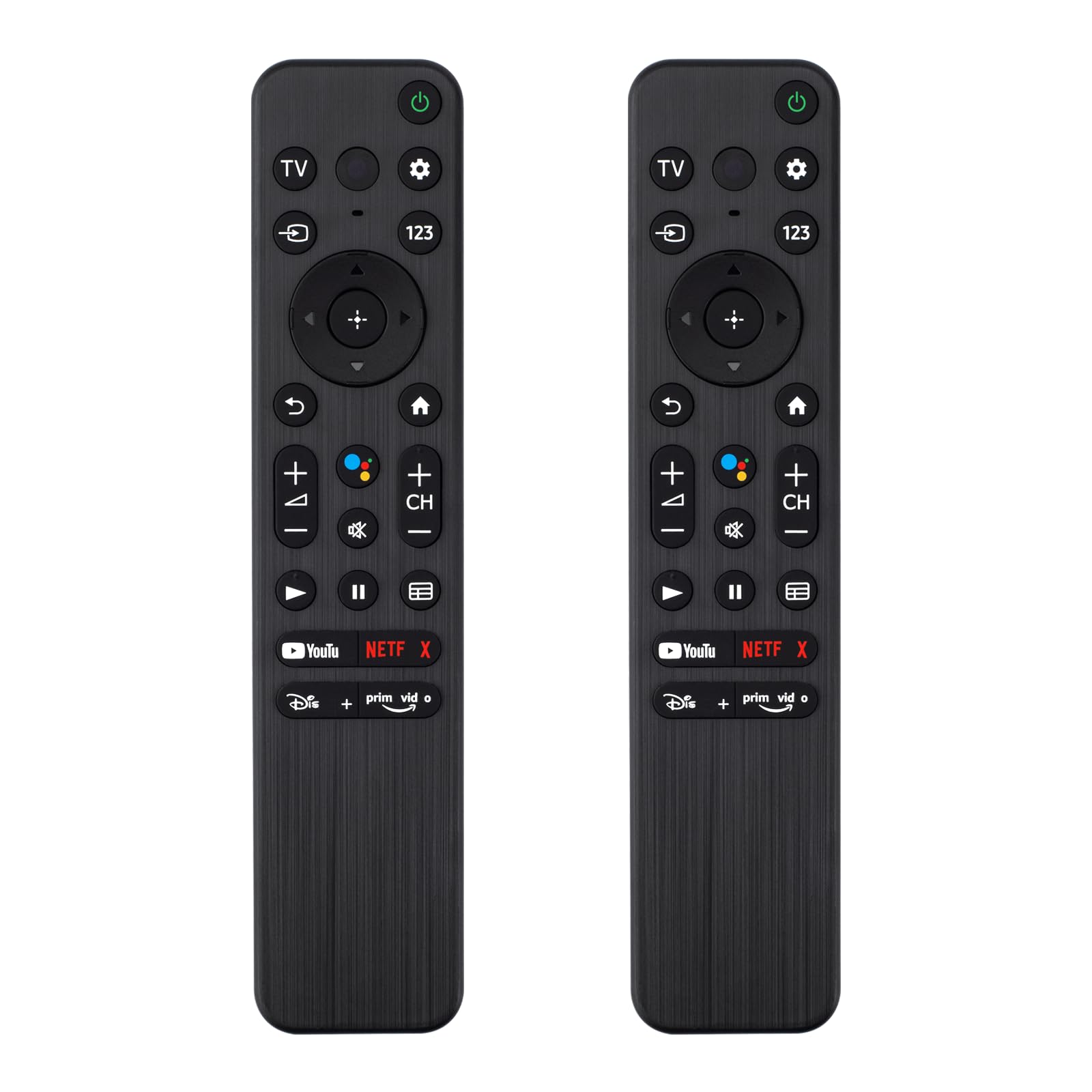
This image provides a visual guide to the remote control's buttons and their corresponding functions.
- TV Krag: Skakel die TV aan of af.
- Vinnige instellings: Accesses quick settings menu.
- Control Menu (123): Opens the control menu, often for number input or additional functions.
- Invoer: Kies die invoerbron (HDMI 1, HDMI 2, ens.).
- Google: Activates Google Assistant (note: this remote does NOT support voice control).
- Navigasie-knoppie (Op/Af/Links/Regs/Enter): Navigeer deur spyskaarte en bevestig keuses.
- Agter: Keer terug na die vorige skerm of spyskaart.
- Tuis: Keer terug na die TV se tuisskerm.
- Volumetoetse (+/-): Pas die TV-volume aan.
- Channel Keys (CH +/-): Verander TV-kanale.
- Demp: Demp of ontdemp die TV-oudio.
- Play/Pause/Stop/Fast Forward/Rewind: Beheer die afspeel van media.
- Gids: Maak die elektroniese programgids oop.
- Kortpadsleutels: Direct access buttons for popular streaming applications (e.g., YouTube, Netflix, Disney+, Prime Video). These are pre-programmed.
4.2 Using Shortcut Buttons
The remote features dedicated shortcut buttons for quick access to popular streaming services. Simply press the corresponding button to launch the application directly on your compatible Sony TV.

This image highlights the dedicated shortcut buttons for various streaming services, allowing for quick access.
4.3 Remote Control Range
The upgraded infrared technology allows for a long-distance remote control range of up to 40 feet (approximately 12 meters). Ensure there are no obstructions between the remote control and the TV's infrared receiver for optimal performance.

This image illustrates the effective long-distance control capability of the remote, with a signal range exceeding 40 feet.
5. Onderhoud
5.1 Skoonmaak
To maintain the remote control's appearance and functionality, clean it regularly. Use a soft, dry cloth to wipe the surface. For stubborn dirt, slightly dampen the cloth with water or a mild, non-abrasive cleaner. Avoid using harsh chemicals, solvents, or abrasive materials, as these can damage the remote's finish or internal components.
5.2 Batterysorg
- Vervang batterye wanneer die afstandbeheerder se reaksie traag of onreëlmatig raak.
- If the remote control will not be used for an extended period (e.g., one month or more), remove the batteries to prevent leakage and potential damage to the device.
- Gooi gebruikte batterye weg volgens plaaslike regulasies.
6. Probleemoplossing
Indien u probleme met u afstandbeheer ondervind, raadpleeg die volgende algemene probleme en oplossings:
| Probleem | Moontlike oorsaak | Oplossing |
|---|---|---|
| Remote reageer nie | Dooie of verkeerd geïnstalleerde batterye. Obstruksie tussen afstandbeheer en TV. Afstandbeheer buite bereik. | Replace batteries with new ones, ensuring correct polarity. Remove any objects blocking the signal path. Move closer to the TV (within 40 ft). |
| Knoppies werk nie | Dirty contacts under buttons. Remote damage. | Clean the remote surface. If specific buttons are unresponsive, the remote may be damaged and require replacement. |
| TV not responding to specific functions | TV model incompatibility for certain advanced functions (e.g., voice control). | This remote does not support voice control. Ensure your TV model is listed as compatible for all desired functions. |
7. Spesifikasies
| Kenmerk | Detail |
|---|---|
| Handelsmerk | Generies |
| Modelnommer | Sny-310E-V |
| Versoenbare toestelle | Television (Sony 4K 8K HD TV X80K X90K X95K Series 2022 Models) |
| Verbindingstegnologie | Infrarooi |
| Maksimum reeks | 10 Meters (approximately 33 feet) / Up to 40 feet (12 meters) as per feature bullets |
| Battery Tipe | 2 x AAA 1.5V batterye (nie ingesluit nie) |
| Materiaal | Premium ABS |
| Kleur | SWART |
| Spesiale kenmerk | Ergonomies |
| Knoppie Hoeveelheid | 14 |
8. Waarborginligting
Specific warranty information for this product was not provided in the available data. Please refer to the retailer or manufacturer's website for details regarding warranty coverage, if applicable.
9. Kliëntediens
Contact information for customer support was not provided in the available data. For assistance, please refer to the retailer where the product was purchased or check the product packaging for support details.
Ask a question about this manual
Ask about setup, troubleshooting, compatibility, parts, safety, or missing instructions. Manuals+ will review the question and use this page’s manual context to help answer it.