
1. Inleiding
Dankie vir die aankoopasing the Zopsc Dual Screens Waterproof Digital Camera. This manual provides essential information for the safe and effective use of your camera. Please read it thoroughly before operating the device and keep it for future reference.
2. Veiligheidsinligting
- Waterdigte seël: Before each underwater use, carefully ensure that the battery door is securely locked. Failure to do so will compromise the camera's waterproof integrity and may cause damage.
- Depth and Duration: The camera is waterproof up to 10 feet (3 meters) for approximately one hour per use without an additional case. Do not exceed these limits.
- Temperatuur: Vermy die blootstelling van die kamera aan uiterste temperature.
- Skoonmaak: After underwater use, rinse the camera with fresh water and dry thoroughly with a soft cloth. Do not use chemical cleaners.
- Battery: Use only the specified battery type. Do not attempt to open or modify the battery.
3. Pakketinhoud
Verifieer dat al die items wat hieronder gelys word, in jou pakket ingesluit is:
- 1 x Zopsc Dual Screens Waterproof Digital Camera (Host)
- 1 x Handtou
- 1 x Laaikabel (Mikro USB)
- 1 x Opbergsak
- 1 x Gebruikershandleiding

This image shows the Zopsc Digital Camera along with its included accessories: a hand rope, a charging cable, and a storage bag.
4. Produk verbyview
Maak jouself vertroud met die kamera se komponente en kontroles.
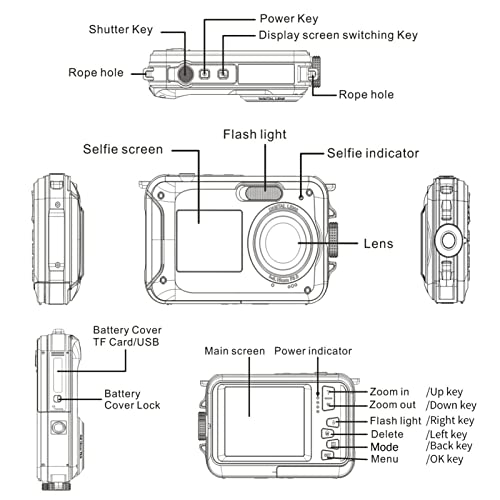
This detailed diagram labels the various parts and controls of the Zopsc Digital Camera, including the shutter key, power key, display screen switching key, rope holes, selfie screen, flash light, lens, battery cover, USB port, main screen, power indicator, zoom buttons, flash light button, delete button, mode button, and menu button.
Dual Screen Design
The camera features a rear 2.7-inch TFT LCD (4:3) for general viewing and a front 1.8-inch TFT LCD (4:3) for convenient selfies.
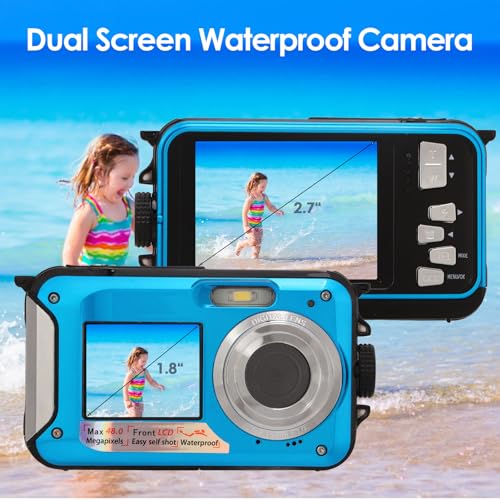
This image displays the Zopsc Dual Screens Waterproof Digital Camera, highlighting both the larger rear 2.7-inch LCD and the smaller front 1.8-inch LCD, demonstrating its dual-screen capability for easy selfies and viewing.
5. Opstelling
5.1. Battery installasie en laai
- Vind die batterykompartement aan die kant van die kamera.
- Press the cover lock with one hand and slide the battery cover outwards with the other hand to open the battery door.
- Insert the provided 650mAh BP 5m Lithium Ion Battery, ensuring correct polarity.
- Close the battery door securely until it clicks into place. Ensure it is fully locked, especially before underwater use.
- To charge, connect the camera to a power source using the Micro USB charging cable. The power indicator light will show charging status.
5.2. Geheuekaartinstallasie
The camera supports Micro SD cards up to 128GB (not included, purchase separately).
- Open the battery compartment door as described above.
- Locate the Micro SD card slot inside the compartment.
- Insert the Micro SD card into the slot until it clicks.
- Maak die deur van die battery veilig toe.

This image displays the Zopsc Digital Camera alongside a 128GB Micro SD card, indicating its compatibility with high-capacity storage for extended shooting.
6. Bedryfsinstruksies
6.1. Skakel aan/af
Druk en hou die Kragtoets to turn the camera on or off.
6.2. Neem foto's
In fotomodus, druk die Sluiter sleutel to capture a 48MP image. The camera supports various image resolutions including 48M, 30M, 24M, 20M, 16M, 12M, 8M, 7M, 5M, 2M.
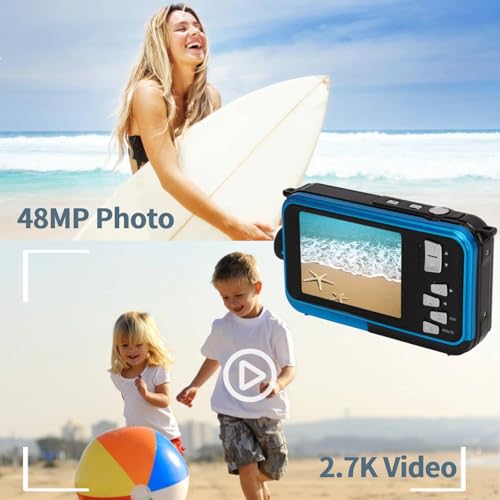
This image highlights the camera's ability to capture high-resolution 48MP photos and record 2.7K video, suitable for various outdoor and underwater activities.
6.3. Opneem van video's
Switch to video mode using the Modus knoppie. Druk die Sluiter sleutel to start recording 2.7K (2688x1520P/20fps) or 1080P (1920x1080P/30fps) video. Press again to stop recording.
6.4. Using Dual Screens (Selfie Mode)
Druk die Display Screen Switching Key to toggle between the rear and front LCD screens. The front screen is ideal for framing selfies. Built-in selfie timers (2, 5, 10 seconds) are available in the settings.
6.5. Digitale Zoom
Gebruik die Zoem in en Zoem uit buttons to adjust the 16X digital zoom. Note that digital zoom may reduce image quality.
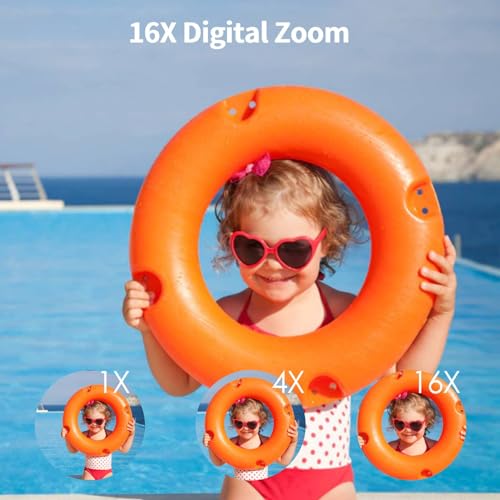
This image illustrates the 16X digital zoom capability of the Zopsc camera, showing a subject at 1X, 4X, and 16X magnification.
6.6. Flitsmodusse
The camera features a built-in flash. Use the Flitslig button to cycle through flash modes: Auto, On/Fill, and Off.
6.7. Underwater Use
Ensure the battery door is securely locked before submerging the camera. The camera is waterproof up to 10 feet (3 meters) for up to one hour per session. It is designed for outdoor activities and underwater photography.

This image shows the Zopsc Digital Camera in use underwater, demonstrating its waterproof design for capturing moments during swimming or snorkeling.
6.8. Recording While Charging
The camera supports recording while charging, allowing for extended use when connected to a power source.
7. Onderhoud
- Skoonmaak: After each use, especially after exposure to saltwater, rinse the camera with fresh water. Wipe the body and screens with a soft, lint-free cloth. Do not use abrasive materials or chemical solvents.
- Seëls: Regularly inspect the rubber seals around the battery compartment for any signs of damage, dirt, or debris. Clean them gently if necessary. Damaged seals can compromise waterproofing.
- Berging: Store the camera in a cool, dry place away from direct sunlight and extreme temperatures. Ensure the battery compartment is dry before closing for long-term storage.
- Batterysorg: If storing for an extended period, remove the battery. Recharge the battery periodically to maintain its health.
8. Probleemoplossing
- Kamera skakel nie aan nie:
- Maak seker die battery is korrek geïnstalleer en ten volle gelaai.
- Check if the battery door is securely closed.
- Water lekkasie:
- Immediately remove the camera from water.
- Check the battery door seal for proper closure and any damage or debris.
- Do not use the camera if water has entered the compartment. Contact support.
- Swak beeld-/videokwaliteit:
- Ensure the lens is clean and free from smudges or water droplets.
- Check lighting conditions.
- Digital zoom (16X) can reduce image clarity; try to shoot without maximum zoom if possible.
- Geheuekaartfout:
- Ensure the memory card is correctly inserted.
- Try formatting the memory card (this will erase all data).
- Test with a different compatible Micro SD card.
- Controls are unresponsive or fiddly:
- Ensure your fingers are dry and clean.
- Practice using the controls to become familiar with their operation.
9. Spesifikasies
| Kenmerk | Spesifikasie |
|---|---|
| Beeld resolusie | Up to 48MP (48M, 30M, 24M, 20M, 16M, 12M, 8M, 7M, 5M, 2M) |
| Beeldformaat | JPEG |
| Video-resolusie | FHD 2.7K (2688x1520P/20fps), FHD 1920x1080P/30fps, HD 1280x720P/30fps, VGA, QVGA |
| Video-formaat | AVI |
| Dubbele skerm | Rear: 2.7 Inch TFT LCD (4:3); Front: 1.8 Inch TFT LCD (4:3) |
| Digitale zoom | 16X |
| Waterdigte diepte | 10 voet (3 meter) |
| Battery kapasiteit | 650mAh BP 5m Lithium Ion Battery |
| Koppelvlak | Mikro USB 2.0 |
| Geheue ondersteuning | Mikro SD-kaart tot 128 GB (nie ingesluit nie) |
| Deurlopende skiet | Ja |
| Mikrofoon | Ingeboude |
| Materiaal | ABS, metaal |
| Gewig | Ongeveer. 258g / 9.1oz |
10. Waarborg en Ondersteuning
For warranty information and technical support, please refer to the documentation provided at the time of purchase or contact your retailer. Keep your purchase receipt as proof of purchase.