
Inrico S300
Inrico S300 PoC Radio User Manual
Model: S300
Inleiding
The Inrico S300 is a robust Push-to-Talk Over Cellular (PoC) radio designed for reliable communication across 3G, 4G, and LTE networks. It features an IP54 waterproof rating, an Android operating system, and a portable handheld design, making it suitable for various professional environments. This manual provides essential information for the proper setup, operation, and maintenance of your S300 device.
Produk verbyview
Sleutel kenmerke
- Nationwide coverage via cell towers for video, voice, and message communication.
- 3.1-inch touchscreen display with built-in antenna.
- One-Click SOS function for emergency situations.
- Dual cameras: 5MP front and 13MP rear with 170-degree wide-angle lens.
- Android operating system with 4G LTE, Wi-Fi, Bluetooth, and NFC connectivity.
- Integrated GPS, AGPS, and BDS for navigation.
- 4600mAh battery vir langdurige werking.
- Compact dimensions: 156.8 x 75.7 x 16mm.
- IP67 rated for waterproof and dust-proof performance, tested for 1.2-meter drops.
Toestelkomponente

Voorkant view of the Inrico S300, displaying the user interface with group communication options.

Sykant en voorkant views illustrating the Power button, PTT button, programmable keys (F1, F2), SIM card slot, and USB port.

Top view showing the headphone jack and SOS button. Bottom view showing charging contacts.
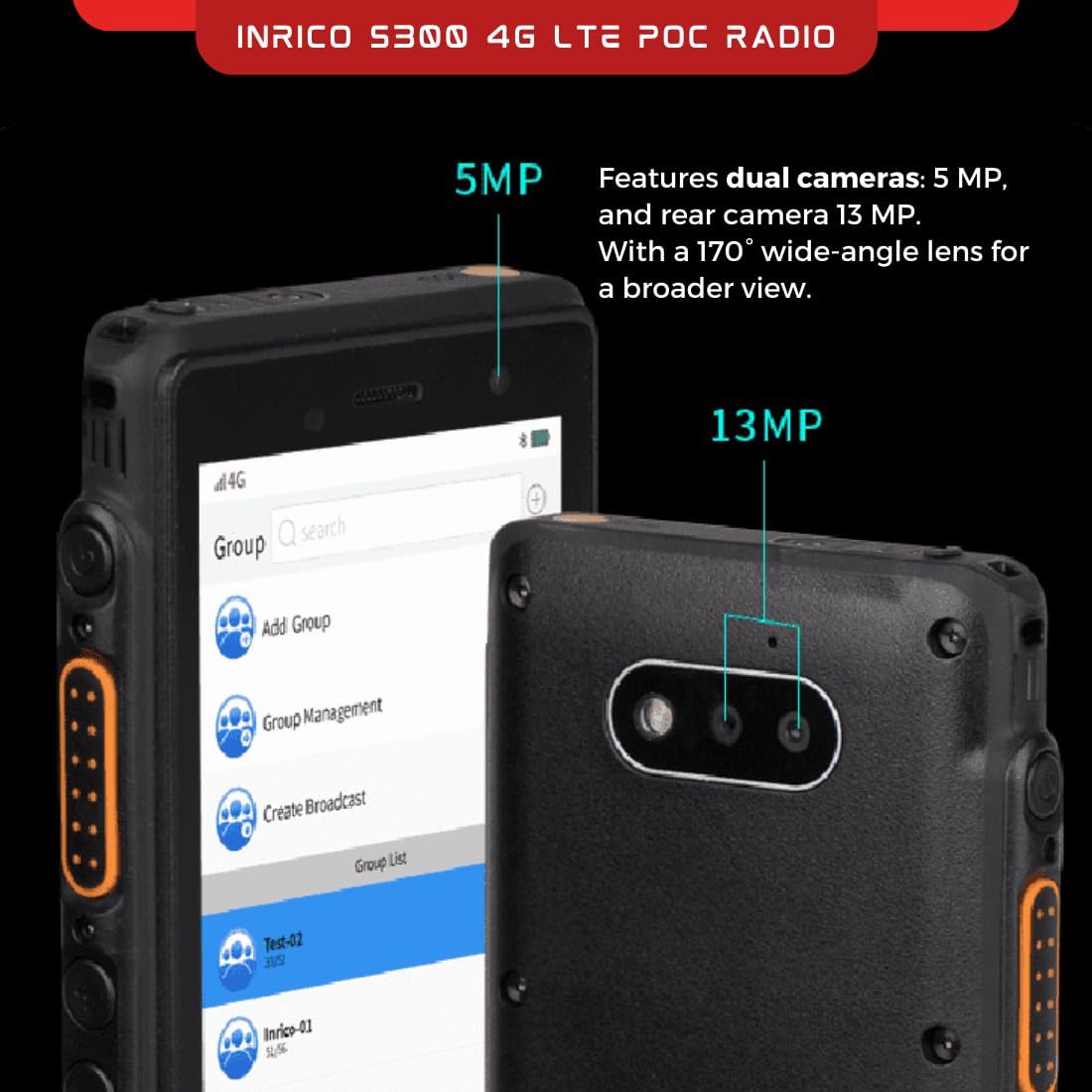
Detail of the 5MP front camera and 13MP rear camera, highlighting their positions on the device.
Opstelling
Wat is in die boks
- Inrico S300 PoC Radio
- Gebruikershandleiding
- Battery
- Lanyard
Aanvanklike opstellingstappies
- Installeer SIM-kaart: Locate the SIM card slot on the side of the device. Insert your activated 3G/4G LTE SIM card into the designated slot. Ensure it is correctly oriented.
- Installeer die battery: Open the battery compartment cover on the rear of the device. Insert the provided Lithium Polymer battery, ensuring the contacts align. Close the cover securely.
- Laai toestel: Connect the device to a power source using the appropriate charging cable. Allow the device to fully charge before first use. The charging indicator will show the charging status.
- Krag aan: Press and hold the Power button (located on the side) until the Inrico logo appears on the screen.
- Aanvanklike konfigurasie: Follow the on-screen prompts to complete the initial Android setup, including language selection, Wi-Fi connection (if desired), and Google account setup (optional).
Bedryfsinstruksies
Push-to-Talk (PTT) Operation
The Inrico S300 functions primarily as a Push-to-Talk (PTT) device over cellular networks. Communication is managed through dedicated PoC applications.
- Access PoC Application: From the home screen, tap on the installed PoC application (e.g., Inrico App, Zello).
- Select Group/Contact: Within the application, navigate to the desired group or individual contact you wish to communicate with.
- Initiate Talk: Press and hold the dedicated PTT button on the side of the device. Speak clearly into the microphone. Release the PTT button when you have finished speaking to listen for a response.
- Receive Communication: When another user is transmitting, the device will automatically play their audio.
SOS funksie
The S300 includes a dedicated SOS button for emergency situations.
- Aktiveer SOS: Press and hold the orange SOS button (located on the top of the device) for a few seconds.
- Noodwaarskuwing: This action will trigger a pre-configured emergency alert, which may include sending your location, an audio message, or initiating a call to designated contacts or a dispatch center, depending on the PoC application's settings.
Kameragebruik
The device is equipped with front (5MP) and rear (13MP) cameras for capturing images and videos.
- Toegang tot kamera: Open the camera application from the app drawer.
- Capture Media: Use the on-screen controls to switch between front and rear cameras, take photos, or record videos.
Programmable Keys (F1, F2)
The F1 and F2 keys on the side of the device can be customized through the Inrico App or other compatible PoC applications to perform specific functions, such as quick access to contacts, groups, or other features.
Onderhoud
Skoonmaak
- Gebruik 'n sagte, damp lap om die buitekant van die toestel skoon te maak.
- Moenie harde chemikalieë, oplosmiddels of skuurmiddels gebruik nie.
- Ensure all port covers are securely closed before cleaning, especially if using a damp cloth, to maintain IP67 rating.
Battery sorg
- Charge the battery regularly, avoiding complete discharge when possible.
- Moenie die battery aan uiterste temperature blootstel nie.
- If the device will not be used for an extended period, store it with a partial charge (around 50%) in a cool, dry place.
Water- en stofweerstand (IP67)
The Inrico S300 is IP67 rated, meaning it is protected from dust ingress and can withstand immersion in water up to 1 meter for 30 minutes. To maintain this rating:
- Ensure all port covers (USB, headphone jack) and the battery compartment cover are firmly sealed before exposing the device to water or dusty environments.
- Do not intentionally submerge the device beyond the specified depth or duration.
- If the device gets wet, dry it thoroughly before opening any covers or charging.

The Inrico S300 demonstrating its IP67 water and dust resistance, suitable for harsh environments.
Probleemoplossing
| Probleem | Moontlike oorsaak | Oplossing |
|---|---|---|
| Toestel skakel nie aan nie. | Low battery; Battery not installed correctly; Software issue. | Charge the device for at least 30 minutes. Ensure battery is properly seated. Perform a forced restart (refer to device support for specific key combinations). |
| Geen netwerksein nie. | Out of network coverage; SIM card issue; Network settings. | Move to an area with better cellular coverage. Check if the SIM card is properly inserted and activated. Verify APN settings in Android network settings. |
| Cannot transmit/receive PTT. | No network connection; PoC application not running; Incorrect group selected; Microphone/speaker issue. | Ensure device has active cellular data. Open and log into the PoC application. Confirm the correct group or contact is selected. Check microphone and speaker for obstructions. |
| Raakskerm reageer nie. | Tydelike sagtewarefout; Skermskade. | Herbegin die toestel. Kontak kliëntediens as die probleem voortduur. |
Spesifikasies
| Kenmerk | Detail |
|---|---|
| Modelnommer | S300 |
| Netwerk Verenigbaarheid | 2G/3G/4G/WLAN |
| Bedryfstelsel | Android |
| Vertoon | 5.0-inch intelligent touch display |
| Voorste kamera | 5MP |
| Agterste kamera | 13MP |
| Waterweerstand | IP67 (Waterdig en Stofdig) |
| Valweerstand | 1.2 Meters (MIL-STD 810G) |
| Battery kapasiteit | 4600 mAh litium polimeer |
| Afmetings (L x B x H) | 156.8 x 75.7 x 16mm (0.63 x XUMX x 2.98 duim) |
| Gewig | 1.1 pond |
| Navigasie | GPS, AGPS, BDS |
| Konnektiwiteit | Wi-Fi, Bluetooth, NFC |
Toepassingsscenario's
The Inrico S300 PoC radio is versatile and suitable for a wide range of professional applications requiring reliable and wide-area communication.

Examples of environments where the Inrico S300 can be effectively utilized, such as transportation, retail, public safety, and outdoor activities.
- Vervoer: Ideal for logistics, fleet management, and delivery services, enabling real-time communication across large areas.
- Kleinhandel: Enhances coordination among staff in large stores or multiple locations.
- Public Safety: Supports communication for security personnel, event management, and emergency response teams.
- Construction & Industrial: Durable design suitable for rugged environments, facilitating communication on job sites.
- Leisure & Outdoor Activities: Provides reliable communication for groups engaged in hiking, cycling, or other outdoor pursuits where cellular coverage is available.
Waarborg en Ondersteuning
Vervaardiger se waarborg
The Inrico S300 comes with a 1 jaar vervaardiger se waarborgHierdie waarborg dek defekte in materiaal en vakmanskap onder normale gebruik. Bewaar asseblief u bewys van aankoop vir waarborgeise.
Kliënte ondersteuning
For technical assistance, troubleshooting beyond this manual, or warranty inquiries, please contact Inrico customer support through their official webwebwerf of die kontakinligting wat saam met u aankoopdokumentasie verskaf is.
Verwante Dokumente - S300
 |
Hytera HYT-P50 PoC Radio Vinnige Verwysingsgids 'n Vinnige verwysingsgids vir die Hytera HYT-P50 TD-LTE PoC-radio, wat produkuitleg, opstelling, basiese bedrywighede, netwerkkonnektiwiteit en PoC-dienste dek. |
 |
NM350 LTE PoC Radio User Manual | Azle Communications Solutions - Any Distance, Anywhere Comprehensive user manual for the Azle Communications Solutions NM350 LTE PoC Radio. Discover how this device provides reliable, long-distance communication capabilities for professionals, covering setup, operation, and features. |
 |
Inrico S300 POC Radio Gebruikershandleiding Gebruikershandleiding vir die Inrico S300 POC Radio, wat instruksies verskaf oor die installering van bykomstighede, radio oorview, funksies, stelselparameters, veiligheidsinligting en FCC-nakoming. |
 |
Inrico T330 Robuuste PoC Radio Gebruikersgids Omvattende gebruikersgids vir die Inrico T330 Rugged PoC Radio, wat opstelling, werking, batteryversorging, hanteringsvoorsorgmaatreëls, probleemoplossing en FCC-nakomingsinligting dek. |
 |
ALERVITES POC-AT1 PoC Radio User Manual Comprehensive user manual for the ALERVITES POC-AT1 PoC Radio, covering setup, operation, menu functions, troubleshooting, and technical specifications. |
 |
Hytera PNC360S PoC Radio: Produk Verbyview, Spesifikasies en Bedryf Omvattende gids tot die Hytera PNC360S PoC-radio, wat produkte oorview, installasie, basiese bedrywighede, PoC-dienste en gedetailleerde tegniese spesifikasies. |
Ask a question about this manual
Ask about setup, troubleshooting, compatibility, parts, safety, or missing instructions. Manuals+ will review the question and use this page’s manual context to help answer it.