
CANEOE BN1001
CANEOE Modern LED Chandelier User Manual
Model: BN1001
Brand: CANEOE
Inleiding
This user manual provides comprehensive instructions for the installation, operation, and maintenance of your CANEOE Modern LED Chandelier, Model BN1001. Please read this manual thoroughly before installation and use to ensure proper function and safety.

Image: The CANEOE Modern LED Chandelier, showcasing its unique wavy design and the included remote control for operation.
The CANEOE Modern LED Chandelier is a stylish and functional lighting fixture designed for various indoor spaces such as living rooms, dining rooms, kitchens, hallways, and bedrooms. It features integrated LED lighting, dimmable brightness, and adjustable color temperature, all controllable via a convenient remote.
Produk Kenmerke
- Dimbare LED-beligting: The integrated 29W LED chip offers continuous dimming from 10% to 100% brightness, allowing you to set the perfect ambiance.
- Verstelbare kleurtemperatuur: Easily switch between warm white (3000K), neutral white (4500K), and cool white (6000K) to suit your preference and activity.

Image: Visual representation of the chandelier emitting warm light (3000K), natural light (4500K), and white light (6000K), demonstrating the adjustable color temperature feature.
- Verstelbare hanghoogte: The 100 cm (39.37 inches) long suspension wire can be adjusted to customize the hanging height according to your ceiling and room requirements.

Image: Close-up details showing the height adjustment mechanism, the aluminum lamp body, the ceiling adapter suitable for flat/sloped ceilings, and the high-quality LED strips.
- Konstruksie van hoë gehalte: Crafted from durable metal, aluminum, and high-quality acrylic, ensuring better heat dissipation and a longer lifespan. The chrome-plated metal surface is smooth, scratch-resistant, fade-resistant, and anti-corrosion.
- Afstandbeheer werking: Conveniently control the light's brightness and color temperature from a distance using the included remote control.
- Veelsydige toepassing: Ideal for various indoor settings including living rooms, dining rooms, kitchens, hallways, bedrooms, and study rooms.

Image: Four panels showing the chandelier installed in a dining room, bedroom, study room, and hallway/aisle, illustrating its wide range of applications.
Spesifikasies

Image: Diagram illustrating the dimensions of the chandelier, including the ceiling plate height, lamp body height, and lamp body width, along with a list of key specifications.
| Eienskap | Waarde |
|---|---|
| Handelsmerk | KANOE |
| Vervaardiger | KANOE |
| Produkafmetings (L x B x H) | 44 x 47 x 44 cm (17.32 x 18.5 x 17.32 duim) |
| Item Modelnommer | BN1001 |
| Aantal items | 1 |
| Styl | Moderne |
| Kleur | Silver (Style B) |
| Materiaal | Acrylic, Aluminum, Metal |
| Voltooi Tipe | Glad |
| Aantal ligbronne | 1 (Geïntegreerde LED) |
| Ingesluit komponente | Mounting hardware, Remote control |
| Voltage | 220 Volt |
| Spesifieke gebruike | Slegs binnenshuise gebruik |
| Spesiale kenmerke | Dimmable, Adjustable height, Adjustable color temperature |
| Skermkleur | Wit |
| Skadu Materiaal | Acrylic, Aluminum, Metal |
| Tipe prop | Elektriese kabel |
| Installasie tipe | Plafonmontering |
| Batterye benodig | Nee |
| Gloeilamp tipe | LED |
| Energie-etiket | E (View EPREL-databasis) |
| Wattage | 29 Watt |
| Kleurweergawe-indeks (CRI) | 85.00 |
| Item gewig | 2.31 kilogram |
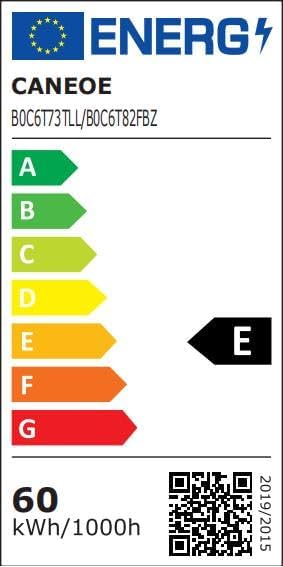
Image: The energy efficiency label for the CANEOE LED Chandelier, indicating an energy rating of E and a QR code linking to the EPREL database.
Installasie-instruksies
Belangrike veiligheidsinligting: Installation should be performed by a qualified electrician or a person with sufficient knowledge of electrical wiring. Always turn off the main power supply before beginning installation.

Image: A comprehensive diagram illustrating the step-by-step installation process of the CANEOE LED Chandelier, including tools required and component assembly.
Gereedskap benodig:
- Handskoene
- Elektriese band
- Basic tools (e.g., screwdriver, wrench)
Installasie stappe:
- Prepare the Mounting Bracket: Unscrew the iron bracket from the light fixture. Fix this bracket securely to the ceiling using appropriate screws. (Refer to step 1 in the installation diagram)
- Koppel die drade: Carefully connect the electrical wires from your ceiling to the light fixture's wires. Ensure all connections are secure and properly insulated with electrical tape.
- Versteekte drade: Gently push any remaining excess wires into the canopy (ceiling plate) to hide them. (Refer to step 2 in the installation diagram)
- Heg die afdak aan: Fix the canopy to the ceiling using screws. Ensure the holes on the canopy align perfectly with the holes on the previously installed bracket for a secure connection. (Refer to step 3 in the installation diagram)
- Pas hanghoogte aan: Press the button on the fixture and pull the suspension wire to adjust the light fixture's height to your desired length. (Refer to step 4 in the installation diagram)
- Assemble Light Strips: Attach the individual light strips to the main body of the light fixture. Ensure the head of each strip is correctly matched with the connecting head on the main body. If a light strip does not work, try turning it upside down and re-connecting it. (Refer to step 5 in the installation diagram)
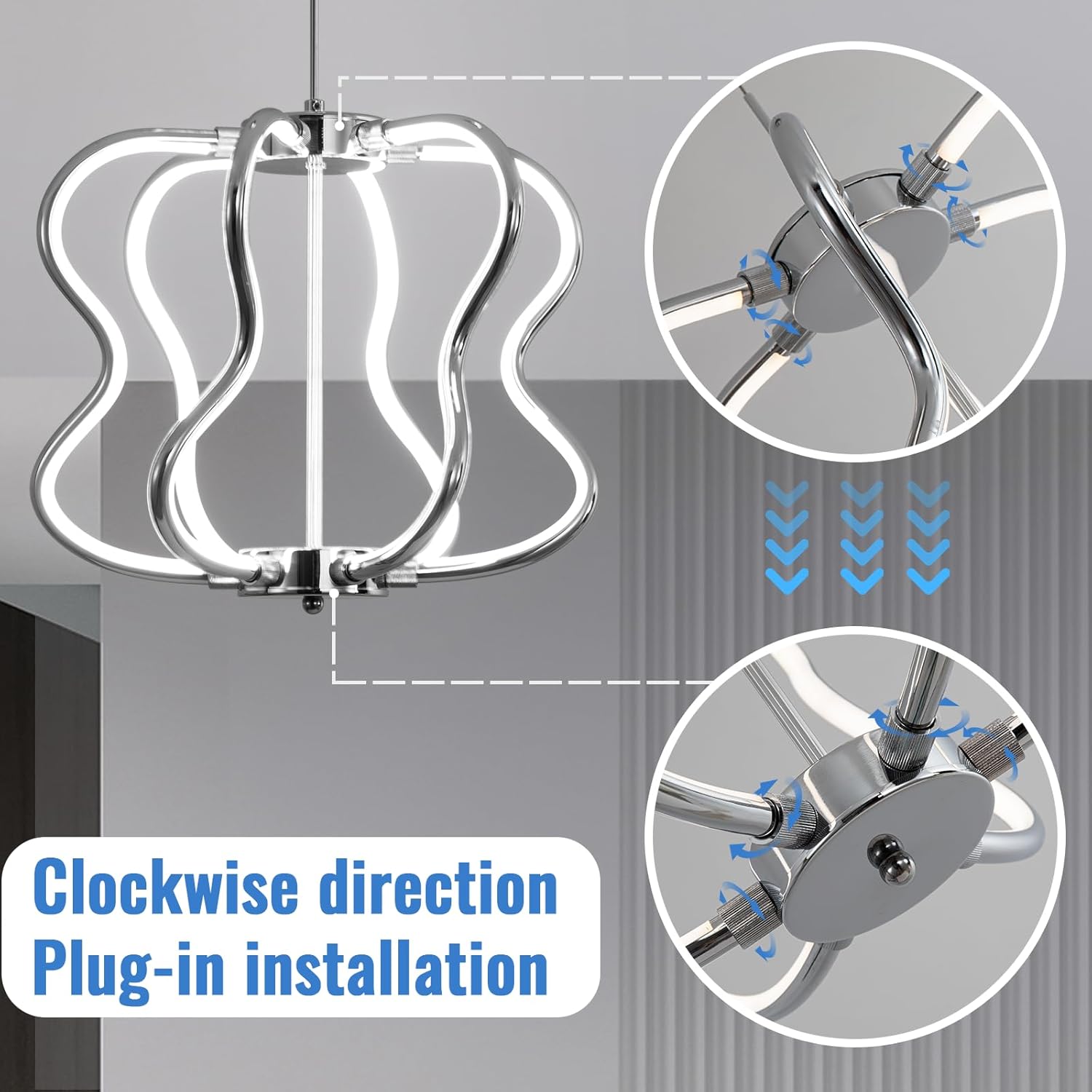
Beeld: Nabyskoot view demonstrating the clockwise plug-in installation method for attaching the light strips to the main body of the chandelier.
Note: The light fixture must be installed firmly and securely to prevent accidents.
Bedryfsinstruksies
Your CANEOE LED Chandelier is operated using the included remote control. Ensure the remote control has working batteries (not included, typically AAA batteries) before use.
Afstandbeheer funksies:
- Krag aan/af: Use the dedicated power button to turn the light fixture on or off.
- Helderheidsaanpassing (verduistering): Use the brightness control buttons (often marked with '+' and '-' or up/down arrows) to increase or decrease the light intensity from 10% to 100%.
- Kleur temperatuur aanpassing: Use the color temperature buttons (often marked with 'W' for Warm, 'N' for Neutral, 'C' for Cool, or sun/moon icons) to cycle through or select the desired color temperature:
- Warm Wit (3000K): For a cozy and inviting atmosphere.
- Neutraal Wit (4500K): For general illumination and a balanced feel.
- Koelwit (6000K): For bright, clear illumination, suitable for tasks.
- Geheue funksie: The light fixture typically remembers the last brightness and color temperature setting when turned off and on again.
Onderhoud
Regular maintenance will help preserve the appearance and functionality of your CANEOE LED Chandelier.
- Skoonmaak: Before cleaning, ensure the power supply to the fixture is turned off. Use a soft, dry, or slightly damp cloth to wipe the metal and acrylic surfaces. Avoid using abrasive cleaners, solvents, or harsh chemicals, as these can damage the finish.
- Gloeilamp vervanging: The LED light source is integrated and not user-replaceable. If the LEDs fail, please contact customer support for assistance.
- Inspeksie: Kontroleer gereeld alle verbindings en monteerhardeware om te verseker dat hulle stewig bly.
Probleemoplossing
If you encounter any issues with your CANEOE LED Chandelier, please refer to the following common troubleshooting steps:
| Probleem | Moontlike oorsaak | Oplossing |
|---|---|---|
| Lig skakel nie aan nie. | No power supply; Loose wiring connection; Faulty fixture. | Check the circuit breaker. Ensure all wires are securely connected as per installation instructions. If problem persists, contact customer support. |
| Afstandbeheer werk nie. | Dead batteries in remote; Remote not paired (if applicable); Obstruction between remote and receiver. | Replace remote control batteries. Ensure there are no obstructions. If the remote requires pairing, refer to specific pairing instructions (not provided in current manual, but common for remotes). |
| Light strips are not illuminating or only partially illuminating. | Improper connection of light strips to the main body. | Ensure each light strip is correctly matched and firmly connected to the main body. Try turning the problematic light strip upside down and re-connecting it. |
| Lig flikker of dof onverwags. | Unstable power supply; Loose connection; Overheating. | Check electrical connections. Ensure proper ventilation around the fixture. If flickering persists, consult a qualified electrician. |
Waarborg en Ondersteuning
CANEOE provides a 12 maande waarborg for this LED Chandelier from the date of purchase. This warranty covers manufacturing defects and material faults under normal use.
If you encounter any problems with your product during the warranty period, please do not hesitate to contact our customer support team. We are committed to providing a satisfactory solution within 24 hours of your inquiry.
For support, please refer to the contact information provided with your purchase or on the official CANEOE webwebwerf.
Ask a question about this manual
Ask about setup, troubleshooting, compatibility, parts, safety, or missing instructions. Manuals+ will review the question and use this page’s manual context to help answer it.