
1. Inleiding
This manual provides instructions for the proper use and care of your Docooler Portable USB Cassette Player. This device allows you to play audio cassettes and convert their content into digital MP3 files via a USB connection to a computer. Please read this manual thoroughly before operating the device to ensure optimal performance and longevity.
2. Produk verbyview
The Docooler Portable USB Cassette Player is a compact, handheld device designed for playing and digitizing audio cassettes. It features a transparent casing, allowing visibility of the internal mechanism.
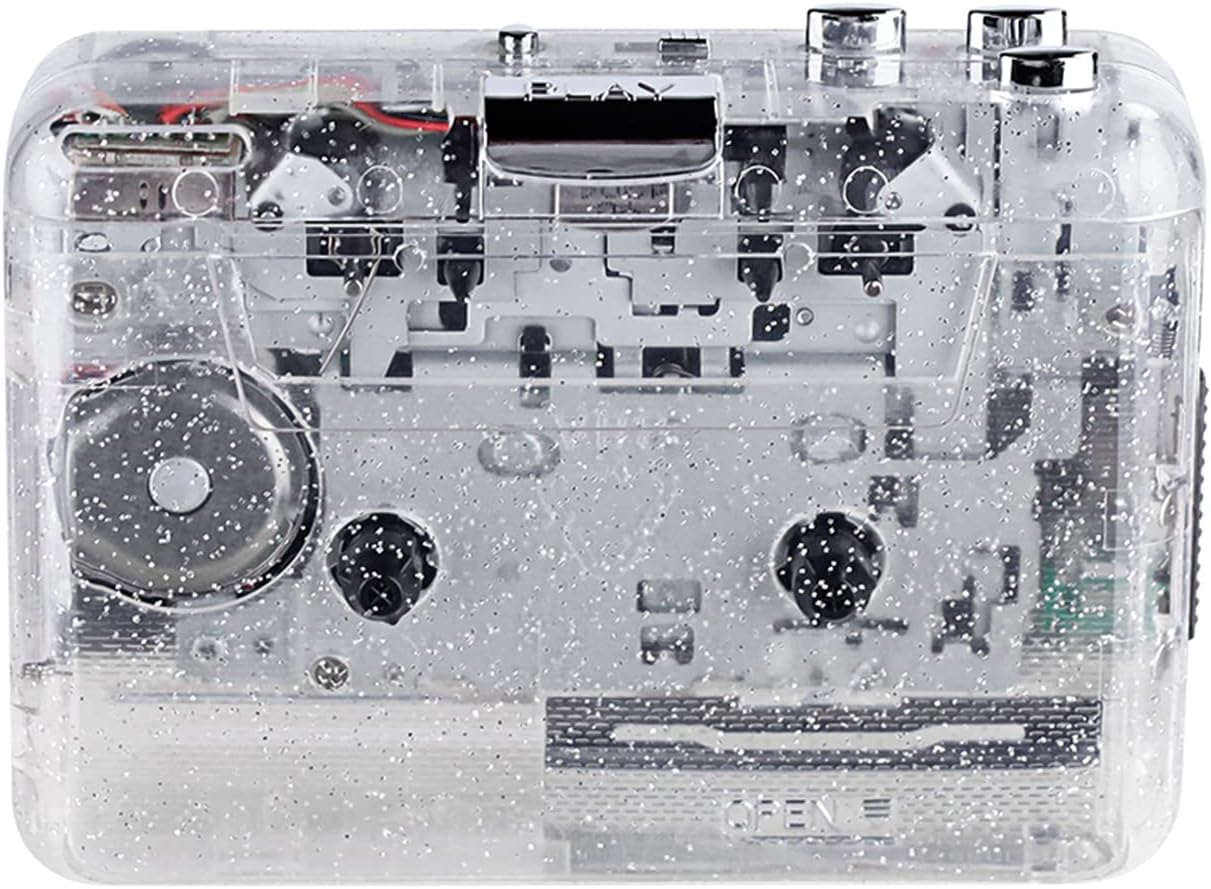
Figuur 1: Voorkant view of the Docooler Portable USB Cassette Player, showcasing its transparent design.

Figure 2: Various angles of the cassette player, including top, side, and open views.
Pakketinhoud:
- Docooler Portable USB Cassette Player
- USB kabel
- Gebruikershandleiding (hierdie dokument)
- Headphones (may vary by package)
3. Opstelling
3.1 Kragtoevoer
The cassette player can be powered by either batteries or a USB connection.
Battery installasie:
- Vind die batterykompartement op die toestel.
- Maak die batteryvakdeksel oop.
- Insert 2 x AA batteries (not included), ensuring correct polarity (+/-).
- Maak die batterykompartement se deksel stewig toe.
USB krag:
Connect the provided USB cable to the player's USB port and the other end to a powered USB port on your computer or a USB wall adapter. The device will draw power from the USB connection.
4. Bedryfsinstruksies
4.1 Playing a Cassette Tape
- Open the cassette compartment cover.
- Insert an audio cassette tape with the open edge facing upwards.
- Maak die deksel van die kassetkompartement stewig toe.
- Connect headphones or external speakers to the 3.5mm audio output jack.
- Druk die SPEEL knoppie om afspeel te begin.
- Gebruik die STOP knoppie om die terugspeel te stop.
- Gebruik die FF (Vinnig Vorentoe) en REW (Terugspoel) knoppies om deur die band te navigeer.
- Verstel die volume met die volumebeheerskakelaar.
- The "DIR" button allows you to quickly flip the tape direction. The "play mode" button can be used to reverse playback once or an unlimited number of times.

Figure 3: The cassette player in use, demonstrating tape insertion and playback setup.

Figure 4: Users listening to audio through headphones connected to the cassette player.
4.2 Converting Tapes to MP3 Files
The Docooler Portable USB Cassette Player can convert your analog cassette audio into digital MP3 files. This process requires a computer and compatible audio recording software (not included).
- Ensure the cassette player is powered (via batteries or USB).
- Connect the cassette player to your computer using the provided USB cable.
- Install and open your preferred audio recording software on your computer. Software such as Audacity (free and open-source) is commonly used for this purpose.
- Configure your recording software to recognize the cassette player as an audio input device.
- Insert the cassette tape you wish to convert into the player.
- Start recording in your software, then press the SPEEL button on the cassette player.
- Monitor the recording process. Once the tape has finished playing, stop the recording in your software.
- Stoor die opgeneemde klank as 'n MP3 file op jou rekenaar.

Figure 5: Illustration of the process to convert cassette audio to MP3 files using the player and a computer.
5. Onderhoud
5.1 Die skoonmaak van die toestel
- Vee die buitekant van die speler af met 'n sagte, droë lap.
- Do not use liquid cleaners or abrasive materials, as they may damage the surface.
- Periodically clean the tape heads and pinch rollers using a cotton swab lightly dampmet isopropylalkohol gespuit om optimale klankgehalte te verseker en bandskade te voorkom.
5.2 Berging
- Wanneer dit nie vir lang tye gebruik word nie, verwyder batterye om lekkasie te voorkom.
- Bêre die speler op 'n koel, droë plek weg van direkte sonlig en uiterste temperature.
6. Probleemoplossing
| Probleem | Moontlike oorsaak | Oplossing |
|---|---|---|
| Geen krag nie | Dead batteries; USB cable not connected properly. | Replace batteries; ensure USB cable is securely connected. |
| Geen klank nie | Headphones/speakers not connected; volume too low; dirty tape heads. | Connect audio output device; increase volume; clean tape heads. |
| Poor sound quality (hissing, muffled) | Dirty tape heads; worn-out tape; low battery. | Clean tape heads; try a different tape; replace batteries. |
| Tape not playing or moving | Tape jammed; mechanism issue; low battery. | Check tape for damage; replace batteries. |
| Cannot convert to MP3 | USB connection issue; software not configured correctly; no recording software. | Ensure USB is connected; check software settings; install compatible recording software. |
7. Spesifikasies
- Model: B0C69FDZF6
- Kragtoevoer: 2 x AA Batteries or USB 5V DC
- Interface: USB 2.0
- Oudio-uitvoer: 3.5 mm stereo-aansluiting
- Afmetings: 7.2 x 5.91 x 1.54 duim (ongeveer)
- Gewig: 9.6 onse (ongeveer)
- Vervaardiger: Doenkoeler
8. Veiligheidsinligting
- Moenie die toestel aan water of oormatige vog blootstel nie.
- Vermy om die toestel te laat val of aan sterk impakte te onderwerp.
- Moenie probeer om die toestel self uitmekaar te haal of te herstel nie. Raadpleeg gekwalifiseerde dienspersoneel.
- Hou buite bereik van kinders.
- Gooi batterye weg volgens plaaslike regulasies.
9. Waarborg en ondersteuning
For warranty information or technical support, please refer to the documentation included with your purchase or contact Docooler customer service through their official website or the retailer where the product was purchased. Please have your model number (B0C69FDZF6) and purchase date available when contacting support.


