
TECURS B0C5QJ6F34
TECURS Wireless Gaming Keyboard
Gebruikershandleiding
Produk verbyview
The TECURS Wireless Gaming Keyboard is designed for an optimal typing and gaming experience. It features advanced 2.4 GHz wireless technology for stable and fast data transmission, ensuring no delays or drops within a 33-foot range. The keyboard utilizes silent membrane technology, providing a responsive typing experience with minimal noise, ideal for quiet environments. Its full-size, ergonomic design includes an inclination angle for comfortable typing during extended use. Dedicated multimedia keys offer convenient control over media functions, and the monochromatic backlight with adjustable brightness enhances visibility in various lighting conditions. This keyboard is widely compatible with Windows XP, Windows 8, and Windows 10 operating systems, making it suitable for desktops, laptops, and other devices.

Beeld: Die TECURS Draadlose Speletjiesleutelbord, wysasing its full-size layout with vibrant, multi-color backlighting. A compact USB receiver is visible to the right of the keyboard, indicating its wireless connectivity.
Opstelling en installasie
Setting up your TECURS Wireless Gaming Keyboard is a straightforward process, designed for quick plug-and-play functionality.
- Pak die sleutelbord uit: Carefully remove the keyboard and the USB receiver from its packaging.
- Vind die USB-ontvanger: The compact USB receiver is typically stored in a compartment on the keyboard or included separately in the box.
- Koppel die ontvanger: Insert the USB receiver into an available USB port on your computer (desktop or laptop).
- Skakel die sleutelbord aan: Ensure the keyboard is charged or has sufficient battery. There might be a power switch on the keyboard; turn it to the 'ON' position if present.
- Outomatiese verbinding: The keyboard should automatically connect to your computer within a few seconds. No additional drivers are typically required for basic functionality.
- Aanvanklike heffing: For optimal performance, it is recommended to fully charge the keyboard before its first use. Use the provided USB charging cable to connect the keyboard to a USB power source.
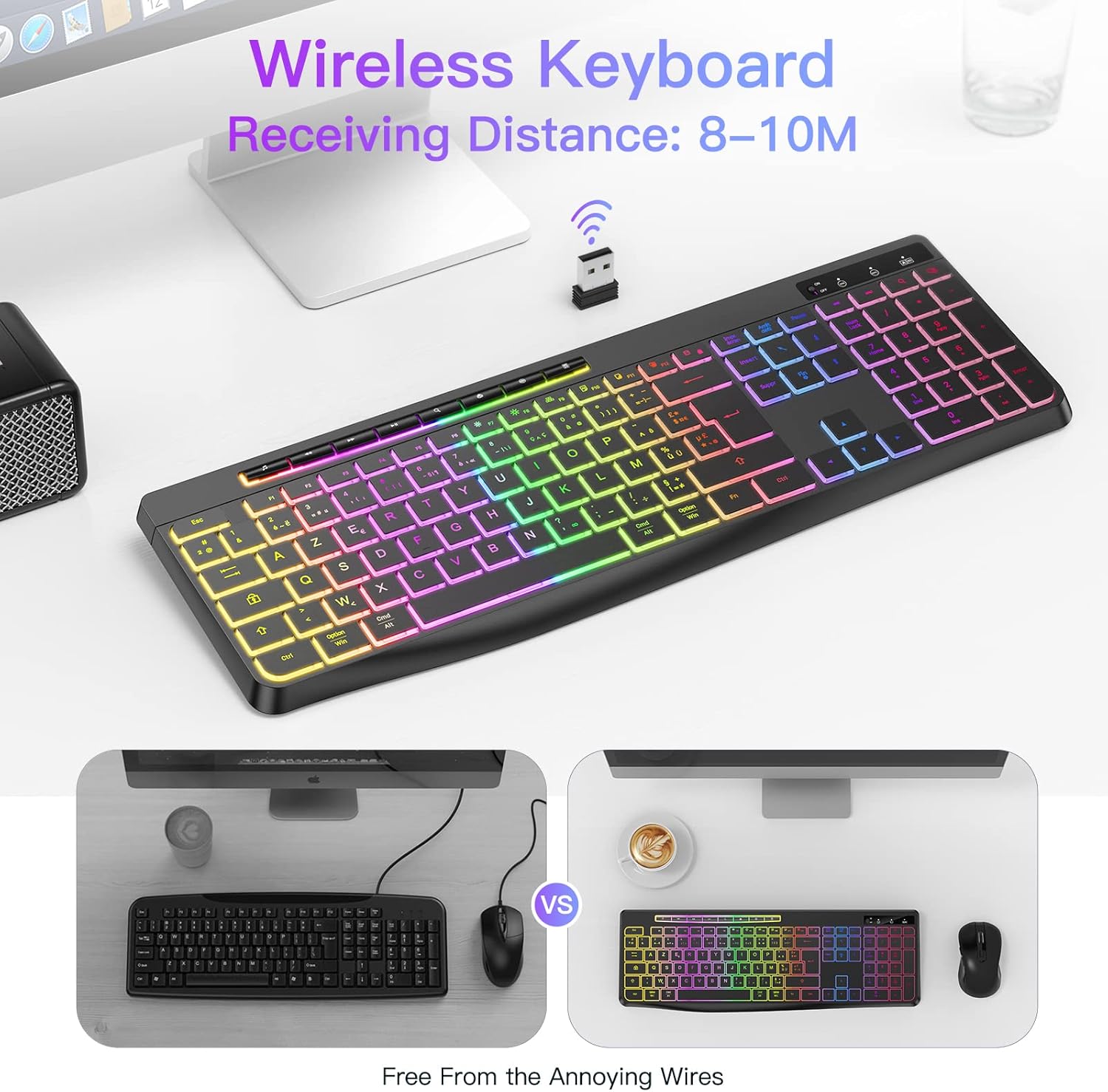
Image: The TECURS Wireless Keyboard positioned on a desk, with its USB receiver prominently displayed. An icon above the receiver indicates a wireless signal, illustrating the 8-10 meter receiving distance.
Bedryfsinstruksies
Basiese gebruik
Once connected, the keyboard functions like a standard full-size keyboard. Its silent membrane keys provide a comfortable and quiet typing experience, suitable for various environments.

Image: A person's hands are shown typing on the TECURS keyboard, which features colorful backlighting. The image emphasizes the low noise operation, with a muted speaker icon, suggesting its suitability for quiet environments like a bedroom where a child is sleeping in the background.
Multimedia sleutels
The keyboard includes dedicated multimedia keys for quick access to media controls. These keys are typically located along the top row (F-keys) and can be activated directly or by pressing the Fn key in combination with the respective F-key.
- Volumebeheer: Adjust volume up, down, or mute.
- Mediaspeel: Play/pause, stop, previous track, next track.
- Ander funksies: Access calculator, web browser, email, etc. (refer to keyboard legends for specific functions).

Beeld: 'n Gedetailleerde view of the keyboard highlighting its dimensions (437mm length, 149mm width, 20mm thickness) and key features. Insets show compatibility with Mac/Windows, the row of individual multimedia buttons, and the adjustable stand at the back of the keyboard.
Agterligbeheer
The keyboard features a monochromatic backlight with adjustable brightness. This allows you to customize the illumination to suit your environment and preference.
- Toggle Backlight: Use the dedicated backlight key (often indicated by a light bulb icon or combined with Fn + Scroll Lock or similar) to turn the backlight on/off.
- Pas Helderheid aan: Use the brightness control keys (often Fn + Bladsy op / Bladsy af or similar) to increase or decrease the backlight intensity.
Note: The backlight may automatically turn off after a period of inactivity to conserve battery. Press any key to reactivate it.

Image: A split image demonstrating the keyboard's backlight feature. The left side shows the keyboard with the backlight off, indicating a "Backlight 15 Days" battery life. The right side shows the keyboard with the backlight on, indicating "Light on 10 Hours" battery life, with a 1000mAh battery icon at the top.
Onderhoud en versorging
Proper maintenance ensures the longevity and optimal performance of your TECURS Wireless Gaming Keyboard.
- Skoonmaak:
- Ontkoppel die sleutelbord van jou rekenaar voordat jy dit skoonmaak.
- Gebruik 'n sagte, pluisvrye lap effens dampmet water of 'n sagte skoonmaakoplossing om die oppervlak af te vee.
- Vermy harde chemikalieë, skuurmiddels of oormatige vog.
- Gebruik saamgeperste lug om stof en puin tussen die sleutels te verwyder.
- Batterysorg:
- The keyboard uses a rechargeable Lithium-ion battery.
- Vermy om die battery gereeld heeltemal te ontlaai om sy lewensduur te verleng.
- Charge the keyboard using the provided USB cable and a standard USB power source.
- If storing the keyboard for an extended period, charge it to about 50% and store in a cool, dry place.
- Berging: Store the keyboard in a clean, dry environment away from extreme temperatures and direct sunlight.
Probleemoplossing
If you encounter issues with your TECURS Wireless Gaming Keyboard, refer to the following common troubleshooting steps:
| Probleem | Moontlike Oplossing |
|---|---|
| Sleutelbord reageer nie / Geen verbinding nie. |
|
| Agterlig werk nie of is dof. |
|
| Sleutels is klewerig of reageer nie. |
|
Produkspesifikasies
| Kenmerk | Detail |
|---|---|
| Handelsmerk | TECURS |
| Modelnommer | B0C5QJ6F34 |
| Kleur | Swart |
| Verbindingstegnologie | 2.4 GHz Draadloos (USB Ontvanger) |
| Bedryfstelselversoenbaarheid | Windows XP, Windows 8, Windows 10 |
| Versoenbare toestelle | Spelkonsole, Skootrekenaar, Rekenaar |
| Sleutelbordbeskrywing | Membraan |
| Spesiale kenmerke | Multimedia Shortcuts, Backlit |
| Aantal sleutels | 104 |
| Agterlig Kleurbestuur | Single Color (Monochromatic) |
| Battery Tipe | Litium-ioon (herlaaibaar) |
| Sleutel lewe | 50,000,000 klik |
Waarborg en Ondersteuning
For warranty information, technical support, or any inquiries regarding your TECURS Wireless Gaming Keyboard, please contact TECURS customer service directly. Details can typically be found on the product packaging, the official TECURS webwebwerf, of deur die kleinhandelaar waar die produk gekoop is.
The manufacturer, TECURS, is committed to providing quality products and support to its customers.
Ask a question about this manual
Ask about setup, troubleshooting, compatibility, parts, safety, or missing instructions. Manuals+ will review the question and use this page’s manual context to help answer it.