
Inleiding
Welcome to the user manual for your Qubo NEO2NW mobile phone. This device is specifically designed for seniors, featuring large buttons, a clear display, and essential functions for easy communication. Please read this manual carefully to understand how to use your phone safely and effectively.
Produk verbyview
The Qubo NEO2NW is a user-friendly flip phone equipped with features tailored for convenience and safety.

Prent: The Qubo NEO2NW flip phone in its open position, displaying its large, easy-to-read keypad and clear screen. A charging dock is visible in the background, indicating its charging method.

Prent: A black flip phone displaying the digital time '22:10' on its screen. This image provides multiple views of the phone, highlighting its large keypad and clear display.
Sleutel kenmerke:
- Large buttons for easy dialing and navigation.
- Clear 2.4-inch display with adjustable font size.
- SOS emergency button for quick contact with pre-set numbers.
- Loud ringtone and speaker for improved audibility.
- Charging dock for convenient and stable charging.
- Basic functions: Call, SMS, Phonebook, Alarm Clock, Camera, FM Radio, Torch.
Opstelling
1. Uitpak en Komponente
Carefully unpack your Qubo NEO2NW phone and ensure all components are present.

Prent: 'n verbyview of the box contents, including the Qubo NEO2NW phone, its charging dock, a USB cable, a power adapter, the battery, and printed user manuals.
2. Die SIM-kaart en battery installeer
- Verwyder die agterblad van die foon.
- Insert your Micro SIM card(s) into the designated slot(s) (supports Dual SIM).
- If desired, insert a MicroSD memory card (up to 32GB) into the memory card slot.
- Insert the 800mAh Lithium-ion battery, ensuring the contacts align.
- Plaas die agterblad terug.
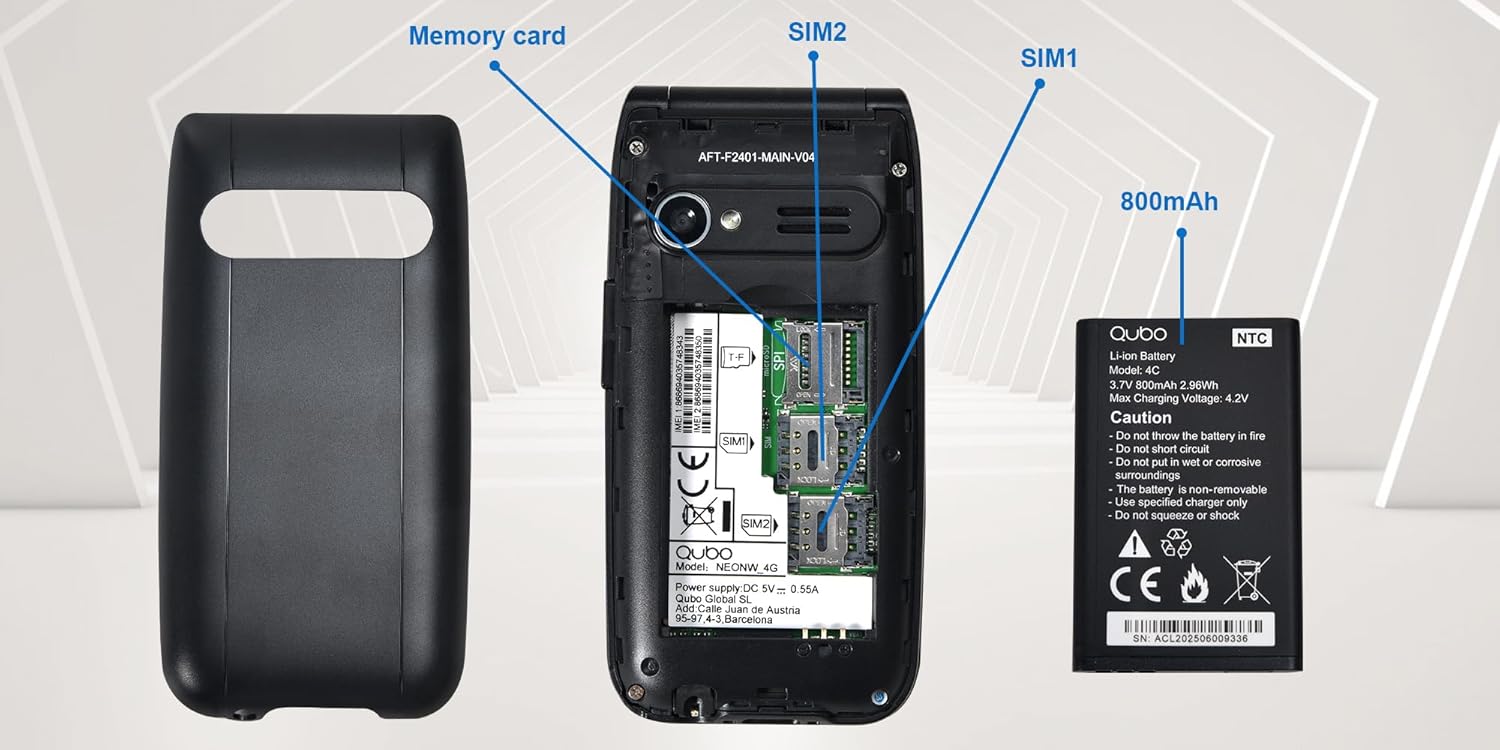
Prent: 'n Gedetailleerde view of the phone's interior, highlighting the slots for two Micro SIM cards (SIM1, SIM2) and a memory card. The 800mAh battery is shown separately.
3. Laai die foon
Before first use, fully charge the phone.
- Connect the USB Type-C cable to the phone and the power adapter. Plug the adapter into a wall outlet.
- Alternatively, place the phone in the charging dock. Ensure it is seated correctly and the charging indicator appears on the screen.
- 'n Volle laai neem ongeveer 2.3 uur.

Prent: This image shows the Type-C charging interface on the Qubo NEO2NW phone, along with an illustration of its battery compartment and icons indicating low power consumption and power-saving technology.
Bedryfsinstruksies
1. Skakel aan/af
- Om aan te skakel: Druk en hou die Skakel/Beëindig Oproep knoppie (rooi knoppie) totdat die skerm aanskakel.
- Om af te skakel: Druk en hou die Skakel/Beëindig Oproep button until the power off options appear, then select 'Power off'.
2. Maak en Ontvang Oproepe
- Om te skakel: Voer die telefoonnommer in met behulp van die sleutelbord en druk die Bel knoppie (groen knoppie).
- Uit die telefoonboek: Navigate to the Phonebook, select a contact, and press the Bel knoppie.
- Om te antwoord: Wanneer die telefoon lui, druk die Bel knoppie.
- To end call: Druk die Skakel/Beëindig Oproep knoppie.
3. Stuur en ontvang SMS'e
- Navigeer na die Boodskap spyskaart.
- Select 'New Message' to compose.
- Voer die ontvanger se nommer in of kies uit kontakte.
- Tik jou boodskap met die sleutelbord.
- Druk 'Stuur'.
4. SOS-noodfunksie
The SOS button allows you to quickly contact pre-set emergency numbers.
- SOS-nommers instel: Gaan na Instellings > SOS-instellings to add up to 5 emergency contacts.
- Aktivering van SOS: In 'n noodgeval, druk en hou die SOS button on the back of the phone for a few seconds.
- The phone will automatically call the pre-set numbers in sequence until one answers. It will also send an emergency SMS to these contacts.

Prent: This image demonstrates the SOS emergency call feature. It shows the Qubo NEO2NW phone with a highlighted SOS button and a visual representation of how it connects to up to 5 pre-programmed family numbers in an emergency.
5. Display and Font Settings
The phone features a 2.4-inch screen with options for large fonts for better readability.

Prent: The Qubo NEO2NW phone's screen displaying large, clear fonts and the option to switch font sizes. The image also points out the loud ringtone capability and the large, tactile buttons on the keypad.
Onderhoud
- Hou die foon droog. Vog kan elektroniese stroombane beskadig.
- Vermy uiterste temperature. Hoë temperature kan die lewensduur van elektroniese toestelle verkort en batterye beskadig.
- Moenie harde chemikalieë, skoonmaakoplosmiddels of sterk skoonmaakmiddels gebruik om die foon skoon te maak nie. Vee dit af met 'n sagte, damp lap.
- Hanteer die foon versigtig. Moenie dit laat val, stamp of skud nie.
- Use only Qubo-approved batteries, chargers, and accessories.
Probleemoplossing
| Probleem | Moontlike oorsaak | Oplossing |
|---|---|---|
| Foon skakel nie aan nie | Die battery is leeg of nie korrek geïnstalleer nie. | Charge the battery for at least 30 minutes. Ensure the battery is correctly inserted. |
| Kan nie oproepe maak of ontvang nie | No SIM card, SIM card not active, or out of network coverage. | Ensure SIM card is inserted and active. Check network signal. Contact your service provider. |
| SOS-knoppie werk nie | SOS numbers not set or incorrect. | Verify that emergency numbers are correctly configured in SOS settings. Ensure sufficient network signal. |
| Swak klankgehalte | Low volume, poor network, or speaker/microphone obstruction. | Adjust call volume. Move to an area with better network coverage. Ensure speaker and microphone are clear. |
Spesifikasies
| Kenmerk | Detail |
|---|---|
| Model Naam | Qubo Flip Phone Charging Dock |
| Vertoon grootte | 2.4 duim |
| Vertoon resolusie | 240 x 320 piksels |
| Bedryfstelsel | KaiOS |
| RAM | 64 MB |
| SVE-spoed | 260 MHz |
| Sellulêre Tegnologie | 2G, 3G (GSM, UMTS) |
| SIM-kaartgleuwe | Dual SIM (Micro SIM) |
| Max Flash Memory Support | 32 GB (MikroSD) |
| Agterste kamera | 0.3 MP |
| Battery kapasiteit | 800 mAh (Litium-ioon) |
| Laai tyd | Ongeveer. 2.3 uur |
| Praat Tyd | Ongeveer. 4 uur |
| Bystandtyd | Ongeveer. 8 dae |
| Konnektiwiteit | USB Tipe-C, 3.5 mm-koptelefoonaansluiting |
| Afmetings | 10.5 x 5.3 x 1.7 cm |
| Spesiale kenmerke | SOS Button, FM Radio, Torch, GPS |
Waarborg en Ondersteuning
For warranty information, please refer to the warranty card included in your product packaging. For technical support or further assistance, please contact Qubo customer service.
- Vervaardiger: Qubo
- ASIN: B0C5GXR2VR
- Modelnommer: 6e39af81-1411-4b00-b5ae-d8778c6ab86c
- Kontak: Refer to the official Qubo website or documentation for up-to-date contact information.