
VAIO VJPF11C11N
VAIO Pro PF (VJPF11C11N) Notebook PC User Manual
1. Inleiding
This manual provides essential information for setting up, operating, maintaining, and troubleshooting your VAIO Pro PF (Model: VJPF11C11N) notebook PC. Please read this manual thoroughly before using your device to ensure proper and safe operation.
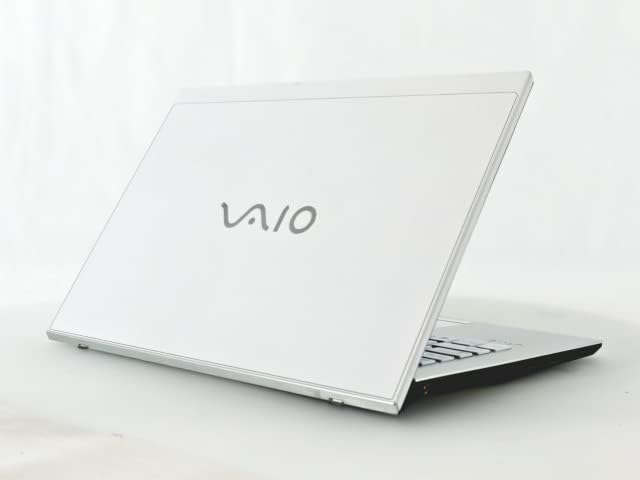
Figure 1: VAIO Pro PF Notebook PC
The VAIO Pro PF is a lightweight and compact mobile notebook designed for productivity. It features an 11.6-inch Full HD display, an Intel 8th Generation Core i5-8250U processor, 8GB of RAM, and a 256GB SSD, running on Windows 11 Pro. The device also includes a backlit keyboard for comfortable typing in various lighting conditions.
2. Opstelling
2.1 Uitpak
Verwyder alle komponente versigtig uit die verpakking. Maak seker dat die volgende items teenwoordig is:
- VAIO Pro PF Notebook PC
- AC-adapter en kragkabel
- Dokumentasie (hierdie handleiding, waarborginligting)
2.2 Koppel aan krag
Before initial use, connect the AC adapter to the laptop's power input port and then plug the power cord into a wall outlet. Allow the battery to charge fully.
2.3 Aanvanklike aanskakeling en Windows-opstelling
Druk die aan/af-knoppie om die skootrekenaar aan te skakel. Volg die instruksies op die skerm om die aanvanklike Windows 11 Pro-opstelling te voltooi, insluitend taalkeuse, netwerkverbinding en die skep van 'n gebruikersrekening.
3. Operating Your VAIO Pro PF
3.1 Sleutelbord en raakvlak
The VAIO Pro PF features a full-sized keyboard with a backlight for improved visibility. The touchpad located below the keyboard supports multi-touch gestures for navigation.

Figuur 2: Sleutelbord- en raakvlakuitleg
3.2 Eksterne Toestelle Koppel
Jou skootrekenaar is toegerus met verskeie poorte vir die koppeling van eksterne toestelle:
- USB 3.0-poorte (x3): For connecting USB devices such as external hard drives, mice, or keyboards.
- HDMI-poort: For connecting to external displays or projectors with HDMI input.
- D-SUB15 (VGA) Port: For connecting to older external displays or projectors with VGA input.
- Wired LAN Port: For connecting to a wired network using an Ethernet cable.
- Koptelefoonaansluiting: Vir die koppeling van oorfone of eksterne luidsprekers.
3.3 Draadlose verbinding
The VAIO Pro PF supports both Wi-Fi and Bluetooth connectivity:
- Wi-Fi (802.11n): To connect to a wireless network, go to Windows Settings > Network & Internet > Wi-Fi, turn Wi-Fi on, and select your desired network.
- Bluetooth: To connect Bluetooth devices, go to Windows Settings > Bluetooth & devices, turn Bluetooth on, and pair your device.
3.4 Gebruik die Web Kamera
Die geïntegreerde web camera can be used for video calls and conferences. Access it through applications like Camera, Microsoft Teams, or Zoom.
4. Onderhoud
4.1 Skoonmaak van die skootrekenaar
To clean the exterior of your laptop, use a soft, lint-free cloth slightly dampened with water or a mild, non-abrasive cleaning solution. Avoid spraying liquids directly onto the device. For the screen, use a specialized screen cleaner.
4.2 Sagteware-opdaterings
Regularly check for and install Windows updates to ensure your system has the latest security patches and performance improvements. Go to Windows Settings > Windows Update.
4.3 Batterysorg
Om die batterylewe te verleng, vermy uiterste temperature en ontlaai die battery gereeld. Vir langtermynberging, laai die battery tot ongeveer 50-70%.
5. Probleemoplossing
This section addresses common issues you might encounter with your VAIO Pro PF.
| Probleem | Oplossing |
|---|---|
| Skootrekenaar skakel nie aan nie. | Maak seker dat die WS-adapter stewig gekoppel is en dat die kragaansluiting funksioneel is. Probeer om die aan/af-knoppie vir 10-15 sekondes in te hou. |
| Wi-Fi-verbindingsprobleme. | Check if Wi-Fi is enabled in Windows Settings. Restart your router and the laptop. Ensure you are within range of the Wi-Fi network. |
| Keyboard backlight is not working. | Check if the backlight function key (often Fn + F key) is enabled. Adjust brightness settings if available. |
| Eksterne skerm nie bespeur nie. | Ensure the cable is securely connected to both the laptop and the display. Use Windows display settings to detect or extend displays. Try a different cable or port if available. |
6. Spesifikasies
| Kenmerk | Detail |
|---|---|
| Model Naam | VAIO Pro PF (VJPF11C11N) |
| Handelsmerk | VAIO (Manufacturer: SONY) |
| Vertoon grootte | 11.6 duim |
| Resolusie | 1920x1080 piksels (Volle HD) |
| SVE | Intel Core i5-8250U (8th Gen, 4 Cores, 8 Threads, 1.6 GHz base, up to 3.4 GHz) |
| RAM | 8 GB DDR4 SDRAM |
| Berging | 256 GB SSD (Solid State Drive) |
| Bedryfstelsel | Windows 11 Pro (64-bis) |
| Grafika | Geïntegreerde Intel-grafika |
| Draadlose konneksie | Wi-Fi (802.11n), Bluetooth |
| Hawens | 3x USB 3.0, 1x HDMI, 1x D-SUB15 (VGA), 1x Wired LAN, 1x Headphone Jack |
| Web Kamera | Geïntegreerde |
| Sleutelbord | Verligte sleutelbord |
| Gewig | Approx. 0.87 kg (870 g) |
| Eerste Beskikbare Datum | 10 Mei 2023 |
7. Waarborg en Ondersteuning
For information regarding your product's warranty, please refer to the warranty card included with your purchase or visit the official VAIO support website. For technical assistance, driver downloads, or further inquiries, please contact VAIO customer support through their official channels.
Ask a question about this manual
Ask about setup, troubleshooting, compatibility, parts, safety, or missing instructions. Manuals+ will review the question and use this page’s manual context to help answer it.