
HOCO HC5
Hoco HC5 Cool Enjoy Sports Wireless Speaker User Manual
Model: HC5
Inleiding
Dankie vir die aankoopasing the Hoco HC5 Cool Enjoy Sports Wireless Speaker. This manual provides important information regarding the setup, operation, and maintenance of your new speaker. Please read this manual thoroughly before using the product to ensure proper function and to extend its lifespan.
Veiligheidsinligting
- Moenie die luidspreker blootstel aan uiterste temperature, direkte sonlig of hoë humiditeit nie.
- Vermy om die luidspreker te laat val of aan sterk impakte te onderwerp.
- Moenie die luidspreker self uitmekaar haal, herstel of wysig nie. Raadpleeg gekwalifiseerde dienspersoneel.
- Hou die luidspreker weg van water en ander vloeistowwe.
- Gebruik slegs die gespesifiseerde laaikabel en adapter.
- Maak die luidspreker skoon met 'n sagte, droë lap. Moenie harde chemikalieë of skuurmiddels gebruik nie.
Pakketinhoud

Image: Hoco HC5 speaker in its retail packaging, showing the speaker and its accessories.
Kontroleer asseblief die inhoud van die pakket noukeurig. Indien enige items ontbreek of beskadig is, kontak u kleinhandelaar.
- Hoco HC5 Wireless Speaker
- USB-laaikabel
- AUX kabel
- Skouerband
- Gebruikershandleiding (hierdie dokument)
Produk verbyview
Familiarize yourself with the various parts and controls of your Hoco HC5 speaker.

Beeld: Voorkant view of the Hoco HC5 speaker, showcasing its cylindrical design, speaker grilles, and attached shoulder strap.

Beeld: Nabyskoot view of one end of the Hoco HC5 speaker, highlighting the speaker driver and the robust casing.
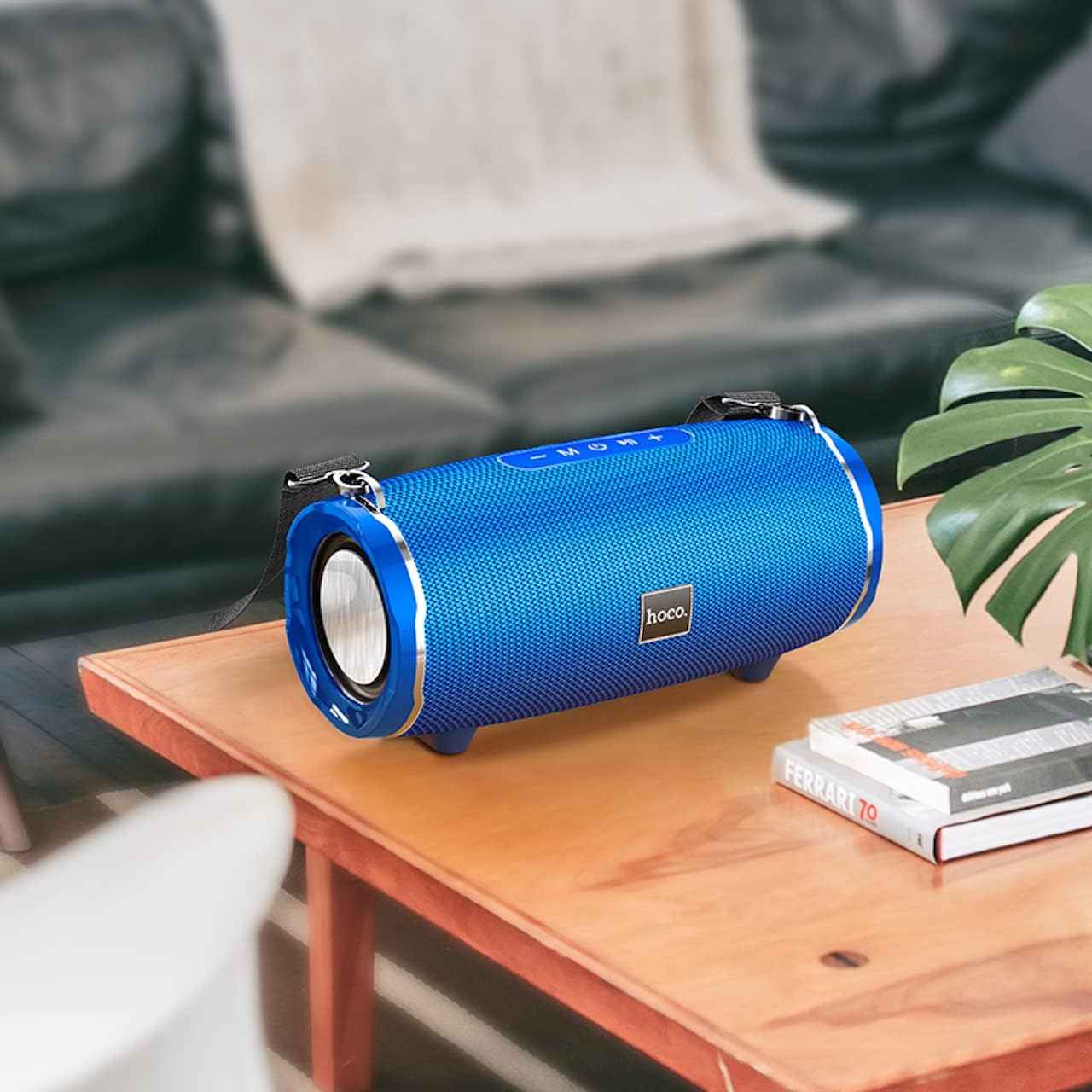
Image: The Hoco HC5 speaker placed on a wooden table, demonstrating its size and how it might appear in a home setting.
Control Panel (Top/Rear)
- Kragknoppie: Druk en hou om aan/af te skakel.
- Modusknoppie (M): Short press to switch between Bluetooth, TF Card, USB, AUX, and FM modes.
- Speel/Pouseer-knoppie (▶⏸): Short press to play or pause music. In FM mode, short press to auto-scan and save stations.
- Volume af / Vorige snit (-): Druk kort vir vorige snit. Druk lank om die volume te verlaag.
- Volume op / Volgende snit (+): Druk kort vir die volgende snit. Druk lank om die volume te verhoog.
Ports (Rear/Side)
- USB-poort: Vir die terugspeel van 'n USB-geheuestokkie.
- TF-kaartgleuf: Vir TF (MicroSD) kaartweergawe.
- AUX-poort: For connecting external audio devices via 3.5mm audio cable.
- Laaipoort: Vir die laai van die luidspreker se interne battery.
Opstelling
Laai die luidspreker
- Koppel die USB-laaikabel aan die luidspreker se laaipoort.
- Koppel die ander kant van die USB-kabel aan 'n USB-kragadapter (5V/1A aanbeveel) of 'n rekenaar se USB-poort.
- Die laai-aanwyserliggie sal tydens laai brand en afskakel wanneer dit volledig gelaai is.
- 'n Volle laai neem ongeveer 3.5 uur.
Krag aan/af
- Om aan te skakel: Press and hold the Power button for a few seconds until you hear a power-on prompt.
- Om af te skakel: Press and hold the Power button again for a few seconds until you hear a power-off prompt.
Bedryfsinstruksies
Bluetooth modus
- Skakel die luidspreker aan. Dit sal outomaties na Bluetooth-paringsmodus gaan, aangedui deur 'n flikkerende LED-liggie.
- Aktiveer Bluetooth op jou toestel (slimfoon, tablet, ens.).
- Soek vir "HC5" in the list of available Bluetooth devices and select it to connect.
- Once connected, the LED indicator will stop flashing, and you will hear a connection tone.
- Jy kan nou klank vanaf jou toestel deur die luidspreker speel.
- Use the Play/Pause, Volume Up/Down, and Previous/Next Track buttons on the speaker or your device to control playback.
TF Card / USB Mode
- Insert a TF (MicroSD) card or USB flash drive into the corresponding slot on the speaker.
- The speaker will automatically switch to TF Card or USB mode and begin playing audio files. If not, short press the "M" (Mode) button to switch.
- Verseker jou klank files is in 'n versoenbare formaat (bv. MP3).
- Use the Play/Pause, Volume Up/Down, and Previous/Next Track buttons to control playback.
AUX-modus
- Connect one end of the 3.5mm AUX cable to the speaker's AUX port.
- Koppel die ander kant aan die klankuitset-aansluiting van jou eksterne toestel (bv. MP3-speler, rekenaar).
- The speaker will automatically switch to AUX mode. If not, short press the "M" (Mode) button to switch.
- Audio will now play through the speaker. Control playback from your external device.
FM-radiomodus
- Short press the "M" (Mode) button until you enter FM radio mode.
- To auto-scan and save available FM stations, short press the Play/Pause button. The speaker will scan and store stations automatically.
- Use the Previous/Next Track buttons to navigate between saved stations.
TWS (True Wireless Stereo) Function (If Supported)
The Hoco HC5 speaker supports TWS function, allowing you to pair two HC5 speakers together for a true stereo sound experience.
- Ensure both HC5 speakers are powered on and not connected to any Bluetooth device.
- On one of the speakers (this will be the primary speaker), long press the Play/Pause button until you hear a prompt indicating TWS pairing mode.
- The two speakers will automatically search for and connect to each other. Once connected, you will hear a confirmation tone.
- Now, connect your device to the primary speaker via Bluetooth as described in the "Bluetooth Mode" section.
- Oudio sal nou in stereo deur beide luidsprekers speel.
Onderhoud
- Skoonmaak: Gebruik 'n sagte, droë, pluisvrye lap om die oppervlak van die luidspreker af te vee. Moenie vloeibare skoonmaakmiddels, aërosols of oplosmiddels gebruik nie.
- Berging: Wanneer dit nie vir lang tye gebruik word nie, bêre die luidspreker op 'n koel, droë plek weg van direkte sonlig en uiterste temperature.
- Batterysorg: Om die batterylewe te verleng, vermy om die battery gereeld heeltemal te ontlaai. Laai die luidspreker gereeld, selfs al word dit nie gebruik nie.
Probleemoplossing
| Probleem | Moontlike oorsaak | Oplossing |
|---|---|---|
| Luidspreker skakel nie aan nie. | Battery is laag of uitgeput. | Laai die luidspreker volledig. |
| Kan nie met Bluetooth-toestel saambind nie. | Luidspreker is nie in paringsmodus nie; toestel Bluetooth is af; luidspreker is reeds aan 'n ander toestel gekoppel. | Ensure speaker is in pairing mode (flashing LED). Turn off and on Bluetooth on your device. Disconnect from other devices. |
| Geen geluid van die luidspreker nie. | Volume is too low; incorrect mode selected; audio source issue. | Increase speaker and device volume. Press "M" button to select correct mode. Check audio source. |
| FM-radio-ontvangs is swak. | Swak sein; omgewingsinmenging. | Relocate the speaker. Re-scan for stations. |
Spesifikasies
| Kenmerk | Detail |
|---|---|
| Model | HC5 |
| Bluetooth weergawe | 5.0 (JL chip) |
| Luidsprekergrootte | 76 mm * 2 |
| Luidspreker se kraguitset | 15W * 2 (Totaal 30W) |
| Battery kapasiteit | 3600mAh |
| Laai tyd | Ongeveer 3.5 uur |
| Musiek / Gesprekstyd | Tot 4 uur |
| Verbindingsopsies | Bluetooth, TF card, USB, AUX, FM, TWS |
| Produk afmetings | 292 x 139 x 132 mm |
| Produk Gewig | 1.5 kg |
| Klankuitvoermodus | Omring |
| Montage tipe | Tafelblad |
Waarborg en Ondersteuning
The Hoco HC5 speaker comes with a standard manufacturer's warranty. Please refer to the warranty card included in your package for specific terms and conditions. For technical support, troubleshooting assistance, or warranty claims, please contact the retailer where you purchased the product or visit the official HOCO webwebwerf vir kontakinligting.
Vervaardiger: Hoco
Land van oorsprong: China
Ask a question about this manual
Ask about setup, troubleshooting, compatibility, parts, safety, or missing instructions. Manuals+ will review the question and use this page’s manual context to help answer it.